
Hello again. Last lesson introduced classes as objects with state and behavior, and used private fields plus public methods to preserve valid state. That boundary is useful only when a project has more than two files. Backend applications quickly grow into dozens of types, so Java needs a way to name, group, and selectively expose them.
In this lesson, you will place the Subscription example into named packages, import it from another package, and choose among public, private, package-private, and protected access. By the end, you should be able to read a typical Java package declaration and understand why an apparently valid class or method is inaccessible.
Packages are names, organization, and boundaries
A package groups related Java types. It serves three practical purposes:
- It makes related code easier to find.
- It prevents naming collisions.
- It participates in access control.
For example, these are different types because their fully qualified names differ:
com.grasp.subscription.domain.Subscription
com.grasp.billing.domain.Subscription
Both classes may use the simple name Subscription, but their package names identify which one is meant.
If your Unity work included C#, packages will resemble namespaces at first: both organize types and help avoid collisions. Java packages do more, though: package membership also determines whether package-private members are accessible. Java also conventionally aligns package names with folders beneath a source root.
For a small backend-oriented example, use this structure:
src/
  com/
    grasp/
      subscription/
        app/
          SubscriptionDemo.java
        domain/
          Subscription.java
          SubscriptionRules.java
The package names are:
com.grasp.subscription.app
com.grasp.subscription.domain
Each dot in the name corresponds to a folder beneath the source root, here src.
Package names are conventionally:
- all lowercase;
- organized from broad to specific;
- prefixed with a reversed domain name in professional code, such as
com.company.project.
Your future Spring Boot application might begin with a package such as com.yourname.taskboard. The exact name matters less than choosing a unique, consistent prefix and keeping related code together.
The following official Dev.java reading establishes the terminology and rules. It is particularly useful for distinguishing a package name from a class name and for seeing the three ways to refer to a type in another package.
Read “Packages” from Dev.java for the core rules behind package declarations, package naming, imports, and naming conflicts.
In “Understanding Packages” and “Creating a Package,” read the package foundation. Notice that the package statement applies to every type in its source file. Then read “Naming a Package and Naming Conventions,” focusing on the naming convention. In “Using Package Members,” read the qualified-name rationale, then skim “Name Ambiguities” for the collision rule.
Declaring a package
The first code statement in a packaged Java file is its package declaration:
package com.grasp.subscription.domain;

public class Subscription {
    // class body
}
The declaration is not a comment or a label. It tells the compiler that the fully qualified name of this type is:
com.grasp.subscription.domain.Subscription
A file with no package declaration belongs to the unnamed package, sometimes called the default package. It is acceptable for tiny learning programs, such as the two files from the previous lesson. Do not treat it as normal application structure: classes in named packages cannot import classes from the unnamed package.
One subtle but important point: package names that look hierarchical are still distinct packages.
com.grasp.subscription
com.grasp.subscription.domain
The second is not “inside” the first for access purposes. Being in com.grasp.subscription does not grant package-private access to com.grasp.subscription.domain.
Imports make external types convenient to name
A class can refer directly to types in its own package. A class in a different package must either use a fully qualified name or import the public type it needs.
Here is the Subscription class moved into the domain package.
src/com/grasp/subscription/domain/Subscription.java
package com.grasp.subscription.domain;

public class Subscription {
    private final String planName;
    private final int monthlyRequestLimit;
    private int requestsUsed;

    public Subscription(String planName, int monthlyRequestLimit) {
        if (planName == null || planName.isBlank()) {
            throw new IllegalArgumentException("planName must not be blank");
        }

        if (!SubscriptionRules.hasValidLimit(monthlyRequestLimit)) {
            throw new IllegalArgumentException(
                "monthlyRequestLimit must be positive"
            );
        }

        this.planName = planName;
        this.monthlyRequestLimit = monthlyRequestLimit;
        this.requestsUsed = 0;
    }

    public String getPlanName() {
        return planName;
    }

    public int getRequestsRemaining() {
        return monthlyRequestLimit - requestsUsed;
    }

    public boolean tryConsumeRequest() {
        if (requestsUsed >= monthlyRequestLimit) {
            return false;
        }

        requestsUsed++;
        return true;
    }
}
The demo is in a different package, so it imports Subscription.
src/com/grasp/subscription/app/SubscriptionDemo.java
package com.grasp.subscription.app;

import com.grasp.subscription.domain.Subscription;

public class SubscriptionDemo {

    public static void main(String[] args) {
        Subscription starterPlan = new Subscription("Starter", 3);

        boolean accepted = starterPlan.tryConsumeRequest();

        System.out.println("Request accepted: " + accepted);
        System.out.println(
            starterPlan.getPlanName()
                + " requests remaining: "
                + starterPlan.getRequestsRemaining()
        );
    }
}
The standard file order is:
packagedeclaration, if there is one;importdeclarations;- class, interface, enum, or record declaration.
An import does not move, copy, instantiate, or make a type public. It is simply permission to write the simple name Subscription instead of the full name com.grasp.subscription.domain.Subscription.
These two declarations mean the same thing:
import com.grasp.subscription.domain.Subscription;

Subscription plan = new Subscription("Starter", 3);
com.grasp.subscription.domain.Subscription plan =
    new com.grasp.subscription.domain.Subscription("Starter", 3);
Imports are normally clearer for types used repeatedly. Prefer importing individual types:
import java.util.ArrayList;
import java.util.List;
Java also permits a wildcard import:
import java.util.*;
That syntax imports types directly in java.util, not types in its subpackages. It does not import java.util.concurrent, for example. Wildcards do not make the program slower, but specific imports make dependencies clearer and avoid confusion when projects grow.
You do not need to import String, System, or Math because Java automatically makes the java.lang package available. Java also makes the current package available, which is why Subscription can use SubscriptionRules without an import.
This video gives an IDE-based demonstration of creating packages, importing a class, and seeing the difference between public and package-private access.
Public, Default Access Specifiers, Packages | Java Object Oriented Tutorials
Watch “Public, Default Access Specifiers, Packages” by LearningLad to connect the source-code rules to what an IDE shows when a type is accessible or inaccessible.
Watch package imports to see a class become usable from another package. Continue with public access, then skip to package private. Focus on the compiler errors: an import statement and an access modifier solve different problems.
When names collide
Suppose a file needs two classes named Date:
java.util.Date
java.sql.Date
You cannot make the name unambiguous by importing both and then writing only Date. Use a fully qualified name for at least one of them:
import java.util.Date;

public class DateExample {
    private Date createdAt;
    private java.sql.Date databaseDate;
}
The same rule applies to your own code. Packages prevent the global naming collision, but your current file still must state clearly which identically named type it uses.
Access modifiers: who may use this member?
An access modifier controls who may access a type or member. Java has four access levels:
| Access level | Written as | Typical purpose |
|---|---|---|
private | private | Internal state and implementation details of one class |
| Package-private | no modifier | Collaboration within one package |
protected | protected | Same-package access, plus limited inheritance-based access |
public | public | Deliberate API available from other packages |
“Package-private” is often casually called “default access,” but there is no default keyword for it. You obtain it by writing no modifier.
Here is a useful visibility map for members:
| Code trying to access the member | private | Package-private | protected | public |
|---|---|---|---|---|
| Same class | Yes | Yes | Yes | Yes |
| Different class, same package | No | Yes | Yes | Yes |
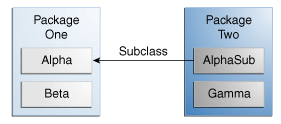
| Subclass in a different package | No | No | Yes, through inheritance | Yes |
| Non-subclass in a different package | No | No | No | Yes |
The final two rows explain why protected must not be treated as “public for subclasses.” Any class in the same package can use a protected member, even if it is not a subclass.
private: preserve the class invariant
You already used private in Subscription:
private int requestsUsed;
No code outside Subscription can assign to that field directly. This lets the class ensure that usage never becomes negative or exceeds the allowed limit.
Use private by default for fields. Also use it for helper methods that are implementation details rather than operations that another class should invoke.
Package-private: implementation shared within one package
Now add a small rule class beside Subscription.
src/com/grasp/subscription/domain/SubscriptionRules.java
package com.grasp.subscription.domain;

final class SubscriptionRules {

    static boolean hasValidLimit(int monthlyRequestLimit) {
        return monthlyRequestLimit > 0;
    }
}
Notice the absence of an access modifier before both class and static boolean. They are package-private.
Subscription can call this method because both classes are in com.grasp.subscription.domain:
if (!SubscriptionRules.hasValidLimit(monthlyRequestLimit)) {
    throw new IllegalArgumentException(
        "monthlyRequestLimit must be positive"
    );
}
However, this code in SubscriptionDemo, which belongs to com.grasp.subscription.app, does not compile:
import com.grasp.subscription.domain.SubscriptionRules;

// Error: SubscriptionRules is not public and cannot be accessed
Adding an import cannot bypass access control. The import tells Java which type you mean; the modifier determines whether you are allowed to use it.
Package-private is useful when several closely related classes implement an internal feature but should not become part of the package’s public API. It is a more focused boundary than public, but it is not the same as C#’s internal, which is based on an assembly. Java package-private access is based on the exact package name.
public: the API other packages may depend on
The demo in com.grasp.subscription.app can create a Subscription because both the class and its constructor are public:
public class Subscription {
    public Subscription(String planName, int monthlyRequestLimit) {
        // ...
    }
}
This two-level check matters:
- A
publicmethod inside a package-private class is still unavailable outside the package. - A
publicclass with a package-private constructor cannot be constructed outside its package.
For top-level types such as ordinary classes, Java permits only:
public class Subscription {
}
or package-private:
class SubscriptionRules {
}
A top-level class cannot itself be declared private or protected. Those modifiers are valid for members nested inside another class, a topic that can wait until it becomes useful.
protected: an inheritance extension point
protected is primarily for a superclass that intentionally allows subclasses to access or customize part of its implementation. In a different package, a subclass can access the protected member through inheritance, typically with this or its own inherited member.
There is one Java-specific subtlety worth remembering: a subclass in another package cannot use protected as permission to access that member on an arbitrary superclass object. This keeps the permission tied to the subclass relationship.
For ordinary backend domain classes, protected is usually less common than private, package-private, and public. Do not choose it “just in case.” Make a member protected only when inheritance is a conscious part of the design. You will evaluate inheritance versus composition in the next module.
Compile the packaged example from the command line
IDEs create folders and imports for you, but compiling once from the command line makes the package rules concrete.
From the src directory containing the com folder, compile all three files into a separate output directory:
javac -d ../out com/grasp/subscription/domain/SubscriptionRules.java com/grasp/subscription/domain/Subscription.java com/grasp/subscription/app/SubscriptionDemo.java
Then run the fully qualified name of the class containing main:
java -cp ../out com.grasp.subscription.app.SubscriptionDemo
The important details are:
-d ../outtellsjavacwhere to write compiled.classfiles while preserving their package folders.-cp ../outtellsjavawhere the package root of compiled classes is.com.grasp.subscription.app.SubscriptionDemois a fully qualified class name. Do not add.javaor.class.
Common package-related errors are usually structural rather than mysterious:
| Error or symptom | Likely cause | Check |
|---|---|---|
package ... does not exist | Source root, package declaration, and folder path disagree | Start compilation from the source root and verify each folder matches the package name |
cannot find symbol for Subscription | Missing import or misspelled type/package name | Add a specific import, or use the fully qualified name temporarily |
X is not public ... cannot be accessed from outside package | Code is trying to use a package-private type or member externally | Move the caller, expose a deliberate public operation, or keep the boundary |
Could not find or load main class | Running with a simple class name, wrong classpath, or wrong output folder | Use the fully qualified main-class name and correct -cp path |
In IntelliJ IDEA, create packages under the marked src source root rather than manually making folders in arbitrary places. The IDE will insert the package declaration and maintain the matching directory structure. Still read the declaration at the top of each file; it remains the authoritative statement of a class’s package.
Key takeaways
Packages group related types, prevent naming conflicts, and form an access boundary. A class’s package comes from its package declaration, and its folder path should match that package beneath the source root.
Use specific imports to refer conveniently to public types in other packages. Imports do not grant access, import subpackages, or copy code into a file. When names collide, use a fully qualified name to state precisely which type you mean.
For access choices, use private for internal mutable state, package-private for internal cooperation inside a package, public for intentional external API, and protected only for deliberate inheritance extension points. Remember that a type’s accessibility and its member’s accessibility are checked separately.
Next, you will trace Java object references and add null-safety checks, which will help you diagnose one of the most common runtime failures in Java: NullPointerException.
Can't find a good explanation? Sign up and we'll make it for you
Sign up