
Hello. Last time, you used a for loop and accumulators to process a sequence of market observations—for example, summing volume and counting negative-return days. That code worked, but you would have to copy the same loop each time you wanted the same calculation on another list.
A function gives a calculation a clear name, accepts inputs, and can send a result back to the rest of your notebook. This is a foundational habit for quantitative research: instead of scattering repeated logic across a notebook, you build small, inspectable calculations that can be reused and tested.
In this lesson, you will define a function, supply it with arguments through parameters, and use return to make its result available for later calculations.
A function is defined first, then called
You have already used built-in functions:
print("Hello")
len([10, 20, 30])
Python also lets you define your own functions. A function definition has:
- The keyword
def - A descriptive function name
- Parentheses containing any parameters
- A colon
- An indented body
def show_research_message():
    print("Checking market observations.")
Running this cell defines the function. It does not print the message yet. Python has learned what show_research_message means, but it does not run the body until you call the function:
show_research_message()
Output:
Checking market observations.
The parentheses are important:
show_research_messagerefers to the function itself.show_research_message()calls the function and runs its body.
In a notebook, the definition cell must be run before a cell that calls the function. If you restart the notebook kernel, Python forgets definitions and variables stored in memory, so rerun the earlier definition cells before continuing.
Functions in Python are easy 📞
Watch “Functions in Python are easy” from Bro Code for a visual introduction to defining a function, giving it inputs, and receiving a returned result. The examples are general-purpose, but the same structure will support our market-data calculations.
Watch definition and calls to see why functions prevent copied code. Then watch inputs, focusing on the distinction between arguments and parameters and why their order matters. Finish with return values, concentrating on the idea that a function call evaluates to the value sent back with return.
Parameters receive arguments
A function becomes genuinely reusable when it can work with different input values.
Consider a calculation of a position's notional value:
def notional_value(shares, price):
    return shares * price
This definition has two parameters:
sharesprice
Parameters are temporary variable names used inside the function. They describe the inputs the function expects.
Now call it:
trade_value = notional_value(25, 102.40)

print(trade_value)
Output:
2560.0
The values inside the call, 25 and 102.40, are the arguments. During this particular call, Python assigns 25 to shares and 102.40 to price, computes the product, and returns it.
| Code element | Role in this call |
|---|---|
notional_value | The function’s name |
shares, price | Parameters: local input names in the definition |
25, 102.40 | Arguments: actual values supplied in the call |
shares * price | The calculation |
return shares * price | The instruction that sends the calculated value back |
You can also pass variables as arguments:
number_of_shares = 40
execution_price = 98.75

trade_value = notional_value(number_of_shares, execution_price)

print(trade_value)
Output:
3950.0
The caller’s variable names do not need to match the parameter names. number_of_shares is not renamed permanently to shares; rather, while the function runs, its local parameter shares holds the supplied value.
By default, arguments are matched to parameters by position. Therefore, the order is part of the function’s contract:
notional_value(25, 102.40)
means 25 shares at a price of 102.40. Reversing those arguments would describe a very different—and nonsensical—calculation.
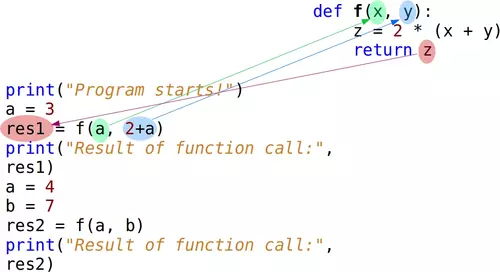
return sends a result back
The word return is central to calculation functions.
def notional_value(shares, price):
    return shares * price
When Python reaches return, it:
- Evaluates the expression after
return. - Ends that function call.
- makes the resulting value available where the function was called.
Thus, this line behaves as though the function call were replaced by its result:
trade_value = notional_value(25, 102.40)
For this call, Python ultimately assigns 2560.0 to trade_value.
A returned value can be stored, printed, or used within another expression:
print(notional_value(10, 50.0))
Output:
500.0
You may first assign an intermediate variable inside a function:
def notional_value(shares, price):
    value = shares * price
    return value
This is equivalent to returning the expression directly:
def notional_value(shares, price):
    return shares * price
Use an intermediate variable when it makes a multi-step calculation easier to read. For a one-step calculation, direct return is often clearer.
return is not the same as print
This distinction prevents a common and consequential beginner mistake.
def notional_value_printed(shares, price):
    print(shares * price)
Calling it displays a number:
notional_value_printed(25, 102.40)
Output:
2560.0
But this version does not return the number for use elsewhere. Therefore:
trade_value = notional_value_printed(25, 102.40)

print(trade_value)
produces:
2560.0
None
The first line comes from print inside the function. The second line is None, Python’s special value indicating that no explicit result was returned.
For quantitative work, calculation functions should normally return data. Keep presentation separate:
def notional_value(shares, price):
    return shares * price

trade_value = notional_value(25, 102.40)
print(f"Notional value: {trade_value}")
This design lets you later use trade_value in another calculation, save it, compare it, or test it. A printed value alone is difficult to build on.
Package the previous lesson’s loop into a function
In the prior lesson, you counted negative-return days with a loop and an accumulator. That is a useful repeated calculation, so it is a good candidate for a function.
Create a Markdown cell:
## Reusable decline-day calculation

The function below counts observations with a strictly negative simple return.
Then create and run this code cell:
def count_decline_days(daily_returns):
    decline_days = 0

    for daily_return in daily_returns:
        if daily_return < 0:
            decline_days += 1

    return decline_days
Read the function as a compact specification:
- Input: a list called
daily_returns - Rule: count values strictly below zero
- Output: the number of decline days
Now call it with two different return samples:
week_one_returns = [0.010, -0.020, 0.015, -0.004, 0.000]
week_two_returns = [-0.003, 0.006, 0.002, 0.008, -0.001]

week_one_declines = count_decline_days(week_one_returns)
week_two_declines = count_decline_days(week_two_returns)

print(f"Week one decline days: {week_one_declines}")
print(f"Week two decline days: {week_two_declines}")
Expected output:
Week one decline days: 2
Week two decline days: 2
Each call creates its own temporary decline_days accumulator, beginning at zero. The first call does not leave its accumulator behind for the second call. Only the returned value is assigned outside the function, in week_one_declines or week_two_declines.
This is much better than copying the same loop twice:
week_one_declines = count_decline_days(week_one_returns)
week_two_declines = count_decline_days(week_two_returns)
The repeated operation now has one authoritative implementation. If you later decide that zero returns should count as declines, you change the rule once inside the function:
if daily_return <= 0:
That change would affect every later call consistently. Of course, whether zero should count is a research-definition choice, not merely a coding choice; the function makes that choice visible and easy to review.
For short independent practice, make these controlled changes in your notebook:
- Add another negative return to
week_two_returns, then rerun the call cell. - Rename the parameter
daily_returnstoreturns. The function should behave identically if you update its body consistently. - Change the condition from
< 0to<= 0, then observe the change in the first week’s result.
A small function-quality checklist
At this stage, a well-designed function does not need to be complicated. Before trusting one, inspect four things:
| Check | Good practice |
|---|---|
| Name | Use a verb or calculation description, such as count_decline_days or notional_value. |
| Inputs | Make the needed values explicit as parameters. |
| Indentation | Indent every statement in the function body by four spaces. |
| Output | Use return when later code needs the calculated result. |
A few early mistakes are worth recognizing:
# Incorrect: no colon after the function header
def notional_value(shares, price)
    return shares * price
# Incorrect: return is not indented into the function body
def notional_value(shares, price):
return shares * price
# Incorrect for a reusable calculation: this displays a value but returns None
def notional_value(shares, price):
    print(shares * price)
# Correct
def notional_value(shares, price):
    return shares * price
For now, use simple functions that perform one clearly stated task. Larger research notebooks will eventually be composed of many such pieces: one function might validate price data, another compute returns, and another produce a performance statistic. The reliability of that larger workflow starts with being precise about each function’s inputs and output.
Key takeaways
A Python function packages a named piece of reusable logic.
- Define a function with
def, a name, parentheses, a colon, and an indented body. - Defining a function records its instructions; calling it with
()runs those instructions. - Parameters are local input variables in the definition.
- Arguments are the concrete values supplied in a function call.
- Argument order matters when values are supplied by position.
returnsends a result back to the calling code so it can be assigned, printed, or used in another expression.printdisplays a value but does not make it available for later computation.- Turning the decline-day loop into
count_decline_dayseliminated duplicated code and made the research rule explicit.
Next, you will learn to read a Python traceback and correct common errors such as syntax mistakes, undefined names, incompatible types, and invalid list indexes.
Can't find a good explanation? Sign up and we'll make it for you
Sign up