
Welcome back. In the previous lesson, you used if, elif, and else to choose an action for one daily observation. Quantitative research rarely stops at one day: a notebook may need to total volume over hundreds of dates, count decline days, or build a running value from an entire return history.
A for loop lets Python visit each item in an ordered sequence and apply the same logic to it. In this lesson, you will use a loop together with an accumulator: a variable that keeps an updated result as observations are processed.
From one observation to a sequence
Suppose you have daily returns stored in a list:
daily_returns = [0.010, -0.020, 0.015]
You could handle each value separately:
print(daily_returns[0])
print(daily_returns[1])
print(daily_returns[2])
But this approach is fragile. If the list gains another day, your code does not automatically include it. If the list is shorter than expected, indexing can fail. For real market datasets with many thousands of observations, writing one line per date is impossible.
A for loop expresses the intended rule more clearly:
for daily_return in daily_returns:
    print(daily_return)
Read this as:
“For each
daily_returnin the sequence calleddaily_returns, run the indented code.”
Python assigns the first list item to daily_return, runs the indented body, then assigns the next item and runs the body again. It stops when there are no items left.
Python For Loops - Python Tutorial for Absolute Beginners
Watch “Python For Loops - Python Tutorial for Absolute Beginners” from Programming with Mosh for a compact visual introduction to the structure of a for loop.
Watch the loop basics. Focus on the colon after the loop header, the indentation of the loop body, and how the loop variable takes a new value on each pass.
Like an if statement, a for statement ends with a colon and its body must be indented by four spaces:
for daily_return in daily_returns:
    print(daily_return)

print("All observations processed.")
The final print is not indented, so it runs only once, after the loop finishes.
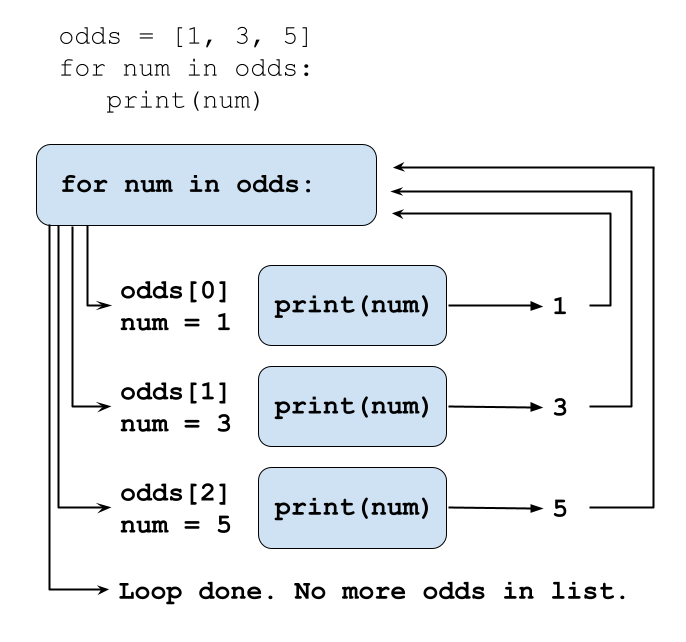
Choose a meaningful loop-variable name. daily_return, day, price, and volume communicate what one item represents. A name such as x or thing makes research code harder to inspect later.
Aggregation: preserving a result while the loop runs
Printing each observation is useful for understanding loops, but research often requires one combined answer. Examples include:
- total reported trading volume;
- number of negative-return days;
- total amount invested;
- a sequence of running totals.
An accumulator is the variable that stores this evolving result. The standard pattern has three parts:
- Initialize the accumulator before the loop.
- Update it once per observation inside the loop.
- Use or display the completed result after the loop.
Foundations of Data Science / Python - Loops / Hands-on
Read the “Accumulation” section. It introduces the accumulator pattern and uses a running total to show why the starting value and the location of the update both matter.
In the “Accumulation” subsection, begin with the paragraph explaining the idea of accumulation. Read the accumulator pattern, then study the following example that sums integers. Pay particular attention to the placement of total = 0 before the loop and the update within the indented block.
A running sum of observations
Here is a loop that adds each daily return to a running total:
daily_returns = [0.010, -0.020, 0.015]

total_return = 0

for daily_return in daily_returns:
    total_return = total_return + daily_return

print(total_return)
Output:
0.004999999999999999
The display is a normal floating-point representation issue; mathematically, the result is , or .
Trace the accumulator carefully:
| Loop pass | Current daily_return | Previous total_return | Updated total_return |
|---|---|---|---|
| Before loop | — | — | 0 |
| 1 | 0.010 | 0 | 0.010 |
| 2 | -0.020 | 0.010 | -0.010 |
| 3 | 0.015 | -0.010 | 0.005 |
The important line is:
total_return = total_return + daily_return
Python first evaluates the expression on the right, using the current total and the current observation. It then stores that new result in total_return.
Python provides a shorter equivalent form:
total_return += daily_return
For now, read += as “update this variable by adding the value on the right.” The same loop can therefore be written:
daily_returns = [0.010, -0.020, 0.015]

total_return = 0

for daily_return in daily_returns:
    total_return += daily_return

print(total_return)
This is an arithmetic sum of simple returns, not the correct compounded investment return over multiple days. Treat it as a loop and aggregation example only. In the financial-returns module, you will calculate compounded wealth properly; confusing the two would produce an incorrect backtest result.
Why initialization and indentation matter
The initial value must match the aggregation you intend to perform.
For a sum, begin at zero:
total_volume = 0
For a count, also begin at zero:
negative_days = 0
Do not reset the accumulator inside the loop:
# Incorrect: total_volume is reset on every pass.
for volume in volumes:
    total_volume = 0
    total_volume += volume
After each iteration, this code throws away the earlier result. The final value is just the last volume, not the total.
The correct version initializes once, before Python begins visiting the sequence:
volumes = [1200000, 950000, 1600000]

total_volume = 0

for volume in volumes:
    total_volume += volume

print(total_volume)
Output:
3750000
Similarly, the final print normally belongs outside the loop:
for volume in volumes:
    total_volume += volume

print(total_volume)
If you indent it, Python prints a running total after every observation instead:
for volume in volumes:
    total_volume += volume
    print(total_volume)
That can be helpful while checking code, but it is a different task.
Counting observations that meet a rule
A loop can use the conditional logic from the previous lesson. For example, suppose you want to count negative-return days.
daily_returns = [0.010, -0.020, 0.015, -0.004, 0.000]

negative_days = 0

for daily_return in daily_returns:
    if daily_return < 0:
        negative_days += 1

print(negative_days)
Output:
2
There are now two nested structures:
for daily_return in daily_returns:
    if daily_return < 0:
        negative_days += 1
The for loop processes every return. On each pass, the if statement decides whether that return should increase the count.
Notice the indentation levels:
forstarts at the left margin.ifis indented once because it belongs to the loop.negative_days += 1is indented twice because it belongs to the conditional block.
A zero return does not meet the rule daily_return < 0; it is not counted as a decline. If your research definition instead required “non-positive days,” you would write daily_return <= 0. As before, the boundary rule is part of the specification.
Notebook lab: aggregate market observations
You previously worked with a list of dictionaries, where each dictionary represented one daily record. Now aggregate two results across that list: total reported volume and the number of decline days.
Create a Markdown cell:
## Daily-observation aggregation

This cell sums reported volume and counts days with a negative simple return.
Then run this code cell:
price_days = [
    {"date": "2024-01-02", "daily_return": 0.010, "volume": 1200000},
    {"date": "2024-01-03", "daily_return": -0.020, "volume": 950000},
    {"date": "2024-01-04", "daily_return": 0.015, "volume": 1600000},
]

total_volume = 0
decline_days = 0

for day in price_days:
    total_volume += day["volume"]

    if day["daily_return"] < 0:
        decline_days += 1

print(f"Total reported volume: {total_volume}")
print(f"Number of decline days: {decline_days}")
Expected output:
Total reported volume: 3750000
Number of decline days: 1
This code contains two accumulators:
| Accumulator | Starting value | Update rule | Meaning after the loop |
|---|---|---|---|
total_volume | 0 | Add each day["volume"] | Sum of volume across all records |
decline_days | 0 | Add 1 only when return is negative | Count of records meeting the decline rule |
To see the program state while it runs, temporarily add this line as the final line inside the loop:
print(day["date"], total_volume, decline_days)
This is a basic debugging technique: observe the accumulator after each record rather than trusting the final result blindly. Once the intermediate values make sense, remove the debugging line to keep the notebook output clean.
Finally, add a fourth observation to price_days, predict how the two final values should change, and rerun the entire cell. A loop should include the new observation without any change to the loop itself. That scalability is the reason loops are central to data analysis.
Common mistakes to recognize early
These mistakes are especially common in first research notebooks:
| Mistake | What happens | Correction |
|---|---|---|
Initializing total_volume inside the loop | Earlier observations are discarded | Initialize once before for |
| Forgetting to update the accumulator | Final result remains 0 | Put += in the loop body |
| Printing inside the loop unintentionally | You get one output per observation | Move the final print left to the margin |
Using = instead of += | The old total is overwritten | Use total += value for accumulation |
Writing if at the left margin | The condition runs only after the loop, using the final item | Indent if so it runs for every item |
| Trying to add text to a number | Python cannot form a numeric sum | Ensure every value follows a stated data policy before aggregation |
A loop assumes the sequence is usable. In later modules, you will inspect real price data for missing values, duplicated dates, and nonnumeric fields before relying on totals, counts, or derived returns.
Key takeaways
A for loop repeats an indented block once for each item in a sequence.
- The loop variable represents the current observation, such as
dayordaily_return. - An accumulator stores a result that is updated during each pass.
- Initialize sum and count accumulators to
0before the loop. - Use
+=to update a running total or count. - Put a conditional inside a loop when every observation must be checked against a rule.
- Keep final reporting outside the loop unless you intentionally want intermediate output.
- A sum of simple returns is not a compounded investment return; defining the quantity correctly matters as much as writing the code.
Next, you will define reusable Python functions. This will let you package a repeated calculation, such as counting decline days, into a named operation with inputs and a returned result.
Can't find a good explanation? Sign up and we'll make it for you
Sign up