
Hello. In the previous lesson, you turned repeated calculations into functions with explicit inputs and returned results. You also saw that indentation and a colon are structural parts of a function definition. Today you will learn what to do when Python refuses to run code—or when code starts running and then stops with an error.
This is the final lesson in Python and Notebook Essentials. By the end, you should be able to read a notebook error message as evidence: identify the error type, find the relevant line, form a small explanation of what went wrong, and make a justified correction. These habits matter in quantitative research because an unnoticed typo, a stale notebook cell, or a mistaken data type can invalidate an entire calculation.
Plan for roughly 40 minutes: read the traceback structure, reproduce a few controlled mistakes, and correct each one.
Errors are not all the same
Python errors fall into two broad groups.
A syntax error means Python cannot understand the structure of the code you wrote. It cannot begin running that cell because the code breaks Python’s grammar.
An exception means the code was structurally valid, and Python began to run it, but an operation failed during execution. A NameError, TypeError, and IndexError are all exceptions.
Study the two opening sections of the official Python tutorial before continuing. They establish the central distinction: syntax is checked before execution, while exceptions arise during execution.
Read “Errors and Exceptions” from the official Python tutorial. It gives the essential distinction between malformed Python code and code that fails while running.
In Section 8.1, “Syntax Errors,” read the syntax error explanation, including the missing-colon example. Then, in Section 8.2, “Exceptions,” read the explanation of execution errors. Focus on what the displayed line, pointer, error type, and final explanatory text each tell you.
A useful first rule is:
Do not treat an error message as a verdict that your whole notebook is broken. Treat it as a precise report about one failed attempt.
For example, this cell has a syntax error:
def notional_value(shares, price)
    return shares * price
Python expects a colon after the function header. Since it cannot parse the definition, it does not create the function at all.
This cell is syntactically valid:
shares = 25
price = "102.40"

notional_value = shares + price
But it fails during execution because shares is a number and price is text. Python understands the statement’s structure but does not know how to add these incompatible values. That failure is a TypeError.
Read the traceback from the bottom upward
When an exception occurs in a notebook, Jupyter or Colab displays a traceback. The exact visual layout varies slightly by environment, but it often includes:
- One or more locations where functions were called.
- The code line associated with each location.
- A final line containing the exception type and a more specific explanation.
For a simple notebook error, the bottom may resemble this:
NameError: name 'share_count' is not defined
Start there. The final line tells you the most important facts:
| Part | Meaning |
|---|---|
NameError | The category of failure |
name 'share_count' | The particular name Python could not find |
is not defined | The immediate reason for the failure |
Then move upward to locate the marked code line and inspect the surrounding lines. If functions call other functions, the traceback may list several locations. The entry nearest the bottom is usually the location where Python actually failed; entries above it show how execution reached that point.
Watch this short explanation of the bottom-up approach.
python: traceback basics + raise from (beginner - intermediate) anthony explains #283
Watch “python: traceback basics + raise from” by anthonywritescode for a compact visual explanation of the location information in a traceback.
Watch a single traceback. Focus on the idea that the most recent function call appears nearest the bottom, alongside the file or notebook location, line number, and code that failed. In your notebook, the location may say Cell In[...] rather than a filename.
A syntax error looks slightly different because no code has run yet. Rather than a full execution traceback, Python normally repeats the problematic line and displays a caret, ^, near where it detected the problem.
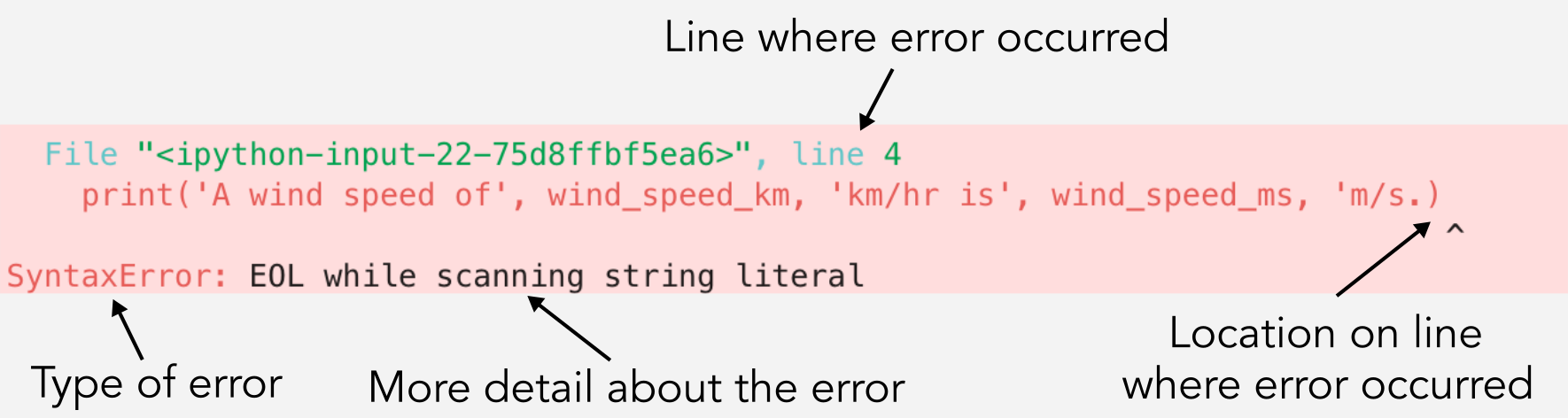
The caret is highly useful, but read it carefully: it marks where Python noticed that something was wrong, not always the earliest character that caused the problem. For instance, with an unclosed quotation mark, Python may point near the end of the line even though the missing quote began earlier.
Use this compact debugging routine whenever a cell fails:
- Read the final line first. Identify the exception type and its explanation.
- Find the indicated line. In a notebook, click the failing cell and compare its current code with the displayed line.
- Inspect the relevant inputs and nearby syntax. Check spelling, capitalization, quotation marks, parentheses, indentation, list length, and value types.
- Make one minimal correction. Avoid changing five things at once; otherwise, you cannot tell what fixed the problem.
- Rerun the corrected cell and any required earlier cells. A notebook remembers only what has already been run in its current session.
Syntax errors: repair Python’s grammar
A SyntaxError means Python could not parse the cell. Common beginner causes include:
- A missing colon after
if,for,def, orelse - An unclosed quote, parenthesis, bracket, or brace
- Incorrect indentation after a line ending in a colon
- A keyword or operator used in an invalid position
Consider a rule from the earlier loop lesson:
daily_return = -0.012

if daily_return < 0
    print("Decline day")
The condition is fine, but the if header needs a colon. Python will flag the line because it expects the statement header to end properly.
daily_return = -0.012

if daily_return < 0:
    print("Decline day")
The same principle applies to functions:
# Incorrect
def count_decline_days(daily_returns)
    decline_days = 0
# Correct
def count_decline_days(daily_returns):
    decline_days = 0
Also check punctuation pairs. This code has an opening quotation mark with no matching closing quotation mark:
market_name = "Global Equity Fund
Correct it by completing the string:
market_name = "Global Equity Fund"
When you encounter a syntax error, first inspect the highlighted line, then look immediately before it. A missing closing parenthesis or quote on the preceding line can cause Python to complain later than the real omission.
For the rest of this lesson, it is useful to make a temporary code cell, deliberately enter one faulty example, run it once, read the message, then replace it with the correction. Deliberate, small failures make the error messages familiar without risking the rest of your notebook.
Name errors: Python cannot find the name you used
A NameError says that Python encountered a variable, function, or other identifier that it does not know.
number_of_shares = 25
execution_price = 102.40

trade_value = number_of_shares * price
The final line will say something similar to:
NameError: name 'price' is not defined
Python knows number_of_shares and execution_price, but there is no variable named price. The correction is not merely to suppress the error; it is to use the name that represents the intended value:
number_of_shares = 25
execution_price = 102.40

trade_value = number_of_shares * execution_price
print(trade_value)
A NameError is often caused by one of four issues:
| Cause | Example | Appropriate correction |
|---|---|---|
| Misspelling | execution_prcie | Use the exact defined spelling. |
| Different capitalization | Price rather than price | Match capitalization exactly. Python is case-sensitive. |
| Cell run out of order | Calling a function before running its definition cell | Run the definition cell first. |
| Kernel restart | Variables disappear after a restart | Rerun the notebook’s setup cells in order. |
Notebook order deserves particular attention. The visual position of a cell does not guarantee that it has been run. This can happen:
# Cell A: perhaps never run, or forgotten after a restart
def notional_value(shares, price):
    return shares * price
# Cell B
trade_value = notional_value(25, 102.40)
If Cell B is run while the function has not been defined in the current notebook session, Python raises:
NameError: name 'notional_value' is not defined
The function code may visibly exist above the call, but Python only knows it after its definition cell has run successfully.
A practical reliability check is to occasionally restart the notebook kernel and use Run All or rerun your cells from top to bottom. If the notebook only works in a mysterious, manually chosen order, it is not yet reproducible research.
Type errors: an operation does not fit the data type
A TypeError means that Python received a kind of value that does not support the requested operation.
Suppose an execution price was entered as text:
shares = 25
price = "102.40"

total_cost = shares + price
Python raises a TypeError because shares is an integer and price is a string. The + operation cannot add a number to text.
Before converting anything, establish the intended meaning. Here, price is supposed to represent a numerical dollar value, so making it a numeric value is appropriate:
shares = 25
price = 102.40

total_cost = shares * price
print(total_cost)
Output:
2560.0
If your price originated as numeric-looking text, you can convert it deliberately:
shares = 25
price_text = "102.40"

price = float(price_text)
total_cost = shares * price

print(total_cost)
The key idea is not “always use float().” It is: make the type match the meaning of the data and the calculation. A company ticker such as "MSFT" should remain text; a price intended for arithmetic should be numeric.
When unsure, inspect a value’s type:
price = "102.40"

print(price)
print(type(price))
Output:
102.40
<class 'str'>
Later, real market files may contain missing labels or malformed values mixed into a numerical column. You will learn systematic checks for that problem. For now, a TypeError is a prompt to ask: What kind of value is this, and what kind of value should this calculation receive?
Index errors: the requested list position does not exist
Lists are ordered, and Python indexes them starting from zero. Given three closing prices:
closing_prices = [100.00, 101.50, 99.80]
their valid positions are:
| Index | Value |
|---|---|
0 | 100.00 |
1 | 101.50 |
2 | 99.80 |
This code asks for a fourth observation:
fourth_price = closing_prices[3]
Python raises:
IndexError: list index out of range
The list has length three, so index 3 is outside its valid range. If the intended observation is the third one, use index 2:
third_price = closing_prices[2]
print(third_price)
If you genuinely need a fourth value, the correct response is not to select a different index at random. You must obtain or construct the missing observation. In research work, “index out of range” can indicate that a data sample is shorter than assumed.
Use len() to inspect how many values are available:
closing_prices = [100.00, 101.50, 99.80]

print(len(closing_prices))
Output:
3
When the required index is stored in a variable, check it before retrieving the list item:
closing_prices = [100.00, 101.50, 99.80]
requested_index = 3

if 0 <= requested_index < len(closing_prices):
    print(closing_prices[requested_index])
else:
    print("Requested price is unavailable.")
This uses the conditional statements you learned earlier. Rather than letting the program attempt an impossible lookup, it makes the data requirement explicit.
The following short video segments reinforce the most common error messages you will meet at this stage.
Top 10 Most Common ERRORS In Python (And How To FIX Them)
Watch the selected sections of “Top 10 Most Common ERRORS In Python (And How To FIX Them)” by Indently. They show the four exception categories in this lesson with beginner-scale examples.
Watch name errors to reinforce undefined names and Python’s case sensitivity. Then watch type and index errors, paying particular attention to the difference between an incompatible operation and an out-of-range list position.
When a function is involved: use the full traceback
A traceback becomes more valuable when a function calls code that fails. Consider this deliberately flawed function:
def selected_price(prices):
    return prices[3]

week_prices = [100.00, 101.50, 99.80]

chosen_price = selected_price(week_prices)
The call is valid: week_prices is passed into the parameter prices. The failure occurs inside the function because the list has only three items.
The traceback will show both:
- The cell line that called
selected_price(week_prices) - The line inside
selected_price()that tried to retrieveprices[3]
Read upward from the final IndexError message. The lowest code location identifies the immediate failed operation. The line above it helps you understand the route by which Python arrived there.
The correction depends on the research requirement:
def selected_price(prices):
    return prices[2]
This is correct only if you intended to select the third observation. If the function’s actual requirement is “return the fourth price,” then the function should not be called with only three prices. The error message tells you where execution failed; your reasoning determines which correction preserves the intended rule.
This distinction is essential. Code that runs is not automatically correct. An erroneous index changed from 3 to 2 might remove an exception while silently changing the meaning of a calculation. Always state what the variable, list position, or function result is supposed to represent.
A compact error-diagnosis record can help as notebooks become longer:
Error type: IndexError
Failing line: return prices[3]
Observed input: [100.00, 101.50, 99.80]
Cause: Three observations exist; index 3 requests a fourth.
Correction: Use index 2 only if the intended observation is the third price.
This is much more useful than recording “fixed an error.” It preserves the evidence, the cause, and the assumption behind the correction.
Key takeaways
Python errors are diagnostic information, not something to ignore or conceal.
- A
SyntaxErrormeans Python cannot parse the code. Check colons, indentation, paired quotes, parentheses, and brackets. - A
NameErrormeans Python cannot find a referenced name. Check spelling, capitalization, notebook execution order, and kernel state. - A
TypeErrormeans an operation was attempted on an inappropriate type. Inspect values withtype()and ensure the chosen conversion matches the data’s meaning. - An
IndexErrormeans a requested list position is outside the available range. Check the list length and the intended observation. - For exceptions, read the traceback from the bottom upward: error type and message first, failed line second, earlier calling context after that.
- Make one minimal correction at a time, then rerun the necessary cells in their correct order.
- Removing an error is not enough; the correction must preserve the intended financial or research meaning.
You have now completed the notebook and core-Python foundation for the course. Next, you will move into Market Mechanics and Reliable Price Data, beginning with the distinct roles of stocks, bonds, ETFs, futures, and options.
Can't find a good explanation? Sign up and we'll make it for you
Sign up