
Welcome back. In the previous lesson, you represented a small price history as a list of dictionaries: the list preserved chronological order, while each dictionary labeled fields such as "date", "close", and "volume".
Now we add decision-making. A research notebook should not only store observations; it should be able to apply a clearly stated rule to them. For example: “If a daily return is at or below , flag it for review; otherwise, record it as ordinary.” Python implements this kind of rule with conditional statements.
By the end of this lesson, you will be able to translate a quantitative rule into if, elif, and else code, understand which branch Python selects, and avoid a few consequential syntax and logic mistakes.
A condition produces True or False
A condition is an expression Python can evaluate as either True or False. You encountered Boolean values in the earlier variables lesson; conditionals use them to decide whether a block of code should run.
For example:
daily_return = -0.032

print(daily_return <= -0.05)
print(daily_return < 0)
Output:
False
True
The first comparison asks whether the return was at most . It was not: is above . The second asks whether the return was negative, which is true.
Here are the comparison operators you will use most often:
| Operator | Meaning | Example | Result |
|---|---|---|---|
== | equal to | close == 100.00 | True if the values match |
!= | not equal to | volume != 0 | True if volume is not zero |
> | greater than | daily_return > 0 | True for a positive return |
< | less than | daily_return < 0 | True for a negative return |
>= | greater than or equal to | volume >= 1000000 | True at or above the threshold |
<= | less than or equal to | daily_return <= -0.05 | True at or below |
The distinction between = and == is essential:
daily_return = -0.032
The single equals sign assigns a value to a variable.
daily_return == -0.032
The double equals sign compares two values and produces True or False.
A condition is a question; an assignment is an instruction to store or update a value.
If statements in Python are easy (if, elif, else) 🤔
Watch “If statements in Python are easy (if, elif, else)” by Bro Code for a compact visual introduction to conditional syntax, comparison, fallback actions, and branch ordering.
Watch basic if syntax to see why an indented block runs only when its condition is true. Then watch else and elif for the alternative and multi-branch forms. Pay particular attention to the colon after each condition and to the order in which elif tests are considered.
The if statement: act only when a rule holds
The simplest conditional statement says: if this condition is true, perform this action.
daily_return = -0.032

if daily_return < 0:
    print("The day had a negative return.")
Output:
The day had a negative return.
Python first evaluates daily_return < 0. Since it is True, it runs the indented line beneath if.
If you change the value:
daily_return = 0.014

if daily_return < 0:
    print("The day had a negative return.")

print("Analysis complete.")
Output:
Analysis complete.
The condition is now False, so Python skips the indented print line. The final line still runs because it is no longer indented: it is outside the conditional block.
Two pieces of syntax carry meaning here:
- The colon after the condition tells Python that the conditional header is complete.
- The indentation tells Python which statements belong to the conditional block.
Use four spaces for indentation in notebook code. A missing colon or inconsistent indentation will produce an error rather than an unreliable result, which is helpful: Python is forcing you to state the rule structure unambiguously.
Foundations of Python Programming: Functions First
Read this short section from Foundations of Python Programming: Functions First to reinforce the formal structure of an if/else statement and, especially, Python’s indentation rule.
In Section 5.6, begin with the syntax template immediately below “The syntax for an if statement looks like this.” Then read through the explanation of the header and body. Focus on the indentation rule: an unindented line ends the conditional block.
Two possible actions: if and else
Often a rule requires an action in both cases. Add else for the fallback action taken when the if condition is false.
daily_return = 0.014

if daily_return < 0:
    market_label = "down day"
else:
    market_label = "non-negative day"

print(market_label)
Output:
non-negative day
Only one block runs:
- When
daily_return < 0isTrue, Python runs theifblock and skipselse. - When it is
False, Python skips theifblock and runselse.
This is useful when every observation must receive one label. For example, a data check may classify a reported volume as present or missing:
volume = 0

if volume == 0:
    data_status = "Volume needs investigation."
else:
    data_status = "Volume is present."

print(data_status)
A real dataset can legitimately report zero volume in some contexts, so the code above is only a toy classification rule. The important point is that the rule is explicit. You can inspect its threshold, revise it, and test its consequences.
More than two actions: if, elif, and else
A quantitative rule frequently has several possible outcomes. For that, use an if/elif/else chain.
Suppose you decide to label daily returns as follows:
- Return at or below :
"large decline — review" - Otherwise, negative return:
"ordinary decline" - Otherwise:
"non-negative day"
daily_return = -0.052

if daily_return <= -0.05:
    action = "large decline — review"
elif daily_return < 0:
    action = "ordinary decline"
else:
    action = "non-negative day"

print(action)
Output:
large decline — review
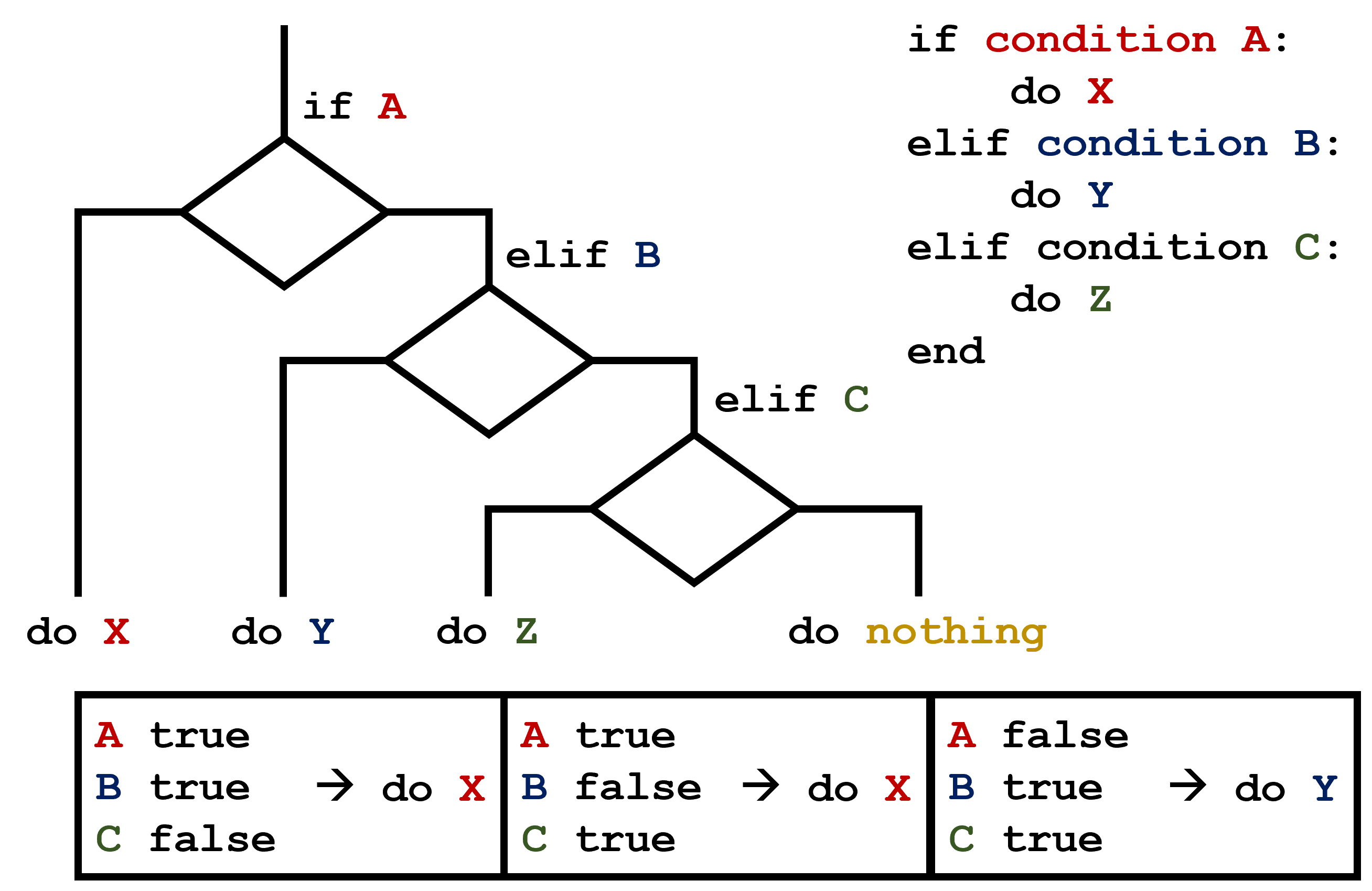
elif is short for “else if.” Python tests the conditions from top to bottom and executes only the first true branch in one conditional chain. Once it finds that branch, it skips every remaining elif and else block.
Order is part of the rule
Because Python stops at the first true condition, place more specific or more severe conditions first.
This version is wrong:
daily_return = -0.052

if daily_return < 0:
    action = "ordinary decline"
elif daily_return <= -0.05:
    action = "large decline — review"
else:
    action = "non-negative day"
The result is "ordinary decline", even though the return is below . Why? The first condition, daily_return < 0, is already true. Python never reaches the later elif.
The corrected version puts the stricter threshold first:
if daily_return <= -0.05:
    action = "large decline — review"
elif daily_return < 0:
    action = "ordinary decline"
else:
    action = "non-negative day"
Think of each elif as asking: “If none of the earlier conditions held, does this next condition hold?” The order therefore defines the policy.
A useful boundary check is to test the exact threshold:
daily_return = -0.05
With <= -0.05, this is classified as a large decline. If your written rule instead says “strictly below ,” write < -0.05. The difference is small in code but can matter in a formally specified research rule.
Combining conditions with and, or, and not
A decision may depend on more than one fact.
Use and when both conditions must hold:
daily_return = -0.041
volume = 1500000

if daily_return <= -0.03 and volume >= 1000000:
    action = "Review a large move with high reported volume."
else:
    action = "No high-volume decline alert."

print(action)
The alert appears only if the return meets its threshold and volume meets its threshold.
Use or when at least one condition is enough:
daily_return = 0.012
volume = 0

if daily_return <= -0.05 or volume == 0:
    action = "Investigate the observation."
else:
    action = "No immediate data-review flag."

print(action)
Here, a large loss or zero reported volume is sufficient to trigger review.
Use not to reverse a Boolean value:
data_is_complete = False

if not data_is_complete:
    print("Do not use this record for analysis yet.")
This reads naturally as “if the data is not complete.”
For research code, prefer conditions that say exactly what you mean. This is vague:
if volume:
    print("Volume exists.")
Python treats nonzero numbers as true and zero as false, so this code can run. But it hides the intended rule. If your actual requirement is “volume must be positive,” write it plainly:
if volume > 0:
    print("Reported volume is positive.")
Explicit comparisons make thresholds inspectable and reduce ambiguity when you revisit a notebook later.
Notebook lab: select an action from a daily record
Use a small dictionary, like the daily observations from the prior lesson, and convert a stated rule into a transparent action variable.
Create a Markdown cell:
## Conditional review rule

Flag a daily observation for review when its daily return is at or below -5%.
Label smaller negative returns as ordinary declines.
Label zero and positive returns as non-negative days.
Then run this code cell:
latest_day = {
    "date": "2024-01-05",
    "close": 94.80,
    "daily_return": -0.052,
    "volume": 1420000,
}

daily_return = latest_day["daily_return"]

if daily_return <= -0.05:
    review_action = "large decline — review"
elif daily_return < 0:
    review_action = "ordinary decline"
else:
    review_action = "non-negative day"

print(f"Date: {latest_day['date']}")
print(f"Daily return: {daily_return}")
print(f"Action: {review_action}")
Now change only the value of "daily_return" and rerun the complete cell for each of these cases:
| Test value | Expected action |
|---|---|
-0.05 | "large decline — review" |
-0.012 | "ordinary decline" |
0.0 | "non-negative day" |
0.018 | "non-negative day" |
This is a compact form of boundary testing. Rather than assuming a rule works, test values at the threshold, slightly inside it, and outside it. Later, the same habit will help you validate trading signals, transaction-cost rules, and data-quality checks.
You can then add a separate data-quality condition:
volume = latest_day["volume"]

if volume <= 0:
    volume_action = "Check the volume field."
else:
    volume_action = "Volume passes this basic check."

print(volume_action)
These are two independent questions:
- What does the return rule say?
- Does the volume field pass the stated data check?
For independent questions, use separate if statements. Use one if/elif/else chain when the actions are mutually exclusive and exactly one category should be selected.
Key takeaways
A conditional statement lets Python select an action based on a Boolean condition.
ifruns an indented block only when its condition isTrue.elseprovides the fallback action when the preceding condition is false.elifadds further conditions; Python chooses the first true branch in the chain.==compares values, while=assigns a value.andrequires all listed conditions to be true;orrequires at least one;notreverses a Boolean value.- Threshold order and boundary choices, such as
<versus<=, are part of a quantitative rule’s definition.
In the next lesson, you will use a for loop to apply calculations across an entire sequence of observations rather than handling one daily record at a time.
Can't find a good explanation? Sign up and we'll make it for you
Sign up