
Welcome back. Previously, you used variables to store one value at a time: a price, ticker, cost, or Boolean data-quality flag. You also saw why a variable’s type matters and why rerunning edited notebook cells matters.
Real market research quickly involves collections of values. A sequence of closing prices has an order: the first observation occurred before the second. A small description of one instrument has labels: "ticker", "market", and "currency". This lesson introduces the two basic Python structures for those jobs:
- Lists store observations in an intentional order.
- Dictionaries store values under meaningful labels.
By the end, you will be able to create, retrieve, and update both structures, including a useful combination: a list of labeled daily observations.
Ordered observations: Python lists
A list is one variable that holds multiple values in order. You create one with square brackets, placing items between the brackets and separating them with commas.
closing_prices = [100.00, 101.25, 99.80, 102.10]

print(closing_prices)
Output:
[100.0, 101.25, 99.8, 102.1]
The values are not merely grouped together: their positions matter. In this toy example, assume each value is the closing price on a successive trading day. Then the position encodes time order.
Python gives every list item an index, meaning its numerical position:
| Observation position | Python index | Value |
|---|---|---|
| First | 0 | 100.00 |
| Second | 1 | 101.25 |
| Third | 2 | 99.80 |
| Fourth | 3 | 102.10 |
The first index is 0, not 1. Retrieve an item by placing its index in square brackets after the list name:
closing_prices = [100.00, 101.25, 99.80, 102.10]

first_close = closing_prices[0]
third_close = closing_prices[2]

print(first_close)
print(third_close)
Output:
100.0
99.8
The expression closing_prices[2] means “retrieve the item at index 2.” It does not mean “retrieve the second item.” Index 2 is the third item.
You can also retrieve the final item with index -1:
latest_close = closing_prices[-1]

print(latest_close)
Output:
102.1
This is useful because -1 continues to mean “last item” even if the list grows.
Python Tutorial for Beginners 4: Lists, Tuples, and Sets
Watch “Python Tutorial for Beginners 4: Lists, Tuples, and Sets” by Corey Schafer for a visual introduction to list syntax, zero-based indexing, list length, and adding observations.
Watch list basics first. Focus on the difference between the human description “first item” and Python’s index 0, and notice why an invalid index produces an error. Then watch adding items to see the distinction between adding an item at the end and placing one at a chosen position.
Updating and extending a list
Lists are mutable, which means their contents can change after creation. Suppose you discover that the second closing price was entered incorrectly:
closing_prices = [100.00, 101.25, 99.80, 102.10]

closing_prices[1] = 101.10

print(closing_prices)
Output:
[100.0, 101.1, 99.8, 102.1]
Only the item at index 1 changed. The other observations stayed where they were.
To record a new observation at the end, use the .append() method:
closing_prices.append(103.40)

print(closing_prices)
Output:
[100.0, 101.1, 99.8, 102.1, 103.4]
A method is an action associated with an object. Here, .append() acts on closing_prices itself and changes that list. This is different from an expression such as len(closing_prices), which asks Python to report the number of observations:
number_of_observations = len(closing_prices)

print(number_of_observations)
Output:
5
Order is data, not decoration
In quantitative research, a price list normally represents a time sequence. Therefore, the order of the values must be preserved and understood.
For example, this list might represent closing prices from Monday through Friday:
week_dates = [
    "2024-01-02",
    "2024-01-03",
    "2024-01-04",
    "2024-01-05",
]

week_closes = [
    100.00,
    101.25,
    99.80,
    102.10,
]
The matching is positional:
print(week_dates[2])
print(week_closes[2])
Output:
2024-01-04
99.8
This pairing works only because the lists are kept in exactly the same order. If someone inserts a date into one list but not the other, the date-price correspondence becomes wrong. Later, pandas DataFrames will provide a safer structure for larger market datasets. For now, this demonstrates why data order requires care.
A common research mistake would be sorting a chronological list of prices merely because the values “look untidy.” Prices are expected to rise and fall. Sorting them numerically would destroy the time sequence and make any later return calculation meaningless.
Labeled observations: Python dictionaries
A list answers questions such as “what was the third observed price?” But an index like 2 cannot tell you whether a value is a price, a volume, a ticker, or a currency.
A dictionary stores values using meaningful labels called keys. Each key has an associated value. Create a dictionary with curly braces:
instrument = {
    "ticker": "ABC",
    "market": "US",
    "currency": "USD",
    "is_active": True,
}

print(instrument)
The structure has four key-value pairs:
| Key | Value | Meaning |
|---|---|---|
"ticker" | "ABC" | Instrument identifier |
"market" | "US" | Market label |
"currency" | "USD" | Currency label |
"is_active" | True | A Boolean status flag |
The dictionary’s keys are strings here, so they need quotation marks. The values can have different types: strings, numbers, and Booleans can all appear in the same dictionary.
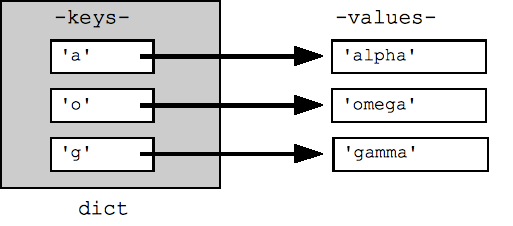
To retrieve a value, write the dictionary name followed by the desired key in square brackets:
ticker = instrument["ticker"]
currency = instrument["currency"]

print(ticker)
print(currency)
Output:
ABC
USD
Although both lists and dictionaries use square brackets for retrieval, what goes inside them is different:
| Structure | Retrieval uses | Example | Meaning |
|---|---|---|---|
| List | Numerical index | closing_prices[0] | First ordered item |
| Dictionary | Key | instrument["ticker"] | Value labeled "ticker" |
A dictionary key must be unique. If the same key appears twice when the dictionary is created, the later value replaces the earlier one. A value, however, can be repeated under different keys.
Python Dictionaries: Visually Explained
Watch “Python Dictionaries: Visually Explained” by Visually Explained to connect dictionary syntax with the idea of looking up a labeled value.
Watch dictionary setup for curly braces, colons, key-value pairs, and lookup by key. Continue with lists versus dictionaries, focusing on why labels are preferable when a position number would be hard to remember. Finally, watch rules and updates: values may have different types, keys must be unique, and assignment can either update an existing key or add a new one.
Updating a value and adding a label
Dictionary assignment has two related uses. If the key already exists, it updates the associated value:
instrument["market"] = "NYSE"

print(instrument["market"])
Output:
NYSE
If the key does not yet exist, the same syntax adds a new labeled value:
instrument["sector"] = "Technology"

print(instrument)
The dictionary now includes a "sector" key.
Keys must match exactly. Python treats "close" and "Close" as different keys, just as it treats the variable names price and Price as different names. If you request a nonexistent key, Python raises a KeyError. That is often useful: it can reveal a misspelling or a dataset whose expected field is absent.
A daily market observation: labels within an ordered history
In actual data work, you commonly need both structures together.
One day’s market observation has labels:
day_one = {
    "date": "2024-01-02",
    "close": 100.00,
    "volume": 1250000,
}
Retrieve individual fields by their labels:
print(day_one["date"])
print(day_one["close"])
Output:
2024-01-02
100.0
Several daily observations have a time order, so place the dictionaries inside a list:
daily_prices = [
    {
        "date": "2024-01-02",
        "close": 100.00,
        "volume": 1250000,
    },
    {
        "date": "2024-01-03",
        "close": 101.25,
        "volume": 1100000,
    },
    {
        "date": "2024-01-04",
        "close": 99.80,
        "volume": 1380000,
    },
]
This is called a list of dictionaries:
- The outer list keeps daily records in an intentional order.
- Each inner dictionary labels the fields of one daily record.
Retrieving the close for the second record takes two steps:
second_day = daily_prices[1]
second_close = second_day["close"]

print(second_close)
Output:
101.25
You can also write the retrieval in one expression:
print(daily_prices[1]["close"])
Read this from left to right:
daily_prices[1]retrieves the second daily dictionary.["close"]retrieves the value labeled"close"from that dictionary.
This form is compact, but the two-line version is often easier to inspect when learning or debugging.
Notebook lab: correct and extend a small price history
Create a Markdown cell:
## Toy daily price history
Then run the following code cell:
daily_prices = [
    {
        "date": "2024-01-02",
        "close": 100.00,
        "volume": 1250000,
    },
    {
        "date": "2024-01-03",
        "close": 101.25,
        "volume": 1100000,
    },
    {
        "date": "2024-01-04",
        "close": 99.80,
        "volume": 1380000,
    },
]

first_record = daily_prices[0]
latest_record = daily_prices[-1]

print(f"First date: {first_record['date']}")
print(f"First close: {first_record['close']}")
print(f"Latest date: {latest_record['date']}")
print(f"Latest volume: {latest_record['volume']}")
print(f"Number of records: {len(daily_prices)}")
Now suppose the close for 2024-01-03 was corrected from 101.25 to 101.10. Update precisely that labeled value:
daily_prices[1]["close"] = 101.10

print(daily_prices[1])
Finally, append a later observation:
daily_prices.append(
    {
        "date": "2024-01-05",
        "close": 102.10,
        "volume": 1420000,
    }
)

print(daily_prices[-1])
print(f"Number of records: {len(daily_prices)}")
This small example already illustrates a disciplined data habit:
- Use a list when the sequence is meaningful.
- Use a dictionary when the field’s name is meaningful.
- Update the specific observation and field you intend to correct.
- Append only when the new record genuinely belongs at the end of the existing chronological sequence.
- Rerun the relevant cell after every change, then inspect the result rather than assuming the update worked.
Key takeaways
A Python list stores an ordered collection. Its items are retrieved with numerical indexes beginning at 0, and lists can be updated or extended with operations such as item assignment and .append().
A Python dictionary stores labeled values as key-value pairs. Retrieve a value with its key, such as instrument["ticker"]; update or add an entry with assignment such as instrument["market"] = "NYSE".
For early market-data work, a list of dictionaries is a useful mental model: time order belongs in the list, while labels such as "date", "close", and "volume" belong in each dictionary.
Next, you will use Boolean expressions with if statements so that a notebook can choose an action based on a stated quantitative rule.
Can't find a good explanation? Sign up and we'll make it for you
Sign up