
Hello. In the previous lesson, you created a sample-and-asset inventory so that raw reads, derived data, code, results, and supporting files each have an explicit role. That inventory lets you ask a more demanding question: what must be true for the current pipeline to work correctly?
Many pipeline failures are not caused by an obviously broken command. They occur because a script silently assumes that every FASTQ follows one naming pattern, every sample has an R2 mate, the current directory is the project root, or a metadata label such as control is always spelled exactly the same way. A professional pipeline makes those assumptions visible, documents them, and later validates the important ones.
By the end of this lesson, you will be able to inspect your existing RNA-seq project and produce an assumption audit covering filenames, directory layout, metadata, and reference resources. This is a useful portfolio artifact: it shows that you can reason about reproducibility and failure modes, not only run tools.
An assumption is a hidden contract
An assumption is a condition your pipeline relies on without necessarily checking or documenting it.
For example, consider this Bash fragment:
for r1 in data/raw/*_R1.fastq.gz; do
  sample=$(basename "$r1" _R1.fastq.gz)
  r2="data/raw/${sample}_R2.fastq.gz"
done
This may work perfectly on your current dataset. But it embeds several contracts:
| Location | Implied assumption |
|---|---|
data/raw/ | All raw reads are stored directly in this directory. |
*_R1.fastq.gz | Every forward-read filename ends in exactly _R1.fastq.gz. |
basename ... _R1.fastq.gz | Everything before that suffix is a valid sample identifier. |
${sample}_R2.fastq.gz | Every sample is paired-end and has a matching R2 file. |
| One loop iteration per R1 file | Each FASTQ pair represents one analysis sample rather than one lane or technical run. |
None of these assumptions is inherently wrong. The problem arises when it is unverified, undocumented, or false for a subset of samples.
A helpful distinction is:
- A documented contract is an intentional rule, such as “input FASTQs must be gzip-compressed and named using the project naming convention.”
- A hidden assumption is a rule that exists only in a filename parser, a hard-coded path, or someone’s memory.
- A validation is a check that stops or warns when the contract is violated.
This lesson focuses on identifying the first two. You will build validations later, when you develop reliable R and Bash scripts.
Read filenames as a grammar, not as decoration
A filename often carries operational information. It may encode a sample label, sequencing lane, mate number, processing stage, date, contrast, or version. But a filename is not a reliable substitute for structured metadata.
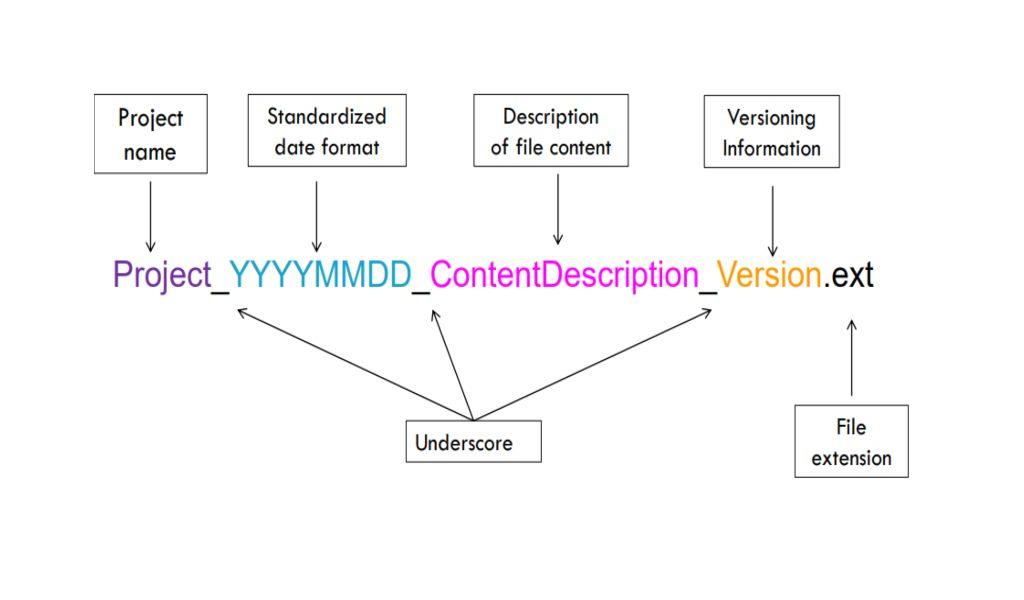
A typical Illumina-derived RNA-seq filename might look like:
PRJ01_S01_L002_R1_001.fastq.gz
Depending on the facility and conversion software, the tokens often suggest:
| Token | Likely meaning | Assumption to verify |
|---|---|---|
PRJ01 | Project or sequencing-batch label | Is it really stable across all data deliveries? |
S01 | Sample-sheet position or library label | Does it equal your biological sample ID? |
L002 | Sequencing lane | Are lanes separate technical runs that must be combined? |
R1 | Read mate 1 | Is the library paired-end, and is a corresponding R2 file present? |
001 | File split number | Is there only one split per lane, or must several files be concatenated? |
.fastq.gz | Gzip-compressed FASTQ | Does your script reject uncompressed or incorrectly named inputs? |
Be particularly careful with what a label does not prove:
R1andR2identify the two mates of a paired-end fragment; they do not establish library strandedness.- A token such as
controlin a filename does not prove the sample belongs in the control group. The experimental condition belongs in metadata. - A prefix such as
S01may identify a library or sample-sheet position, not necessarily an independent biological replicate. - A filename that appears unique may still refer to one of several lanes for the same library.
The following short video gives practical principles for choosing a convention: descriptive but concise names, safe separators, sortable dates, and leading zeros for numeric order.
Knowledge clip: Keeping research data organized
Watch “Knowledge clip: Keeping research data organized” from UGent Open Science for a compact framework for deciding what belongs in a filename and what belongs in a directory.
Watch file naming to focus on informative components, sortable dates, and safe characters. Then watch directory design for the distinction between a logical hierarchy and overlapping categories.
Common filename assumptions in an RNA-seq pipeline
Audit each command in your current Bash pipeline that uses a wildcard, suffix removal, sed, awk, or parameter expansion. Look for these common assumptions:
-
Read-pair convention
The script may expect_R1and_R2, while the facility supplied_1and_2, or different extensions such as.fq.gz. -
One FASTQ pair equals one analysis sample
This fails when a sample has reads from multiple lanes, multiple sequencing runs, or technical replicates. -
Sample IDs can be recovered from filenames without ambiguity
A parser such as “remove everything after the first underscore” breaks when the meaningful sample ID itself contains underscores. -
Every library has the same layout
A script may assume paired-end reads even though one public dataset sample is single-end, or it may assume one strandedness setting for all samples. -
Filename order represents biological order
Lexical order is not experimental design.control_1,control_10, andcontrol_2may sort unexpectedly without leading zeros; more importantly, order should never determine condition assignment. -
A name indicates processing state truthfully
A file namedtrimmed.fastq.gzmay have been copied, partially produced, or created with different trimming parameters. A name is evidence of intent, not proof of provenance.
A particularly high-value question for your own project is:
When your script extracts a “sample name” from a FASTQ filename, is it extracting a biological sample ID, a library ID, a lane-specific run ID, or merely a convenient file stem?
Write down the answer rather than relying on an intuitive interpretation.
Lanes and repeated runs: the assumption most likely to change your sample count
Suppose your raw-read directory contains:
CTRL_01_L001_R1.fastq.gz
CTRL_01_L001_R2.fastq.gz
CTRL_01_L002_R1.fastq.gz
CTRL_01_L002_R2.fastq.gz
TRT_01_L001_R1.fastq.gz
TRT_01_L001_R2.fastq.gz
A simple filename-based pipeline might interpret this as three samples:
CTRL_01_L001
CTRL_01_L002
TRT_01_L001
But the experiment may contain only two biological samples: CTRL_01 and TRT_01, with CTRL_01 sequenced across two lanes. Treating the two control lanes as independent biological replicates would inflate apparent replication and can invalidate downstream inference.
The nf-core RNA-seq samplesheet model makes this contract explicit: multiple rows can share the same sample identifier when one sample was sequenced more than once. The workflow then handles the raw-read runs as inputs belonging to the same sample rather than treating them as independent biological observations.
Read the relevant parts of the nf-core RNA-seq usage documentation as a concrete example of how a mature workflow turns hidden filename and reference assumptions into explicit input requirements.
In “Samplesheet input,” read the input contract, noting the required fields and why a pipeline should not infer them solely from filenames. Continue into “Multiple runs of the same sample,” beginning with the lane handling explanation; compare its repeated sample identifier with your own lane and run naming. Then, in “Reference genome options,” read the note beginning the reference consistency note. Focus on the fact that genome and annotation filenames can conceal incompatible chromosome and gene-ID conventions.
For your project, keep these identities separate in metadata whenever the source information permits:
biological_sample_id
library_id
run_id
lane_id
analysis_sample_id
You may not know all of them for a public dataset. Record what is available and state what is unknown. Do not silently declare a one-to-one relationship merely because the filename seems to imply one.
Directory layouts make assumptions about meaning and execution
A directory tree is also a contract. It tells both humans and scripts where things are expected to live, what should be preserved, and what can be regenerated.

A well-organized layout is not mainly about aesthetic neatness. It limits dangerous ambiguity. Consider these directory names:
data/
results/
output/
final/
new/
processed/
They invite questions:
- Is
processed/an alignment directory, a normalized count table, or a cleaned metadata file? - Are
results/andoutput/different categories, or do they contain duplicate figures? - Does
final/mean reviewed and reproducible, or simply “the version I last edited”? - Can a script safely delete and recreate
output/? - Does
data/include immutable raw FASTQs, downloaded references, and derived count matrices together?
A more meaningful distinction is based on role and mutability:
| Directory role | Typical contents | Contract to document |
|---|---|---|
| Raw input | Original FASTQs or download manifests | Never modify in place. |
| Reference input | FASTA, GTF, indices, reference manifest | Versions must match and be recorded. |
| Metadata/configuration | Sample sheet, contrast definition, parameters | Values are human-reviewed and machine-readable. |
| Code | Bash, R, reporting, and test scripts | Version-controlled; scripts use project-relative paths. |
| Derived data | BAMs, quantifications, count matrices | Regenerable from specified inputs and code. |
| Results | QC reports, figures, DE tables, report output | Generated from a documented run; not hand-edited. |
| Logs | Commands, timestamps, warnings, tool versions | Preserve evidence of what actually ran. |
The exact folder names can differ. What matters is that a given category has one clear home and that a file should not reasonably fit in several competing places.
How to organize a bioinformatics project: using bash to set up a project directory (CC013)
Watch “How to organize a bioinformatics project: using bash to set up a project directory (CC013)” from the Riffomonas Project for a practical explanation of self-contained project structure and project-root execution.
Watch organization principles. Focus on the separation of raw inputs, derived outputs, code, and references, and on the convention of launching work from the project root. Then watch the example layout to compare the role of each top-level directory with the locations listed in your asset inventory.
Directory-layout assumptions worth finding
Search your scripts for literal paths such as:
data/raw/
reference/
results/
output/
../
~/Downloads/
Each path reveals an assumption. Record it in plain language.
For example:
| Observed path or behavior | Hidden assumption | Risk if false |
|---|---|---|
data/raw/*.fastq.gz | Raw FASTQs are directly below data/raw/, with no sample subdirectories. | A valid nested download layout is silently ignored. |
reference/genome.fa | The correct genome FASTA always has this exact name. | A different assembly or stale reference can be used unintentionally. |
results/counts.tsv | One count matrix exists and is current. | A rerun may overwrite or reuse an incompatible matrix. |
../metadata/sample_sheet.csv | The script runs from a particular subdirectory. | The same script fails when launched from the project root or another machine. |
~/project/... | The project exists at the author’s personal absolute path. | The pipeline is not portable. |
The Data Carpentry guidance is useful here because it connects human-readable organization with machine-readable structure. Metadata and directories must be designed for the commands that will consume them, not only for visual browsing.
Project Organization and Management for Genomics: All in One View
Read this Data Carpentry guidance to sharpen the difference between conventions that are easy for a human to guess and rules that a computational workflow can use consistently.
In “Structuring data in spreadsheets,” read the structuring rules. Focus on one observation per row, one variable per column, machine-safe column names, and keeping separate pieces of information in separate fields. Then scan the “Sending samples to the facility” example and its solution, especially the list of inconsistent identifiers, capitalization, dates, and numeric formats. Treat these as examples of assumptions that are easy to miss until a script or statistical model depends on them.
Metadata contains the most consequential assumptions
Metadata is where biological meaning enters the pipeline. A pipeline can align reads correctly and still produce an invalid differential-expression comparison if the metadata are incorrectly interpreted.
In the previous lesson, you began sample_metadata.tsv with one row per analysis unit. Now inspect it for the assumptions embedded in that structure.
1. What does one row represent?
Your metadata table may assume that one row is:
- one biological specimen;
- one library preparation;
- one sequencing run;
- one lane-level FASTQ pair; or
- one count-matrix column.
For DESeq2, the practical rule is that the metadata used to construct the dataset should have one row per count-matrix column. But that does not mean this row is necessarily a biological specimen. If technical libraries were combined before counting, the row may represent a combined analysis sample. Document that relationship.
2. What does each label mean?
The following labels might look equivalent but are analytically different:
control
Control
CTRL
untreated
vehicle
baseline
Do not assume they represent the same experimental condition. A label can reflect treatment status, collection time, a control substance, or an investigator’s shorthand.
Likewise, batch can mean different things:
- RNA extraction batch,
- library-preparation batch,
- sequencing run,
- sequencing lane,
- laboratory operator,
- sample collection cohort.
If you use a variable in a design formula later, you must know exactly what it measures. A generic batch column with undocumented meaning is not enough.
3. Are variables atomic?
Avoid composite values such as:
treatment_batch2_female
control_RIN7.8
tumor_stage3
These encode several variables in one string, making filtering, checking, and modeling error-prone. Separate them:
condition = treatment
library_batch = batch_2
sex = female
rin = 7.8
This is not merely a spreadsheet preference. It determines whether you can later check balance across groups, identify confounding, or include a scientifically justified covariate in a model.
4. Are missing values meaningful?
Your pipeline may currently treat these as interchangeable:
blank cell
NA
N/A
unknown
-
not_available
They are not interchangeable unless you define them as such. Use a documented missing-value convention. Distinguish, when useful:
- not collected;
- not known from the public record;
- not applicable;
- awaiting verification.
For a job-ready repository, it is better to state that a sequencing-center field is unavailable than to fill it with a plausible guess.
Reference resources are metadata, too
Your current pipeline probably contains reference-related assumptions even if the reference files are stored outside the repository.
At minimum, identify:
- organism and strain, when applicable;
- genome assembly, such as
GRCh38; - FASTA source and release;
- GTF or GFF source and release;
- whether chromosome names include a
chrprefix; - whether gene IDs retain version suffixes, such as
.1; - aligner or quantifier index source and creation parameters;
- whether your count matrix retains Ensembl IDs, symbols, or another identifier type.
A common failure is using a genome FASTA from one provider with an annotation from another, where chromosome names or identifier conventions differ. The pipeline may finish, but reads or genes can be omitted because names no longer match. Record the actual files and versions used, not simply “human genome” or “GRCh38.”
This belongs in your assumption audit because a script that accepts arbitrary genome.fa and annotation.gtf without checking compatibility is assuming compatibility.
Create an assumption audit for your RNA-seq project
Create a working document such as:
docs/assumption_audit.md
Do not try to solve every issue immediately. First make the contracts visible. A compact table is enough:
| ID | Where observed | Assumption | Evidence | Consequence if false | Status | Follow-up |
|---|---|---|---|---|---|---|
| FN-01 | FASTQ parser | Read 1 files end in _R1.fastq.gz. | All current files match. | Files may be skipped. | verified for current data | Validate before processing. |
| FN-02 | Sample ID extraction | One FASTQ pair equals one biological sample. | Lane labels are present. | Technical runs may be treated as replicates. | uncertain | Compare with source sample sheet. |
| DIR-01 | data/raw/ | Raw data are immutable and never overwritten. | No write command found. | Original inputs may be lost. | partly verified | Add checksum record. |
| META-01 | condition column | Values use exactly control and treatment. | One value is Control. | Samples may split into unintended groups. | violated | Standardize and document permitted values. |
| REF-01 | Reference paths | FASTA and GTF use compatible chromosome names. | Sources not recorded. | Gene counting may omit features. | unknown | Create reference manifest. |
Use four status labels consistently:
- verified: you have direct evidence the assumption holds for the current project.
- uncertain: plausible, but not yet checked.
- violated: evidence shows it is false or inconsistent.
- intentional: a deliberate project rule that should be documented and validated later.
A focused audit workflow
Work through the project in this order:
-
Start with the sample sheet and count matrix.
Compare count-matrix column names withsample_metadata.tsv. Determine precisely what one analysis sample represents. -
Inspect a representative set of filenames.
Include at least one file from each condition, each lane or run, and any unusual naming pattern. Note every token your Bash script extracts or discards. -
Read your scripts as if you were a new collaborator.
Search for hard-coded paths, wildcard patterns, suffix stripping, implicit default parameters, and sample-name transformations. -
Inspect the directory tree.
For every major folder, write one sentence defining what belongs there, whether contents are immutable or regenerable, and which script reads or writes there. -
Inspect metadata values as controlled vocabulary.
Look for inconsistent capitalization, spaces, date formats, missing-value markers, composite fields, and duplicate IDs. -
Trace reference provenance.
Find the FASTA, GTF, index, or configuration currently used. If the version is unknown, mark it unknown rather than guessing.
A useful outcome is not “all assumptions are fixed.” A useful outcome is a list of explicit, prioritized risks. For example, an undocumented lane-merging rule is more urgent than whether a figure filename uses hyphens or underscores, because it can change the number of biological replicates in the analysis.
What to preserve in the portfolio repository
Your audit should produce evidence that another analyst can inspect:
docs/assumption_audit.md
metadata/sample_metadata.tsv
metadata/asset_inventory.tsv
metadata/reference_manifest.tsv
docs/metadata_dictionary.md
At this stage, these files can be short. Their value is that they separate:
- what is known from what is inferred;
- intentional conventions from accidental habits;
- biological metadata from filename shorthand;
- raw input identity from derived-output identity;
- a current working run from a reproducible project specification.
Avoid “fixing” an inconsistency by silently renaming files or editing metadata without recording the decision. If you change Control to control, document the permitted vocabulary. If you merge lane-level FASTQs, document the source runs and the resulting analysis sample. If you replace a reference annotation, record the old and new versions.
Key takeaways
A working RNA-seq pipeline contains many contracts, whether or not they are written down.
- Filenames may assume a read-pair convention, one lane per sample, a particular suffix, or a recoverable sample ID.
- Directory layouts may assume a working directory, a fixed location for inputs, or a distinction between immutable and regenerable files.
- Metadata may assume a row represents one biological sample, that labels have controlled meanings, and that missing values are consistently encoded.
- Reference resources may assume compatible genome assemblies, annotations, chromosome names, and gene identifiers.
- The practical response is an assumption audit that records each assumption, its evidence, its impact if false, and its status.
Next, you will turn the most important findings into measurable acceptance criteria for a successful pipeline run and a trustworthy differential-expression result.
Can't find a good explanation? Sign up and we'll make it for you
Sign up