Recommended resources
The freely available resources this lesson will direct you to.
- 1 month of content in 1 hour | Updated guide to content batching & planning + free content calendar!www.youtube.com
- How to Plan 1 Week of Social Media Content in 60 Minutes (Tools and Hacks)www.youtube.com
- 13+ Free Social Media Calendar Templates to Help You ...buffer.com
- 100 Content Ideas in 60 Minutes (Yes, Really) - Rachel Pedersenrachelpedersen.com
Introduction
Welcome back! In our last lesson, you took a massive step by selecting a content calendar tool and setting a realistic weekly posting schedule. You now have the "when" and "how often" for your content strategy—a blank calendar that is the blueprint for your growth.
Today, we're going to bring that blueprint to life. The goal of this lesson is to map out one full week of content by assigning a specific post idea and format to each scheduled slot. This is the "what" of your plan. By the end of this session, you'll have a clear, actionable plan for your first week of posts, transforming your strategy from an abstract idea into a concrete to-do list. This will make the actual creation process faster, less stressful, and much more effective.
A Quick Recap: Your Weekly Schedule
Remember the weekly posting frequency you established in the last lesson. It might look something like this:
- Instagram: 3 posts/week
- TikTok: 3 videos/week
- YouTube: 1 video/week
- Pinterest: 3 pins/week
- X (Twitter): 1-2 posts/day
Keep this schedule handy, as we'll be filling in every single slot.
Step 1: Brainstorming with "Content Buckets"
The key to keeping your audience engaged is to offer a variety of content. A simple way to do this is by using "content buckets"—broad categories that ensure you're not just posting the same type of content over and over.
Let's explore this idea.
100 Content Ideas in 60 Minutes (Yes, Really)
The article '100 Content Ideas in 60 Minutes' from creator Rachel Pedersen introduces a powerful system for generating ideas using content buckets. We'll adapt her professional categories for your 'cheap and cheerful lifestyle' niche.
Read the first section, 'Step 1: Buckets Save You From Blank Page Hell.' Focus on understanding the concept of using broad categories to guide your brainstorming.
Now, let's create a set of content buckets tailored to your money-saving niche:
- Value / How-To: This is the core of your content. You're teaching your audience something practical.
- Examples: "5 ways to save on groceries," "How to create a weekly meal plan on a budget," "A tutorial on using a cashback app."
- Relatable / Personal Story: This builds connection. You're sharing your own experiences, struggles, and wins.
- Examples: "My biggest budget fail and what I learned," "A 'day in the life' of living frugally," "Why I started my money-saving journey."
- Proof / Quick Win: This builds trust and provides inspiration. You're showing the results of your tips.
- Examples: A photo of a grocery receipt showing the savings, "How I saved $50 this week with one simple change," sharing a great deal you found.
- Myth-Busting / Belief-Shifting: This establishes your authority and unique perspective. You're challenging common assumptions about your niche.
- Examples: "Myth: Frugal living is boring and restrictive," "You don't need a six-figure income to start investing," "Why 'buy now, pay later' is a trap."
- Community / Engagement: This sparks conversation and makes your followers feel involved.
- Examples: A poll asking "Splurge or Save on coffee?", a question like "What's your #1 money-saving hack?", a quiz on budgeting basics.
Action Step 1: Brainstorm Ideas
Take 10 minutes and write down 1-2 specific content ideas for each of these five buckets. Don't worry about the format yet—just get the core ideas down. This list will be your idea bank for the next step.
Step 2: Match Ideas to Formats and Platforms
Now that you have a list of ideas, the next step is to decide which format and platform is best for each one. A quick video might be perfect for TikTok, while a step-by-step guide is better as an Instagram carousel or a YouTube video.
This infographic gives you a great starting point for thinking about different formats, specifically for Instagram.

To see how this works in practice, let's plan a hypothetical week of content around the theme of "Saving Money on Groceries."
- Monday (Instagram Post): A colorful Carousel with the title "5 Common Grocery Shopping Mistakes." Each slide details one mistake and how to avoid it. (Bucket: Value/How-To)
- Tuesday (TikTok Video): A fast-paced Reel/TikTok showing a "Shop with me" trip to a discount grocery store, pointing out specific deals. (Bucket: Proof/Quick Win)
- Wednesday (X/Twitter Post): A simple tweet: "Quick poll: What's your biggest weakness at the grocery store? A) The snack aisle B) Fresh bakery C) The checkout candy". (Bucket: Community/Engagement)
- Thursday (Pinterest Pin): An eye-catching Pin graphic titled "My Ultimate Budget Grocery List" that links to a future blog post or YouTube video. (Bucket: Value/How-To)
- Friday (Instagram Reel): A short, trending-audio video where you point to text on screen debunking a myth: "Myth: You have to eat boring food to save money." (Bucket: Myth-Busting)
- Saturday (TikTok Video): A "talking head" style video sharing a personal story about your worst budget-breaking grocery trip. (Bucket: Relatable/Personal Story)
- Sunday (YouTube Video): A 10-minute long-form video titled "How I Meal Prep for a Week with Just $50," showing the entire process from shopping to cooking. (Bucket: Value/How-To)
Notice how we used a single theme but created a variety of content types across all platforms, touching on almost every content bucket.
Step 3: Fill Out Your Content Calendar
It's time for you to do this for your own content. Open the calendar tool you chose in the last lesson (whether it's a Canva template, a Google Sheet, or a scheduling tool like Metricool).
Your goal is to fill in every slot you created for the week. For each post, you need to define:
- Platform & Time: The slot you've already defined.
- Content Idea/Topic: A brief description of the post.
- Format: The type of media (e.g., Reel, Carousel, Static Graphic, Long-form Video, Text Thread).
- (Optional) Content Bucket: Note which bucket it falls into to ensure variety.
13+ Free Social Media Calendar Templates to Help You ...
To make sure you're capturing the right information, let's review a quick FAQ from Buffer's article on calendar templates.
Find and read the FAQ question, 'What should I include in my social media calendar?' This section lists the essential elements to include in your plan, such as the platform, format, and captions/visuals.
The process of planning is a crucial part of the "batching" workflow that will save you hours.
1 month of content in 1 hour | Updated guide to content batching & planning + free content calendar!
Creator Jade Beason does an excellent job of explaining how the planning stage fits into the larger process of content creation. This will help you see how the work you're doing now sets you up for success.
Watch the section on planning from 07:12 to 10:23. Pay attention to how she describes taking an idea and breaking it down into a detailed plan within a content calendar before you start creating anything. This is exactly what you are doing now.
Action Step 2: Map Your Week
This is your main task for this lesson. Using your brainstormed ideas and your weekly schedule, fill out your content calendar for one full week.
Here is an example of what a filled-out calendar might look like. Your version doesn't need to include the final caption or hashtags yet, just the core idea and format.
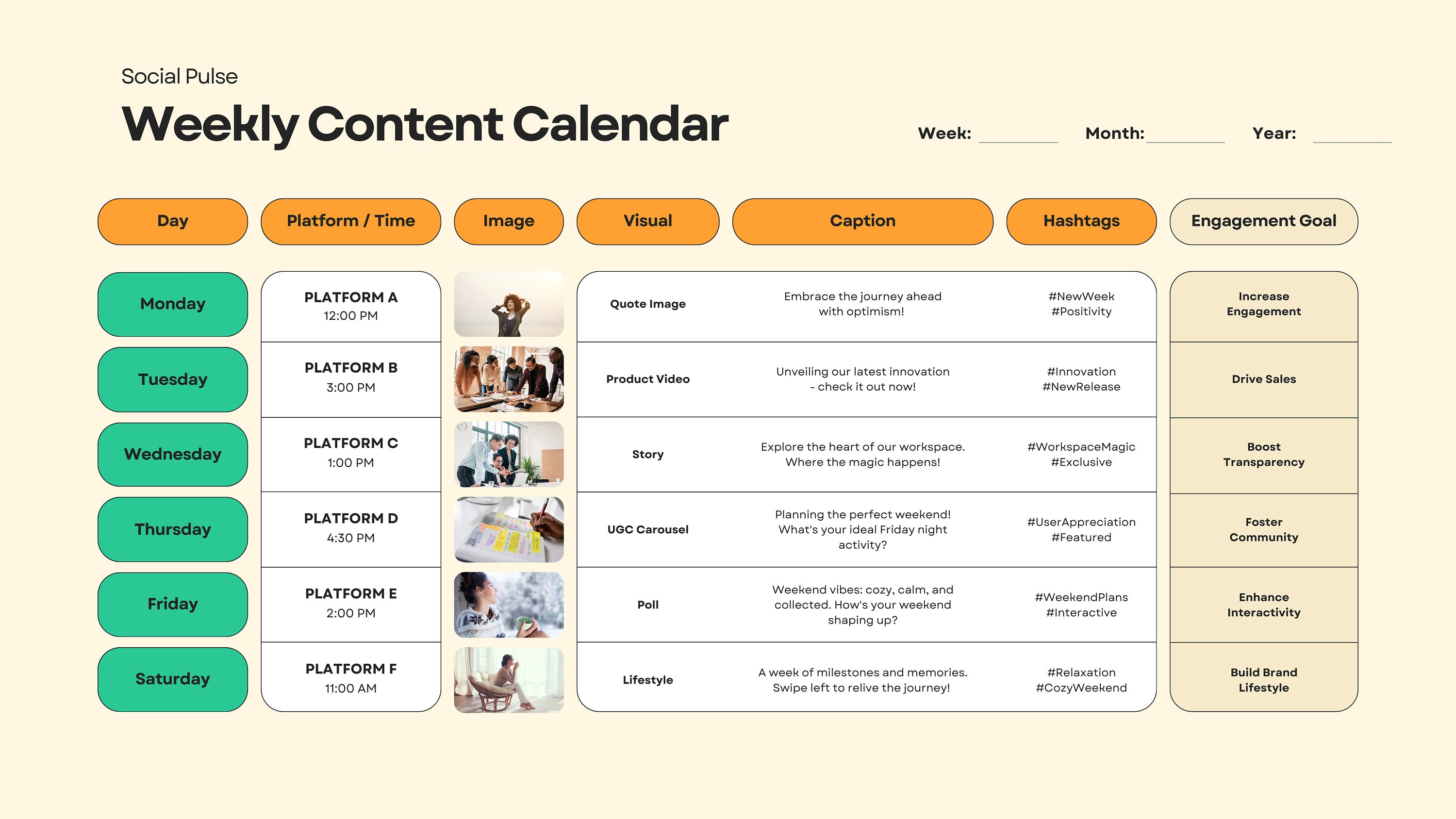
Take the next 20-30 minutes to complete this. Don't strive for perfection; aim for a complete plan. You can always adjust it later.
Conclusion
Congratulations! You have successfully transformed your abstract strategy into a concrete, week-long action plan. You now know exactly what you need to create for every platform, every day you plan to post. This level of organization is what empowers successful creators to stay consistent and avoid burnout.
Key Takeaways:
- Content Buckets help you create a balanced and engaging mix of content.
- Matching your idea to the right format and platform is key to making it effective.
- A filled-out content calendar is your roadmap, telling you exactly what to create and when to post it.
Preview of the Next Lesson:
Now that you have a plan for a generic week, where do you get ideas for the weeks after that? In our next lesson, we will identify and plan content around seasonal budget-living topics. This will show you how to tap into timely events (like holidays, back-to-school season, or tax time) to create relevant content your audience is actively searching for.