
Hello! Welcome to your second lesson on Web Application Analysis and Mapping.
In our last session, you successfully set up your lab environment, configuring Burp Suite to act as an interception proxy. You now have the power to see the raw communication between your browser and any web application. This is the foundational skill for any web penetration tester.
Today, we're going to use that power. This lesson will teach you how to decipher the traffic you're intercepting. We'll move beyond just capturing requests and start analyzing them to understand how a web application truly functions. We will deconstruct HTTP/S requests and responses, paying close attention to the parts that are most critical for security testing: headers, cookies, and the API calls that drive modern applications. Mastering this is the first step toward finding vulnerabilities.
1. The Anatomy of an HTTP Conversation
With Burp Suite running and your browser configured to use it, every time you click a link, submit a form, or even just load a page, one or more HTTP requests are sent to the server, and the server sends back corresponding responses. These conversations appear in Burp Suite's "Proxy" > "HTTP history" tab.
A typical HTTP exchange consists of two main parts:
- The Request: Sent from your browser (the client) to the server. It asks the server to perform an action (e.g., retrieve a web page, submit data).
- The Response: Sent from the server back to your browser. It contains the result of the requested action (e.g., the HTML of the page, a success/error message).

Let's break down the key components you'll be looking at.
2. Deconstructing Requests and Responses
The best way to learn about HTTP is to see it in action. The following video provides a detailed walkthrough of HTTP headers, methods, and status codes using Burp Suite. It's a fantastic practical guide that will form the bedrock of your analysis skills.
Web App Pentesting - HTTP Headers & Methods
The video 'Web App Pentesting - HTTP Headers & Methods' by HackerSploit will guide you through the essential components of HTTP requests and responses. It explains the purpose of common headers and methods, and what different server responses mean.
Watch the segments from 02:53 to 15:44. Focus on the following: Request Headers (02:53 - 09:39): Pay attention to what each header like Host, User-Agent, Accept, Connection, and Cookie tells the server. Response Headers (09:39 - 11:50): Understand what headers like Server, X-Powered-By, Content-Type, and Content-Length reveal about the server and the data it's sending. Status Codes (11:50 - 15:44): Learn the meaning of the different status code categories (2xx for success, 3xx for redirection, 4xx for client errors, 5xx for server errors).
Key Takeaways from the Video:
- Request Headers are directives from the client to the server. For a tester, they can reveal client-side information (
User-Agent) and are often targets for manipulation. - Response Headers provide information from the server. They can leak sensitive version information (
Server,X-Powered-By) that can be used to find known exploits. - Status Codes are your first clue about the result of a request. A
404 Not Foundtells you a resource doesn't exist, while a403 Forbiddentells you it exists but you can't access it—a crucial distinction in security testing. A500 Internal Server Errormight indicate that your input caused the application to crash, which is often a sign of a vulnerability.
3. Understanding HTTP Methods: More Than Just GET and POST
The HTTP method (e.g., GET, POST) tells the server the action you want to perform. While GET (retrieve data) and POST (submit data) are the most common, other methods can have significant security implications if a server is misconfigured.
The next part of the HackerSploit video demonstrates this perfectly by showing how an insecurely configured PUT method can be used to upload a web shell, leading to Remote Code Execution (RCE).
Web App Pentesting - HTTP Headers & Methods
Continue with the HackerSploit video to see a practical demonstration of various HTTP methods and how they can be used for reconnaissance and exploitation.
Watch from 15:44 to 31:26. Focus on: The explanation of methods like HEAD, OPTIONS, PUT, and DELETE. How the OPTIONS method is used to discover which methods are allowed for a specific directory. The step-by-step exploitation using curl to PUT (upload) a PHP backdoor and then DELETE it. This is a real-world example of why enumerating HTTP methods is critical.
The key takeaway here is that you should always check which HTTP methods are supported on interesting endpoints. The OPTIONS method is your primary tool for this. Finding PUT or DELETE on a sensitive directory can be a high-impact vulnerability.
4. Managing State: Cookies and Tokens
HTTP is a stateless protocol, meaning each request is independent. To create a continuous "session" (like staying logged in), applications need a way to remember who you are across multiple requests. This is done using cookies and authentication tokens.
Cookies
A cookie is a small piece of data that the server sends to your browser. Your browser then sends that cookie back with every subsequent request to that server. This is how a server identifies your session.
Authentication Tokens (e.g., JWT)
Modern applications, especially those with separate frontend and backend components (APIs), often use Bearer Tokens. A common format for these is the JSON Web Token (JWT). After you log in, the server gives you a JWT. You then present this token in the Authorization header of your requests to prove your identity.
To dive deeper into the structure and security attributes of these state-maintaining mechanisms, the following reading is essential.
A Guide to Web Penetration Testing with Burp Suite
The article 'A Guide to Web Penetration Testing with Burp Suite' provides a concise breakdown of critical headers and the anatomy of cookies. This will help you understand the security implications of what you see in Burp.
Read the section titled '9- HTTP headers and cookies'. Pay close attention to: The purpose of headers like Authorization and Cookie. The explanation of response headers like Set-Cookie. The breakdown of cookie attributes: HttpOnly, Secure, and SameSite. Understanding these is crucial for assessing the security of a session management implementation.
Test your understanding!
You are testing a banking application and have captured your session cookie. You notice that the HttpOnly flag is not set on this cookie. If you were to find a Cross-Site Scripting (XSS) vulnerability elsewhere in the application, what is the direct security impact of the missing HttpOnly flag?
Show answer
If the HttpOnly flag is missing, it means the cookie can be accessed by client-side JavaScript. An attacker who finds an XSS vulnerability could inject a script that reads the value of your session cookie (document.cookie) and sends it to their own server. They could then use this stolen cookie to hijack your authenticated session and perform actions on your behalf.
5. Identifying and Analyzing API Calls
Most modern web applications are not simple collections of static HTML pages. They are dynamic, interactive frontends (often written in frameworks like React or Angular) that communicate with a backend server via Application Programming Interfaces (APIs). As a tester, your goal is to understand and test these API endpoints.
You can identify API calls by looking at the requests in Burp's history. They often have a specific path prefix, like /api/ or /rest/, and frequently transfer data using JSON.
The following video is an excellent demonstration of analyzing a modern application and its API calls in Burp Suite.
Master Burp Suite Like A Pro In Just 1 Hour
Watch these segments from 'Master Burp Suite Like A Pro In Just 1 Hour' by Netsec Explained. The presenter analyzes OWASP Juice Shop, a realistic vulnerable web app, showing you how to dissect API requests to understand functionality and spot potential flaws.
Watch the following clips, focusing on how API requests are identified and analyzed: Recon & API Discovery (01:56 - 04:02): See how browsing the app reveals GET requests to REST API endpoints like /rest/products/1/reviews. Analyzing POST Requests (04:02 - 08:04): Observe the analysis of a POST request to a feedback API. Note the JSON body and how the presenter uses Repeater to tamper with the data. Information Leakage via API (08:04 - 11:20): A GET request to /rest/memories reveals sensitive user data, including password hashes, in the JSON response. This is a classic example of what you're looking for. Login and JWTs (19:25 - 22:22): Watch the login process. See the POST request with credentials and the JWT returned in the response. Observe how Burp's Decoder is used to inspect the contents of the JWT. Finding Vulnerabilities in APIs (23:50 - 26:15): The presenter identifies a numeric ID in an API endpoint (/api/Basket/6), tampers with it in Repeater, and discovers they can view other users' shopping baskets—a classic IDOR (Insecure Direct Object Reference) vulnerability.
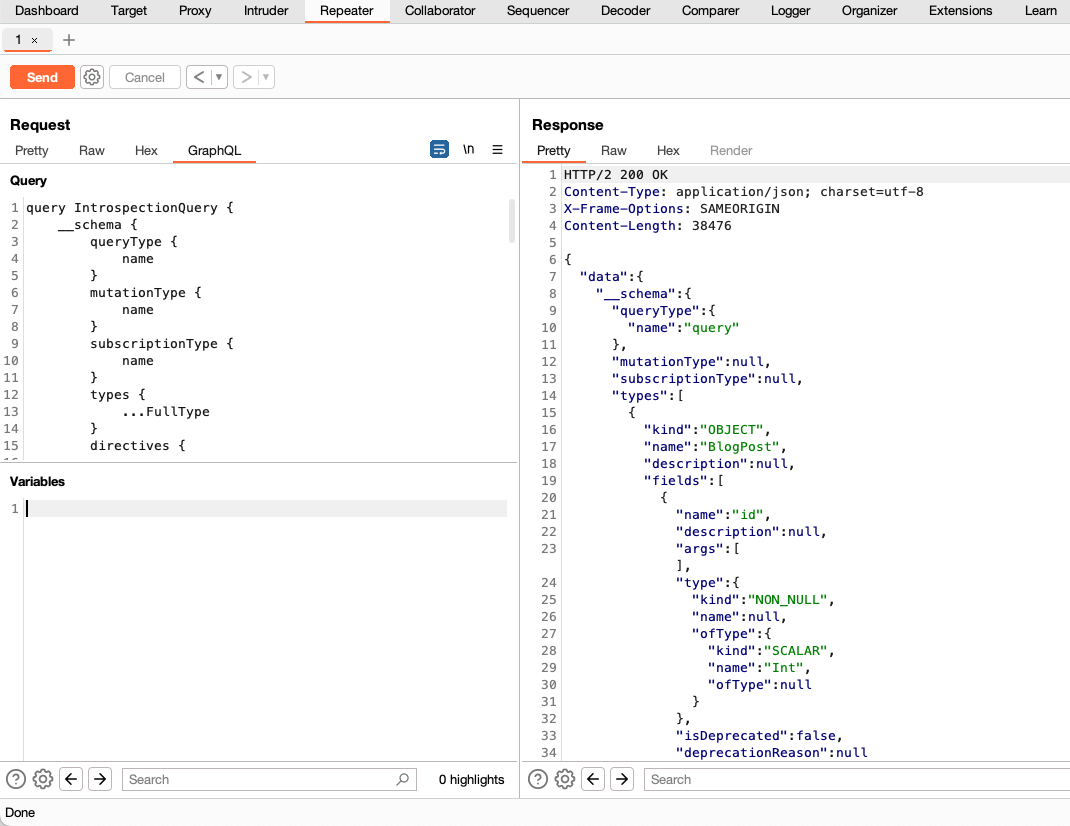
APIs can use different architectures. While the video focuses on REST APIs, you might also encounter others, like GraphQL. You don't need to be an expert in all of them yet, but it's good to recognize them.
Conclusion
You have now learned how to move from simply intercepting traffic to actively analyzing it. This is the core skill of a web application security tester. By deconstructing requests and responses, you can build a mental model of how an application works, how it manages state, and where its potential weaknesses lie.
Key Takeaways:
- HTTP requests contain the method, target URI, headers, and an optional body.
- HTTP responses contain the status code, headers, and an optional body.
- Headers provide critical context and can leak information or be targets for manipulation.
- Uncommon HTTP methods like
PUT,DELETE, andOPTIONScan reveal or create significant vulnerabilities if misconfigured. - Cookies and JWTs are used to maintain state. Their implementation details (e.g., cookie flags, JWT contents) are a rich source of potential security flaws.
- Modern applications are driven by APIs. Your primary task is to identify these API endpoints, understand what they do, and test how they handle data.
Next Lesson Preview:
Manually clicking through every part of a large application to find all its pages and API endpoints is time-consuming and error-prone. In the next lesson, we will explore automated ways to map an application's attack surface using Burp Suite's powerful spidering and content discovery tools. This will help you build a comprehensive picture of your target much more efficiently.