
Hello! Welcome to the next lesson in your journey through web application analysis.
In our last session, we focused on the art of manual inspection. You learned to intercept and analyze individual HTTP requests and responses with Burp Suite, dissecting headers, cookies, and API calls to understand how an application communicates. This granular view is essential for a deep understanding of a target.
Today, we're zooming out. Manually exploring a large, complex application is inefficient and prone to missing hidden functionality. This lesson focuses on automating the discovery process to build a comprehensive map of your target's attack surface. You will learn how to use Burp Suite's powerful spidering and content discovery tools to ensure no part of the application goes unexamined. Mastering these techniques is the difference between a superficial check and a thorough, professional assessment.
1. Building Your Map: The Target Sitemap and Scope
As you browse a target application with Burp proxying your traffic, it quietly builds a map of all the resources you've visited. You can find this map in the Target > Site map tab. It's a tree-like structure representing the directories and endpoints of the application.
However, your browser generates a lot of "noise"—requests to Google, telemetry services, and other domains unrelated to your target. To focus your efforts, you must define a scope.
The following video from Bugcrowd University provides a clear explanation of the sitemap and how to use the scope feature to filter out irrelevant traffic.
Bugcrowd University - Introduction to Burp Suite
This segment from 'Bugcrowd University - Introduction to Burp Suite' demonstrates how to use the Target sitemap and, most importantly, how to set a scope. This is a fundamental skill for keeping your project organized.
Watch from 06:45 to 17:05. Focus on: How the sitemap gets populated as you browse. The problem of out-of-scope traffic (like requests to Google). The process of right-clicking a target in the sitemap and selecting 'Add to scope'. How to use the filter bar to 'Show only in-scope items', which cleans up your view in both the Target and Proxy history tabs.
Setting a scope is the first thing you should do when starting a new engagement. It instructs Burp's automated tools, which we are about to cover, to only attack the intended target.
2. Following the Links: Spidering
The most straightforward way to automate mapping is spidering (or crawling). Burp's Spider follows every link it finds on a page, recursively, to discover new content. It mimics a user clicking on every link they see.
There are two modes of spidering:
- Passive Spidering: Burp automatically processes the responses to requests you make while browsing and adds any discovered links to the sitemap. This is enabled by default and requires no extra action from you.
- Active Spidering: You explicitly instruct Burp to crawl a specific target. You do this by right-clicking a host or directory in the sitemap and choosing Spider this host/branch.
This next video segment demonstrates how the spider works and how to configure it.
Bugcrowd University - Introduction to Burp Suite
Continuing with the Bugcrowd University video, this section focuses on the Spider tool itself. It explains its purpose, controls, and key configuration options.
Watch from 25:32 to 33:17. Pay attention to: The difference between passive and active spidering. The Spider's 'Control' tab, where you can start, stop, and monitor the crawl. The Spider's 'Options' tab, especially settings like 'maximum link depth', which controls how deep the spider will go. This is a trade-off between thoroughness and time.
Spidering is excellent for quickly mapping out all the linked content of an application. But what about content that isn't linked, like an administrator's portal, backup files, or old API endpoints? For that, we need a different technique.
3. Finding the Hidden: Content Discovery
Content discovery, also known as "forced browsing," is the process of finding unlinked content by guessing filenames and directory paths. Instead of following links, you send a large number of requests for common names (e.g., /admin, /backup, /config.txt) and analyze the server's responses to see which ones exist.
This is often done using wordlists—text files containing thousands of common directory and file names. Projects like SecLists are an essential part of every tester's toolkit.
Method 1: The Content Discovery Tool (Burp Suite Professional)
Burp Suite Professional includes a dedicated tool for this purpose. Even if you are using the Community Edition, it's important to be aware of how the professional tooling works.
The official PortSwigger documentation explains the 'Content discovery' feature. It provides a solid conceptual understanding of how automated content discovery is configured and executed.
Read through the documentation page to understand the tool's capabilities. Focus on the 'Config' tab sections: Target: How you define the starting point and scope. Filenames: The different sources for names, including built-in lists, custom lists, and names derived from the site itself. File extensions: How you can test for different file types (e.g., .php, .bak, .config). Discovery engine: Settings that control the scan's behavior.
Here is what the configuration panel and the process of launching the tool look like:
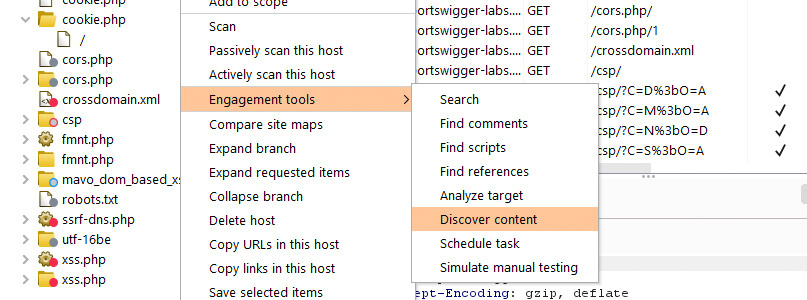
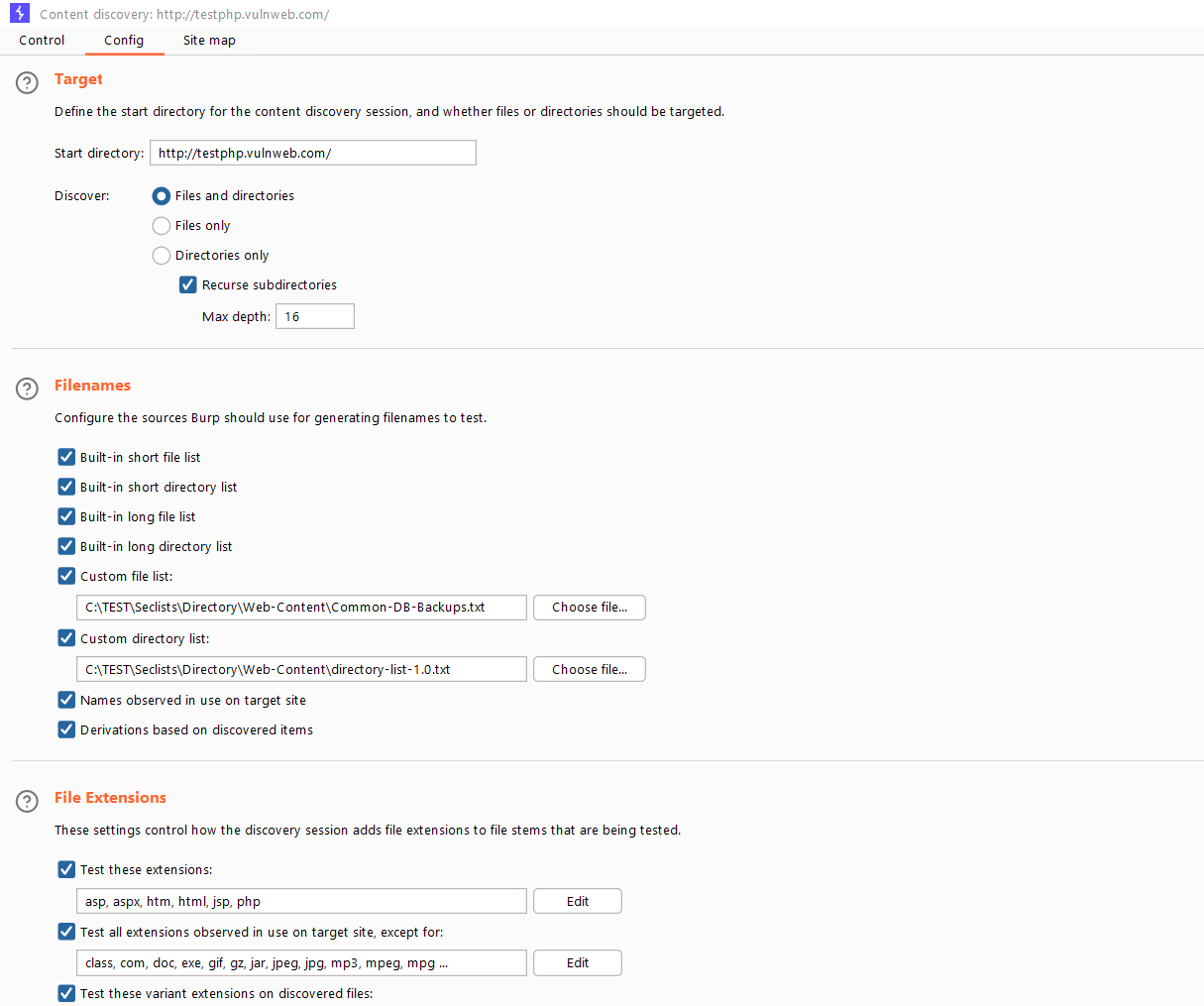
Method 2: Content Discovery with Burp Intruder (Community & Pro)
For users of the Community Edition, or for more customized attacks, Burp Intruder is the tool of choice. You can use it to send a single request repeatedly, substituting a part of it with payloads from a wordlist. This technique is often called "fuzzing."
The "Master Burp Suite" video you saw in the previous lesson provides two excellent, practical demonstrations of using Intruder for discovery.
Master Burp Suite Like A Pro In Just 1 Hour
The video 'Master Burp Suite Like A Pro' by Netsec Explained demonstrates how to use Burp Intruder for powerful, targeted discovery tasks. This goes beyond simple directory guessing and into enumerating application-specific identifiers.
First, watch the segment from 26:15 to 32:20. This is a perfect example of using Intruder for enumeration. Observe how the presenter: Identifies a numeric ID in an API request (/api/baskets/4). Sends the request to Intruder. Marks the ID number as the payload position. Configures a number range as the payload. Uses 'Grep - Extract' to pull out the userId from responses, quickly identifying which baskets belong to which users. This is a classic technique for discovering IDOR vulnerabilities.
The next example is more complex and demonstrates the kind of creative thinking required in bug bounty hunting. The goal is to find and purchase a product that is not listed on the website.
Master Burp Suite Like A Pro In Just 1 Hour
Now, let's watch a more advanced use case from the same video. This section shows how to combine multiple Burp tools to uncover and interact with hidden functionality.
Watch from 40:22 to 50:36. This is a multi-step attack, so pay close attention to the logic: The presenter first tries to find a 'Christmas' product by fuzzing product names and descriptions with Intruder, but fails. The new hypothesis is: what if the product exists but isn't listed? The presenter uses Intruder to add every possible product ID (1-50) to the basket. This reveals the hidden 'Christmas Surprise' product in the basket. The final steps involve using Repeater and Intruder again to delete all other items from the basket and then purchase the hidden one. This is an excellent example of using content discovery techniques to test business logic.
This creative use of Intruder highlights that content discovery isn't just about finding files like admin.php. It's about systematically probing every input and identifier to see what you can uncover.
Test your understanding!
You are testing a web application. You have used Burp's Spider to crawl the entire site, but you suspect there might be a developers' test page that is not linked from anywhere. You guess the page might be called test.php, debug.php, or something similar, located in the root directory.
Which Burp Suite tool and technique would you use to confirm if such a page exists, and why would the Spider be unsuitable for this task?
Show answer
You would use Burp Intruder for this task.
- Technique: Capture a valid request to the root directory (e.g.,
GET /index.php). - Send this request to Intruder.
- Set the payload position to be the filename (e.g.,
GET /§index.php§ HTTP/1.1). - Load a wordlist of common page names (
test.php,debug.php, etc.) as the payload set. - Run the attack and look for responses with a
200 OKstatus code, which would indicate the page exists.
The Spider is unsuitable because it only follows links (<a> tags, etc.) that are present in the application's responses. If the developers' test page is not linked from any other page, the spider will never find it. Content discovery with Intruder is necessary to find this unlinked content.
Conclusion
You have now learned how to systematically map a web application's attack surface using both automated and semi-automated methods. This is a crucial phase of any penetration test or bug bounty hunt, as you can't hack what you can't find.
Key Takeaways:
- Attack Surface Mapping is the process of identifying all accessible components of an application.
- The Target Sitemap provides a visual map, and Scope is used to filter out noise.
- Spidering is an automated crawling technique that discovers all linked content.
- Content Discovery (or forced browsing) uses wordlists to find unlinked content like hidden pages, directories, and API endpoints.
- Burp Intruder is a versatile tool that can be used for sophisticated content discovery and enumeration tasks, especially when a dedicated tool isn't available.
Next Lesson Preview:
Now that you have a comprehensive map of the application's structure, the next step is to dive deeper into its functionality. In the next lesson, we will focus on manually browsing the application to identify key user workflows and business logic. This is where we'll start analyzing multi-step processes like user registration, password resets, and shopping cart checkouts to find the subtle logic flaws that automated scanners always miss.