
Hello and welcome back!
In our last lesson, you mastered writing complex SELECT queries directly in MSSQL, covering JOINs, GROUP BY, and powerful window functions. This gave you a solid understanding of the database's native capabilities.
Now, we'll bridge the gap between that raw SQL power and your Laravel application. Today's lesson focuses on a crucial skill: translating complex SQL queries into Laravel's Query Builder syntax. We'll see how Laravel's fluent, object-oriented interface can produce the exact same queries you wrote by hand, but in a way that is more readable, maintainable, and secure within a PHP application.
1. The Laravel Query Builder: Your SQL Toolkit in PHP
Laravel's Query Builder provides a programmatic and database-agnostic interface for creating and running queries. Instead of writing SQL strings, you chain together intuitive PHP methods. This has several key advantages:
- Readability: A fluent chain of methods like
->where()->orderBy()is often easier for a PHP developer to read than a long SQL string. - Security: The Query Builder uses PDO parameter binding to protect against SQL injection attacks automatically.
- Maintainability: It's easier to conditionally add clauses to a query using PHP logic.
Let's start by reviewing the core components and a few common methods.
Database: Query Builder - Laravel 12.x
The official Laravel documentation is the best place to start. It introduces the Query Builder and covers the most fundamental methods for selecting data.
Please review the following sections of the documentation: Introduction: Understand the purpose of the Query Builder. Running Database Queries: See how to start a query with DB::table(), retrieve results with get(), and fetch single records with first() and find(). Select Statements: Learn how to specify columns using select() and create aliases.
The basic structure of a query always starts with the DB facade and the table() method, and typically ends with a method to retrieve the results, like get():
use Illuminate\Support\Facades\DB;

// SQL: SELECT name, email FROM users WHERE active = 1 ORDER BY name ASC;

$users = DB::table('users')
            ->select('name', 'email')
            ->where('active', '=', 1)
            ->orderBy('name', 'asc')
            ->get();
This fluent, chainable syntax is the foundation we will build upon.
2. Translating JOINs, GROUP BY, and HAVING
Let's move on to the structural clauses you learned in the previous lesson. The Query Builder has direct, one-to-one equivalents for most of them.
Database: Query Builder - Laravel 12.x
Now, let's dive into how the Query Builder handles JOIN, GROUP BY, and HAVING. The documentation provides clear examples for each.
Focus on these specific sections: Joins: Read the subsections on 'Inner Join Clause' and 'Left Join / Right Join Clause'. Notice how the syntax mirrors the SQL ON condition. Ordering, Grouping, Limit and Offset: In this block, focus on the subsection 'The groupBy and having Methods'.
JOIN Translation
An INNER JOIN in SQL becomes a ->join() method call, and a LEFT JOIN becomes ->leftJoin().
Raw SQL:
SELECT
    users.name,
    profiles.photo_url
FROM users
INNER JOIN profiles ON users.id = profiles.user_id
WHERE users.active = 1;
Query Builder:
$users = DB::table('users')
            ->join('profiles', 'users.id', '=', 'profiles.user_id')
            ->select('users.name', 'profiles.photo_url')
            ->where('users.active', '=', 1)
            ->get();
Notice how the arguments to join() directly map to the ON clause: (table, first_column, operator, second_column).
GROUP BY and HAVING Translation
Similarly, GROUP BY and HAVING have direct method equivalents.
Raw SQL:
SELECT
    department,
    COUNT(id) AS number_of_employees,
    AVG(salary) AS average_salary
FROM employees
GROUP BY department
HAVING COUNT(id) > 10;
Query Builder:
$employees = DB::table('employees')
               ->select('department')
               ->selectRaw('COUNT(id) as number_of_employees, AVG(salary) as average_salary')
               ->groupBy('department')
               ->having('number_of_employees', '>', 10) // Note: Using the alias here depends on DB support. Using the raw aggregate is safer.
               // Safer alternative for `having`:
               // ->havingRaw('COUNT(id) > ?', [10])
               ->get();
The "golden rule" still applies: any column in your select that is not part of an aggregate function must be in the groupBy clause. You can see we also used selectRaw here—we'll explore that next.
3. Handling Complex Expressions with Raw Methods
What about window functions, database-specific functions like MSSQL's STRING_AGG, or calculations within a GROUP BY clause? The Query Builder doesn't have fluent methods for everything. For these scenarios, we drop down to "raw" expressions.
Raw methods allow you to insert arbitrary SQL strings into different parts of your query. This gives you the full power of SQL while keeping the structure and security of the Query Builder.
Database: Query Builder - Laravel 12.x
The documentation covers the various *Raw methods that are essential for complex queries.
Read the section Raw Expressions and its subsections on selectRaw, whereRaw, havingRaw, orderByRaw, and groupByRaw. This is a critical concept for this lesson.
The most common tool is DB::raw(), which creates a raw expression object that Laravel will not try to parse or protect.
Example 1: Aggregating Strings with STRING_AGG
Imagine you need to get a list of users and a comma-separated list of their roles. In MSSQL, you'd use the STRING_AGG function. Since there's no ->stringAgg() method in Laravel, we use DB::raw().
Multi-Join Raw SQL Query To Laravel Query Builder Conversion
This video demonstrates exactly how to convert a raw SQL query with a complex aggregate function (GROUP_CONCAT, MySQL's version of STRING_AGG) into the Query Builder. The principle is identical.
Watch the full video to see the process from start to finish. The key takeaway is how DB::raw() is used inside the select() method to wrap the database-specific function.
Here's how you would write a similar query for MSSQL:
Raw SQL (MSSQL):
SELECT
    u.name,
    STRING_AGG(r.name, ', ') AS role_names
FROM users u
JOIN user_roles ur ON u.id = ur.user_id
JOIN roles r ON ur.role_id = r.id
GROUP BY u.id, u.name;
Query Builder:
$usersWithRoles = DB::table('users as u')
    ->join('user_roles as ur', 'u.id', '=', 'ur.user_id')
    ->join('roles as r', 'ur.role_id', '=', 'r.id')
    ->select(
        'u.name',
        DB::raw("STRING_AGG(r.name, ', ') as role_names")
    )
    ->groupBy('u.id', 'u.name')
    ->get();
The DB::raw() call allows STRING_AGG to be passed directly to the database engine.
Example 2: Grouping by a Calculated Value
Sometimes you need to group by something that isn't a direct column, like the year a record was created. The selectRaw and groupByRaw methods are perfect for this.
Laravel Eloquent Report: Group By Year with Raw Queries
This video from Laravel Daily shows a practical example of grouping transactions by the year they were created, which is calculated from a timestamp field.
Watch the video to see how selectRaw is used to create a transaction_year alias and how groupByRaw is then used to group by that calculated alias.
Raw SQL (MSSQL):
SELECT
    YEAR(created_at) AS transaction_year,
    SUM(amount) AS total
FROM transactions
GROUP BY YEAR(created_at);
Query Builder:
$transactionsByYear = DB::table('transactions')
    ->selectRaw('YEAR(created_at) as transaction_year, SUM(amount) as total')
    ->groupByRaw('YEAR(created_at)')
    ->orderByRaw('YEAR(created_at)')
    ->get();
Example 3: Ordering by an Aggregate on a Joined Table
A common complex query involves ordering a list of items based on an aggregate from a related table. For example, ordering blog posts by their most recent comment date. This requires a JOIN, a GROUP BY to avoid duplicate posts, and an ORDER BY on an aggregate (MAX).
Ordering database queries by relationship columns in Laravel
This article provides a masterclass in ordering by relationship data. We'll focus on the 'has-many' example, which translates a tricky SQL concept into the Query Builder.
Read the section Ordering by has-many relationships. Pay close attention to the join-based approach, which uses groupBy('users.id') and orderByRaw('max(logins.created_at) desc'). The article explains why the max() aggregate and orderByRaw are necessary, which is a key concept.
Raw SQL (ordering posts by last comment):
SELECT
    posts.*
FROM posts
INNER JOIN comments ON posts.id = comments.post_id
GROUP BY posts.id, posts.title, posts.body, posts.created_at, posts.updated_at -- Note: all selected post columns must be in GROUP BY for MSSQL
ORDER BY MAX(comments.created_at) DESC;
Query Builder:
$posts = DB::table('posts')
    ->select('posts.*')
    ->join('comments', 'posts.id', '=', 'comments.post_id')
    ->groupBy('posts.id', 'posts.title', 'posts.body', 'posts.created_at', 'posts.updated_at')
    ->orderByRaw('MAX(comments.created_at) DESC')
    ->get();
Here, orderByRaw is essential because we are ordering by the result of an aggregate function, which has no direct fluent method.
4. Pagination and Limiting Results
Translating OFFSET and FETCH (or LIMIT and OFFSET in other dialects) is straightforward.
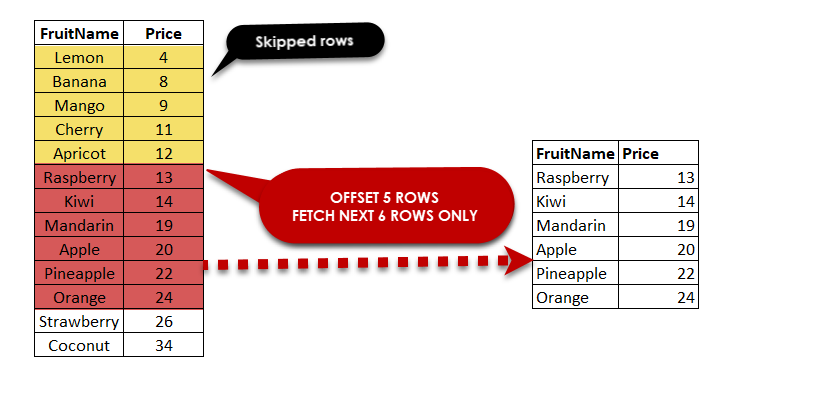
The skip() method is equivalent to OFFSET, and take() is equivalent to FETCH or LIMIT.
Raw SQL (MSSQL):
SELECT * FROM products
ORDER BY name
OFFSET 10 ROWS
FETCH NEXT 5 ROWS ONLY;
Query Builder:
$products = DB::table('products')
              ->orderBy('name')
              ->skip(10) // or offset(10)
              ->take(5)  // or limit(5)
              ->get();
In practice, you will more often use Laravel's built-in ->paginate() method, which handles this logic for you automatically.
5. Debugging Your Translations
How can you be sure your Query Builder code produces the correct SQL? Laravel gives you tools to inspect the generated query. This is an invaluable step for debugging.
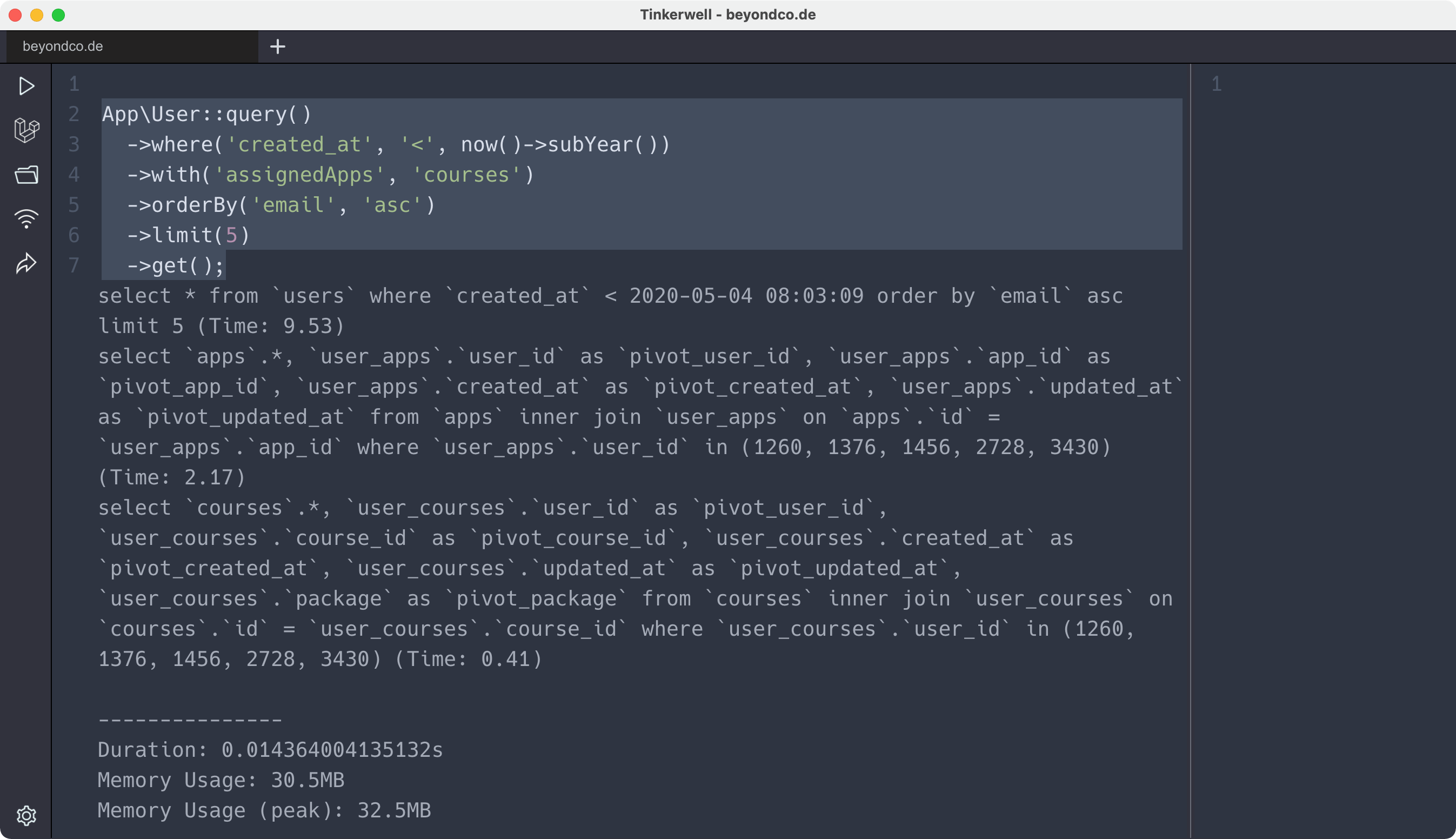
You can replace ->get() with one of these methods to see the underlying SQL:
->toSql(): Returns the SQL query as a string.->dump(): Dumps the SQL query and its bindings, then continues execution.->dd(): Dumps the SQL query and its bindings, then stops execution ("dump and die").
// This will NOT execute the query. It will print the SQL and stop.
DB::table('users')
    ->join('profiles', 'users.id', '=', 'profiles.user_id')
    ->where('users.active', '=', 1)
    ->dd();

// Output would look something like:
// "select * from [users] inner join [profiles] on [users].[id] = [profiles].[user_id] where [users].[active] = ?"
// [ 1 ]
Always use these methods to confirm your Query Builder chain is producing the efficient, complex query you designed.
Conclusion
Today you've learned to translate the complex SQL queries you already know how to write into Laravel's clean, maintainable, and secure Query Builder syntax.
Key Takeaways:
- Most standard SQL clauses like
SELECT,JOIN,WHERE,GROUP BY, andHAVINGhave direct, fluent method equivalents in the Query Builder. - For database-specific functions, complex calculations, or unsupported clauses, the
*Rawmethods (selectRaw,orderByRaw,DB::raw()) are your essential tools. They give you the full power of SQL within the Query Builder's structure. - Translating a query is a process of mapping each SQL clause to its corresponding Query Builder method.
- Always use debugging methods like
dd()ortoSql()to verify that your translated query matches the intended raw SQL.
Up Next:
While the Query Builder is incredibly powerful, there are rare occasions where a query is so complex that building it with the fluent interface becomes more cumbersome than helpful. In our next lesson, we will cover how to execute raw SQL queries securely within Laravel when necessary, completing your toolkit for database interaction.