
Hello. In the previous lesson, you traced C++ from source code through preprocessing, compilation, assembly, linking, and finally loading into a Linux process. That pipeline gives us an important debugging fact: different tools observe defects at different moments. The compiler can inspect source without running it; sanitizers instrument the executable and inspect behavior while it runs.
This lesson builds a practical diagnostic loop for WSL:
- compile with a useful warning baseline;
- treat a warning as evidence to investigate, not as cosmetic output;
- rebuild with AddressSanitizer and UndefinedBehaviorSanitizer;
- read a runtime report back to the responsible source lines;
- repair the violated lifetime or bounds rule;
- rerun the same case with instrumentation still enabled.
By the end, you will have located and repaired a heap use-after-free in a small C++ program.
Two complementary defect detectors
A compiler warning is a static diagnostic: the compiler sees source that is legal enough to compile but suspicious enough to merit attention. It does not run your program and cannot know every runtime input or control-flow path.
A sanitizer is dynamic analysis: the compiler inserts checking code into the executable. When an instrumented program actually executes an invalid operation, the sanitizer can stop it and explain what happened. This makes sanitizers especially valuable for defects involving pointers, array bounds, object lifetimes, and undefined behavior that are difficult to prove from source alone.
Neither category is complete:
| Tool | Can reveal | Cannot guarantee |
|---|---|---|
| Warnings | Suspicious conversions, unused values, certain uninitialized uses, some statically visible bounds and lifetime mistakes | That warning-free code is correct |
| AddressSanitizer, ASan | Many out-of-bounds accesses, use-after-free, double-free, and some stack-lifetime errors on executed paths | That unexecuted paths are safe, or every C++ rule is checked |
| UndefinedBehaviorSanitizer, UBSan | Many instrumented undefined operations, such as invalid shifts or signed integer overflow | All undefined behavior, especially behavior requiring unavailable runtime information |
Think of warnings as an inexpensive source audit and sanitizers as monitored execution. A disciplined development build uses both.
Warning Options (Using the GNU Compiler Collection (GCC))
Read the relevant parts of GCC's warning-options reference to establish what warnings are: risk indicators, not necessarily compilation failures. The later entries also show that GCC has diagnostics for some lifetime and array mistakes, though these analyses are necessarily incomplete.
In Section 3.9, “Options to Request or Suppress Warnings,” begin with the opening definition. Then locate the entries for -Werror, -Wall, and -Wextra, noting how -Werror changes a warning into a failed build. Farther down in the same section, find -Wuse-after-free=n and read that description. Scan the nearby -Warray-bounds and -Wdangling-pointer entries to see the kinds of problems a compiler may sometimes identify before execution.
A warning baseline for everyday C++ builds
On WSL, first verify that your compiler is available:
g++ --version
For small learning programs, begin with this baseline:
g++ -std=c++20 -Wall -Wextra -Wpedantic -g program.cpp -o program
The flags have distinct purposes:
| Flag | Purpose |
|---|---|
-std=c++20 | Selects the intended language standard explicitly |
-Wall | Enables a broad set of common, useful warnings; despite its name, it is not literally every warning |
-Wextra | Enables further diagnostics that are often useful in application code |
-Wpedantic | Requests diagnostics for non-standard extensions and strict portability concerns |
-g | Embeds debug information, allowing tools to map machine addresses back to source files and line numbers |
Two optional warnings are often worth trying in a personal project:
-Wconversion -Wshadow
-Wconversion reports implicit conversions that may alter a value. -Wshadow reports a local declaration that hides an outer variable or parameter. Both can produce noise in an established codebase, so add them deliberately and address their diagnostics rather than suppressing them reflexively.
Consider this deliberately questionable program:
// warnings.cpp
int bucket_for(double measurement) {
    int bucket = measurement;
    return bucket;
}

int main() {
    int status = 0;
    return bucket_for(3.8);
}
Compile it with a stricter exploratory warning set:
g++ -std=c++20 -Wall -Wextra -Wpedantic \
    -Wconversion -Wshadow -g warnings.cpp -o warnings
GCC should identify two meaningful concerns:
statusis assigned but never used.- converting
measurementfromdoubletointcan discard its fractional part.
The right repair depends on the intended contract. If truncation is genuinely the policy, state it explicitly:
int bucket_for(double measurement) {
    return static_cast<int>(measurement);
}

int main() {
    return bucket_for(3.8);
}
The cast is not a magical repair. It tells readers and the compiler that narrowing is deliberate. In a real system, you may instead need rounding, range checking, or a different return type. The warning has succeeded when it makes you decide and encode the intended behavior.
When should warnings become errors?
During active development, this can be useful:
g++ -std=c++20 -Wall -Wextra -Wpedantic -Werror \
    warnings.cpp -o warnings
-Werror prevents the executable from being produced if any enabled warning remains. For new projects and CI checks, “no warnings” is a productive standard. For a pre-existing codebase with many inherited diagnostics, first reduce the warnings or promote selected categories individually:
-Werror=return-type
Do not respond to an inconvenient warning by broadly adding -w, which silences all warnings, or by adding a suppression without understanding why the compiler complained.
For warnings such as -Wmaybe-uninitialized and some bounds analyses, GCC can discover more when optimization is enabled. A separate audit build can therefore be informative:
g++ -std=c++20 -Wall -Wextra -Wpedantic -Wconversion \
    -O2 -c program.cpp
This does not replace your debuggable build. It simply gives the compiler more information for certain data-flow analyses.
Sanitizers: monitored execution in your debug build
AddressSanitizer is designed to detect invalid memory accesses at runtime. It instruments loads, stores, allocation, and deallocation, then tracks regions that are valid, out of bounds, or no longer alive. In practical terms, it is extremely effective at catching errors that may otherwise print a plausible answer, crash later, or appear only on one machine.
UndefinedBehaviorSanitizer complements it by checking a different family of operations whose behavior the C++ language does not define. We will use both in the same debug build.
C++ Weekly - Ep 84 - C++ Sanitizers
Watch “C++ Weekly — Ep 84 — C++ Sanitizers” by C++ Weekly With Jason Turner for a compact view of the sanitizer family and a concrete AddressSanitizer run. The key point is that sanitizers instrument an executable and need the faulty path to execute.
Watch the sanitizer overview to distinguish AddressSanitizer, UndefinedBehaviorSanitizer, ThreadSanitizer, and MemorySanitizer. Then watch the ASan demonstration, focusing on the contrast between a normal run that appears harmless and the sanitizer report that identifies a stack-buffer overflow. Notice why compiling with debug information improves the reported source location.
For GCC on WSL, use this command for an instrumented debug build:
g++ -std=c++20 -Wall -Wextra -Wpedantic \
    -g -O1 -fno-omit-frame-pointer \
    -fsanitize=address,undefined \
    uaf.cpp -o uaf
Important details:
-fsanitize=address,undefinedenables both ASan and UBSan.- Because one
g++invocation compiles and links this small program, the sanitizer option reaches both phases. If you compile object files and link separately, include the sanitizer options in the final link command too. -glets reports name your source file and line number.-O1is a practical sanitizer setting: it retains reasonably understandable behavior while allowing some compiler analysis.-O0is also fine while learning.-fno-omit-frame-pointeroften makes stack traces easier to interpret on x86-64 systems.
Setup Address Sanitizer | EECS 280 Tutorials
Read the AddressSanitizer tutorial from EECS 280 for the core WSL/Linux setup idea and its example of a program that appears to run despite an invalid vector access. Use the exact GCC command in this lesson for your experiment; the central lesson from the tutorial is the difference between an ordinary execution and an instrumented one.
In the “Address Sanitizer” page, read the “Quick Start” section, beginning at the sanitizer introduction. Then continue to “Example without Address Sanitizer” and “Example with Address Sanitizer.” Focus on the fact that an out-of-range access can produce ordinary-looking output without being valid, while an ASan build stops with a report and stack trace.
The same resource mentions -D_GLIBCXX_DEBUG. This is a separate libstdc++ debug mode that adds checks to standard-library containers and iterators. It can be useful in a dedicated debug configuration:
-D_GLIBCXX_DEBUG
Use it consistently for all translation units in that debug build. Do not casually mix code compiled with and without that macro when standard-library container types cross a binary boundary.
Lab: locate a heap use-after-free
Create a fresh file named uaf.cpp:
#include <cstddef>
#include <iostream>

int total(const int* scores, std::size_t count) {
    int result = 0;

    for (std::size_t i = 0; i < count; ++i) {
        result += scores[i];
    }

    return result;
}

int main() {
    int* scores = new int[3]{10, 20, 30};

    delete[] scores;

    std::cout << total(scores, 3) << '\n';
}
Before compiling, trace the lifetime:
new int[3]dynamically allocates an array containing threeintobjects.scoresstores the address of the first array element.delete[] scoresends the lifetime of that allocated array and releases the allocation.total(scores, 3)attempts to read through a pointer whose pointed-to array no longer exists.
The pointer variable still contains an address after delete[]; deletion does not automatically erase its bits. But the address is no longer permission to access an int object. That distinction is the essence of a dangling pointer and use-after-free.
Compile and run the instrumented program:
g++ -std=c++20 -Wall -Wextra -Wpedantic \
    -g -O1 -fno-omit-frame-pointer \
    -fsanitize=address,undefined \
    uaf.cpp -o uaf

./uaf
Your exact addresses, library frames, and line numbers will differ, but the report should resemble this structure:
ERROR: AddressSanitizer: heap-use-after-free
READ of size 4 at ...
    #0 total(...) uaf.cpp:...
    #1 main uaf.cpp:...

freed by thread T0 here:
    #0 operator delete[] ...
    #1 main uaf.cpp:...

previously allocated by thread T0 here:
    #0 operator new[] ...
    #1 main uaf.cpp:...
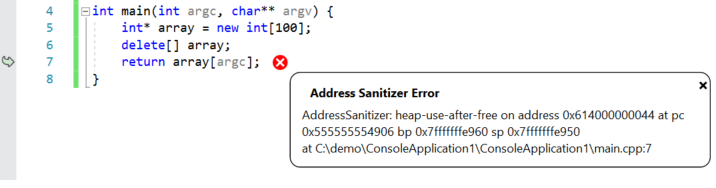
Read a sanitizer report in this order:
-
Classify the defect.
heap-use-after-freesays the access involves dynamically allocated memory whose lifetime already ended. This is a stronger diagnosis than “segmentation fault.” -
Find the invalid operation.
The first stack trace identifies the executed read or write. Here it should lead toscores[i]intotal. -
Find the lifetime-ending operation.
Thefreed bytrace identifiesdelete[] scoresinmain. -
Find the allocation site if needed.
Thepreviously allocated bytrace tells you where the object originally came from. This becomes crucial in larger programs where allocation, deallocation, and invalid use occur in different files. -
State the broken rule in plain language.
“totalreads the array aftermainhas ended its lifetime.”
The long hexadecimal addresses and shadow-memory dump can be useful to sanitizer developers, but they are not the primary evidence you need for a first repair. Start with the source-level stack traces and the reported operation.
Repair the lifetime, not the symptom
A tempting but incorrect “repair” is:
delete[] scores;
scores = nullptr;
std::cout << total(scores, 3) << '\n';
This makes the dangling-pointer state explicit, but total still dereferences the null pointer. The program remains invalid; it has merely changed the form of the defect.
Another incorrect response is to remove delete[] entirely. That avoids use-after-free only by creating a memory leak.
The actual requirement is simple: every read of the array must finish before its lifetime ends. Rewrite main as follows:
int main() {
    int* scores = new int[3]{10, 20, 30};

    const int result = total(scores, 3);

    delete[] scores;

    std::cout << result << '\n';
}
Now compile and rerun with exactly the same sanitizer configuration:
g++ -std=c++20 -Wall -Wextra -Wpedantic \
    -g -O1 -fno-omit-frame-pointer \
    -fsanitize=address,undefined \
    uaf.cpp -o uaf

./uaf
The expected program output is:
60
More importantly, ASan should produce no error report. This is a necessary validation, not a proof that every possible path in a larger program is safe. Sanitizers only observe code that your tests execute. For a function with multiple input modes or error paths, run tests that deliberately exercise each ownership and cleanup path.
At this stage, the raw new[] and delete[] are useful because they make lifetime visible. A later lesson will replace error-prone manual ownership patterns with RAII and smart pointers, which encode this cleanup responsibility more reliably.
A reusable diagnostic workflow
For small C++ programs in WSL, use this workflow whenever output is suspicious, a program crashes, or code handles pointers and arrays:
1. Build with warnings enabled.
2. Read each warning and decide the intended program behavior.
3. Build a sanitizer-enabled debug executable.
4. Run a minimal input that reproduces the problem.
5. Read the report: error class, invalid access, release site, allocation site.
6. Repair the underlying lifetime, bounds, or arithmetic rule.
7. Rebuild cleanly and rerun the reproducer plus relevant tests.
A compact debug command worth keeping nearby is:
g++ -std=c++20 -Wall -Wextra -Wpedantic \
    -g -O1 -fno-omit-frame-pointer \
    -fsanitize=address,undefined \
    main.cpp -o app
For a multi-file program, list all project .cpp files or use your build system so they are compiled consistently. Sanitizers are development tools: their checks add memory and runtime overhead, so they are normally enabled in a debug or test configuration rather than a performance-oriented release build.
Takeaways
- Compiler warnings are static clues. Start with
-Wall -Wextra -Wpedantic, then selectively consider flags such as-Wconversionand-Wshadow. -Werrorcan enforce a warning-free build, especially in new projects and CI, but only after you understand the enabled warnings.- ASan detects many executed memory-safety violations; UBSan detects many executed undefined operations. Use
-gso their reports map back to your source. - A heap use-after-free is not repaired by nulling a pointer after deletion or by suppressing the report. The repair is to ensure no access occurs after the allocation’s lifetime ends.
- The most useful parts of an ASan report are the error classification, the invalid access stack trace, and the allocation/deallocation traces.
Next, you will use GDB to pause a running program at a breakpoint and inspect stack frames, variables, and control flow directly.
Can't find a good explanation? Sign up and we'll make it for you
Sign up