
Hello, and welcome to the first lesson in the C++ Execution and Hardware Foundations module. This module begins by making the build process visible: before debugging memory, reading assembly, or reasoning about the operating system, you need a reliable mental model of how the C++ text you write becomes a running Linux process.
A command such as g++ main.cpp -o app looks like one action, but it asks a compiler driver to coordinate several distinct tools and transformations. By the end of this lesson, you will be able to trace a source file through preprocessing, compilation proper, assembly, linking, and loading, and identify which stage is responsible when a build fails.
The pipeline: from text to a running process
The following diagram gives the standard four build stages. The final step in today’s lesson, loading, happens after this diagram’s executable has been produced: it is the operating system’s work when you run the program.
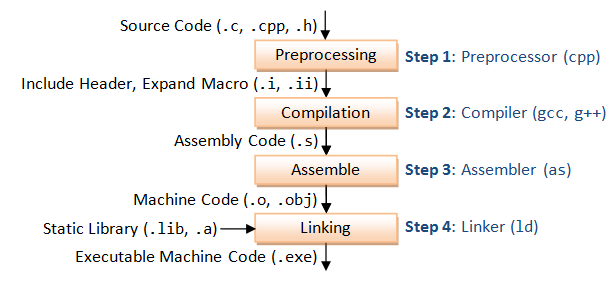
For a C++ source file main.cpp, the conventional intermediate artifacts are:
| Stage | Input | Output | Main responsibility |
|---|---|---|---|
| Preprocessing | main.cpp and included headers | main.ii | Expand #include, macros, and conditional directives |
| Compilation proper | Translation unit | main.s | Check C++ rules and generate target-specific assembly |
| Assembly | Assembly source | main.o | Encode instructions and data into an object file |
| Linking | Object files and libraries | executable, such as demo | Resolve cross-file references and form one program |
| Loading | Executable | running process | Map program and shared libraries into memory, then begin execution |
There is a terminology trap worth resolving early:
- Developers often say “compile” to mean the whole process from
.cppto executable. - More precisely, compilation proper is just the transformation from preprocessed C++ into assembly.
- Building is a useful word for the complete source-to-executable process.
- Loading begins only when the operating system is asked to execute the finished executable.
The GCC driver, invoked through g++, recognizes main.cpp as C++ based on its suffix. It then chooses the appropriate language frontend and invokes the needed internal tools. For a C++ program, prefer g++ rather than gcc, particularly for the final link: g++ ensures the C++ standard library and C++ runtime are linked appropriately.
In 54 Minutes, Understand the whole C and C++ compilation process
Watch “In 54 Minutes, Understand the whole C and C++ compilation process” by Mike Shah for a compact visual overview of the artifacts and the distinction between object files, executables, and libraries.
Watch the overview. Focus on the boundary between the assembler’s object-file output and the linker’s executable output. Notice the diagnostic clue that “undefined reference” normally identifies a link-stage failure rather than a C++ syntax failure.
Preprocessing: constructing a translation unit
C++ preprocessing handles directives that start with #. The most important are:
#include, which makes declarations from a header available to the source file;#define, which creates macro substitutions;#if,#ifdef, and related directives, which select code conditionally;- include guards, which prevent a header’s contents from being inserted more than once into one translation unit.
Consider this small two-file program:
// math.hpp
#ifndef MATH_HPP
#define MATH_HPP

int scaled_add(int a, int b);

#endif
// math.cpp
#include "math.hpp"

int scaled_add(int a, int b) {
    return a + b;
}
// main.cpp
#include "math.hpp"
#include <cstdio>

#define SCALE 3

int main() {
    std::printf("%d\n", SCALE * scaled_add(2, 5));
}
The header declares the function: it tells the compiler its name, parameter types, and return type. The source file math.cpp contains the function’s definition, including its body. main.cpp can therefore type-check the call to scaled_add even though it does not contain the implementation.
Preprocessing main.cpp replaces the #include "math.hpp" directive with the relevant header contents and replaces SCALE with 3. The output is called a translation unit: roughly, it is the C++ source after preprocessor directives have been handled.
One important correction to the informal “copy and paste” explanation of headers: it is a good first approximation, but preprocessing also tracks source locations, evaluates conditions, and applies include guards. Still, thinking “the header’s declarations become visible textually to this .cpp file” correctly explains most everyday header behavior.
Overall Options (Using the GNU Compiler Collection (GCC))
Read the relevant portion of GCC’s official manual to connect each build stage to the GCC flags that stop after it. This is the reference you will use while inspecting artifacts in WSL.
In Section 3.2, begin with the four stages. Then move past the filename-suffix list to the paragraph beginning the stage controls, and read the descriptions of -c, -S, -E, and -o. Focus on what artifact each option produces and, especially, which later stages it intentionally skips.
In WSL, create the three files above in an empty directory, then run:
g++ -std=c++20 -E -dD main.cpp -o main.ii
Here:
-Esays: preprocess only, then stop.-dDretains macro definitions in the output, making your own#define SCALE 3easier to find.-o main.iisaves the otherwise enormous preprocessor output to a file.
Now inspect the meaningful parts:
grep -n -E 'SCALE|scaled_add|int main' main.ii
You should see the declaration of scaled_add, the macro definition, and the main function. You will also see that standard-library headers make main.ii much larger than main.cpp. That is expected: #include <cstdio> introduces declarations and supporting definitions needed by the standard library interface.
Key boundary: the preprocessor does not verify that scaled_add is implemented. It merely makes the declaration available. A declaration lets the compiler check that a call is well-formed; the definition is needed later to provide the actual machine instructions.
Compilation proper: C++ rules become assembly
The compiler proper consumes a translation unit. It parses C++ grammar, performs name lookup and type checking, enforces many language rules, and generates code for the target architecture. Internally, a modern compiler has numerous intermediate representations and optimization passes. At this point, however, the important externally visible output is assembly language.
Generate assembly from the already preprocessed file:
g++ -std=c++20 -S -O0 -g main.ii -o main.s
The relevant flags are:
-Sstops after compilation proper, producing assembly rather than an object file.-O0asks for no optimization. This keeps the generated code closer to the source structure, which will be valuable when you inspect assembly later in the module.-gincludes debugging information, which will support the later GDB lesson.
Open the result:
less main.s
You do not need to understand every instruction yet. Instead, look for these broad features:
- labels identifying functions;
- a section containing executable instructions, often named
.text; - a reference associated with
scaled_add; - strings used by
printf, commonly placed in read-only data sections.
Assembly is text, but it is already tied to a specific instruction-set architecture. A C++ expression such as SCALE * scaled_add(2, 5) is not directly executed by the processor. The compiler chooses an instruction sequence and calling convention appropriate to your target, often x86-64 under WSL.
At this stage, the compiler can diagnose errors it can see within the translation unit. For example, if math.hpp were not included, it would likely report something like:
error: ‘scaled_add’ was not declared in this scope
That is a compile-time error: the compiler lacks even a declaration for the name.
Assembly: encoding an object file
The assembler converts the readable instruction mnemonics in main.s into binary machine-code bytes. Its output is an object file:
g++ -c main.s -o main.o
The -c option means “compile or assemble, but do not link.” Since the input is assembly, GCC invokes the assembler and produces main.o.
Repeat the same explicit stages for math.cpp:
g++ -std=c++20 -E math.cpp -o math.ii
g++ -std=c++20 -S -O0 -g math.ii -o math.s
g++ -c math.s -o math.o
Check what you now have:
ls -lh main.cpp main.ii main.s main.o math.cpp math.ii math.s math.o
file main.o math.o
On WSL, file will normally identify the .o files as ELF relocatable object files for your architecture. ELF is the common executable and object-file format on Linux systems.
An object file contains more than bare instructions. Conceptually, it contains:
- machine code for functions defined in that translation unit;
- static data and string literals;
- a symbol table, recording names defined and names needed elsewhere;
- relocation information, describing locations that must be adjusted when the final program layout is known;
- potentially debug metadata.
This is why an object file is not yet an executable program. main.o includes code for main, but the call to scaled_add needs an address. At the time main.cpp was compiled, the compiler deliberately processed it separately from math.cpp, so it could not fully connect that call to the definition.
Use nm to see that missing connection:
nm -C main.o | grep scaled_add
nm -C math.o | grep scaled_add
The -C flag demangles C++ names into readable forms. Typically:
- In
main.o,scaled_add(int, int)appears withU, meaning it is undefined in this object file and must be supplied elsewhere. - In
math.o, it appears withT, meaning the function is defined in executable code in that object file.
This separate-compilation model is why modifying only math.cpp normally requires rebuilding math.o, not recompiling every unrelated .cpp file. Build tools such as Make, Ninja, and CMake formalize that dependency tracking.
Linking: resolving a whole program
The linker takes all required object files and libraries and creates the executable:
g++ -g main.o math.o -o demo
./demo
The output should be:
21
The linker matched main.o’s unresolved use of scaled_add(int, int) with math.o’s definition. It also linked the program against the required C++ and system runtime components, including the implementation needed for std::printf.
The linker’s central jobs are:
-
Symbol resolution
Match each reference to a suitable definition. In this example, the call inmain.ois matched to the function body inmath.o. -
Layout and relocation
Decide how code and data are arranged in the final binary, then adjust address-dependent locations accordingly. -
Library selection
Incorporate needed code from static libraries and record dependencies on shared libraries.
This lets you distinguish a compiler error from a link error:
| Symptom | Likely stage | Meaning |
|---|---|---|
scaled_add was not declared in this scope | Compilation proper | The translation unit has no usable declaration. Include or correct the header. |
undefined reference to scaled_add(int, int) | Linking | A declaration exists, but no matching definition was linked. Add math.cpp or math.o to the build, or provide the definition. |
multiple definition of ... | Usually linking | More than one object file provides incompatible definitions of the same entity. |
To see the driver’s intended commands without actually running them, use:
g++ -std=c++20 -Wall -Wextra -g -O0 -### main.cpp math.cpp -o demo 2>&1 | less
-### prints the commands GCC would run, including its compiler process, assembler invocation, and linker-driver command, but does not execute them. The exact command lines differ across GCC versions and installations, so treat them as an inspection of your toolchain rather than a fixed recipe.
Avoid invoking ld directly for ordinary C++ builds. The linker itself is a lower-level tool; g++ knows which startup files, runtime support, library paths, and standard C++ libraries must be supplied.
Static libraries, shared libraries, and the boundary of “linking”
A library is compiled code packaged for reuse.
A static library is usually an archive ending in .a on Linux. At link time, the linker extracts the needed object-file code from the archive and incorporates it into the executable.
A shared library is usually a file ending in .so on Linux. The executable does not generally contain a full copy of its code. Instead, the link step records that the program needs that library at runtime.
You can inspect the shared-library dependencies of your executable:
ldd ./demo
You should see entries including the C++ standard library, commonly libstdc++.so, as well as core system libraries. ldd is useful for binaries you trust; avoid casually running it on untrusted executables.
This observation introduces an important distinction:
- The static linker runs during the build. It creates
demoand records dynamic dependencies. - The dynamic loader runs when the program starts. It finds and maps the required shared libraries.
The link step can succeed even when a required shared library is unavailable at runtime. In that case, the executable exists but fails to start because the dynamic loader cannot locate a dependency.
Loading: from executable file to process
When you execute:
./demo
your shell requests that Linux execute the file. Linux then performs loading work before your main function begins.
For a typical dynamically linked executable in WSL, the essential sequence is:
- The kernel recognizes
demoas an ELF executable and creates a new process. - It establishes the process’s initial virtual-memory mappings for executable code, data, stack, and related program segments.
- The executable identifies a dynamic loader (also called the runtime linker). The kernel starts that loader.
- The dynamic loader locates the required
.solibraries, maps them into the process, and resolves or prepares dynamic references between them. - C++ runtime initialization runs, including initialization needed before
main. - Startup code eventually calls
main. - When
mainreturns, runtime cleanup occurs and the process exits.
Inspect the interpreter—the dynamic loader path—embedded in the executable:
readelf -lW demo | grep interpreter
Inspect the libraries the executable declares it needs:
readelf -dW demo | grep NEEDED
The exact loader pathname and dependency list depend on your WSL distribution and GCC installation.
Loading also explains why an executable’s addresses cannot simply be thought of as fixed physical memory locations. Modern operating systems use virtual memory and often randomize mapping locations as a security measure. The loader and relocation mechanisms ensure the program’s code and data can work correctly in the process’s actual address space.
For now, retain the main separation:
- Compiler and linker: turn program components into an executable file.
- Kernel and dynamic loader: turn that executable file into a live process with memory, libraries, and an initial instruction to execute.
A compact trace you should be able to reproduce
For the example project, the complete explicit path is:
# Preprocess
g++ -std=c++20 -E -dD main.cpp -o main.ii
g++ -std=c++20 -E math.cpp -o math.ii

# Compile proper
g++ -std=c++20 -S -O0 -g main.ii -o main.s
g++ -std=c++20 -S -O0 -g math.ii -o math.s

# Assemble
g++ -c main.s -o main.o
g++ -c math.s -o math.o

# Link
g++ -g main.o math.o -o demo

# Load and run
./demo
In day-to-day development, you normally let the driver do the intermediate stages:
g++ -std=c++20 -Wall -Wextra -g -O0 main.cpp math.cpp -o demo
The shorter command does not eliminate the stages; it merely asks GCC to orchestrate them without retaining the intermediate files.
Takeaways
A C++ source file is not directly executed. It is transformed through several layers:
- Preprocessing forms a translation unit by handling headers, macros, and conditional directives.
- Compilation proper checks C++ semantics and generates target-specific assembly.
- Assembly encodes instructions and metadata in relocatable object files.
- Linking resolves references across object files and libraries to create an executable.
- Loading is the operating system and dynamic loader preparing that executable to run as a process.
The most practical diagnostic distinction is this: an unknown name is typically a compilation problem; an undefined reference is typically a linking problem.
Next, you will make compiler diagnostics more useful in practice: enable strong warnings and use sanitizers in WSL to locate and repair a defect in a small C++ program.
Can't find a good explanation? Sign up and we'll make it for you
Sign up