
Hello! Welcome back to our journey into AI and LLM Integrations with n8n.
In our last two lessons, we taught our AI agent what to say (text generation) and what to understand (classification, extraction, summarization). However, all these interactions were "stateless"—each one was a brand new request, with no memory of what came before. If you asked the AI your name and then asked "What is my name?" a minute later, it would have no idea.
Today, we're going to fix that. We'll give our AI agent a memory. This is the key to transforming a simple request-response bot into a truly conversational agent that can maintain context, remember details, and provide a much more natural user experience.
By the end of this lesson, you will be able to manage conversation history for stateful, chat-based AI workflows. This involves understanding and implementing n8n's memory nodes to store and retrieve conversational context.
The Core of Conversation: Memory and Session IDs
A stateful agent needs to do two things:
- Store the history of a conversation.
- Retrieve that history when a new message arrives.
In n8n, this is handled by Memory Nodes. These nodes connect to your AI Agent and act as an external "brain" or short-term memory.
The mechanism that keeps conversations separate is the Session ID. Think of it as a unique identifier for each chat session. When a message comes in with a specific Session ID, the memory node fetches the history for that ID and provides it to the AI agent. This is how the agent knows what you were talking about previously. For a multi-user chatbot, ensuring each user has a unique Session ID is critical to prevent conversations from getting mixed up.
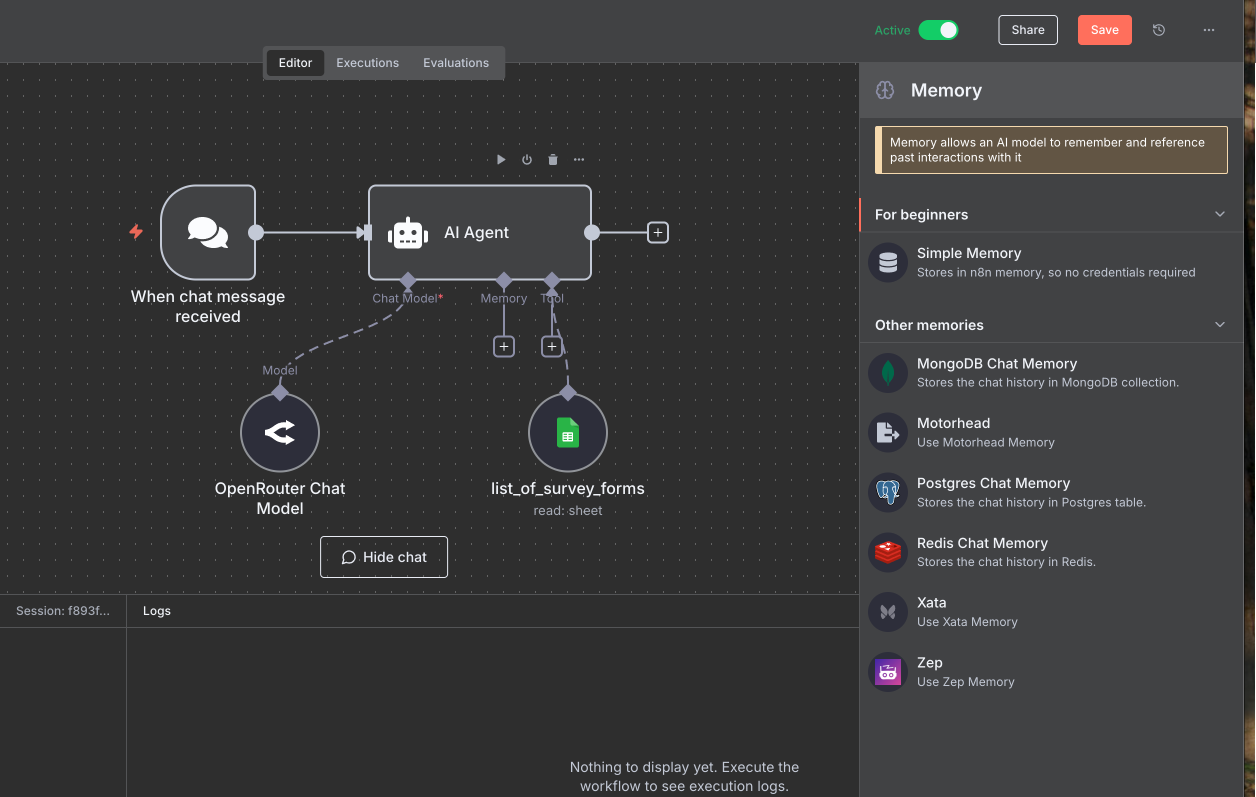
A Tour of n8n's Memory Options
n8n offers a modular approach to memory, allowing you to choose the right storage backend for your needs—a choice that's particularly relevant given your software development background. Let's explore the main categories.
n8n AI Agent Node Memory: Complete Setup Guide for 2026
First, let's get a high-level overview of the different memory types and their primary use cases. This article provides a clear breakdown.
Please read the section 'Top 4 n8n AI Agent Memory Types for 2026'. It covers Simple, Postgres, Redis, and MongoDB memory, explaining the key features and limitations of each. This will give you a good conceptual map before we dive into the setup.
Now that you have the concepts down, let's see how to implement them. The following video is a fantastic, comprehensive guide to setting up each of these memory types. We'll work through it section by section.
Stop picking the wrong memory node in n8n (full set up guide)
This video by Rory Ridgers is a complete walkthrough of n8n's memory options. We will use it as our primary guide for setup and configuration.
1. Simple Memory: For Testing and Prototyping
This is your starting point. It's built-in, requires zero setup, and is perfect for development and testing. Its key characteristic is that it is volatile—the memory is wiped clean every time the workflow is saved or the n8n instance restarts.
Stop picking the wrong memory node in n8n (full set up guide)
Let's see the Simple Buffer Memory in action. It's the quickest way to get started.
Watch the segment from 00:57 to 03:12. The presenter demonstrates how Simple Memory works within a single execution but loses context upon a refresh. This perfectly illustrates its volatile nature.
2. Persistent Memory: For Production Applications
For any real-world application, you need memory that persists across executions and server restarts. This requires an external database. Let's look at the most common options.
Postgres Chat Memory: The Reliable Workhorse
PostgreSQL is a robust, production-grade SQL database. This memory type is excellent for storing long-term conversation history in a structured way that you can also query for analytics. We'll use Supabase, a platform that provides a hosted Postgres database with a generous free tier.
Stop picking the wrong memory node in n8n (full set up guide)
Now for a production-ready setup. Let's see how to connect a Postgres database from Supabase as our agent's memory.
Watch the segment from 12:09 to 16:29. Follow along as the presenter: Creates a Supabase project. Finds the database connection details. Configures the Postgres Chat Memory node in n8n with those credentials. Shows where the chat history is stored in the Supabase table editor.
Redis Chat Memory: The Speed Demon
Redis is an in-memory key-value store, making it incredibly fast. This is the best choice for real-time applications like voice agents, where low latency is critical. The trade-off is that it's typically used for more ephemeral data, not necessarily for permanent, long-term archival. We'll see how to set it up with Upstash.
Stop picking the wrong memory node in n8n (full set up guide)
Next, let's look at a high-speed memory option using Redis.
Watch the segment from 07:28 to 12:09. The presenter guides you through setting up a free Redis instance on Upstash and connecting it to n8n. Notice the emphasis on its speed.
Other Options: Zep and MongoDB
The video also covers Zep (a specialized long-term memory service with advanced features) and MongoDB (a flexible NoSQL option, great if it's already part of your tech stack). The principles are the same: get credentials from the service and plug them into the corresponding n8n memory node.
The presenter provides a great summary of when to use which.
Stop picking the wrong memory node in n8n (full set up guide)
To wrap up our tour, listen to the final recommendations on which memory type to choose for different scenarios.
Watch the summary from 21:04 to 22:26. The key takeaway is to use Simple Memory for testing and Postgres (or Zep for very long-term needs) for production.
Hands-On: Building a Stateful Chatbot
Let's put this into practice. We'll build a simple chatbot and give it a memory.
Part 1: The Forgetful Agent
- Create a new workflow.
- Add a Chat Trigger (
On Chat Message). - Connect an AI Agent node. Inside the agent, connect your OpenAI Chat Model (or another model).
- Activate the workflow and use the Chat UI.
- You:
My favorite color is blue. - Agent:
Okay, I'll remember that.(or similar) - You:
What is my favorite color? - Agent:
I'm sorry, I don't know what your favorite color is.
- You:
The agent fails because each message is a separate, stateless execution.
Part 2: Adding Volatile Memory
Now, let's give it a short-term memory.
Building AI Agents: Chat Trigger, Memory, and System/User Messages Explained [Part 1]
This official n8n video clearly demonstrates adding a basic memory to an agent. Let's watch the relevant clip.
Watch from 14:23 to 17:21. This shows exactly how to add a Window Buffer Memory node to the AI Agent and test the result. Notice that you don't need to configure the Session ID; the Chat Trigger provides it automatically.
Follow the steps in the video:
- In your workflow, add a Memory > Window Buffer Memory node to your AI Agent.
- Leave the
Session IDas "Take from Previous Node Automatically". - Execute the workflow again and repeat the same conversation. This time, the agent will remember your favorite color!
Part 3: Setting Up Persistent Memory
This is the final step: upgrading to a production-ready memory store. Follow the steps from the Rory Ridgers video segment on Postgres Chat Memory (12:09 - 16:29) that you watched earlier.
- Go to Supabase and create a free account and a new project.
- Navigate to your project's Settings > Database to find your connection details (Host, Database name, Port, User, and the password you set).
- In your n8n workflow, replace the
Window Buffer Memorynode with a Postgres Chat Memory node. - Create a new credential, paste in the details from Supabase, and save it.
- Run the chat conversation again. It will work just like before.
- The "Aha!" Moment: Go back to your Supabase project. Navigate to the Table Editor. You will see a new table named
n8n_chat_histories. Click on it, and you'll see your conversation history stored as rows in the database. It is now persistent.
Test your understanding!
You are building a chatbot for multiple users on your website using a webhook trigger. You've correctly set up a Postgres Chat Memory node. However, you notice that all users are sharing the same conversation history. What is the most likely cause of this issue?
Show answer
The most likely cause is that you are not providing a unique Session ID for each user. When using a webhook (unlike the Chat Trigger), you are responsible for generating or sourcing a unique ID from the incoming request (e.g., a user ID from a cookie or authentication token) and passing it to the Session ID field in the memory node. A hardcoded or non-unique Session ID will cause all conversations to be merged.
Managing Sessions in the Real World
The Chat Trigger makes session management easy. But what if your trigger is a webhook, a new email, or a Telegram message? You need to manually define the Session ID. The key is to find a unique identifier in your trigger's data.
The n8n blog post "AI agentic workflows" provides a perfect example for a Telegram bot.
AI agentic workflows: a practical guide for n8n automation
Let's look at a concrete example of setting a custom Session ID. This will show you how to handle state for triggers other than the standard Chat Trigger.
Read only 'Step 4. Window buffer memory to store the conversation history'. Focus on how the Session ID's 'Key' field is set to an expression: chat_with_{{ $('Listen for incoming events').first().json.message.chat.id }}. This creates a unique session for each Telegram chat, which is exactly the pattern you'd use for any multi-user application.
This pattern of constructing a unique ID from the trigger's payload is fundamental to building scalable, multi-user AI applications.
Conclusion
You've now mastered one of the most critical components of building AI agents: memory. You can create agents that not only perform tasks but also engage in meaningful, stateful conversations.
Key Takeaways:
- Stateful vs. Stateless: Memory is what separates a one-off command processor from a conversational agent.
- Volatile vs. Persistent: Use
Window Buffer Memoryfor quick development and testing, but always switch to a persistent store like Postgres, Redis, or MongoDB for production. - The Right Tool for the Job: Choose your memory backend based on your needs: Postgres for reliable, structured storage; Redis for high-speed, low-latency applications.
- Session ID is King: The proper management of unique Session IDs is the cornerstone of any multi-user chat application.
Preview of the Next Lesson:
We've given our agent conversational memory (what we just talked about). But how do we give it knowledge about the world, or about our company's products? In our next lesson, we will explore Retrieval-Augmented Generation (RAG). You'll learn how to connect your agent to a knowledge base (a vector database) so it can answer questions using information from your own documents, effectively giving it a long-term, searchable memory.