
Hello! Welcome back to our module on AI and LLM Integrations.
In our last lesson, you successfully built your first AI-powered workflow, learning how to connect n8n to OpenAI to generate text. You instructed the AI on what to do by giving it a persona and a prompt. We essentially turned n8n into a content creator.
Today, we're going to explore the other side of the coin: using AI for analysis. Instead of generating new content, we'll teach the AI to understand, categorize, and deconstruct existing unstructured text. This is a critical skill for automating real-world processes that deal with messy data like emails, documents, and customer feedback.
By the end of this lesson, you will be able to use AI to classify, summarize, or extract structured data from unstructured text. We'll cover three core AI capabilities:
- Classification: Automatically categorizing text into predefined buckets (e.g., sentiment, support ticket type).
- Summarization: Condensing long-form text into concise summaries.
- Extraction: Pulling specific, structured information (like a JSON object) from a block of text.
An Architectural Choice: Specialized Nodes vs. the AI Agent
In the last lesson, we used the general-purpose AI Agent node. It's incredibly flexible, but for common tasks, n8n provides specialized, high-level nodes that are often easier and more reliable.
- Specialized AI Nodes:
Text Classifier,Sentiment Analysis,Summarization Chain,Information Extractor. These are pre-configured for a single task, with optimized internal prompts. They are your go-to for standard jobs. - The
AI AgentNode: Your "Swiss Army knife". You can prompt it to do anything, but you're responsible for telling it how to do it and how to format the output. This is more powerful for custom or complex multi-step reasoning.
As a developer, you can think of this as using a dedicated library function (e.g., JSON.parse()) versus writing your own parser with regular expressions. The former is easier and more robust for the intended task, while the latter offers more control for unique cases. We will explore both approaches.
1. Classification: Bringing Order to Chaos
Classification is about assigning a label to a piece of text. Is this customer feedback positive or negative? Is this email a sales lead or a support request? AI excels at this.
A Comprehensive Guide to AI Workflow Automation in 2024
First, let's get a formal definition. This n8n blog post, 'A Comprehensive Guide to AI Workflow Automation in 2024', briefly explains the role of classification in AI automation.
Please read just the short section titled 'Classifies data'. It provides a concise definition of what we're about to implement.
n8n provides two key nodes for this: Sentiment Analysis and Text Classifier.
Every AI Node in n8n EXPLAINED | ONLY Guide You Need (Agents, RAG, Parsers & More)
This video provides an excellent overview of n8n's specialized AI nodes. We'll watch the segments on the two main classification nodes.
Please watch the following two segments from the video 'Every AI Node in n8n EXPLAINED': Sentiment Analysis (13:41 - 15:59): See how to analyze text for sentiment (e.g., positive, negative) and get confidence scores. Text Classifier (19:49 - 20:29): Understand how to use this more general node to categorize text into your own custom classes (e.g., 'Sales', 'Support'). Focus on the parameters available in each node and how they simplify the task of classification.
As you saw, these nodes abstract away the prompt engineering. You simply provide the text and the categories, and n8n handles the communication with the LLM.
Example: Classifying Support Emails
Let's look at a practical example. The following article from Codecademy demonstrates building an email support bot that uses an AI node to classify incoming emails as "SIMPLE", "COMPLEX", or "URGENT".
How to Build AI Agents with n8n
This article, 'How to Build AI Agents with n8n', walks through a complete classification workflow.
Read 'Step 2: n8n AI agent classification with Gemini' and 'Step 3: Smart routing with IF conditions in n8n workflows'. Notice how they use a prompt to instruct the AI and then use an IF node to branch the workflow based on the AI's one-word response. This is a fundamental pattern in AI automation.
2. Summarization: Getting the Gist
Summarization is invaluable when dealing with large volumes of text. You can use it to get the essence of an article, a meeting transcript, or a long email thread before deciding how to act on it.
n8n has a dedicated Summarization Chain node for this purpose.
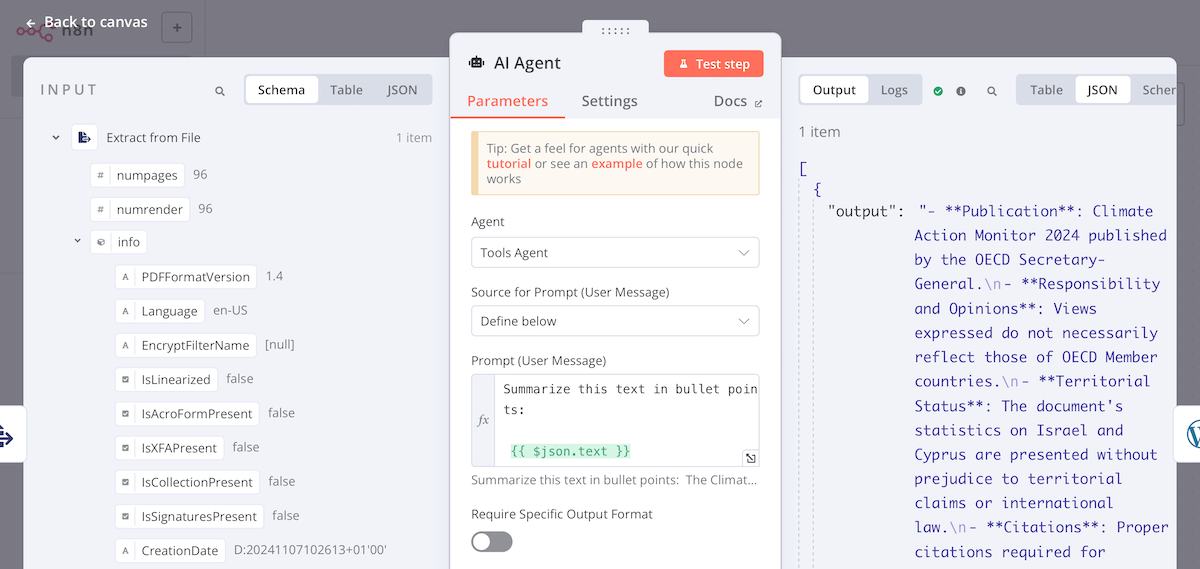
This task seems simple, but there's a key technical challenge: an LLM's context window. Models can only process a limited amount of text at once (a few thousand to a couple hundred thousand tokens). If your document is larger than the context window, you can't just send the whole thing.
The Summarization Chain node solves this with chunking strategies. It automatically breaks the large text into smaller pieces, summarizes each piece, and then combines the summaries. The "MapReduce" method mentioned in the video is a classic computer science pattern, applied here to LLMs.
Every AI Node in n8n EXPLAINED | ONLY Guide You Need (Agents, RAG, Parsers & More)
Let's return to the 'Every AI Node in n8n EXPLAINED' video to see how the Summarization Chain node works.
Watch the segment from 15:59 to 19:49. Pay close attention to: Chunking Strategy: The difference between 'Simple' and 'Advanced' (Recursive Character Text Splitter). Summarization Method: The concepts of 'MapReduce', 'Refine', and 'Stuff', and why 'MapReduce' is often the best choice for large documents.
3. Extraction: Creating Structure from Unstructured Text
This is arguably one of the most powerful uses of LLMs in automation. You can take a blob of text—like an email body or a PDF invoice—and extract a clean, predictable JSON object from it.
As a developer, this is the AI equivalent of creating a robust parser for inconsistent, human-generated text, without writing a single line of regex.
The Simple Way: Information Extractor Node
First, let's look at the specialized node for this task. It's great for simple extractions where you just need to pull out a few fields.
Every AI Node in n8n EXPLAINED | ONLY Guide You Need (Agents, RAG, Parsers & More)
One last time, let's look at 'Every AI Node in n8n EXPLAINED' to see the simplest extraction node.
Watch the segment on the Information Extractor (11:58 - 13:41). Note how you can simply define the attributes you want (e.g., 'address', 'phone number'), and the node handles the rest.
The "Pro" Way: AI Agent with a Structured Output Parser
The Information Extractor is good, but for more complex requirements, you'll want more control. The most robust method is to use the AI Agent node and explicitly tell it to return data in a specific JSON schema. This is done using an Output Parser.
The following video is a masterclass in this technique. It builds a workflow to extract structured data from resumes—a classic real-world problem.
How to Use AI Agents in n8n to Extract Resume Data at Scale
This official n8n video, 'How to Use AI Agents in n8n to Extract Resume Data at Scale', demonstrates the structured extraction pattern perfectly.
Watch from 05:31 to 08:30. This is the most important part of the lesson. Focus on: The System Message that tells the agent its role. Enabling the 'Specific Output Format' toggle. Adding the Structured Output Parser. Defining the desired JSON schema within the parser. This is what guarantees a predictable output for the rest of your workflow.
By defining an output schema, you force the LLM to think in a structured way and provide a response that your workflow can reliably use in subsequent nodes, just like consuming a well-defined API endpoint.
Test your understanding!
You have an AI Agent node that receives unstructured text about a user, like "The user's name is Jane Doe, and her email is jane.doe@example.com. She was born on 1990-05-15.". You need to extract this information into a JSON object. Which n8n node would you add to the AI Agent to enforce a specific JSON output structure like {"name": "...", "email": "...", "date_of_birth": "..."}?
Show answer
You would add the Structured Output Parser node to the Output Parser section of the AI Agent node. Inside this parser, you would define the JSON schema with properties for name, email, and date_of_birth.
Hands-On: Build an Intelligent Email Processor
Let's combine these concepts into a single workflow that processes an incoming customer email.
- Create a new workflow. Start with a Manual trigger.
- Add a
Setnode to simulate an incoming email. Name itSample Email.- Set Mode to
Set Key/Value Pairs. - Add a key named
email_body(Type: String). - For the value, paste this text:
Hi, I'm writing to complain about my recent order #A-12345. The Quantum Sprocket 9000 I received is faulty and shows 'Error 51'. I need a replacement immediately. This is very frustrating. Thanks, Bob.
- Set Mode to
- Add a
Text Classifiernode connected to theSetnode.- Text to Classify: Use an expression to get the email body:
{{ $json.email_body }} - Categories: Add two categories:
Name:Complaint,Description:The user is unhappy, complaining, or expressing frustration.Name:Question,Description:The user is asking a question or requesting information.
- Make sure you have your OpenAI (or other) credential and a model selected.
- Text to Classify: Use an expression to get the email body:
- Add an
IFnode to route based on the classification.- Add a condition:
{{ $last.json.class }}StringEqualsComplaint. - This will create two outputs:
true(for complaints) andfalse(for everything else).
- Add a condition:
- Connect an
AI Agentnode to thetrueoutput. This will be our extractor.- Model: Connect your preferred chat model (e.g., OpenAI Chat Model).
- Prompt (System Message):
You are an expert at extracting key information from customer support emails. Extract the details from the user's message into a structured JSON format. - Prompt (User Message):
{{ $('Sample Email').item.json.email_body }} - Output Parser: Add a
Structured Output Parser. - Schema: Define a schema to extract the important details. Paste this JSON into the schema field:
{
  "type": "object",
  "properties": {
    "order_number": {
      "type": "string",
      "description": "The customer's order number, if mentioned."
    },
    "product_name": {
      "type": "string",
      "description": "The name of the product the customer is writing about."
    },
    "issue_summary": {
      "type": "string",
      "description": "A brief summary of the customer's problem."
    }
  },
  "required": ["product_name", "issue_summary"]
}
- Execute the workflow.
- Execute the
Setnode first, then theText Classifier. It should outputComplaint. - Now execute the
AI Agentnode. Inspect its output. You should see a clean JSON object with the extractedorder_number,product_name, andissue_summary.
- Execute the
You've now built a workflow that can understand the intent of an email and then extract structured data from it, ready to be inserted into a database, sent to a Slack channel, or used to create a support ticket.
Conclusion
Today you've added three powerful AI analysis skills to your n8n toolkit. You've gone beyond simple text generation and learned how to make AI work as an analytical engine within your automations.
Key Takeaways:
- Classification lets you sort unstructured text into meaningful categories using nodes like
Text Classifier. - Summarization allows you to handle large documents by condensing them, using the
Summarization Chainnode which cleverly manages context window limits. - Structured Data Extraction is a game-changer for automation, turning messy text into predictable JSON using either the simple
Information Extractoror the more powerfulAI Agentwith aStructured Output Parser. - Choosing between specialized nodes and the general
AI Agentis a key architectural decision based on the complexity and specificity of your task.
Preview of the Next Lesson:
So far, our AI interactions have been one-shot requests. In the next lesson, "Manage conversation history for stateful, chat-based AI workflows," we'll revisit the concept of Memory that we touched on in the first lesson. You'll learn how to manage and manipulate conversation history to build sophisticated, multi-turn chatbots and agents that remember context over time.