
Hello. In the previous lesson, you made Order protect its state by keeping its line storage private and exposing LineCount plus GetLineAt(). That design was deliberately cautious, but fixed arrays are awkward when a customer adds another item or when the restaurant menu changes.
This lesson replaces those arrays with generic collections. You will use List<T> to hold ordered, changeable sequences of MenuItem and OrderLine objects, and Dictionary<TKey, TValue> to find a menu item by its ID. These are everyday C# tools and frequent junior .NET interview topics.
By the end, your console application will be able to build a menu catalogue, create an order from selected menu IDs, add order lines safely, and print a receipt using foreach.
Why a generic collection?
An array such as OrderLine[] has a fixed length. You can replace an element at an existing position, but you cannot naturally append a fourth line to an array that was created with room for only three.
A List<T> is a dynamically sized, ordered collection. The <T> is a type parameter: it says what kind of value the collection is permitted to hold.
List<MenuItem> menuItems = new();
List<OrderLine> orderLines = new();
These declarations give the compiler useful information:
menuItemscan contain onlyMenuIteminstances.orderLinescan contain onlyOrderLineinstances.- Adding a string, number, or unrelated object is a compile-time error.
var menuItems = new List<MenuItem>();

menuItems.Add(new MenuItem("M-101", "Paneer Wrap", 180m, true));

// This does not compile:
// menuItems.Add("Paneer Wrap");
This is called type safety. It moves a class of mistakes from “a surprising runtime failure” to “a compiler error you fix before running the program.”
Watch this short introduction to the practical difference between arrays and lists.
“C# Lists” by Bro Code introduces the dynamic size of List<T> and the essential operations you will use in the restaurant program.
Watch arrays and lists for the fixed-size array contrast. Then watch creation and indexing to see List<T>, Add, and zero-based indexing. Finish with list changes for Remove and Insert; focus on the fact that the list owns a changing sequence.
Microsoft’s documentation gives the broader reason generic collections are the normal choice over older non-generic collection types.
Generic classes and methods - C#
Read the “Generic collections” portion of Microsoft Learn’s “Generic classes and methods — C#.” It connects the type argument in List<T>, Dictionary<TKey, TValue>, and related types to compiler-enforced safety.
In the “Consuming generic types” section, read the “Generic collections” subsection. Start at the collection overview. Study the List, Dictionary, HashSet, and Queue examples, but keep your immediate attention on why List<T> rejects values of the wrong type.
A list is still an indexable collection, just like an array:
MenuItem firstItem = menuItems[0];
int numberOfItems = menuItems.Count;
The first index is 0, but notice the size property is Count, not an array’s Length.
For most business code, prefer foreach when you want to process every item and do not need the numeric position:
foreach (MenuItem menuItem in menuItems)
{
    Console.WriteLine(
        $"{menuItem.Name}: {menuItem.UnitPrice:C}");
}
The collection types that fit this restaurant
The generic-collection hierarchy can look larger than it needs to be at first. Use it as a map rather than something to memorize today.
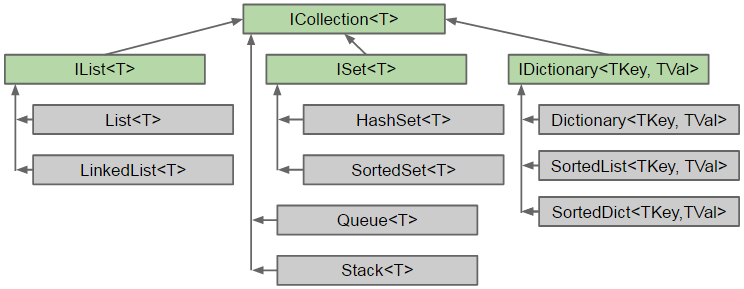
The green boxes in the diagram are interfaces: contracts describing what a collection can do. The grey boxes are concrete classes you can create with new.
For this lesson, choose a collection based on how the restaurant code needs to access data:
| Need | Appropriate collection | Reason |
|---|---|---|
| Display menu items in a chosen sequence | List<MenuItem> | Ordered, supports Add, indexing, and foreach. |
| Keep the ordered lines belonging to one order | List<OrderLine> | A customer can add lines while an order is pending. |
Find one menu item from its ID, such as "M-205" | Dictionary<string, MenuItem> | Looks up a value through a unique key rather than by scanning a list. |
| Store unique values only, such as unique ingredient tags | HashSet<string> | Duplicate values are prevented. Not needed in this implementation. |
| Process jobs in arrival order | Queue<T> | First-in, first-out behaviour. Not needed for order lines. |
Do not choose a Dictionary merely because it is fast, or a List merely because it is familiar. The collection should express the domain need:
- A receipt has an ordered sequence of lines, so a list is natural.
- A menu item ID identifies one particular item, so a dictionary is natural.
Refactor Order to own a List<OrderLine>
In the previous version, Order used a private OrderLine[]. Replace it with a private List<OrderLine>. The important design principle remains unchanged:
Orderowns its internal collection. Other code may ask it to add a valid line, but should not freely replace or mutate the list.
Update Models/Order.cs as follows:
using System.Collections.Generic;

namespace Restaurant.Console.Models;

public class Order
{
    private readonly List<OrderLine> _lines;

    public string OrderNumber { get; }
    public Customer Customer { get; }
    public DateTime CreatedAt { get; }
    public OrderStatus Status { get; private set; }

    public IReadOnlyList<OrderLine> Lines => _lines;

    public Order(
        string orderNumber,
        Customer customer,
        DateTime createdAt,
        IEnumerable<OrderLine> lines)
    {
        if (string.IsNullOrWhiteSpace(orderNumber))
        {
            throw new ArgumentException(
                "Order number is required.",
                nameof(orderNumber));
        }

        if (customer is null)
        {
            throw new ArgumentNullException(nameof(customer));
        }

        if (lines is null)
        {
            throw new ArgumentNullException(nameof(lines));
        }

        _lines = new List<OrderLine>();

        foreach (OrderLine line in lines)
        {
            if (line is null)
            {
                throw new ArgumentException(
                    "Order lines cannot contain null values.",
                    nameof(lines));
            }

            _lines.Add(line);
        }

        if (_lines.Count == 0)
        {
            throw new ArgumentException(
                "An order must contain at least one line.",
                nameof(lines));
        }

        OrderNumber = orderNumber;
        Customer = customer;
        CreatedAt = createdAt;
        Status = OrderStatus.Pending;
    }

    public void AddLine(OrderLine line)
    {
        if (line is null)
        {
            throw new ArgumentNullException(nameof(line));
        }

        if (Status != OrderStatus.Pending)
        {
            throw new InvalidOperationException(
                "Lines can be added only to a pending order.");
        }

        _lines.Add(line);
    }

    public void Confirm()
    {
        if (Status != OrderStatus.Pending)
        {
            throw new InvalidOperationException(
                "Only pending orders can be confirmed.");
        }

        if (_lines.Count == 0)
        {
            throw new InvalidOperationException(
                "An empty order cannot be confirmed.");
        }

        Status = OrderStatus.Confirmed;
    }

    public decimal CalculateSubtotal()
    {
        decimal subtotal = 0m;

        foreach (OrderLine line in _lines)
        {
            subtotal += line.CalculateLineTotal();
        }

        return subtotal;
    }

    public int CalculateItemCount()
    {
        int itemCount = 0;

        foreach (OrderLine line in _lines)
        {
            itemCount += line.Quantity;
        }

        return itemCount;
    }
}
There are several deliberate decisions in this version.
List<OrderLine> is private
The field is private:
private readonly List<OrderLine> _lines;
Only the Order class can call mutating methods such as Add, Remove, or Clear on that particular list. This allows Order.AddLine() to enforce its business rule: confirmed orders cannot receive new lines.
The constructor accepts IEnumerable<OrderLine>
IEnumerable<OrderLine> means “a sequence of OrderLine values that can be traversed with foreach.” A List<OrderLine> fits this contract, as does an array.
Accepting the interface makes the constructor flexible without revealing how Order stores its data internally. The constructor creates a new list and copies each supplied line. Therefore, changing the caller’s original list structure later does not alter the order’s internal list.
IReadOnlyList<OrderLine> exposes reading, not editing
public IReadOnlyList<OrderLine> Lines => _lines;
Other code can use:
order.Lines.Countorder.Lines[0]foreach (OrderLine line in order.Lines)
But this ordinary usage will not compile:
// Not allowed:
// order.Lines.Add(new OrderLine(item, 1));
IReadOnlyList<T> is a useful boundary: the order exposes its lines for a receipt, but changes must happen through named domain methods such as AddLine().
Finally, foreach has simplified both total-calculation methods. It communicates the intent clearly: process every line. A for loop remains useful when you genuinely need the index, especially when removing list elements by index, but it is not necessary for these calculations.
Build a menu list and a menu-ID dictionary
A list is good for displaying the menu. It is less convenient for locating one item by ID: without another structure, the program would need to inspect items one by one.
A dictionary stores pairs:
Dictionary<string, MenuItem>
Here:
stringis the key type, used for a menu ID such as"M-101".MenuItemis the value type, the menu item found through that ID.
Read Microsoft’s explanation of this key-and-value access pattern before adding it to the program.
Read the “Key/value pair collections” section in Microsoft Learn’s “Collections — C# reference.” It demonstrates the lookup pattern that will let the order code find a menu item from a menu ID.
In “Key/value pair collections,” begin with the key-value explanation. Then read the examples that follow, especially the ContainsKey and TryGetValue examples. Focus on why TryGetValue is appropriate when a requested key may not exist.
Now update the object-creation portion of Program.cs. This example uses a list to preserve menu-display order, then creates a dictionary for ID lookup.
using Restaurant.Console.Models;

var paneerWrap = new MenuItem(
    "M-101",
    "Paneer Wrap",
    180m,
    true);

var lemonSoda = new MenuItem(
    "M-205",
    "Lemon Soda",
    60m,
    true);

var chickenBiryani = new MenuItem(
    "M-310",
    "Chicken Biryani",
    250m,
    false);

var menuItems = new List<MenuItem>
{
    paneerWrap,
    lemonSoda,
    chickenBiryani
};

var menuById = new Dictionary<string, MenuItem>();

foreach (MenuItem menuItem in menuItems)
{
    menuById.Add(menuItem.MenuItemId, menuItem);
}

Console.WriteLine("MENU");

foreach (MenuItem menuItem in menuItems)
{
    Console.WriteLine(
        $"{menuItem.MenuItemId}: {menuItem.Name} ({menuItem.UnitPrice:C})");
}

var customer = new Customer("C-001", "Aarav Patel");

var initialLines = new List<OrderLine>
{
    new OrderLine(paneerWrap, 2)
};

var order = new Order(
    "ORD-2025-001",
    customer,
    DateTime.Now,
    initialLines);

const string requestedMenuItemId = "M-205";

if (menuById.TryGetValue(
    requestedMenuItemId,
    out MenuItem? selectedItem))
{
    order.AddLine(new OrderLine(selectedItem, 1));
}
else
{
    Console.WriteLine(
        $"Menu item '{requestedMenuItemId}' was not found.");

    return;
}

order.Confirm();

Console.WriteLine();
Console.WriteLine($"Order:    {order.OrderNumber}");
Console.WriteLine($"Status:   {order.Status}");
Console.WriteLine($"Customer: {order.Customer.FullName}");
Console.WriteLine();

foreach (OrderLine line in order.Lines)
{
    decimal lineTotal = line.CalculateLineTotal();

    Console.WriteLine(
        $"{line.Item.Name,-16} {line.Quantity,2} x " +
        $"{line.Item.UnitPrice,8:C} = {lineTotal,8:C}");
}

Console.WriteLine();
Console.WriteLine($"Items:    {order.CalculateItemCount()}");
Console.WriteLine($"Subtotal: {order.CalculateSubtotal():C}");
The expected receipt contains two lines:
Paneer Wrap        2 x  ₹180.00 =  ₹360.00
Lemon Soda         1 x   ₹60.00 =   ₹60.00

Items:    3
Subtotal: ₹420.00
The exact currency symbol and date formatting depend on your computer’s regional settings.
Dictionary lookup: Add, indexers, and TryGetValue
The code above uses:
menuById.Add(menuItem.MenuItemId, menuItem);
Add requires a new key. If two menu items have the same ID, it throws an exception. That is helpful here because duplicate menu IDs are a data error.
A dictionary also supports an indexer:
MenuItem item = menuById["M-205"];
This is appropriate only when a missing key is clearly a programming error, because it throws KeyNotFoundException if "M-205" is absent.
For a menu selection that could come from a user, TryGetValue is safer:
if (menuById.TryGetValue(
    requestedMenuItemId,
    out MenuItem? selectedItem))
{
    order.AddLine(new OrderLine(selectedItem, 1));
}
else
{
    Console.WriteLine("That menu item does not exist.");
}
TryGetValue returns:
trueand assignsselectedItemwhen the ID exists.falsewhen it does not.
This pattern avoids treating an expected “not found” result as an exception. Later, when this becomes an ASP.NET Core API, that same distinction will matter: a missing menu item should become a clear client response, not an unhandled server failure.
Verify the collection behaviour
Run the application:
dotnet run --project src/Restaurant.Console/Restaurant.Console.csproj
Then make these temporary changes one at a time and observe the result:
| Change | Expected behaviour |
|---|---|
Change requestedMenuItemId to "M-999" | The program reports that the item was not found and ends without confirming the order. |
Call order.AddLine(new OrderLine(lemonSoda, 1)); after order.Confirm() | InvalidOperationException, because confirmed orders cannot change. |
Add another MenuItem with ID "M-101" to menuItems before constructing the dictionary | menuById.Add(...) throws because dictionary keys must be unique. |
Attempt order.Lines.Add(new OrderLine(lemonSoda, 1)); | Compile-time error because Lines is an IReadOnlyList<OrderLine>. |
When it works, preserve the change in Git:
git switch main
git pull --ff-only
git switch -c feature/generic-order-collections
git add src/Restaurant.Console
git commit -m "feat: use generic collections for menu and orders"
git push -u origin feature/generic-order-collections
In the commit or pull request description, state that List<MenuItem> preserves menu order, Dictionary<string, MenuItem> supports menu-ID lookup, and Order owns a private List<OrderLine> while exposing read-only access.
Summary
You have replaced fixed arrays with collection types that better match restaurant behaviour:
List<T>holds an ordered sequence that can grow or shrink while the program runs.- The type argument, such as
MenuIteminList<MenuItem>, gives compile-time type safety. foreachis a clear way to process every menu item or order line.Dictionary<TKey, TValue>associates a unique key with a value;Dictionary<string, MenuItem>is well suited to menu-ID lookup.TryGetValuehandles an unknown menu ID without relying on an exception.Orderstill protects its state by keeping its mutable list private and exposing order changes throughAddLine().
Next, you will query these in-memory generic collections with LINQ: filtering vegetarian menu items, selecting receipt-friendly data, ordering results, and calculating totals through aggregation.
Can't find a good explanation? Sign up and we'll make it for you
Sign up