
Hello again. Your restaurant console app already has the two ingredients LINQ needs: typed in-memory collections such as List<MenuItem> and IReadOnlyList<OrderLine>, plus domain objects with meaningful properties such as IsAvailable, UnitPrice, and Quantity.
In the last lesson, you chose List<T> when order and growth matter, and Dictionary<TKey, TValue> when menu-ID lookup matters. LINQ now gives you a readable way to ask questions of those collections without manually writing a loop for every filter, sort, or report.
By the end of this lesson, you will be able to filter the menu, project domain objects into display-friendly data, order results, and calculate order summaries with LINQ. These are core skills for junior .NET interviews and will reappear when querying EF Core data later in the course.
LINQ: describe the result you want
LINQ means Language Integrated Query. It lets C# query a data source such as a List<MenuItem> using ordinary C# expressions, rather than requiring you to write the looping and collection-building steps yourself every time.
A LINQ query generally has four conceptual jobs:
- Filter data: keep only items that match a condition.
- Order data: arrange the matching items.
- Project data: create the result shape needed by a screen, report, or API response.
- Aggregate data: calculate one summary value, such as a count or subtotal.
LINQ does not replace your domain model. For example, Order.CalculateSubtotal() remains a good domain method because the order owns its own business calculation. LINQ is especially useful when you are preparing a particular view of existing data: a menu screen, receipt report, dashboard card, or API response.
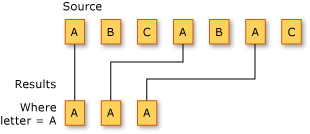
Study Microsoft’s overview once before coding. It introduces the vocabulary used in interviews and makes the important distinction between a query definition and running that query.
LINQ queries in C# - C# | Microsoft Learn
Read “LINQ queries in C#” from Microsoft Learn. It establishes the core model for querying in-memory collections and explains the four operators you will use immediately.
In the “LINQ query expression syntax” section, read the LINQ model and the example that follows it. Focus on the roles of the source, query, and foreach enumeration. Then, in “Common LINQ methods,” read the projection explanation. Finally, in “Run a query,” read the deferred-execution introduction. Keep the idea of a query as a recipe in mind; you will test it later in this lesson.
For a visual code walkthrough, use this short portion of Patrick God’s LINQ tutorial. It focuses on the exact operations needed for the restaurant program.
LINQ Tutorial for Beginners 🚀 Full Course
Watch “LINQ Tutorial for Beginners” by Patrick God. The selected segments demonstrate projection, filtering, ordering, and numeric aggregation on a list of objects.
Watch Select to see an object collection projected into titles. Continue with Where and Any, concentrating on how the lambda describes a condition for each item. Then watch ordering for ascending and descending sorts, followed by aggregation for Average, Max, and related one-value results. The restaurant examples below use Sum and Count on the same principle.
Method syntax and lambda expressions
LINQ has two equivalent styles:
- Query syntax, using keywords such as
from,where,orderby, andselect. - Method syntax, using calls such as
Where(...),OrderBy(...), andSelect(...).
You should recognize both. In modern ASP.NET Core and EF Core code, method syntax is extremely common, so it will be the main style in this course.
Method syntax relies on a lambda expression. For example:
item => item.IsAvailable
Read it aloud as:
For each
item, return whether that item is available.
The value to the left of => is the input variable. The expression on the right is the result that LINQ uses. With Where, that result must be a bool:
var availableItems = menuItems
    .Where(item => item.IsAvailable);
menuItems is the source. Where examines each MenuItem; only items for which IsAvailable is true belong in availableItems.
For a more realistic menu query, filter on two conditions:
var affordableAvailableItems = menuItems
    .Where(item => item.IsAvailable && item.UnitPrice <= 200m);
The && means both conditions must be true. An unavailable item is excluded even if its price is low; an available item above 200m is also excluded.
You can still use the objects themselves after filtering:
foreach (MenuItem item in affordableAvailableItems)
{
    Console.WriteLine($"{item.Name}: {item.UnitPrice:C}");
}
At this point, each result is still a MenuItem. The query only narrowed the sequence; it did not change the shape of each result.
LINQ does not modify the original list
A common misconception is that Where removes values from menuItems. It does not. menuItems remains unchanged, and the LINQ query describes a separate sequence of matching values.
Similarly, OrderBy does not reorder the original List<MenuItem>. It produces a sequence that yields the items in the requested order. This distinction is useful in business software: one part of an application can show a price-sorted menu without silently changing the menu catalogue for every other part.
Build a menu query with filtering, ordering, and projection
Add using System.Linq; at the top of Program.cs if your project does not have implicit usings enabled. The default .NET 8 console template normally enables them, but being explicit is completely valid.
Use the menu created in the previous lesson:
var menuItems = new List<MenuItem>
{
    new MenuItem("M-101", "Paneer Wrap", 180m, true),
    new MenuItem("M-205", "Lemon Soda", 60m, true),
    new MenuItem("M-310", "Chicken Biryani", 250m, false)
};
Now create a customer-facing list of available menu items under 200m:
var menuCards = menuItems
    .Where(item => item.IsAvailable && item.UnitPrice <= 200m)
    .OrderBy(item => item.UnitPrice)
    .ThenBy(item => item.Name)
    .Select(item => new
    {
        item.MenuItemId,
        item.Name,
        item.UnitPrice
    });
Read this code from top to bottom:
Wherekeeps available items priced at200mor less.OrderBysorts the kept items by ascending price.ThenByprovides a second ordering rule when two items have the same price.Selectcreates a new result shape containing only the values the menu display needs.
The result of Select is an anonymous type. It has properties inferred from the projection:
new
{
    item.MenuItemId,
    item.Name,
    item.UnitPrice
}
This is appropriate for a small, local console-display result. Later, in the API module, you will use named DTO classes for public API responses, because those types must be shared, documented, and maintained across application boundaries.
Print the query result:
Console.WriteLine("AVAILABLE MENU");

foreach (var card in menuCards)
{
    Console.WriteLine(
        $"{card.MenuItemId}: {card.Name,-16} {card.UnitPrice,8:C}");
}
With the sample data, the output is:
AVAILABLE MENU
M-205: Lemon Soda        ₹60.00
M-101: Paneer Wrap      ₹180.00
The unavailable biryani does not appear, and the matching items are sorted by price.
Why project instead of returning the whole object?
A projection answers: what data does this particular consumer need?
Suppose a menu card needs only ID, name, and price. Returning the entire MenuItem object may expose properties that the display does not use. Projection makes the intended output clear and reduces coupling to the source object.
You may also project directly to a string for a simple console report:
var menuLabels = menuItems
    .Where(item => item.IsAvailable)
    .OrderBy(item => item.Name)
    .Select(item => $"{item.Name} ({item.UnitPrice:C})");
Now menuLabels is a sequence of string values, not MenuItem values:
foreach (string label in menuLabels)
{
    Console.WriteLine(label);
}
Use a string projection when formatted text is genuinely the final result. Use an anonymous object when later code still needs separate values such as name and price.
Query syntax: recognize it, but prioritize readability
The menuCards query can also be written in query syntax:
var menuCardsQuerySyntax =
    from item in menuItems
    where item.IsAvailable && item.UnitPrice <= 200m
    orderby item.UnitPrice, item.Name
    select new
    {
        item.MenuItemId,
        item.Name,
        item.UnitPrice
    };
This has the same meaning as the method-syntax version. The mapping is straightforward:
| Query syntax | Method syntax | Purpose |
|---|---|---|
where | Where(...) | Filter a sequence |
orderby | OrderBy(...) | Sort a sequence |
select | Select(...) | Shape each result |
from | source before the first method call | Name the source and item variable |
In an interview, it is enough to explain that both forms are LINQ and can often express the same query. Use the form that your team uses consistently and that makes the code easiest to understand. Method syntax is required for many operations that return one value, including Sum() and predicate-based Count().
Aggregate an order into useful summaries
Filtering, ordering, and projection return sequences: potentially many values. An aggregation reads a sequence and produces one result.
For order reporting, these are useful distinctions:
int lineCount = order.Lines.Count;

int totalItemCount = order.Lines
    .Sum(line => line.Quantity);

decimal subtotal = order.Lines
    .Sum(line => line.CalculateLineTotal());
lineCount and totalItemCount are not necessarily the same:
- Line count is the number of distinct receipt rows.
- Total item count is the sum of quantities across those rows.
For example, an order with two Paneer Wraps and one Lemon Soda has two lines but three items.
The Count property above belongs to IReadOnlyList<OrderLine> and needs no LINQ. LINQ’s Count() method becomes valuable when you need a condition:
int multiQuantityLineCount = order.Lines
    .Count(line => line.Quantity > 1);
That calculates the number of lines where the customer ordered more than one item.
You can combine querying and aggregation in a focused summary:
decimal availableMenuValue = menuItems
    .Where(item => item.IsAvailable)
    .Sum(item => item.UnitPrice);
The source starts as MenuItem objects, Where keeps only available items, and Sum produces one decimal.
For an existing order, keep the domain method as the source of truth:
decimal domainSubtotal = order.CalculateSubtotal();

decimal reportSubtotal = order.Lines
    .Sum(line => line.CalculateLineTotal());
With the current model, these should be equal. In production code, you would not usually maintain two competing implementations of an important business rule. Here, the LINQ version demonstrates aggregation; the Order method remains the appropriate place to own order-subtotal behavior.
A receipt-friendly LINQ projection
You can use the previous lesson’s OrderLine objects to create a sorted receipt display without changing Order.Lines.
var receiptLines = order.Lines
    .OrderBy(line => line.Item.Name)
    .Select(line => new
    {
        ItemName = line.Item.Name,
        line.Quantity,
        UnitPrice = line.Item.UnitPrice,
        LineTotal = line.CalculateLineTotal()
    });

Console.WriteLine("RECEIPT");

foreach (var line in receiptLines)
{
    Console.WriteLine(
        $"{line.ItemName,-16} {line.Quantity,2} x " +
        $"{line.UnitPrice,8:C} = {line.LineTotal,8:C}");
}

int itemCount = order.Lines.Sum(line => line.Quantity);
decimal subtotal = order.Lines.Sum(line => line.CalculateLineTotal());

Console.WriteLine();
Console.WriteLine($"Items:    {itemCount}");
Console.WriteLine($"Subtotal: {subtotal:C}");
This query is useful because it separates responsibilities:
OrderLinestill ownsCalculateLineTotal().- LINQ chooses receipt order and produces receipt-oriented fields.
- The
foreachloop only displays the prepared result.
That separation will matter later when an ASP.NET Core endpoint needs to return a response DTO rather than directly exposing internal domain objects.
Deferred execution: a query is a recipe
Many LINQ operations that return sequences use deferred execution. Defining the query does not necessarily read the collection immediately. Enumeration, often through foreach, is one point at which it runs.
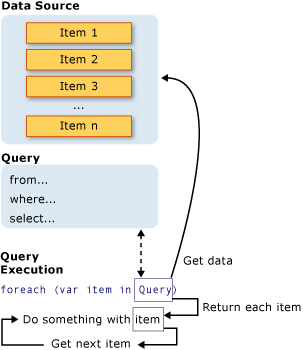
Consider this code:
var availableItems = menuItems
    .Where(item => item.IsAvailable);

menuItems.Add(
    new MenuItem("M-410", "Masala Chai", 40m, true));

foreach (MenuItem item in availableItems)
{
    Console.WriteLine(item.Name);
}
Because availableItems has not been enumerated before Masala Chai is added, the later foreach includes it.
This is useful, but it means you should know whether you hold:
- a deferred query, which can reflect later source changes; or
- a materialized snapshot, which is fixed at the time it is created.
Use ToList() when you specifically need the second behavior:
List<MenuItem> menuSnapshot = menuItems
    .Where(item => item.IsAvailable)
    .OrderBy(item => item.Name)
    .ToList();
ToList() executes the preceding query immediately and stores the result in a new List<MenuItem>.
Do not change a List<T> while it is actively being enumerated in foreach; that causes an InvalidOperationException. Adding an item before a deferred query is enumerated, as in the earlier example, is different.
Aggregation methods such as Sum(), Count(), Min(), and Max() also execute immediately because they must inspect the relevant elements to return one value.
Consolidate the change
Run the console application and verify that:
- the displayed menu includes only available items that meet your chosen price condition;
- menu display ordering changes when you change
OrderBytoOrderByDescending; - receipt lines are sorted by item name without altering the original
order.Linesorder; itemCountreflects quantities, whilelineCountreflects receipt rows;- adding an available item before enumerating a deferred query changes that query’s output;
- adding
.ToList()creates a fixed result list.
When the queries work, preserve the work in Git:
git switch main
git pull --ff-only
git switch -c feature/linq-menu-and-order-reports
git add src/Restaurant.Console
git commit -m "feat: query menu and order data with LINQ"
git push -u origin feature/linq-menu-and-order-reports
A useful commit description would mention filtering available menu items, projecting display data, sorting receipt lines, and summing order quantities and totals.
Summary
LINQ lets you query List<T> and other IEnumerable<T> sequences declaratively:
Wherefilters items according to a Boolean condition.OrderBy,OrderByDescending, andThenBycontrol result order without mutating the original list.Selectprojects each source object into the data shape a caller needs.SumandCountaggregate a sequence into one summary value.- Queries that return sequences are often deferred;
foreach,ToList(), and aggregations cause data to be read. ToList()is appropriate when you explicitly need a stable snapshot.
Next, you will handle invalid input and domain failures with C# exceptions, including deciding which situations should be prevented by validation and which should signal an invalid operation.
Can't find a good explanation? Sign up and we'll make it for you
Sign up