
Hello again. Last lesson replaced parallel arrays with MenuItem, Customer, OrderLine, and Order classes. That made the restaurant data easier to understand, but the model still trusts every caller: it can create an order line with quantity 0, a menu item with a negative price, or an order whose state is changed without following a restaurant rule.
In this lesson, you will make the model protect itself. You will use encapsulation to keep important data changes inside the class that owns the rule, and an enum to represent the limited set of order statuses. This is a core habit in production ASP.NET Core work: controllers and services may request a change, but the domain model decides whether that change is valid.
A valid object is more valuable than a convenient object
An invariant is a rule that must always be true for an object that exists in a valid state.
For this restaurant model, useful invariants include:
- A menu item has a non-empty ID and name.
- A menu item price cannot be negative.
- An order line quantity must be greater than zero.
- An order contains at least one line.
- An order always has one known status.
- Other code cannot directly replace an order’s internal lines or assign any status it wants.
The key idea is not simply “make fields private.” It is this:
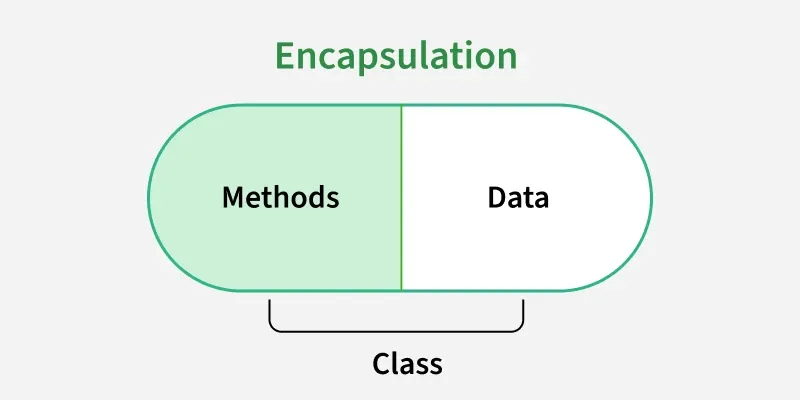
Put each business rule beside the data it protects, then expose operations that preserve that rule.
A public property such as this is convenient but unsafe for important business values:
public int Quantity { get; set; }
Any code can write:
line.Quantity = -4;
A property with a private set changes the situation:
public int Quantity { get; private set; }
Now code outside the class can read the quantity, but only code inside OrderLine can change it. The class can therefore check the new value before it stores it.
Using Properties (C# Programming Guide)
Read Microsoft Learn’s “Using Properties” to connect C# property syntax with the reason for encapsulation: controlled access and validation.
In the opening explanation of Using Properties (C# Programming Guide), read the property overview. Then continue to the Date example immediately below it, where the Month property accepts only values from 1 through 12. Focus on the private backing field, the incoming value in the set accessor, and why the validation belongs in the class rather than at every call site.
In modern C# domain models, constructors and purpose-named methods are often clearer than public setters. Compare these two APIs:
// Weak API: callers decide what any value means.
order.Status = OrderStatus.Confirmed;
// Stronger API: the class owns the meaning of confirmation.
order.Confirm();
The second form lets Order verify that confirmation is allowed before changing its state.
Use an enum for a mutually exclusive order status
An enum is a custom value type containing a fixed set of named constants. It is a good fit when one value must be selected from a known, mutually exclusive set.
An order cannot be both Preparing and Completed at the same time, so an OrderStatus enum is appropriate:
namespace Restaurant.Console.Models;

public enum OrderStatus
{
    Pending = 0,
    Confirmed = 1,
    Preparing = 2,
    Completed = 3,
    Cancelled = 4
}
The explicit numeric values are not required here, but they make two things clear:
- The values are stored internally as numbers.
Pending = 0is a deliberate, valid default status.
Do not use a [Flags] enum for order status. Flags are for combinations such as “available for delivery” and “vegetarian.” Order status represents one stage of an order, not a combination of stages.
C# Enum [Step By Step Tutorial to use C# Enum] - How to use an Enum in C#
Watch “C# Enum [Step By Step Tutorial to use C# Enum]” by Coding Droplets for a compact introduction to enum declarations and their use as class properties.
Watch enum basics to see an enum declared and named values selected. Then watch enums in classes, which demonstrates the important idea of using an enum as a property on a domain object rather than storing a loose text value.
With an enum, this will not compile:
// Not allowed:
// order.Status = "Ready soon";
That is already safer than a string. However, an enum is not automatically complete validation. C# allows an integer cast that may produce a value with no declared member:
OrderStatus suspiciousStatus = (OrderStatus)99;
Console.WriteLine(suspiciousStatus); // 99
When a value comes from an external source—later, this might be an HTTP request or a database—you can verify it:
bool isKnownStatus = Enum.IsDefined(
    typeof(OrderStatus),
    suspiciousStatus);
Enumeration types - C# reference | Microsoft Learn
Read the relevant parts of Microsoft Learn’s “Enumeration types” reference to understand both what enums guarantee and the numeric-value edge case you must still recognize in backend code.
Start at the beginning of Enumeration types (C# reference) and read through the first definition and examples, using the enum basics as a reference point near the end of that opening discussion. Then read the full Implicit conversions from zero subsection, including its code sample. Pay special attention to why undefined values exist and the recommendation to include a zero-valued member and use Enum.IsDefined when converting numeric input.
For the console application you are building now, the constructor will always assign OrderStatus.Pending, and Status will have a private setter. That means normal application code has no way to create an order with status 99.
Make the restaurant classes enforce their own rules
Create a branch for this improvement:
git switch main
git pull --ff-only
git switch -c feature/order-encapsulation
In src/Restaurant.Console/Models, add OrderStatus.cs with the enum shown above. Then replace the existing model classes with the following versions.
Models/MenuItem.cs
A menu item must have usable text values and a non-negative price. Its identity and price remain immutable after creation.
namespace Restaurant.Console.Models;

public class MenuItem
{
    public string MenuItemId { get; }
    public string Name { get; }
    public decimal UnitPrice { get; }
    public bool IsVegetarian { get; }

    public MenuItem(
        string menuItemId,
        string name,
        decimal unitPrice,
        bool isVegetarian)
    {
        if (string.IsNullOrWhiteSpace(menuItemId))
        {
            throw new ArgumentException(
                "Menu item ID is required.",
                nameof(menuItemId));
        }

        if (string.IsNullOrWhiteSpace(name))
        {
            throw new ArgumentException(
                "Menu item name is required.",
                nameof(name));
        }

        if (unitPrice < 0m)
        {
            throw new ArgumentOutOfRangeException(
                nameof(unitPrice),
                "Unit price cannot be negative.");
        }

        MenuItemId = menuItemId;
        Name = name;
        UnitPrice = unitPrice;
        IsVegetarian = isVegetarian;
    }
}
A price of 0m is allowed here because a restaurant could intentionally offer a free item or promotion. A negative price has no valid meaning in this model, so construction stops immediately.
Models/Customer.cs
The customer constructor validates required identity information. DeliveryAddress remains optional, but an address cannot be whitespace only.
namespace Restaurant.Console.Models;

public class Customer
{
    public string CustomerId { get; }
    public string FullName { get; }
    public string? DeliveryAddress { get; private set; }

    public Customer(string customerId, string fullName)
    {
        if (string.IsNullOrWhiteSpace(customerId))
        {
            throw new ArgumentException(
                "Customer ID is required.",
                nameof(customerId));
        }

        if (string.IsNullOrWhiteSpace(fullName))
        {
            throw new ArgumentException(
                "Customer name is required.",
                nameof(fullName));
        }

        CustomerId = customerId;
        FullName = fullName;
    }

    public void UpdateDeliveryAddress(string? deliveryAddress)
    {
        if (deliveryAddress is not null &&
            string.IsNullOrWhiteSpace(deliveryAddress))
        {
            throw new ArgumentException(
                "Delivery address cannot be empty.",
                nameof(deliveryAddress));
        }

        DeliveryAddress = deliveryAddress;
    }
}
Notice the distinction:
nullmeans “no delivery address has been provided.”" "means an address was provided but contains no useful information.
Models/OrderLine.cs
An order line cannot exist without a menu item, and its quantity must be at least one.
namespace Restaurant.Console.Models;

public class OrderLine
{
    public MenuItem Item { get; }
    public int Quantity { get; }

    public OrderLine(MenuItem item, int quantity)
    {
        if (item is null)
        {
            throw new ArgumentNullException(nameof(item));
        }

        if (quantity <= 0)
        {
            throw new ArgumentOutOfRangeException(
                nameof(quantity),
                "Quantity must be greater than zero.");
        }

        Item = item;
        Quantity = quantity;
    }

    public decimal CalculateLineTotal()
    {
        return Item.UnitPrice * Quantity;
    }
}
Quantity is now get-only. The simplest rule is also the safest one: an order line cannot have its menu item or quantity changed after it has been created.
Models/Order.cs
This version makes two important encapsulation improvements:
- It stores its array in a private field rather than exposing the original array.
- It controls its status through the
Confirm()method.
namespace Restaurant.Console.Models;

public class Order
{
    private readonly OrderLine[] _lines;

    public string OrderNumber { get; }
    public Customer Customer { get; }
    public DateTime CreatedAt { get; }
    public OrderStatus Status { get; private set; }

    public int LineCount => _lines.Length;

    public Order(
        string orderNumber,
        Customer customer,
        DateTime createdAt,
        OrderLine[] lines)
    {
        if (string.IsNullOrWhiteSpace(orderNumber))
        {
            throw new ArgumentException(
                "Order number is required.",
                nameof(orderNumber));
        }

        if (customer is null)
        {
            throw new ArgumentNullException(nameof(customer));
        }

        if (lines is null)
        {
            throw new ArgumentNullException(nameof(lines));
        }

        if (lines.Length == 0)
        {
            throw new ArgumentException(
                "An order must contain at least one line.",
                nameof(lines));
        }

        for (int index = 0; index < lines.Length; index++)
        {
            if (lines[index] is null)
            {
                throw new ArgumentException(
                    "Order lines cannot contain null values.",
                    nameof(lines));
            }
        }

        OrderNumber = orderNumber;
        Customer = customer;
        CreatedAt = createdAt;
        Status = OrderStatus.Pending;

        _lines = (OrderLine[])lines.Clone();
    }

    public OrderLine GetLineAt(int index)
    {
        return _lines[index];
    }

    public void Confirm()
    {
        if (Status != OrderStatus.Pending)
        {
            throw new InvalidOperationException(
                "Only pending orders can be confirmed.");
        }

        Status = OrderStatus.Confirmed;
    }

    public decimal CalculateSubtotal()
    {
        decimal subtotal = 0m;

        for (int index = 0; index < _lines.Length; index++)
        {
            subtotal += _lines[index].CalculateLineTotal();
        }

        return subtotal;
    }

    public int CalculateItemCount()
    {
        int itemCount = 0;

        for (int index = 0; index < _lines.Length; index++)
        {
            itemCount += _lines[index].Quantity;
        }

        return itemCount;
    }
}
The clone in the constructor is subtle but useful. Without it, this code outside the class could alter the order after creation:
OrderLine[] suppliedLines =
{
    new OrderLine(paneerWrap, 2)
};

var order = new Order(
    "ORD-2025-001",
    customer,
    DateTime.Now,
    suppliedLines);

// Unsafe if Order kept the original array:
// suppliedLines[0] = new OrderLine(lemonSoda, 99);
By cloning the array, Order receives its own copy. The public API exposes LineCount and GetLineAt() for now, while the internal representation stays private. In the next lesson, you will replace this array-focused design with a more natural generic collection design.
Update the console program and verify the rules
Your existing object-creation code still works because the constructors accept the same valid values. Make these three changes in Program.cs.
First, after creating the order, confirm it:
var order = new Order(
    "ORD-2025-001",
    customer,
    DateTime.Now,
    lines);

order.Confirm();
Second, show the enum value in the receipt header:
Console.WriteLine($"Order:    {order.OrderNumber}");
Console.WriteLine($"Status:   {order.Status}");
Console.WriteLine($"Customer: {order.Customer.FullName}");
Finally, replace the loop that uses order.Lines with this version:
for (int index = 0; index < order.LineCount; index++)
{
    OrderLine line = order.GetLineAt(index);
    decimal lineTotal = line.CalculateLineTotal();

    Console.WriteLine(
        $"{line.Item.Name,-16} {line.Quantity,2} x {line.Item.UnitPrice,8:C} = {lineTotal,8:C}");
}
Run the program:
dotnet run --project src/Restaurant.Console/Restaurant.Console.csproj
Your receipt should still have the same totals as before, while now showing:
Status: Confirmed
Perform these quick manual checks one at a time, then undo the temporary change:
| Temporary change | Expected result |
|---|---|
new OrderLine(paneerWrap, 0) | ArgumentOutOfRangeException |
new MenuItem("M-101", "Paneer Wrap", -10m, true) | ArgumentOutOfRangeException |
Call order.Confirm() twice | InvalidOperationException |
Try order.Status = OrderStatus.Cancelled; | Compile-time error because the setter is private |
The exception messages are intentionally clear. At this stage, the console program stops when invalid domain data is created. A later lesson will focus on handling invalid input properly; for now, the priority is ensuring invalid objects cannot silently continue through the program.
When the receipt works, commit and push the feature:
git status
git add src/Restaurant.Console
git commit -m "feat: enforce order state with encapsulation"
git push -u origin feature/order-encapsulation
In the pull request description, mention the invariants you added: required IDs and names, non-negative prices, positive quantities, non-empty orders, private order-line storage, and controlled order confirmation.
Summary
You have strengthened the restaurant model from a collection of convenient objects into a model that protects meaningful rules:
- Encapsulation keeps data and the operations that protect it inside the same class.
- Constructors establish valid initial state.
private setand get-only properties prevent arbitrary external mutation.OrderStatusis an enum that represents one valid named order state at a time.Order.Confirm()expresses an allowed business action more clearly than a public status setter.- Enums reject arbitrary text at compile time, but numeric casts can still produce undefined values, so external numeric input may need
Enum.IsDefined. - Cloning the incoming array prevents outside code from replacing an order’s internal line references.
Next, you will use generic collections such as List<OrderLine> to store and process menu items and order lines more naturally than fixed arrays.
Can't find a good explanation? Sign up and we'll make it for you
Sign up