
Hello again. In the previous lesson, you used LINQ to prepare menu and receipt data without changing the underlying collections. That code assumed valid inputs and valid domain objects. Real applications cannot make that assumption: a customer can enter text where a quantity is expected, a menu ID may not exist, and a previously available item may become unavailable before it is added to an order.
This lesson separates those cases clearly. You will handle ordinary invalid console input with validation and retries, while using C# exceptions to protect the restaurant domain when a method cannot safely complete its contract. This distinction is important in junior .NET work: it keeps the console app reliable now and provides the same foundation that later becomes API validation and error responses.
Two different problems: input mistakes and domain failures
An exception is an object representing a failure during program execution. When code throws one, normal execution of the current method stops. The runtime looks for a compatible catch block higher in the call stack; if none exists, the application ends with an unhandled exception.
The crucial design question is not “Can I use try-catch here?” It is:
Is this an expected condition that my current layer can prevent or correct, or is it a failure that means this operation cannot continue safely?
For the restaurant console application, use this guideline:
| Situation | Preferred response | Why |
|---|---|---|
Customer enters "two" for quantity | Validate with int.TryParse and ask again | Invalid typing is expected in an interactive UI. |
Customer enters 0 or -3 | Validate and ask again | The UI can explain the rule and request a correction. |
| Customer enters an unknown menu ID | Check with TryGetValue and show a message | A missing selection is an expected result, not a program crash. |
Code calls Order.AddItem(item, 0) | Throw ArgumentOutOfRangeException | The caller violated the method’s contract. |
| Code attempts to add an unavailable item | Throw InvalidOperationException | The operation is not allowed in the current domain state. |
| A database, file, or network operation fails later | Handle or propagate an exception at an appropriate boundary | The current operation may be impossible to complete. |
A domain object such as Order cannot prompt a user to try again. It should protect its own valid state and clearly signal when a caller asks it to do something invalid.
Study Microsoft’s guidance before implementing the policy. Focus on why exceptions indicate a method cannot fulfill its defined purpose, and why they should not drive ordinary program flow.
Creating and Throwing Exceptions - C# | Microsoft Learn
Read Microsoft Learn’s “Create and throw exceptions.” It establishes the professional distinction between invalid arguments, invalid object state, and ordinary control flow.
In the opening discussion, read from when to throw. Pay particular attention to the examples using ArgumentException and InvalidOperationException. Then continue in the “Things to consider when throwing exceptions” section. Read the recommended practices, especially the advice not to throw broad framework exceptions such as Exception, NullReferenceException, or IndexOutOfRangeException from your own code.
Validate console input without treating mistakes as exceptions
The image below shows a common beginner pattern: a while (true) loop calls int.Parse inside try-catch. A nonnumeric entry throws, the catch prints an error, and the loop retries.
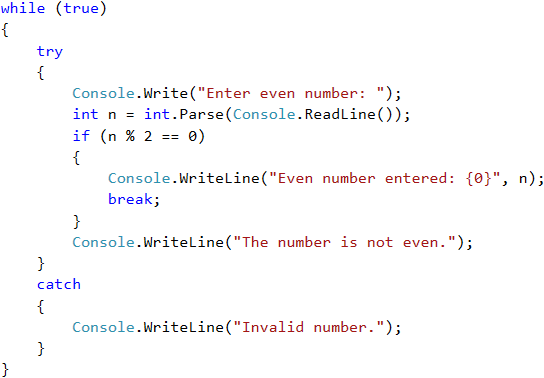
This works technically, but it is not the preferred pattern for routine user input. A customer typing "one" instead of 1 is not exceptional; it is normal input that did not meet the required format. int.TryParse represents that situation directly with a bool, without throwing an exception.
Use a focused helper method for a positive order quantity:
static int? ReadPositiveQuantity()
{
    while (true)
    {
        Console.Write("Quantity (or press Ctrl+Z / Ctrl+D to stop): ");
        string? input = Console.ReadLine();

        if (input is null)
        {
            return null;
        }

        if (!int.TryParse(input, out int quantity))
        {
            Console.WriteLine("Enter a whole number, for example 1 or 2.");
            continue;
        }

        if (quantity <= 0)
        {
            Console.WriteLine("Quantity must be greater than zero.");
            continue;
        }

        return quantity;
    }
}
The method has three possible outcomes:
- It returns a positive
intwhen the user enters valid input. - It displays a specific message and retries for an invalid format or value.
- It returns
nullwhen console input closes, allowing the calling code to cancel cleanly.
A caller can use it like this:
int? quantity = ReadPositiveQuantity();

if (quantity is null)
{
    Console.WriteLine("Order entry cancelled.");
    return;
}

Console.WriteLine($"Adding {quantity} item(s) to the order.");
This is a useful application of nullable values from the earlier lessons: null means “no quantity was supplied because the interaction ended,” not “quantity zero.”
Check missing menu items explicitly
The same principle applies to a menu selection. If the console UI owns a dictionary keyed by menu item ID, test the lookup result rather than relying on an exception:
Console.Write("Menu item ID: ");
string? menuItemId = Console.ReadLine();

if (string.IsNullOrWhiteSpace(menuItemId))
{
    Console.WriteLine("A menu item ID is required.");
    return;
}

if (!menuById.TryGetValue(menuItemId, out MenuItem? item))
{
    Console.WriteLine("That menu item was not found.");
    return;
}
TryGetValue expresses a normal possibility: a key may be absent. Using the dictionary indexer, such as menuById[menuItemId], would throw KeyNotFoundException for an unknown key. That is usually the wrong tool when a user can simply select another item.
The important boundary is this: the console layer prevents predictable mistakes. The domain layer defends its rules anyway, because it may later be called from an API, a test, an import job, or another application service.
Choose the exception type that communicates the failure
C# has many built-in exception types. Start with these rather than inventing a custom exception for every business rule.
| Exception type | Use it when | Restaurant example |
|---|---|---|
ArgumentNullException | A required method argument is null | AddItem(null, 2) |
ArgumentException | An argument is invalid but not specifically a range issue | A menu-item name is blank |
ArgumentOutOfRangeException | A numeric or comparable argument is outside its permitted range | Quantity is zero or negative |
InvalidOperationException | The requested action is not allowed in the current state | Adding an unavailable item to an order |
FormatException | Text cannot be parsed in a required format | int.Parse("two") |
OverflowException | A parsed value is outside the type’s supported range | Parsing a number larger than int.MaxValue |
There are two useful rules behind this table:
- Pick the most specific built-in type that accurately describes the failure.
- Do not deliberately throw
Exception,NullReferenceException, orIndexOutOfRangeExceptionfrom your own domain code. Those types either say too little or usually indicate a programming bug rather than a business rule.
For an invalid argument, include a useful message and the argument name. This makes debugging much easier:
public MenuItem(string menuItemId, string name, decimal unitPrice, bool isAvailable)
{
    if (string.IsNullOrWhiteSpace(menuItemId))
    {
        throw new ArgumentException(
            "Menu item ID is required.",
            nameof(menuItemId));
    }

    if (string.IsNullOrWhiteSpace(name))
    {
        throw new ArgumentException(
            "Menu item name is required.",
            nameof(name));
    }

    if (unitPrice < 0m)
    {
        throw new ArgumentOutOfRangeException(
            nameof(unitPrice),
            unitPrice,
            "Unit price cannot be negative.");
    }

    MenuItemId = menuItemId;
    Name = name;
    UnitPrice = unitPrice;
    IsAvailable = isAvailable;
}
The constructor cannot create a valid menu item when the ID, name, or price is invalid. Throwing is therefore appropriate.
Make the Order protect its own rules
Now apply the same idea to the aggregate that owns order lines. Even though your console UI validates a quantity before calling AddItem, the Order must not rely on that UI.
A safe version of AddItem can look like this:
public void AddItem(MenuItem item, int quantity)
{
    ArgumentNullException.ThrowIfNull(item);

    if (quantity <= 0)
    {
        throw new ArgumentOutOfRangeException(
            nameof(quantity),
            quantity,
            "Quantity must be greater than zero.");
    }

    if (!item.IsAvailable)
    {
        throw new InvalidOperationException(
            $"Menu item '{item.Name}' is currently unavailable.");
    }

    _lines.Add(new OrderLine(item, quantity));
}
Notice the order of operations:
- Guard clauses check every condition needed for a valid change.
- Only after all checks pass does the code add an
OrderLine.
That structure avoids a partially changed order. If the method throws, the _lines.Add(...) call was never reached.
quantity is a method argument, so an invalid quantity is correctly represented by ArgumentOutOfRangeException. Availability is a state of the menu item at the time of the action, so InvalidOperationException communicates that “adding this item is currently not allowed.”
The console application can now combine input validation with domain protection:
int? quantity = ReadPositiveQuantity();

if (quantity is null)
{
    Console.WriteLine("Order entry cancelled.");
    return;
}

try
{
    order.AddItem(item, quantity.Value);
    Console.WriteLine($"{item.Name} added to the order.");
}
catch (InvalidOperationException ex)
{
    Console.WriteLine(ex.Message);
}
catch (ArgumentOutOfRangeException ex)
{
    Console.WriteLine(ex.Message);
}
The ArgumentOutOfRangeException should be unlikely because ReadPositiveQuantity already rejects invalid quantities. It remains useful because no UI validation is a substitute for a domain invariant. For example, another developer could call order.AddItem(item, 0) directly.
A known state failure can still happen after valid input. A menu could be displayed as available, then marked unavailable by a staff action before the customer confirms the order. Catching that known failure at the console boundary lets the user receive a clear message and choose another item.
Catch deliberately, preserve diagnostic information
An exception has useful diagnostic information:
- Type tells you what category of failure occurred.
- Message describes the immediate reason.
- Stack trace records the method calls leading to where it was thrown.
- Inner exception preserves an original exception when a higher layer wraps it with additional context.
Watch this portion of IAmTimCorey’s exception-handling walkthrough. It demonstrates why a caught exception should lead to a deliberate response rather than simply allowing the program to continue with invalid data.
Understanding Exception Handling in C# - throw, Stack Traces, and more
Watch “Understanding Exception Handling in C# - throw, Stack Traces, and more” by IAmTimCorey. It shows an unhandled parsing failure, the information in its stack trace, and the risk of swallowing exceptions.
Watch the exception anatomy to see int.Parse fail and to identify the message, exception type, and stack trace. Then watch the catch critique; focus on why catching an exception and continuing with a default value can leave the application in an invalid state. Finally, skip to preserving the stack. Note the difference between throw;, which preserves the original stack trace, and throw ex;, which obscures where the failure originally occurred.
Do not swallow exceptions
This is dangerous:
try
{
    order.AddItem(item, quantity);
}
catch
{
}
The application has hidden a failure and gives no confirmation that the item was actually added. Empty catch blocks are a strong warning sign in code review.
A broad catch can be just as misleading:
try
{
    order.AddItem(item, quantity);
}
catch (Exception)
{
    Console.WriteLine("Invalid order.");
}
This incorrectly labels every failure as an invalid order, including programming defects that should be diagnosed. For example, a NullReferenceException caused by a bug would be hidden from you.
Instead:
- Catch only exception types you can meaningfully handle at that point.
- Place more specific
catchblocks before broader ones. - If you merely need cleanup, prefer
usingfor disposable resources; C# ensures cleanup even when an exception occurs. - If you catch an exception to log it or add necessary context, use
throw;to let it continue with its original stack trace.
Do not catch an exception just to rethrow it unchanged. In that case, omit the try-catch entirely.
When should you create a custom exception?
Not yet for simple rules such as “quantity must be positive.” Built-in exceptions are clearer and familiar to .NET developers.
A custom exception becomes worthwhile when the rest of the application must identify and handle a domain-specific category differently from all standard exceptions. For now, InvalidOperationException is sufficient for an unavailable-item rule. In later API work, you will centralize how known failures become consistent client-facing responses instead of placing try-catch blocks in every endpoint.
Consolidate the restaurant console application
Make the change on a focused branch. Add the input helper and the domain guards, then manually verify the behavior before committing:
- Enter
twofor quantity; the app should explain the expected format and retry. - Enter
0and-1; the app should explain that quantity must be positive. - Enter a menu ID that does not exist; the app should display a clear message without crashing.
- Attempt to add an unavailable menu item;
Order.AddItemshould reject the operation. - Call
order.AddItem(item, 0)temporarily from code to confirm the domain guard works independently of console validation. - Confirm a rejected operation does not add a new order line.
Then preserve the work:
git switch main
git pull --ff-only
git switch -c feature/exception-safe-order-entry
git add src/Restaurant.Console
git commit -m "feat: validate order input and enforce domain rules"
git push -u origin feature/exception-safe-order-entry
A reviewer should be able to see two complementary protections in this commit: friendly input validation in the console layer and invariant enforcement in the domain model.
Summary
You now have a practical exception policy for the restaurant application:
- Use
TryParse,TryGetValue, conditions, and retry loops for expected invalid user input. - Use exceptions when a method cannot fulfill its contract or a domain operation is invalid in the current state.
- Protect domain invariants inside domain methods even when the UI already validates input.
- Prefer specific standard exceptions such as
ArgumentOutOfRangeExceptionandInvalidOperationException. - Catch only failures you can handle meaningfully; never silently swallow them.
- Preserve original diagnostic information with
throw;when propagation is still required.
Next, the course moves from the console application into ASP.NET Core APIs. You will begin by interpreting HTTP methods, status codes, headers, and JSON bodies—the transport layer through which a React client will eventually submit these same restaurant actions.
Can't find a good explanation? Sign up and we'll make it for you
Sign up