Hello! Welcome back to our module on selling and marketing on TikTok Shop.
In our last lesson, you learned how to analyze top-performing product videos to understand the theory behind what makes them successful. We deconstructed their hooks, formats, and audio choices. Today, we move from analysis to action. Your goal is to produce a short-form product video using a mobile editor, incorporating text overlays and a call-to-action.
This is a highly practical, hands-on lesson where you'll apply the principles you've learned. We will use CapCut, a powerful and free video editing app that is widely used by top creators. By the end of this lesson, you will have the skills to create compelling product videos that are engineered to convert viewers into customers.
1. Your Toolkit: CapCut and Your Video Assets
Before we jump into editing, let's get our tools and materials ready. While TikTok has a built-in editor, we'll focus on CapCut because it offers far more control and professional features, which is essential for creating standout content. Your experience with different software in your IT career will make picking up this new tool straightforward.

The editing process begins after you've gathered your raw materials. This includes:
- Video Clips: These can be sourced from your supplier, user-generated content (with permission), or clips you film yourself.
- A Script/Voiceover: A clear script is the blueprint for your video. You can record your own voiceover or use AI tools for a polished result.
- Background Music: A suitable music track helps set the mood.
The following video will be our primary guide for this lesson. The creator, Ethan Dobbins, provides a comprehensive, step-by-step walkthrough of creating a winning dropshipping ad from scratch using CapCut. We will break down his process into manageable steps.
How I Edit Winning Dropshipping Video Ads In Capcut
This video, 'How I Edit Winning Dropshipping Video Ads In Capcut', is an excellent, practical guide. We will use it to structure our editing workflow, from sourcing clips to the final export.
You don't need to watch this all at once. We will refer to specific segments throughout the lesson. For now, familiarize yourself with the topics he covers.
2. The Editing Workflow: From Raw Clips to Polished Video
A structured workflow is key to editing efficiently. A common professional practice is to build the video's "skeleton" with audio first, then layer the visuals on top.
Step 1: Building the Audio Foundation
The pacing of your video is dictated by the audio. Starting with the voiceover and music ensures your visual cuts are perfectly timed and the video has a consistent rhythm.
How I Edit Winning Dropshipping Video Ads In Capcut
Let's begin by focusing on the audio. Watch this section to learn how to import your voiceover, remove dead space for a faster pace, and layer in background music.
Watch from 05:51 to 08:34. Pay close attention to how cleaning up the audio track creates a more professional and engaging feel. Note the tip on lowering the music volume significantly so it doesn't compete with the voiceover.
Key principles from this step:
- Remove Dead Space: Trim the silent gaps between sentences in your voiceover. This tightens the pacing and holds viewer attention.
- Set the Mood with Music: Choose a track that matches the energy of your product. For many e-commerce ads, instrumental house music or popular beats work well.
- Balance Your Audio: The voiceover should be clear and dominant. Background music should be just that—in the background. A common rule is to lower the music volume by -20 to -30 decibels (dB).
Step 2: Crafting the Visual Story
With the audio timeline in place, you can now add your video clips. The goal is to match the visuals to what's being said in the script, creating a cohesive and persuasive story.
The Hook (First 3 Seconds)
As we covered in the last lesson, the hook is the most critical part of your video. It must stop the scroll. This is also where you'll implement your first text overlay.
How I Edit Winning Dropshipping Video Ads In Capcut
Now, let's build the visual hook. This part of the video demonstrates how to create a powerful 'before and after' hook and, crucially, how to add a text overlay as a 'second hook'.
Watch from 08:48 to 12:54. Focus on how the text overlay is styled to look native to TikTok and how it adds another layer of curiosity beyond the visual clip itself.
The Body (Demonstration and Pacing)
After the hook, you need to maintain momentum. This is done through quick cuts and dynamic visuals that align with your script.
How I Edit Winning Dropshipping Video Ads In Capcut
This next section covers the art of pacing. Learn how to align your clips with the script, using techniques like micro-cuts, zooms, and speed adjustments to keep the viewer engaged.
Watch from 13:15 to 21:44. Notice the rule of thumb: change the visual every 1-2.5 seconds. This is a long section, so focus on the concepts of using different clips and zooms to illustrate each point in the voiceover script.
Step 3: Adding Text Overlays and Captions
Text is essential on TikTok, as many users watch with the sound off. Captions make your video accessible, while text overlays can highlight key benefits and your call-to-action.
How I Edit Winning Dropshipping Video Ads In Capcut
The final touch is adding captions. This clip shows how to use CapCut's autogenerated captions and style them for maximum readability.
Watch from 21:44 to 22:19. Note the font choice (Proxima Nova Bold is a TikTok classic), the use of a black outline for contrast, and the technique of breaking text into shorter lines.
For more advanced text styling options, this article provides a good overview of creating engaging titles and dynamic text animations.
CapCut Tutorial: Text and Caption Mastery
For a deeper dive into text creation, this tutorial provides clear examples of different styling techniques in CapCut.
Read the subsections 'Text Creation' and 'Text And Caption Mastery'. This will give you more ideas for creating visually appealing text overlays and CTAs.
3. The Call-to-Action (CTA): Driving the Sale
Your video's final job is to tell the viewer exactly what to do next. A clear call-to-action bridges the gap between interest and purchase. A CTA can be:
- Verbal: Stated in the voiceover (e.g., "Tap the orange shopping cart to get yours now!").
- Textual: An animated text overlay (e.g., "50% Off Today Only! Shop Now").
- Visual: The creator pointing towards the on-screen location of the "Shop Now" or product link button.
Once your video is edited, you'll upload it to TikTok. This is where you add the clickable product link, transforming your video into a "Shoppable Video".
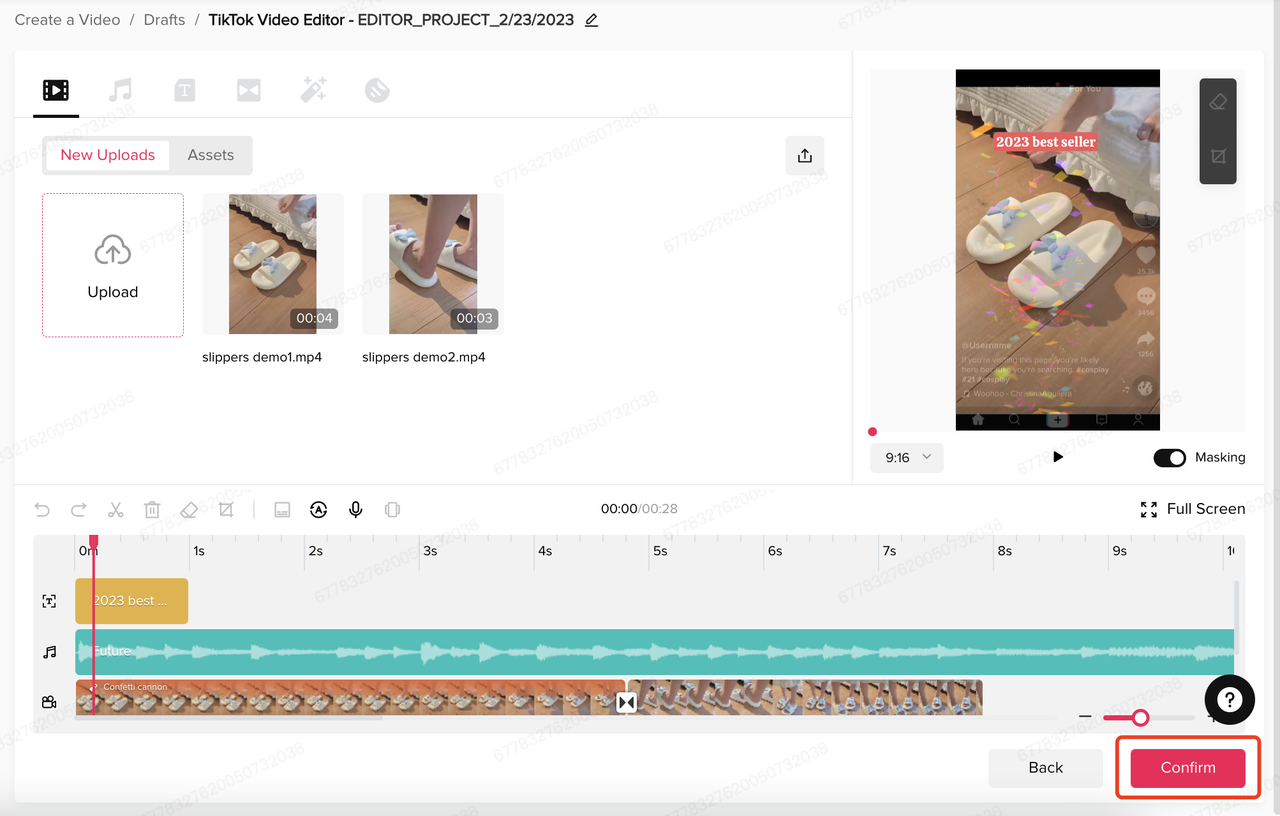
The process is simple: after uploading your edited video, you'll see an "+ Add Link" button. Tapping this allows you to select a product directly from your TikTok Shop catalog.
Test your understanding!
Imagine you're creating a 15-second video for a portable phone charger. Based on what you've learned, which of these is the most effective structure?
A. Start with a 10-second slow-motion shot of the charger, add music, and end with a "Buy Now" text.
B. Start with a 3-second clip of a phone with a red battery icon (Problem), show the charger being plugged in (Solution), add a voiceover saying "Never run out of battery again," and end with a "Tap to shop!" text overlay.
C. Start with a 5-second text-only screen explaining all the technical specs of the charger, then show the product for 10 seconds.
Show answer
B is the most effective structure. It follows the principles we've discussed: it starts with a strong, problem-focused hook, presents a clear solution, uses a benefit-driven voiceover, and includes a clear call-to-action.
Your Turn: Create Your First Product Video
Now it's time to put your skills to the test with a practical exercise.
Your Task:
Find a simple product around you (e.g., a coffee mug, a notebook, a pen). Using your phone, record 3-5 short clips (2-4 seconds each) showcasing it from different angles or in use.
Then, using CapCut, edit these clips into a short video (around 15 seconds) that includes:
- A strong hook: A "before/after" or problem-solution visual.
- A text overlay in the first 3 seconds: A bold claim or question (e.g., "The last notebook you'll ever buy").
- Captions: Use CapCut's auto-caption feature for any spoken words, or just add background music if you prefer.
- A clear call-to-action: A final text overlay like "Shop Now" or "Get Yours Today."
This exercise will solidify the entire workflow in your mind and prepare you to create compelling videos for your actual products.
Conclusion
Congratulations! You've just walked through the entire process of producing a high-converting short-form product video. This is a core skill for any successful e-commerce entrepreneur on TikTok.
Key Takeaways:
- Structure is Everything: A successful video follows a clear path: a strong hook, a problem-solving body, and a clear call-to-action.
- Edit Audio First: Building your video on a solid audio foundation ensures good pacing and rhythm.
- Text Overlays are Non-Negotiable: Use them for your hook, to highlight benefits, and for your final call-to-action.
- CapCut is Your Best Friend: Master this free tool to produce professional-quality videos without a large budget.
Next Up:
You now know how to create pre-recorded video content. In our next lesson, we'll dive into the world of live commerce. You will learn how to plan and execute a mock TikTok Live shopping session, a powerful format for demonstrating products and engaging with your audience in real-time.