
Hello! Welcome back to our n8n course.
In our last lesson on the Filter node, we saw how to discard items that don't meet our criteria. This is great for ensuring data quality. But we left off with a key question: what if the data isn't in the right format to be filtered in the first place? For example, what if a date is combined with a time, but you only want to filter by the date? Or a price is a string like "$99.99" and you need to compare it as a number?
This lesson directly answers that question. We'll dive into the n8n Expression Editor to write basic JavaScript to manipulate strings, numbers, and dates. As a software developer, you'll find this very familiar. Expressions are essentially one-line JavaScript snippets that you can embed in any node parameter field, giving you the power to transform data on the fly. This skill is the key to unlocking dynamic and robust workflows.
1. Expressions: The Power of JavaScript in Every Node
At its core, an n8n expression is a JavaScript snippet enclosed in double curly braces {{ }}. This syntax tells n8n to execute the code inside instead of treating it as plain text.
This allows you to dynamically insert and transform data from previous nodes. The ByteGrad video below gives a concise, developer-oriented introduction to what this looks like in practice.
n8n tutorial for developers - Every Dev Should Know This
Watch this short clip from the 'n8n tutorial for developers' video to see how expressions are used to dynamically set an email subject and perform a simple conditional check.
Watch from 08:22 to 09:20. Notice how you can use standard JavaScript methods like .toUpperCase() and even type-casting within the expression editor.
As you saw, you can access incoming data (usually via the $json object) and apply standard JavaScript methods to it.
For a quick reference on the most common expressions, the "n8n Expressions Cheat-Sheet" is an excellent resource to bookmark.
Take a look at this cheat sheet from n8n Arena. It provides a fantastic overview of what's possible with expressions.
Read the sections 'What are n8n expressions?' and 'How and when to use them'. Then, review the 'Quick Reference' table to get a sense of the key variables ($json, $now) and common methods available.
2. Manipulating Strings
String manipulation is one of the most common tasks in data automation. You'll constantly be cleaning up text, parsing it, and reformatting it.
Here are the essential techniques:
- Cleaning and Case Conversion: Use
.trim()to remove leading/trailing whitespace, and.toLowerCase()or.toUpperCase()to standardize text for comparisons.{{ $json.name.trim() }}{{ $json.status.toUpperCase() }}
- Finding and Replacing: Use
.includes('substring')to check for the presence of text (returnstrue/false), and.replace('old', 'new')or.replaceAll('old', 'new')to substitute parts of a string. - Splitting and Extracting: This is incredibly powerful. Use
.split('delimiter')to break a string into an array. This is perfect for parsing structured text. The image below shows a classic example: extracting a date from a full ISO timestamp string.
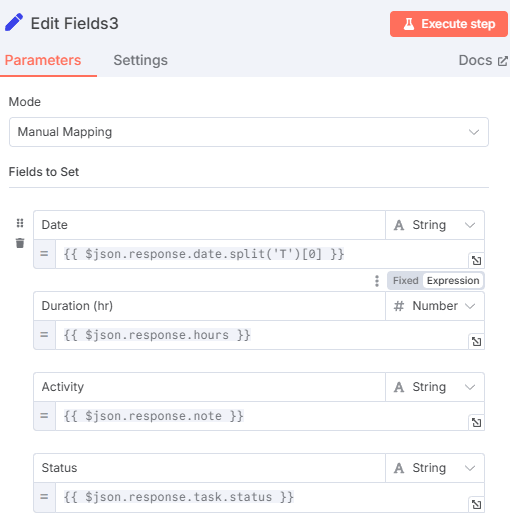
Let's watch a segment that demonstrates some of these core string functions in action.
Every N8N JavaScript Function Explained (106 + 7 Extras)
The video 'Every N8N JavaScript Function Explained' by Nick Saraev is an exhaustive reference. We'll watch a short segment covering some of the most useful string functions.
Watch from 04:22 to 10:25. This segment covers: .split(): Breaking a string into an array (extremely useful). .startsWith() / .endsWith(): Checking the beginning or end of a string. .replaceAll(): A powerful find-and-replace tool. .length: Getting the character count of a string.
3. Manipulating Numbers
Working with numbers in expressions involves two main tasks: performing calculations and converting data types.
Arithmetic Operations
Standard JavaScript math operators work as you'd expect:{{ $json.price * 1.2 }} - Increase price by 20%{{ $json.quantity - 1 }} - Decrement quantity
Type Conversion
This is critical. Data often arrives as a string (e.g., "123.45") but needs to be a number for mathematical operations or comparisons in nodes like Filter or If.
Number(value): Converts a value to a number.parseInt(value): Parses a string and returns an integer.parseFloat(value): Parses a string and returns a floating-point number.
Example: If price comes in as the string "55.99", a condition like {{ $json.price > 50 }} would fail because it's a string comparison. You must first convert it: {{ Number($json.price) > 50 }}.
Rounding
You can use the standard Math object for rounding:
Math.round(value): Standard rounding.Math.floor(value): Always rounds down.Math.ceil(value): Always rounds up.
To see these in action, let's look at another clip.
Every N8N JavaScript Function Explained (106 + 7 Extras)
This clip from the same comprehensive video covers number conversions and rounding.
Watch from 58:55 to 1:02:15. Focus on: toNumber(): n8n's built-in function for converting a string to a number so you can perform math on it. round(), floor(), ceil(): Basic rounding functions.
4. Manipulating Dates with Luxon
n8n has a "superpower" for handling dates and times: it comes with the Luxon library built-in. This makes complex date operations, which are often a headache in programming, remarkably simple.
The most important concepts are:
- Built-in Luxon Objects: n8n provides
$now(current date and time) and$today(current date at midnight) as ready-to-use Luxon objects. - Parsing: Dates often arrive as strings (e.g.,
"2023-12-25T08:00:00.000Z"). You must first parse the string into a Luxon object to manipulate it. The.toDateTime()method is your go-to for this. - Manipulation: Once you have a Luxon object, you can easily perform calculations like adding or subtracting time with
.plus()and.minus(), or find the difference between two dates with.diff(). - Formatting: After your calculations, you can format the Luxon object back into a string in any format you need using
.toFormat()or.toLocaleString().
The official n8n documentation provides the best guide for these common tasks.
The official n8n documentation on Luxon is the definitive guide. We will focus on the most essential operations.
Read through the following sections of the documentation: 'Get the current datetime or date' (to understand $now and $today). 'Convert date string to Luxon' (to see how to handle incoming date strings). 'Get n days from today' (to learn about .minus()). 'Create human-readable dates' (for formatting output with .toLocaleString()). 'Get the time between two dates' (to understand .diff()). Pay close attention to the code examples for each.
The example below shows a dynamic countdown to Christmas, combining several Luxon features to create a practical, self-updating string.
{{ "There are " + Math.round($today.diff(DateTime.fromISO($today.year + '-12-25'), 'days').toObject().days * -1) + " days to Christmas!" }}
This expression:
- Gets the current year:
$today.year - Creates the date for Christmas this year:
DateTime.fromISO($today.year + '-12-25') - Calculates the difference from today in days:
$today.diff(...) - Converts the result to a clean number and constructs the final string.
Test your understanding!
You have an incoming data item with a details string: "SKU:ABC-123,Created:2023-04-15T10:30:00Z,Price:89.5".
Write three separate expressions to:
- Extract the price as a number.
- Extract the creation date and format it as
Sat, Apr 15, 2023. - Check if the creation date was on a weekend (return
trueorfalse).
Show answer
-
Extract Price:
{{ Number($json.details.split('Price:')[1]) }}.split('Price:')[1]isolates the part of the string after "Price:", which is"89.5".Number()converts that string into the number89.5.
-
Format Date:
{{ $json.details.split(',')[1].split('Created:')[1].toDateTime().toFormat('ccc, LLL dd, yyyy') }}- The two
.split()calls isolate the ISO date string"2023-04-15T10:30:00Z". .toDateTime()parses that string into a Luxon object..toFormat('ccc, LLL dd, yyyy')formats it into the desired string.cccis the abbreviated day of the week,LLLis the abbreviated month,ddis the day, andyyyyis the year.
- The two
-
Check for Weekend:
{{ $json.details.split(',')[1].split('Created:')[1].toDateTime().weekday > 5 }}- We first parse the string into a Luxon object as before.
.weekdayreturns a number where Monday is 1 and Sunday is 7.- Therefore, checking if
.weekday > 5will betruefor Saturday (6) and Sunday (7).
Conclusion
You've now added one of the most powerful tools to your n8n arsenal: expressions. By leveraging your existing JavaScript knowledge, you can now manipulate data directly within your nodes to fit the exact needs of your workflow.
Key Takeaways:
- Expressions are JavaScript snippets
{{ }}that allow for dynamic data transformation. - Strings: Use
.split(),.replace(),.trim(), and.toUpperCase()for common parsing and cleaning tasks. - Numbers: Always convert numeric strings to numbers with
Number()orparseFloat()before doing math or comparisons. - Dates: Luxon is built-in. Use
$now, parse strings with.toDateTime(), calculate with.plus()/.minus(), and format with.toFormat().
So far, we've focused on transforming data within a single item. In our next lesson, we'll take the next logical step: learning how to summarize or aggregate data from multiple items into a single item. This is essential for tasks like calculating the total value of a list of orders, counting results, or creating a single report from many pieces of data.