
Hello and welcome back!
In our last lesson, you learned how to create a complete talking-head style explainer video, giving your script a face and a voice using tools like Synthesia and HeyGen. Your video is informative, but to make it truly engaging and professional, it needs atmosphere.
This lesson focuses on that crucial final layer of production. Our learning outcome is to: Generate custom background music for your video using an AI music tool like Soundraw or Mubert.
Adding the right music elevates your video from a simple presentation to a polished marketing asset. It helps set the tone, maintain viewer engagement, and reinforces your brand's identity—all without the high costs of licensing traditional stock music or the risk of copyright strikes on platforms like YouTube. For a founder looking to rapidly scale content, these AI tools are indispensable.
1. The Power of AI Music for SaaS Marketing
Before AI, getting music for your videos involved a trade-off:
- Free Music Libraries: Often generic, overused, and came with complex attribution requirements.
- Paid Stock Music (e.g., Epidemic Sound, Artlist): High-quality but requires an ongoing subscription, and finding the perfect track can take hours.
- Custom Composition: Extremely expensive and slow.
AI music generators solve these problems by offering a new paradigm:
- Speed: Generate dozens of options in seconds.
- Customization: Tailor the music's length, mood, and instrumentation to perfectly match your video's pacing.
- Cost-Effectiveness: Significantly cheaper than traditional licensing for the level of customization you get.
- Copyright Safety: The generated music is royalty-free for use in your marketing content, giving you peace of mind.
We will focus on two of the most powerful and founder-friendly tools in this space: Soundraw and Mubert.
2. Generating Music with Soundraw
Soundraw is known for its incredibly intuitive, click-based interface. You don't need any musical knowledge to create a great track. You guide the AI by selecting from pre-defined moods, genres, and themes, making it exceptionally fast for creating professional background music for corporate and marketing videos.
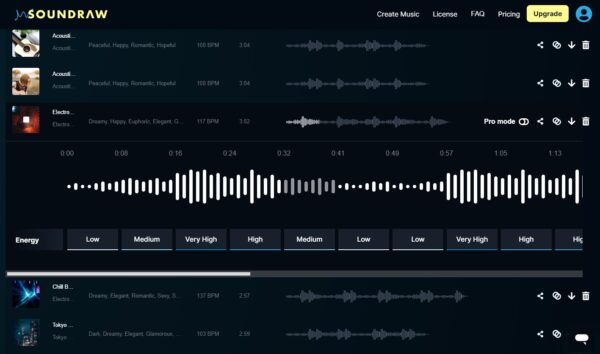
To get a practical feel for Soundraw's capabilities and workflow, let's start with a video overview.
Create Royalty Free Music with AI - Soundraw
The video 'Create Royalty Free Music with AI' by Music Tech Info provides an excellent walkthrough of Soundraw, covering its features, pricing, and the all-important licensing details.
Please watch the following parts: Introduction (00:00 - 01:15): This gives you a quick overview of what Soundraw does and its key value proposition for creators. Hands-On Demonstration (03:08 - 05:52): Watch how music is generated by selecting filters. Pay close attention to how the 'energy' or intensity of the track can be changed in real-time, a powerful feature for matching music to your video's narrative.
Now that you've seen it in action, let's walk through the exact steps to create and download your first track.
How to Make a Song with SOUNDRAW
The official Soundraw blog post 'How to Make a Song with SOUNDRAW' provides a clear, five-step process that you can follow.
Read the section titled 'Create Your First AI Music Track in Less than 5 Minutes with SOUNDRAW'. This provides a concise, step-by-step guide from prompting to using the Mixer feature.
A Note on Licensing
As a founder, licensing is not a minor detail. The music you generate is for a specific purpose. This is where Soundraw's license is perfect for you.
Create Royalty Free Music with AI - Soundraw
Let's return to the 'Create Royalty Free Music with AI' video to clarify what you can and cannot do with the music you generate.
Watch these two crucial segments: Subscription & Usage (01:43 - 03:08): This explains the commercial use license you get with a subscription, covering YouTube, social media, and web ads. License Permissibility (06:27 - 10:01): This is the most important part. It clarifies that you can use the music as background for videos, podcasts, and ads, but you cannot distribute the music as a standalone product (e.g., on Spotify). This fits your use case perfectly.
3. Generating Music with Mubert
Mubert offers a different, but equally powerful, approach. Its strength lies in text-to-music generation. You can describe the music you want in plain English, giving you a higher degree of creative control. It can also generate music based on a reference track, which is great if you've found a style you want to emulate.

The following guide breaks down how to use Mubert Render, the part of their platform designed for content creators like you.
How to Use Mubert: A Complete Guide to AI Music ...
This guide from Crescentech, 'How to Use Mubert: A Complete Guide to AI Music Generation', offers a fantastic, practical walkthrough.
Please read the following sections: 'What is Mubert?' to understand its different products. 'How to Use Mubert Render (Web)' which is the tool you will be using. 'Example: Generating Music with Mubert' for a step-by-step example of writing a prompt and generating a track. 'Why Choose Mubert?' for a summary of its benefits.
To see how Mubert's prompt-based generation works in practice, let's watch a demonstration.
I Tested 10 AI Music Generators.. Here's The BEST!
The 'I Tested 10 AI Music Generators' video from AI Andy includes a great segment on Mubert that shows its strengths and weaknesses.
Watch the section on Mubert AI (13:43 - 15:56). Notice how the creator uses prompts and the 'search by reference' feature to guide the AI. This highlights how you can iterate to get closer to the sound you have in your head.
4. Soundraw vs. Mubert: Which Should You Use?
Both tools are excellent, but they excel in different scenarios.
-
Use Soundraw when:
- You need a high-quality track fast.
- You have a general idea of the mood (e.g., "uplifting corporate," "dramatic cinematic").
- You want to precisely control the energy flow of your video (e.g., quiet intro, high-energy middle, calm outro).
-
Use Mubert when:
- You have a very specific and descriptive idea for your music (e.g., "calm lofi hip-hop with a jazz piano and no drums").
- You have a reference track from another video that you love the style of.
- You want to explore more unique and experimental sounds.
For building a scalable SaaS marketing engine, having both in your toolkit is a strategic advantage. You can use Soundraw for 90% of your standard explainer and demo videos and turn to Mubert when you need something more specific or creatively distinct.
Test your understanding!
Let's revisit the 30-second explainer video for your "AI-powered meeting summarizer" SaaS feature. Your goal is to add background music that sounds modern, professional, and slightly optimistic, without being distracting.
- Which tool would you start with for this task and why?
- If using Soundraw: What combination of
Mood,Genre, orThemetags would you choose to start? - If using Mubert: Write a specific text prompt you would use to generate the music.
Show answer
-
Tool Choice: Soundraw would be an excellent starting point. The task calls for a fairly standard style of background music ("modern, professional, optimistic"), which maps perfectly to Soundraw's tag-based system. You could likely find a suitable track in under five minutes.
-
Soundraw Tags: A great combination would be:
- Theme:
CorporateorTech - Mood:
HopefulorUplifting - Genre:
PoporElectro Pop
You could then adjust the track's length to 30 seconds and fine-tune the energy to be low during the problem statement and higher during the solution.
- Theme:
-
Mubert Prompt: A good prompt would be:
"Uplifting and optimistic corporate background music for a tech product demo. Soft electronic beat, gentle piano melody, 120 BPM. Instrumental only."
This prompt is descriptive, specifies the mood, use case, instrumentation, and tempo, giving the AI clear direction.
Conclusion
Congratulations! You now have the final piece of the puzzle for creating AI-powered videos. By combining an AI avatar, an AI voice, and now AI-generated music, you can produce an unlimited number of high-quality marketing videos quickly and affordably.
Key Takeaways:
- AI music generators like Soundraw and Mubert provide a fast, copyright-safe, and customizable solution for video background music.
- Soundraw excels with its intuitive, click-based interface, making it ideal for quickly generating music based on mood, genre, and theme.
- Mubert offers deep creative control through text-to-music prompts and reference track generation.
- Understanding the licensing is key: these tools grant you the right to use the music as background in your commercial projects, but not to distribute the music as a standalone product.
Preview of the Next Lesson:
Your video now has all its core audio components: a voiceover and a music track. But how do you make them sound clear and professional together? In our next and final lesson of this module, we will learn how to enhance audio recordings by removing background noise and improving clarity with Adobe Podcast AI. This will give your videos that final layer of polish that separates amateur content from professional-grade marketing.