
Hello and welcome back to our module on AI-Powered Video Marketing.
In the last lesson, we focused on audio, learning how to clone your own voice to create a scalable and authentic brand asset. We now have a powerful voiceover capability. The next logical step is to give that voice a face and a visual context.
This lesson directly addresses that need. Our learning outcome is to: Create a short, talking-head style explainer video from a text script using Synthesia or HeyGen.
For a SaaS founder like yourself, being able to rapidly produce high-quality explainer videos, product demos, and social media content without a camera, studio, or even being on-screen yourself is a massive advantage. These tools allow you to scale your video marketing efforts dramatically, ensuring a consistent look and feel across all your content.
1. Understanding AI Avatar Video Generation
AI "talking head" video generators take a text script as input and use a digital avatar to deliver it. You can choose from a library of stock avatars or, for ultimate brand consistency, create a custom avatar of yourself to pair with the voice clone you learned to make in our previous lesson.
Two of the leading platforms in this space are Synthesia and HeyGen.
- Synthesia: Often considered the industry standard for corporate and training videos. It excels at creating polished, professional presentations with a highly structured, scene-by-scene editor. It's ideal for tutorials, onboarding videos, and formal product demos.
- HeyGen: A very powerful and versatile platform, particularly strong for marketing and social media content. It has excellent features like generating an avatar from a single photo, creating product-focused ads, and offering a more flexible, creative editing experience.
We will explore the workflow for both, as each has strengths that can be leveraged for different marketing goals across your SaaS ventures.
2. The Core Workflow: From Script to Video
Regardless of the tool you choose, the creation process follows a consistent pattern. The quality of your final video depends heavily on the planning you do upfront.
Step 1: Define Your Goal and Write Your Script
Before you open any tool, know what you want the video to achieve. Are you explaining a feature? Announcing an update? Driving sign-ups? This goal will shape your script.
The help documentation for HeyGen provides an excellent, time-tested structure for an explainer video script. I highly recommend you review it before writing your own.
How To Create Explainer Videos on HeyGen
The article 'How To Create Explainer Videos on HeyGen' provides a clear, actionable structure for a short marketing video. This framework will be invaluable for your SaaS products.
Read 'Step 1: Define your objective and script'. Pay close attention to the 7-part script structure provided: Hook, Problem, Solution, How it works, Benefits, Social proof, and Call to action (CTA).
As you saw in a previous learning outcome, frameworks like PAS (Problem-Agitate-Solution) or AIDA (Attention-Interest-Desire-Action) are also perfect for this. Remember to keep your script conversational and read it aloud to catch any awkward phrasing.
Step 2: Choose Your Avatar and Voice
Your avatar is the face of your video. You have several options:
- Stock Avatars: Both platforms offer a huge library of high-quality, diverse avatars. You can choose one that fits your brand's persona.
- Custom "Instant" Avatars (HeyGen): HeyGen allows you to upload a single photo and turn it into a talking avatar. This is incredibly fast for creating personalized content.
- Custom "Pro" Avatars (Synthesia/HeyGen): For the highest quality, you can create a full digital twin of yourself by recording a short script. This provides the most realistic and expressive results, perfectly pairing with your cloned voice.
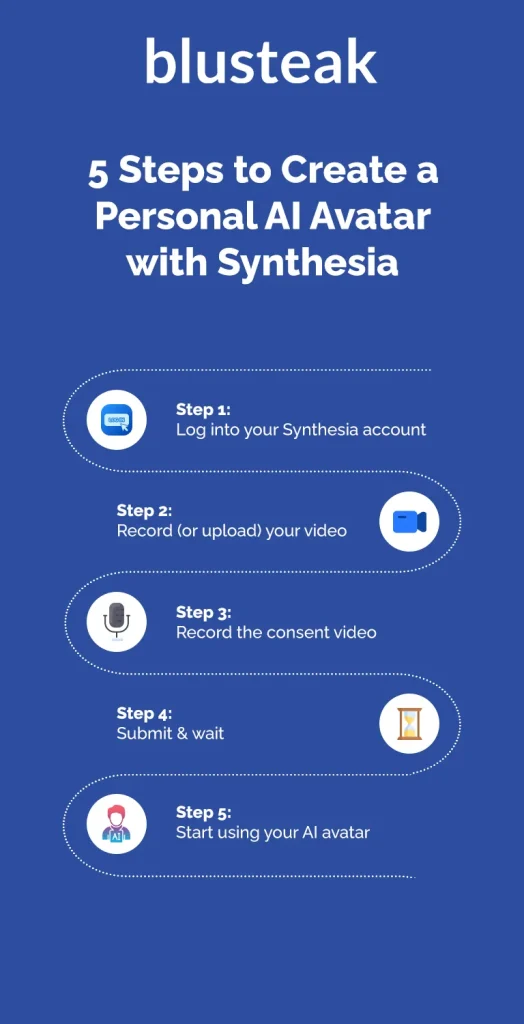
3. Creating an Explainer Video with Synthesia
Synthesia provides a powerful, slide-based editor that will feel familiar if you've ever used presentation software. It excels at combining an avatar with on-screen text, images, and screen recordings.
The following comprehensive video tutorial will walk you through the entire process, from creating an account to generating your final video.
The Only Synthesia AI Tutorial You Will Ever Need (FOR BEGINNERS)
The video 'The Only Synthesia AI Tutorial You Will Ever Need' by Simon Crowe is a complete walkthrough of the platform. It covers everything you need to get started.
Focus on these key segments to master the workflow: Generating a Script with AI (06:10 - 10:02): Watch how you can use a simple prompt to generate a full video outline and script directly inside Synthesia. This is a great starting point for your own content. Customizing Your Video (10:02 - 15:19): This is the most important section. See how to swap in your avatar, change template colors to match your brand, add your logo, and customize on-screen text. Adding Media and Music (15:19 - 17:55): Learn how to replace stock footage, add scene transitions, and incorporate background music to make your video more dynamic. Generating and Downloading (17:55 - 18:52): Understand the final steps to generate and export your video as an MP4 file, ready for upload to YouTube or your website.
To complement the video, Synthesia's own guide provides a strategic checklist that's perfect for ensuring quality and efficiency.
How to Make Synthesia Videos: A Step-by-Step Guide
This step-by-step guide from Synthesia is a great companion resource. It provides a strategic framework and a quick-reference checklist.
Please review the following sections: 'Step 7: Quality check before generation': Use this checklist before generating any video to save time and credits. 'Step 8: Generate and distribute your video': This section clarifies your options for sharing and downloading. 'Frequently asked questions': The first FAQ provides a concise, 30-second summary of the entire workflow.
4. Creating an Explainer Video with HeyGen
HeyGen's interface is also incredibly intuitive and is geared towards creating engaging, marketing-focused content quickly. It has some unique features that are perfect for a SaaS founder's toolkit.
Let's watch a tutorial that highlights these powerful capabilities.
How to Create Talking Avatars & UGC Videos with HeyGen
The video 'How to Create Talking Avatars & UGC Videos with HeyGen' by Kingy AI demonstrates some of HeyGen's most compelling features for marketers.
Pay close attention to these two powerful use cases: Photo to Video Avatar (00:54 - 03:08): This is a game-changer for rapid content creation. See how you can upload a single static image and bring it to life as a talking avatar. Imagine using this for testimonials or social media posts. Product Placement Video (04:46 - 07:53): This feature is tailor-made for SaaS marketing. Watch how you can upload a screenshot of your software, choose an avatar, and have the AI generate a video where the avatar presents your product. It's an ad-in-a-box.

Test your understanding!
Let's put this into practice. Imagine you've just developed a new feature for one of your SaaS products: an "AI-powered meeting summarizer" that transcribes and summarizes calls.
Your task is to create a 30-second explainer video for it.
- Write a Script: Using the Problem-Agitate-Solution (PAS) framework, write a short script (approx. 75 words).
- Choose a Tool: Based on what you've learned, would you use Synthesia or HeyGen for a quick, punchy marketing video for this feature? Why?
- Avatar & Visuals: What kind of avatar would you choose (stock, custom, photo)? What single visual element (e.g., a screenshot of the summary, a calendar icon) would you add to the video to reinforce the message?
Show answer
Here's one possible approach:
-
Script (PAS):
- (Problem): Tired of endless meetings and forgetting key action items?
- (Agitate): You spend hours in calls, but crucial decisions get lost in the chatter, and writing summaries is a tedious chore.
- (Solution): Introducing AI Summarizer! Our tool automatically transcribes your calls and delivers a concise, actionable summary to your inbox the moment the meeting ends. Stop taking notes and start taking action. Try it now!
-
Tool Choice: For a quick, punchy marketing video, HeyGen might be the better choice due to its strengths in creating engaging ads and its rapid "photo-to-video" or "product placement" features. You could quickly generate a compelling ad using just a screenshot of the final summary. Synthesia would be excellent for a more detailed "how-to" tutorial on using the feature.
-
Avatar & Visuals: A friendly, professional stock avatar would work well to build trust. The most impactful visual would be a clean screenshot or mock-up of the final AI-generated summary, clearly showing the organized action items and key decisions. This instantly demonstrates the value proposition.
Conclusion
You now have the skills to transform a simple text script into a professional, engaging talking-head video. By mastering tools like Synthesia and HeyGen, you've unlocked a scalable way to create essential marketing assets without the time and expense of traditional video production.
Key Takeaways:
- AI avatar platforms like Synthesia and HeyGen allow you to create talking-head videos from a script, scaling your content production.
- Synthesia is excellent for structured, professional content like training and detailed demos.
- HeyGen is a powerhouse for marketing, with unique features like photo-to-video and product placement ads.
- The workflow is consistent: Plan & Script -> Choose Avatar & Voice -> Design Scenes -> Generate & Export.
- For maximum brand authenticity, you can combine a custom avatar with the custom voice clone you created in the previous lesson.
Preview of the Next Lesson:
Your video now has a voice and a face, but it's missing atmosphere. In our next lesson, we will complete the core components of our AI-generated video by learning how to generate custom background music for your video using an AI music tool like Soundraw or Mubert. This will allow you to set the perfect mood for your content without worrying about copyright.