Hello and welcome back to your hands-on guide for scaling SaaS companies with AI.
In our last lesson, you learned how to use ElevenLabs with pre-made voices to generate a professional voiceover from a script. You practiced directing an AI's performance using tags and punctuation, turning plain text into engaging audio.
Today, we take that a step further. Instead of borrowing a voice, you will create a truly unique and scalable brand asset: a digital clone of your own voice. The learning outcome for this lesson is to clone your own voice using ElevenLabs or PlayHT to create a scalable audio asset for future content.
This is a powerful strategy for a founder. A voice clone gives your brand authenticity and consistency across all your marketing materials—product demos, tutorials, podcasts, and social media clips. You can fix errors in recordings without re-shooting, generate new content while on vacation, and scale your output dramatically, all while maintaining your personal brand's unique sound.
1. Choosing Your Cloning Tool: ElevenLabs vs. Play.HT
The two leading platforms for high-quality voice cloning are ElevenLabs and Play.HT. While both are excellent, they have different strengths in terms of voice quality, feature sets, and pricing.
To help you decide which tool best fits your needs and budget, let's watch a direct comparison.
Review: Elevenlabs vs Play.HT for AI Voice Cloning
The video 'Review: Elevenlabs vs Play.HT for AI Voice Cloning' by Jeremy Morgan provides an excellent, practical comparison. He uses the same 5.5 hours of his own audio to train a voice clone on both platforms and compares the results side-by-side.
Please watch the following sections to understand the key differences: Direct Voice Comparison (03:11 - 05:58): Listen carefully to the side-by-side examples. Notice the subtle differences in naturalness, energy, and robotic tone. Which one sounds more like the original speaker to you? Pricing Comparison (12:36 - 13:51): This is a critical section for a founder. Pay attention to the free tiers and the cost-per-character or per-minute at different subscription levels. Final Recommendation (13:51 - 15:03): The presenter gives his final verdict based on budget and project seriousness. This will help you frame your own decision.
Key Takeaways from the Comparison:
- ElevenLabs: Generally produces a more natural and accurate clone that's closer to the original speaker's voice. It also offers a wider range of creative tools like sound effect generation and an AI dubbing studio. This quality comes at a higher price.
- Play.HT: The voice clone can sometimes have more "energy" but may sound slightly more robotic. Its major advantage is pricing, especially the annual plan which offers unlimited generation, making it a very cost-effective solution for high-volume content production.
Your Choice:
- If your priority is the absolute highest fidelity and most natural-sounding clone, and budget is less of a concern, ElevenLabs is likely the better choice.
- If you are on a tighter budget but still need great results and plan to generate a large volume of content, Play.HT offers tremendous value.
For the rest of this lesson, we will focus on the step-by-step process in ElevenLabs, as it was introduced in the previous lesson. The core principles of providing high-quality audio are identical for both platforms.
2. The Voice Cloning Process in ElevenLabs
ElevenLabs offers two methods for cloning a voice. Understanding the difference is key to choosing the right approach for your goals.
How to Clone Your Voice with AI - Realistic AI Voice Clones (Full Tutorial)
This official tutorial from ElevenLabs, 'How to Clone Your Voice with AI', clearly explains the two types of voice cloning available on the platform.
Watch the first 50 seconds of the video, from 00:00 to 00:50. The speaker breaks down the difference between Instant Voice Clone (IVC) and Professional Voice Clone (PVC), including the audio requirements and expected quality for each.
- Instant Voice Clone (IVC): Fast and easy. Requires only 1-2 minutes of audio. The result is decent but may struggle with unique accents and lacks the full emotional range and nuance of your real voice. It's great for quick tests.
- Professional Voice Clone (PVC): The professional standard. Requires a minimum of 30 minutes (ideally 2-3 hours) of high-quality audio. This process trains a dedicated AI model on your voice, resulting in a hyper-realistic clone that captures your specific tone, emotion, and delivery. This is the method we will focus on for creating a scalable asset.
3. The Most Critical Step: Preparing Your Audio
The rule for voice cloning is simple: Garbage In, Garbage Out. The quality of your final voice clone is almost entirely dependent on the quality of the audio you provide for training. Cloning the voice is the easy part; recording clean, high-quality audio is the hard part.
Let's review the essential best practices for recording your training data.
Professional Voice Cloning & A Beginner's Guide
The official ElevenLabs documentation on 'Professional Voice Cloning' and the beginner's guide from DevOpsCube provide a comprehensive set of rules for recording high-quality audio. These are not mere suggestions; they are requirements for a successful clone.
Read the sections 'Record high quality audio' and 'Tips and suggestions' in the ElevenLabs documentation. This will give you the technical foundation for what makes a good recording.
How to Clone Voice in ElevenLabs (A Beginner's Guide)
Now, let's look at a more practical take on this from the 'How to Clone Voice in ElevenLabs' guide.
Read the section titled 'Mistakes to Avoid While Recording Your Audio'. This provides actionable tips on environment, speaking style, and adding emotion.
Summary of Essential Recording Practices:
- Audio Quantity: Provide at least 30 minutes of audio for a PVC. For the best results, aim for 2-3 hours.
- Audio Quality:
- Quiet Environment: Record in a room with no background noise (fans, traffic, other people). An acoustically treated room is ideal, but a small room with soft furnishings (like a walk-in closet) can work well.
- Clear Microphone: Use a decent external microphone. A good USB mic (like a Blue Yeti or Rode NT-USB) is a great start. An XLR microphone with an audio interface is the professional standard. Use a pop filter to reduce plosives (the harsh 'p' and 'b' sounds).
- Speak Naturally: Don't put on a "recording voice." Speak as if you're explaining something to a friend. Maintain a consistent tone and style throughout the recording. The AI will learn whatever style you provide.
- Add Emotion: Your voice should not be monotone. Vary your pitch and emotion as you naturally would in a conversation. Smile while speaking for certain parts, ask questions, and vary your pace.
- Clean Audio: Ensure there's only one speaker (you). Avoid long pauses, "uhms," and mispronounced words. While you can edit these out, it's better to provide a clean recording from the start.
Test your understanding!
You want to create a voice clone to narrate product tutorials. You record 45 minutes of audio. However, you recorded it in your living room with an open window, and you were reading a complex technical paper, causing you to speak in a flat, monotone voice. What two major problems will this likely cause in your final voice clone?
Show answer
- Background Noise: The AI will learn the background noise from the open window (traffic, birds, etc.) and may introduce those artifacts into the generated speech, making it sound unclean.
- Monotone Delivery: The AI will learn the flat, monotone style from your recording. Your final voice clone will also sound monotone and unemotional, which is not ideal for engaging product tutorials.
4. Step-by-Step Guide to Professional Voice Cloning
With your high-quality audio prepared (or a plan to record it), let's walk through the cloning process in ElevenLabs.
How to Clone Your Voice with AI - Realistic AI Voice Clones (Full Tutorial)
We'll now return to the ElevenLabs tutorial video. This time, we'll focus on the detailed walkthrough of the Professional Voice Clone creation process.
Watch the section from 06:24 to 10:29. It covers the entire PVC workflow: Navigating to the PVC section. Uploading your prepared audio files. Understanding the feedback on audio length. The mandatory voice verification step (an audio captcha to prove it's your voice). Submitting the voice for training.
Here is the process, summarized:
-
Navigate to VoiceLab: From the ElevenLabs dashboard, click on Voices.
)
This is the starting point. You will click the button to add a new voice. -
Select Professional Voice Clone: Click Add a new voice and choose Professional Voice Clone from the options.
-
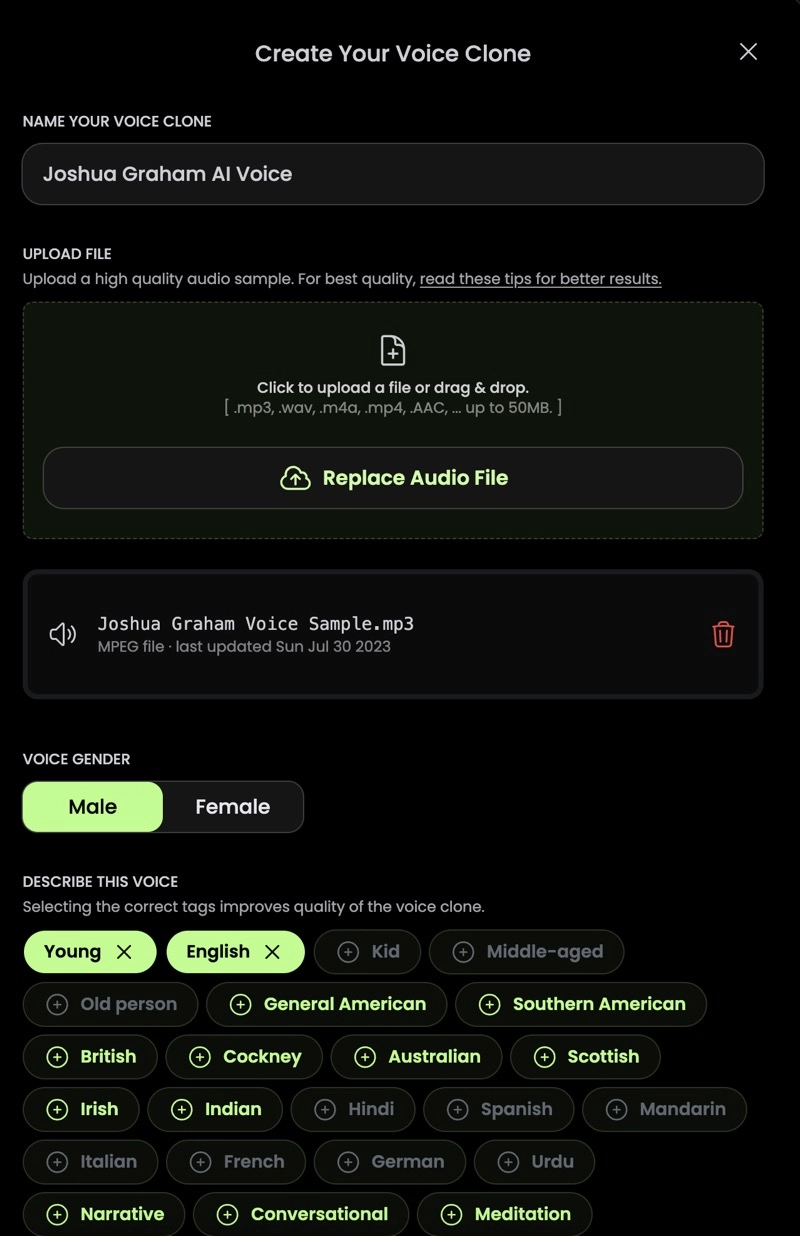
Upload Audio: Name your voice clone and begin uploading your audio files. You can upload pre-recorded files (recommended) or record directly in the browser. It's best to split long recordings into smaller chunks (e.g., 30-minute files) to make uploading easier.
-
Verify Your Voice: Before you can submit the clone for training, you must complete a voice verification step. You'll be asked to read a short, randomly generated text prompt. This is a security measure to ensure you are cloning your own voice and have the rights to do so.
-
Submit and Wait: Once verified, you submit your voice for fine-tuning. This process is not instant; it can take anywhere from 2 to 6 hours, depending on the server queue. You will be notified when it's ready.
The process in Play.HT is very similar, involving uploading samples and letting the model train.
Conclusion
Congratulations! You now have a complete roadmap for creating one of the most powerful and scalable assets in your content marketing arsenal: a digital clone of your own voice. By investing the time upfront to record high-quality audio, you unlock the ability to generate unlimited, authentic audio content for your SaaS ventures.
Key Takeaways:
- A Professional Voice Clone (PVC) is a hyper-realistic digital copy of your voice, ideal for building a consistent and scalable brand.
- The quality of your input audio is the single most important factor for a successful clone. Aim for 2-3 hours of clean, quiet, and naturally spoken recordings.
- The cloning process in tools like ElevenLabs and Play.HT involves uploading your audio, verifying your identity, and waiting for the AI model to train.
- Once created, your voice clone becomes a reusable asset for product demos, tutorials, podcasts, and any other audio-based marketing content.
Preview of the Next Lesson:
Your videos need more than just a great voiceover; they need atmosphere. In the next lesson, you will learn how to generate custom, royalty-free background music for your video using an AI music tool like Soundraw or Mubert. This will allow you to perfectly match the mood of your video content without worrying about copyright issues.