
Good to see you again. In the last lesson, you moved from a service’s logs to its process, open resources, and system calls. DNS troubleshooting uses the same discipline, but the path is wider: an application asks for an address, the operating system applies local name-resolution policy, a local resolver may cache or forward the request, and only then might a packet leave the host.
By the end of this lesson, you should be able to trace that path with evidence and say precisely where it fails: inside the application, in NSS policy, at a local systemd-resolved stub, on the network path to an upstream resolver, or in the resolver’s answer. This is an interview-relevant distinction: “DNS is broken” is a symptom, not a diagnosis.
A hostname lookup is not automatically a DNS packet
When an application needs to contact api.example.com, it usually asks a resolver API for usable socket addresses. On Linux, a common API is getaddrinfo().
The application does not necessarily send a DNS query itself. It asks something equivalent to:
“Give me addresses for this hostname and service.”
The operating system may return an answer from several places:
- a literal IP address supplied by the application, requiring no lookup;
- a local
/etc/hostsentry; - a cache;
- a local resolver daemon;
- an upstream recursive DNS resolver.
The resolver may return IPv4 addresses through A records, IPv6 addresses through AAAA records, or aliases that require following a CNAME record. A dual-stack application may cause both A and AAAA queries. Therefore, seeing two queries is often expected, not automatically a defect.
Keep the boundary with the next troubleshooting topic clear:
- DNS resolution answers: “Which address should I try?”
- TCP connectivity answers: “Can I establish a connection to that address and port?”
A successful lookup does not prove that the application can connect. Conversely, a TCP failure does not prove DNS was wrong.
Also, this common path is not universal. An application written in Go, Java, Node.js, or using a library such as c-ares may use its own resolver behavior, DNS-over-HTTPS, a sidecar, or an explicitly configured nameserver. Start by assuming the standard path only after checking the application’s runtime configuration and behavior.
NSS decides which local sources count as an answer
For applications using glibc’s normal resolver APIs, Linux consults the Name Service Switch, or NSS. NSS is the policy layer that determines the lookup sources and their order.
Inspect the active host-lookup rule first:
grep -E '^[[:space:]]*hosts:' /etc/nsswitch.conf
A simple configuration might contain:
hosts: files dns
Read this as:
- Consult the
filessource, which means/etc/hosts. - If no matching name is found there, consult the
dnssource.
Many modern distributions use a more complex line, for example:
hosts: files resolve [!UNAVAIL=return] dns
Here, resolve usually refers to an NSS module that communicates with systemd-resolved. The bracketed action changes fallback behavior. Its practical purpose is often: use systemd-resolved when it is available, but retain dns as a fallback if that resolver service is unavailable.
Do not assume every host uses files first or even uses DNS at all. The current hosts: line is evidence.
nsswitch.conf(5) - Linux manual page
Read the official nsswitch.conf(5) manual page from man7.org to understand the policy layer between an application resolver call and DNS transport. It explains why an answer in /etc/hosts can prevent a DNS query entirely, and why bracketed rules matter during failures.
In the opening explanation, read the NSS lookup rules. Focus on the hosts database, source ordering, and the meanings of success, notfound, unavail, and tryagain. Then, in the FILES section, read the hosts backend mapping. Notice that files for the hosts database corresponds to /etc/hosts.
A local hosts entry can deliberately override public or internal DNS:
192.0.2.50 api.example.com
If files appears before dns, an application using NSS will receive 192.0.2.50 without sending a DNS query. This can be useful for controlled testing, but it is also a classic source of “only this host reaches the wrong service” incidents.
Inspect, but do not casually edit, the file during an incident:
grep -n -- 'api.example.com' /etc/hosts
cat /etc/hosts
Use getent as an application-like NSS probe:
getent ahostsv4 api.example.com
getent ahostsv6 api.example.com
getent is valuable because it follows the system’s NSS configuration. It is closer to what a typical glibc-based application sees than a direct DNS utility is. It still may not exactly reproduce an application’s address-family preferences, caching behavior, or custom resolver library, so treat it as a targeted probe rather than final proof.
/etc/resolv.conf identifies the next resolver hop—sometimes
If NSS reaches a DNS-capable source, the system needs to know where to send the query. Traditionally, /etc/resolv.conf lists one or more nameservers:
nameserver 10.20.0.10
nameserver 10.20.0.11
search corp.example
On a host without a local resolver daemon, these may be the actual upstream recursive resolvers. The resolver library can send queries directly to them.
However, on many current Linux distributions, you will instead see:
nameserver 127.0.0.53
This does not mean that a DNS server on the Internet is located at 127.0.0.53. It means the application is sending DNS requests to a local stub listener. On systemd-based hosts, that listener is commonly provided by systemd-resolved, which then chooses and contacts an upstream resolver.
Check what resolv.conf really is:
readlink -f /etc/resolv.conf
cat /etc/resolv.conf
It may be:
- a regular static file;
- a file managed by NetworkManager or DHCP;
- a symbolic link to a file generated by
systemd-resolved; - a file pointing at another local resolver such as
dnsmasqorunbound.
That distinction changes your next step. If /etc/resolv.conf lists 127.0.0.53, testing an external resolver directly skips part of the failing path.
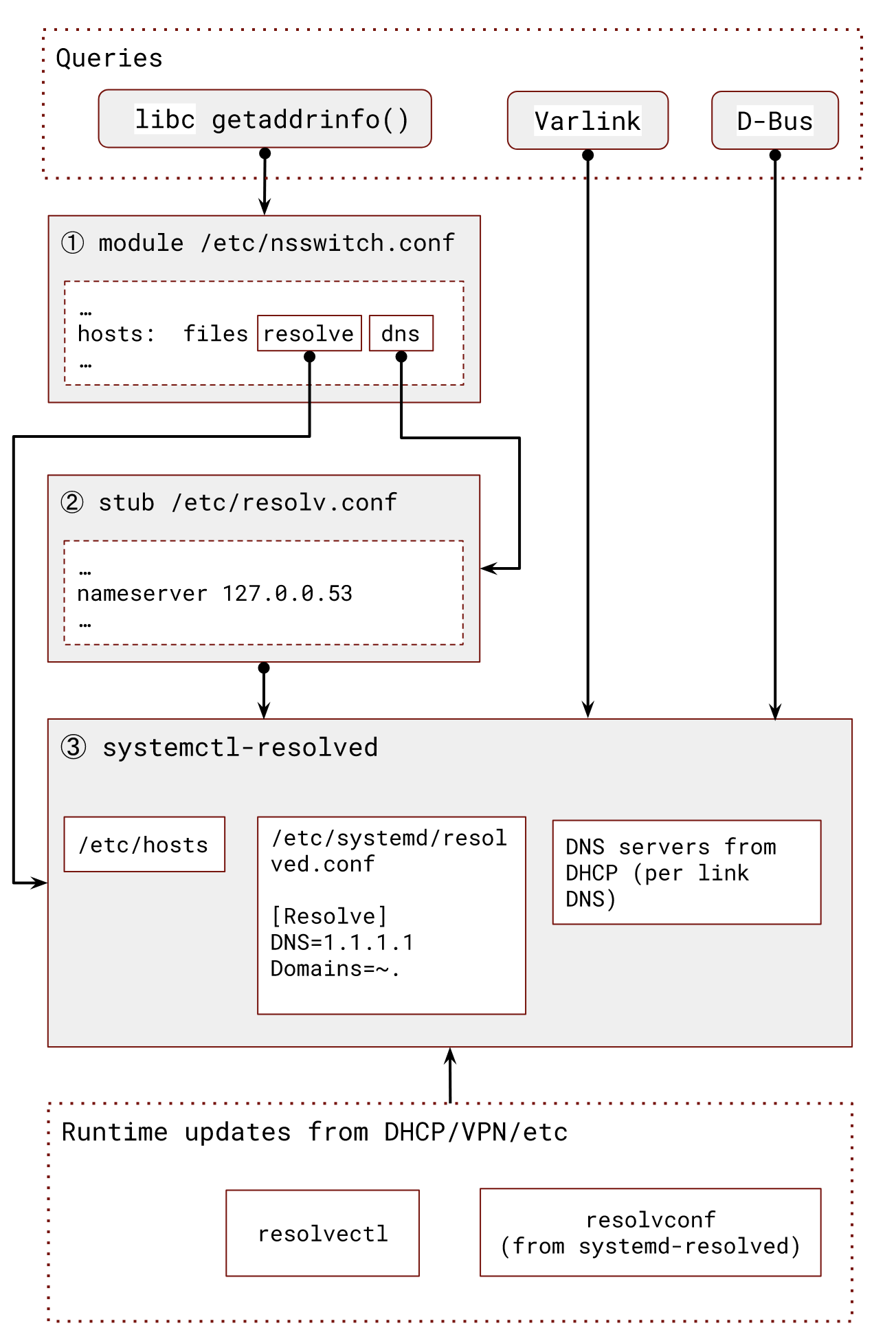
The diagram highlights a production-critical point: the nameserver visible in /etc/resolv.conf may be only the local stub, not the upstream server that ultimately answers the query.
On a host using systemd-resolved, inspect the resolver’s actual view:
systemctl is-active systemd-resolved
resolvectl status
resolvectl query api.example.com
resolvectl status can reveal:
- DNS servers associated with each network link;
- DNS routing domains;
- VPN-specific DNS configuration;
- whether a link is the default DNS route;
- whether DNS-over-TLS or DNSSEC settings affect behavior.
This matters when a name is private to a VPN, such as service.prod.corp.example. A VPN may configure both a DNS server and a routing domain such as ~corp.example. systemd-resolved can then send corporate names through the VPN resolver while sending public names through another link’s resolver. Looking only at /etc/resolv.conf would miss that routing decision.
Runtime network configuration often overwrites manual changes to /etc/resolv.conf. DHCP, NetworkManager, VPN clients, and systemd-resolved can all manage it. During diagnosis, identify the manager before proposing a configuration change.
Use dig to test a specific DNS hop, not the whole application path
dig is an excellent DNS diagnostic tool, but it tests a different layer from getent.
getenttests the NSS path used by many applications, including/etc/hosts.resolvectl querytestssystemd-resolvedwhen that service is in use.dig @servertests a DNS transaction against the exact server you name.
This means a successful dig result does not prove the application will resolve the same hostname. In particular, dig does not validate /etc/hosts precedence or every NSS action rule.
How to Use the dig Command in Linux | DNS Lookup Tutorial
Watch “How to Use the dig Command in Linux | DNS Lookup Tutorial” from Learn Linux TV for the practical mechanics of querying an address record and directing a query to a chosen DNS server. The second capability is especially useful for separating a local resolver problem from an upstream resolver problem.
Watch a basic lookup to see the A-record answer, TTL, and query-time fields. Then watch server targeting for the @server form. In an incident, focus on which server was actually queried and whether the command intentionally bypasses the local resolver layer.
Useful probes include:
# Query through the configured DNS path used by dig itself.
dig api.example.com A

# Query the local systemd-resolved stub explicitly.
dig @127.0.0.53 api.example.com A

# Query one known upstream resolver explicitly.
dig @10.20.0.10 api.example.com A

# Concise answer output, useful for controlled scripts.
dig +short @10.20.0.10 api.example.com A
Interpret each command narrowly:
| Probe | What a success establishes | What it does not establish |
|---|---|---|
getent ahostsv4 name | NSS can produce an IPv4 address on this host. | The answer came from DNS rather than /etc/hosts or a cache. |
resolvectl query name | systemd-resolved can answer the query. | Every application uses systemd-resolved. |
dig @127.0.0.53 name | The local stub listener responds to a DNS query. | The application’s NSS policy reaches that stub. |
dig @upstream name | The host can query that specified resolver directly. | The local resolver is configured to use it or route names to it. |
For a split-DNS incident, these distinctions prevent a common mistake: querying a public resolver, receiving NXDOMAIN, and concluding that an internal application is misconfigured. The application may correctly depend on an internal resolver that is reachable only through a VPN.
Trace the lookup from the affected process
Start with the actual failing service and its exact name. A successful lookup from your shell is useful but insufficient: the service may run as another user, in a container, in a different network namespace, with different /etc/resolv.conf, or with injected environment variables.
First establish the service context:
unit=report-api.service

systemctl status "$unit" --no-pager
journalctl -u "$unit" --since "15 minutes ago" -o short-iso --no-pager

pid=$(systemctl show -p MainPID --value "$unit")
ps -p "$pid" -o pid,user,etime,cmd
Then inspect the resolver configuration visible to that process. For a normal host process, the following often reflects the same filesystem view:
grep -E '^[[:space:]]*hosts:' /etc/nsswitch.conf
cat /etc/hosts
readlink -f /etc/resolv.conf
cat /etc/resolv.conf
For containerized services, inspect from inside the container or its network namespace instead. Kubernetes and container runtimes commonly generate a container-specific /etc/resolv.conf; its nameserver and search domains can differ from the host’s.
If the lookup is reproducible and a short trace is operationally safe, extend the strace method from the previous lesson:
sudo timeout --signal=INT 15s \
  strace -ff -tt -s 128 \
  -e trace=%file,%network \
  -p "$pid" \
  -o "/tmp/dns-trace.${pid}"
Trigger one lookup during the capture. Then inspect the trace files:
sudo grep -E 'nsswitch|hosts|resolv|socket|connect|send|recv|poll' \
  /tmp/dns-trace."$pid"*
You may observe evidence such as:
openat(..., "/etc/hosts", O_RDONLY|O_CLOEXEC) = 3
openat(..., "/etc/resolv.conf", O_RDONLY|O_CLOEXEC) = 3
connect(..., 127.0.0.53:53, ...) = 0
sendmmsg(...) = 2
poll(...) = 0 (Timeout)
The interpretation is a chain of facts:
- The process consulted local configuration.
- It attempted to use the local resolver stub.
- It sent requests, potentially for both A and AAAA records.
- It waited for a response.
- The wait timed out.
This supports “the application did not receive a timely DNS response from its configured local resolver.” It does not yet prove whether the local stub is unhealthy, the upstream resolver is unreachable, a VPN route is absent, or an upstream server is not responding.
On a system using nss-resolve, the process may contact systemd-resolved through local IPC rather than visibly sending UDP to port 53. The exact system calls vary by distribution and resolver library. That is why resolvectl status, resolvectl query, and resolver logs complement strace.
For systemd-resolved, correlate with its logs in the same incident window:
journalctl -u systemd-resolved \
  --since "2025-03-08 10:10:00" \
  --until "2025-03-08 10:20:00" \
  -o short-iso \
  --no-pager
Confirm where packets stop
Packet capture is the final layer of evidence when command-level output does not distinguish a local failure from an upstream failure. Capture only during a controlled reproduction and only as long as required.
If the process uses the 127.0.0.53 stub, observe the loopback interface:
sudo tcpdump -ni lo 'udp port 53 or tcp port 53'
If resolvectl status shows an upstream resolver at 10.20.0.10 on eth0, observe the upstream side separately:
sudo tcpdump -ni eth0 \
  'host 10.20.0.10 and (udp port 53 or tcp port 53)'
Use the evidence to narrow the failure:
| Observation | Most defensible conclusion | Next check |
|---|---|---|
/etc/hosts contains the hostname and getent returns that address | NSS may be resolving locally; no DNS packet is required. | Validate whether the mapping is intentional and current. |
getent fails, but dig @upstream succeeds | The upstream resolver can answer, but the application’s local path differs. | Check NSS policy, local stub health, container configuration, and VPN DNS routing. |
Query reaches 127.0.0.53, but no upstream query leaves the host | The local resolver accepted the request but did not forward it during the capture. | Inspect systemd-resolved state, routing domains, logs, and cache behavior. |
| Query leaves for the configured upstream resolver but no reply returns | The failure is beyond the application and local stub. | Check route, security controls, VPN state, upstream resolver health, and packet loss. |
| Reply returns from the resolver, but the application still reports resolution failure | DNS transport worked; the failure may concern response interpretation or application-specific behavior. | Compare record type, search-domain expansion, resolver library, logs, and the exact hostname requested. |
If DNS-over-TLS is enabled, the upstream traffic may use TCP port 853 rather than UDP or TCP port 53. In that case, tcpdump may show encrypted traffic but not the queried name. The key evidence is still whether the resolver establishes and receives traffic to its configured upstream server.
Avoid routinely flushing caches on production systems just to “make DNS happen.” Caching can explain why no packet is visible, but clearing shared caches can create unnecessary upstream load and change behavior for other workloads. Prefer a controlled reproduction, resolver statistics, and timestamp correlation.
A compact interview and incident workflow
When told, “the service cannot resolve its dependency,” work from the process outward:
- Bound the symptom. Record the affected service, exact hostname, error text, and time window.
- Confirm the application path. Identify whether it uses normal OS resolution or an explicit/custom resolver configuration.
- Test NSS behavior. Inspect the
hosts:rule,/etc/hosts, and usegetentfor IPv4 and IPv6 candidates. - Identify the local resolver topology. Inspect
/etc/resolv.conf; if it names a loopback address, inspectsystemd-resolvedor the relevant local daemon. - Test deliberately chosen hops. Use
resolvectl queryfor the local resolved service anddig @serverfor an exact DNS server. - Trace only when needed. Capture a short, filtered
straceof the affected process during a reproduction. - Use packet capture to locate the last observed hop. Check loopback and the relevant egress interface separately.
- State the conclusion with its boundary. Explain what the evidence proves, what remains unproven, and the next smallest check.
A concise answer in an interview might be:
“I would first confirm the exact hostname and timestamp from the service logs, then identify whether the process uses the standard OS resolver or an application-specific DNS setting. For the OS path, I would inspect the
hosts:entry innsswitch.conf, check/etc/hosts, and usegetentto reproduce the NSS result. Next I would inspect/etc/resolv.conf; if it points to127.0.0.53, I would useresolvectl statusandresolvectl queryto identify the actual upstream resolver and its routing domain. If necessary, I would trace the process briefly and capture DNS traffic on loopback and egress. That lets me distinguish a local override, NSS policy issue, resolver daemon issue, network path failure, and an upstream DNS failure.”
Key takeaways
- An application hostname lookup commonly begins with
getaddrinfo(), but a DNS packet is only one possible part of the process. - NSS policy in
/etc/nsswitch.confdetermines source order;/etc/hostscan answer a lookup before DNS is consulted. /etc/resolv.confmay list actual upstream resolvers or a local stub such as127.0.0.53.- On
systemd-resolvedsystems, useresolvectl statusto see per-link DNS servers, VPN routing domains, and resolver behavior. - Use
getentto test the NSS path,resolvectl queryto test the local resolved service, anddig @serverto test a specific DNS server. - Correlate service logs,
strace, resolver logs, and packet capture. Each establishes a different part of the chain. - A DNS answer gives an address; it does not prove the application can establish a TCP connection to it.
Next, you will use this resolved address as the starting point for isolating TCP connectivity failures with socket, routing, and packet-level evidence.
Can't find a good explanation? Sign up and we'll make it for you
Sign up