
Welcome back. In the previous lesson, you learned to aggregate order data and, crucially, to define the grain of a report: one row per region, category, or other intended grouping. Joins make that discipline even more important. Before you calculate a KPI across several tables, you must know which rows will be retained and whether the join changes the number of rows.
In this lesson, you will combine related tables with INNER JOIN and LEFT JOIN, using explicit keys and table aliases. You will also learn a small set of QA checks that help prevent missing records or inflated totals—two frequent causes of incorrect reports.
Why reporting data is split across tables
In a real reporting system, one table rarely contains everything you need. For example:
- An
ORDERtable records transactions, amounts, dates, and acustomer_id. - A
CUSTOMERtable stores the customer’s name, region, and account status. - The business wants a report showing each order alongside the customer name and region.
The data is separated to avoid repeating customer details on every transaction. The trade-off is that SQL must reconnect the tables when you need a combined result.
SQL Lesson 6: Multi-table queries with JOINs
Read SQLBolt’s concise introduction to normalized tables and INNER JOIN syntax. It establishes why related business data is stored separately and how a matching key reconnects it.
In the “Database normalization” section, read the normalization context. Focus on the trade-off: less duplicated data, but more complex analytical queries. Then, in “Multi-table queries with JOINs,” read the INNER JOIN explanation. Follow the generic query structure and notice that the ON clause defines exactly which values are allowed to match.
Keys: the link between tables
Consider these small tables.
FCT_ORDER — one row per order
| order_id | customer_id | order_date | net_sales |
|---|---|---|---|
| 9001 | 101 | 2025-01-03 | 120.00 |
| 9002 | 101 | 2025-01-05 | 80.00 |
| 9003 | 102 | 2025-01-06 | 200.00 |
| 9004 | 999 | 2025-01-07 | 75.00 |
DIM_CUSTOMER — one row per customer
| customer_id | customer_name | region |
|---|---|---|
| 101 | Aisha Khan | East |
| 102 | Ben Ortiz | West |
| 103 | Chen Wei | East |
| 104 | Diana Rao | South |
Here, DIM_CUSTOMER.customer_id is expected to uniquely identify a customer. It is the table’s primary key. In FCT_ORDER, the same business identifier appears as a foreign key: it tells us which customer placed each order.
The required match is:
The column names need not be identical. What matters is that the two columns represent the same business identifier and have compatible values.
Use table aliases so it is always clear where each column comes from:
oforFCT_ORDERcforDIM_CUSTOMER
This is especially important because both tables have a customer_id column.
INNER JOIN: retain only matched records
An INNER JOIN returns a result row only when the join key has a match in both tables.
SELECT
    o.order_id,
    o.order_date,
    o.net_sales,
    c.customer_name,
    c.region
FROM PORTFOLIO_DB.RAW.FCT_ORDER AS o
INNER JOIN PORTFOLIO_DB.RAW.DIM_CUSTOMER AS c
    ON o.customer_id = c.customer_id
ORDER BY o.order_id;
In this query:
FCT_ORDERsupplies the transaction information.DIM_CUSTOMERsupplies customer attributes.- The
ONcondition says that an order belongs with a customer when theircustomer_idvalues are equal. INNER JOINretains only order-customer pairs that meet that condition.
The output is:
| order_id | order_date | net_sales | customer_name | region |
|---|---|---|---|---|
| 9001 | 2025-01-03 | 120.00 | Aisha Khan | East |
| 9002 | 2025-01-05 | 80.00 | Aisha Khan | East |
| 9003 | 2025-01-06 | 200.00 | Ben Ortiz | West |
Order 9004 is absent because customer 999 is not in DIM_CUSTOMER. Customers 103 and 104 are also absent because they have no orders.
JOIN without the word INNER has the same meaning:
FROM PORTFOLIO_DB.RAW.FCT_ORDER AS o
JOIN PORTFOLIO_DB.RAW.DIM_CUSTOMER AS c
    ON o.customer_id = c.customer_id
While both forms work, write INNER JOIN explicitly while learning. It makes the retention rule visible to anyone reviewing your SQL.
When is an inner join appropriate?
Use an INNER JOIN when unmatched rows should not be part of the result. For example:
- A report of orders with valid customer records
- Revenue by customer region, after deciding unmatched customer IDs are invalid for that report
- A quality check that investigates only records with a known match
But be careful: an inner join can silently remove rows. If the business asks for all completed orders, then losing orders with missing customer records can make revenue appear lower than it really is.
LEFT JOIN: preserve every row from the left table
A LEFT JOIN keeps every row from the table written on its left side of the join. It also adds matching values from the right table where possible.
SELECT
    o.order_id,
    o.customer_id,
    o.order_date,
    o.net_sales,
    c.customer_name,
    c.region
FROM PORTFOLIO_DB.RAW.FCT_ORDER AS o
LEFT JOIN PORTFOLIO_DB.RAW.DIM_CUSTOMER AS c
    ON o.customer_id = c.customer_id
ORDER BY o.order_id;
This result includes all four orders:
| order_id | customer_id | order_date | net_sales | customer_name | region |
|---|---|---|---|---|---|
| 9001 | 101 | 2025-01-03 | 120.00 | Aisha Khan | East |
| 9002 | 101 | 2025-01-05 | 80.00 | Aisha Khan | East |
| 9003 | 102 | 2025-01-06 | 200.00 | Ben Ortiz | West |
| 9004 | 999 | 2025-01-07 | 75.00 | NULL | NULL |
Order 9004 survives because FCT_ORDER is on the left. Since no customer row matches customer_id = 999, the fields selected from DIM_CUSTOMER become NULL.
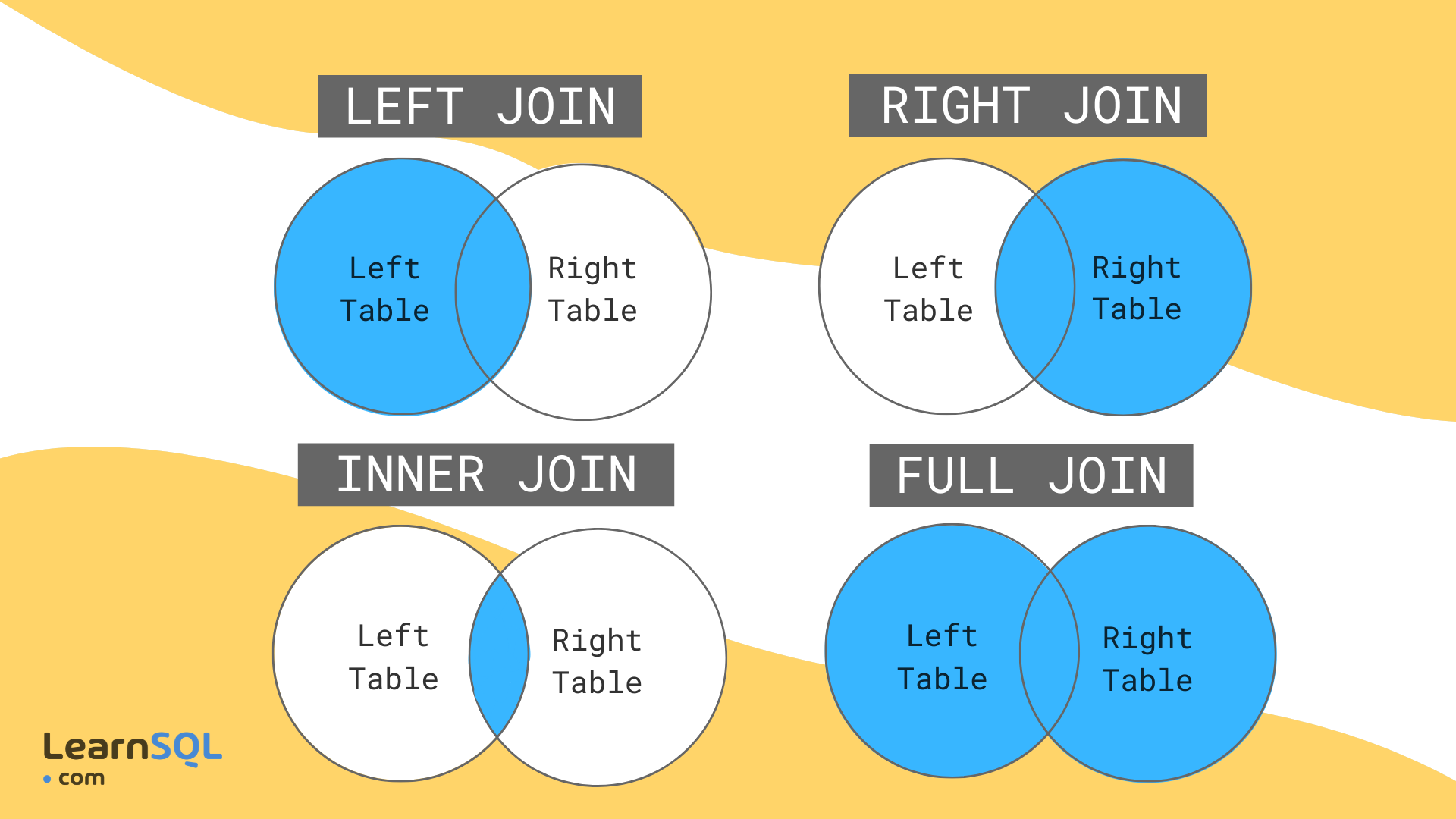
The Venn-style image is useful as a memory aid, but think in terms of rows and key matches, not just abstract sets. SQL joins can produce more than one output row from a source row when keys are duplicated—a major reporting risk we will address shortly.
The key question: which table must survive?
Before choosing LEFT JOIN, state the requirement in plain language:
“Which entity must appear even if related data is missing?”
If the answer is every order, start with FCT_ORDER and place it left of LEFT JOIN.
If the answer is every customer, reverse the table order:
SELECT
    c.customer_id,
    c.customer_name,
    c.region,
    o.order_id,
    o.net_sales
FROM PORTFOLIO_DB.RAW.DIM_CUSTOMER AS c
LEFT JOIN PORTFOLIO_DB.RAW.FCT_ORDER AS o
    ON c.customer_id = o.customer_id
ORDER BY
    c.customer_id,
    o.order_id;
Now customers 103 and 104 appear, with NULL values for the order fields. Customer 101 appears twice because that customer has two orders.
That is not an error. It means the output grain is now:
One row per customer-order combination.
The order of tables does not change the matched rows for an INNER JOIN, but it fundamentally changes the result of a LEFT JOIN.
Inner Joins vs Left Joins in SQL [The Only Video You Need]
Watch “Inner Joins vs Left Joins in SQL [The Only Video You Need]” by Jess Ramos | Data, AI, & Tech. The examples use Snowflake-style tables and clearly show how table order affects a left join.
Watch INNER JOIN behavior to see orders and customers matched by customer ID and to observe why customers without orders disappear. Then watch LEFT JOIN behavior. Notice that the presenter deliberately puts customers on the left when the requirement is to retain all customers, including those with no orders. Finish with the comparison, focusing on the reporting consequences of choosing the wrong join type.
NULL after a left join is useful QA evidence
In the previous lesson, you learned that NULL means missing or unknown. In a left-joined result, a NULL in a right-table key usually signals an unmatched left-table record.
For example, this query finds orders whose customer ID has no matching customer record:
SELECT
    o.order_id,
    o.customer_id,
    o.order_date,
    o.net_sales
FROM PORTFOLIO_DB.RAW.FCT_ORDER AS o
LEFT JOIN PORTFOLIO_DB.RAW.DIM_CUSTOMER AS c
    ON o.customer_id = c.customer_id
WHERE c.customer_id IS NULL
ORDER BY o.order_id;
For the sample data, it identifies order 9004.
Check the right-side key, such as c.customer_id, rather than a descriptive column like c.customer_name. A customer may exist but legitimately have a missing name. If you used c.customer_name IS NULL, you could incorrectly classify a valid match as unmatched.
A compact reconciliation is also useful:
SELECT
    COUNT(*) AS order_rows_after_join,
    COUNT(c.customer_id) AS orders_with_matching_customer,
    COUNT(*) - COUNT(c.customer_id) AS orders_without_matching_customer
FROM PORTFOLIO_DB.RAW.FCT_ORDER AS o
LEFT JOIN PORTFOLIO_DB.RAW.DIM_CUSTOMER AS c
    ON o.customer_id = c.customer_id;
If DIM_CUSTOMER.customer_id is unique, this tells you:
- how many order rows remain after the join,
- how many have a valid customer match,
- how many need data-quality investigation.
For a later KPI report, these counts let you distinguish two different business situations:
- Total order revenue: all orders may be included.
- Revenue attributed to a customer region: only matched orders can be assigned a region unless a defined “Unknown” category is used.
Do not silently treat those as the same metric.
Join grain: why valid SQL can still produce wrong totals
A join may run successfully and still make a report wrong. The most common reason is that the data does not have the grain you expected.
For this join:
FROM FCT_ORDER AS o
LEFT JOIN DIM_CUSTOMER AS c
    ON o.customer_id = c.customer_id
the intended relationship is:
FCT_ORDER: many orders can belong to one customer.DIM_CUSTOMER: one row should exist for each customer.- Result: one row per order.
That result preserves the order grain. Each order can match at most one customer.
However, suppose DIM_CUSTOMER mistakenly has two rows for customer_id = 101. Orders 9001 and 9002 would each match twice. The output would contain duplicate order rows, and SUM(o.net_sales) would overstate revenue.
Check the expected unique key before trusting a join:
SELECT
    customer_id,
    COUNT(*) AS customer_row_count
FROM PORTFOLIO_DB.RAW.DIM_CUSTOMER
GROUP BY customer_id
HAVING COUNT(*) > 1;
For a customer dimension that should return one row per customer, this query should return zero rows.
Then compare counts before and after the join:
SELECT
    COUNT(*) AS source_order_rows,
    COUNT(DISTINCT order_id) AS distinct_orders
FROM PORTFOLIO_DB.RAW.FCT_ORDER;
SELECT
    COUNT(*) AS joined_rows,
    COUNT(DISTINCT o.order_id) AS distinct_orders
FROM PORTFOLIO_DB.RAW.FCT_ORDER AS o
LEFT JOIN PORTFOLIO_DB.RAW.DIM_CUSTOMER AS c
    ON o.customer_id = c.customer_id;
For a valid order-to-customer join:
joined_rowsshould equal the original count of order rows.distinct_ordersshould remain unchanged.- If
joined_rowsincreases, investigate duplicate matches on the customer side.
A left join protects against missing right-side matches. It does not protect against duplicate right-side matches. This distinction becomes central when validating dashboards or AI-generated SQL.
Keep ON and WHERE logically separate
The ON clause defines how rows match. The WHERE clause filters the joined result after the join has been performed.
This query appears to be a left join:
SELECT
    o.order_id,
    c.customer_name,
    c.region
FROM PORTFOLIO_DB.RAW.FCT_ORDER AS o
LEFT JOIN PORTFOLIO_DB.RAW.DIM_CUSTOMER AS c
    ON o.customer_id = c.customer_id
WHERE c.region = 'East';
But it removes unmatched orders because their c.region is NULL, and NULL = 'East' is not TRUE. In practice, this acts like an inner join for the East-region condition.
Use this version when the true requirement is:
“Show orders for customers in the East region.”
That is appropriate because unmatched orders have no confirmed East-region customer.
By contrast, if the requirement is:
“Keep every order, but attach customer information only when the customer is in the East,”
put the condition in the ON clause:
SELECT
    o.order_id,
    o.net_sales,
    c.customer_name,
    c.region
FROM PORTFOLIO_DB.RAW.FCT_ORDER AS o
LEFT JOIN PORTFOLIO_DB.RAW.DIM_CUSTOMER AS c
    ON o.customer_id = c.customer_id
   AND c.region = 'East';
All orders remain. Orders from non-East customers and unmatched customers show NULL for the selected customer fields because they do not meet the complete matching rule.
For foundational work, use a simple discipline:
- Write the business entity that must be retained.
- Choose it as the left table if unmatched records must survive.
- Write the exact key relationship in
ON. - Apply report filters in
WHERE, after deciding whether they should exclude unmatched rows. - Validate the output row count and unmatched-record count before aggregating revenue or orders.
Key takeaways
INNER JOIN retains only rows with matching keys in both tables:
FROM FCT_ORDER AS o
INNER JOIN DIM_CUSTOMER AS c
    ON o.customer_id = c.customer_id
LEFT JOIN retains every row from the table on the left and supplies NULL values for unmatched right-table columns:
FROM FCT_ORDER AS o
LEFT JOIN DIM_CUSTOMER AS c
    ON o.customer_id = c.customer_id
Before joining, identify:
- the business entity that must be retained,
- the correct keys to match,
- the expected grain of each table,
- whether the right-side key is unique.
For QA, use a left join followed by WHERE right_table.key IS NULL to expose unmatched records. Also compare row counts before and after a join, because duplicate matches can inflate aggregates without causing a SQL error.
Next, you will use CASE expressions to create reporting categories and conditional metrics. Combined with joins, CASE will let you label unmatched records, classify orders, and make business rules visible directly in a reporting query.
Can't find a good explanation? Sign up and we'll make it for you
Sign up