
Welcome back. Last time, you learned how INNER JOIN and LEFT JOIN determine which records survive when tables are combined—and why a join can silently drop records or duplicate revenue if its keys and grain are wrong.
Now you will use CASE expressions to make business rules visible in SQL. A CASE expression can label each order with a category such as Small, Medium, or Large; flag exceptions such as unmatched customers; and build metrics such as completed-order revenue or completion rate. These are core techniques for Snowflake reporting, dashboard QA, and validating AI-generated SQL.
CASE: SQL’s conditional decision tool
A CASE expression evaluates conditions in order and returns one value for each input row. Think of it as a cascading decision:
CASE
    WHEN condition_1 THEN result_1
    WHEN condition_2 THEN result_2
    ELSE default_result
END
The pieces have distinct jobs:
CASEstarts the conditional expression.WHENspecifies a condition to test.THENspecifies the returned value when that condition is true.ELSEprovides a fallback when no condition is true.ENDcloses the expression.AS alias_namegives the new calculated column a reporting-friendly name.
The first WHEN condition that evaluates to TRUE wins. SQL does not continue looking for later matches.
Case Statements in SQL in 12 min [100% FREE Masterclass]
Watch Case Statements in SQL in 12 min by Jess Ramos | Data, AI, & Tech. It gives a concise visual explanation of sequential evaluation, category boundaries, and turning conditional flags into reporting metrics.
Start with the core idea to establish the cascading logic. Then watch the syntax and numeric categories; pay close attention to why boundary values and ELSE matter. Finish with binary metrics to see how 1 and 0 values become counts and rates.
A first reporting category
Suppose FCT_ORDER has one row per order and includes quantity. The business wants three order-size categories:
- Small: fewer than 10 units
- Medium: 10 through 20 units
- Large: more than 20 units
SELECT
    o.order_id,
    o.product_id,
    o.quantity,
    CASE
        WHEN o.quantity < 10 THEN 'Small'
        WHEN o.quantity BETWEEN 10 AND 20 THEN 'Medium'
        ELSE 'Large'
    END AS order_category
FROM PORTFOLIO_DB.RAW.FCT_ORDER AS o
ORDER BY o.order_id;
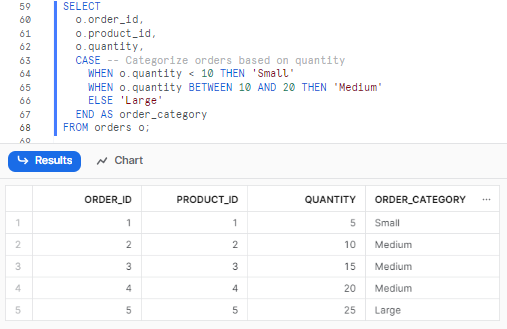
Notice two details:
BETWEEN 10 AND 20includes both 10 and 20.ELSE 'Large'covers every remaining non-NULLquantity, which in this business definition means values above 20.
The category is not stored in the source table. It is calculated when the query runs. This is useful because reporting logic remains visible, reviewable, and easy to test.
Order matters: define complete, non-overlapping ranges
Because CASE stops at the first true condition, condition order is part of the business logic.
Consider this order-value banding rule:
CASE
    WHEN o.net_sales < 500 THEN 'Medium'
    WHEN o.net_sales < 100 THEN 'Small'
    ELSE 'Large'
END AS order_value_band
This is wrong. An order worth 75 meets the first condition, so it becomes Medium; SQL never reaches the Small condition.
Write narrower thresholds first:
CASE
    WHEN o.net_sales < 100 THEN 'Small'
    WHEN o.net_sales < 500 THEN 'Medium'
    ELSE 'Large'
END AS order_value_band
This works because each later rule implicitly applies only after earlier rules failed:
net_sales | First matching rule | Category |
|---|---|---|
| 75.00 | < 100 | Small |
| 100.00 | < 500 | Medium |
| 499.99 | < 500 | Medium |
| 500.00 | ELSE | Large |
This sequential style is compact and usually easier to maintain than repeating lower and upper bounds in every condition.
For data QA, though, you may deliberately write the full ranges when the boundary policy needs to be unmistakable:
CASE
    WHEN o.net_sales >= 0
     AND o.net_sales < 100 THEN 'Small'
    WHEN o.net_sales >= 100
     AND o.net_sales < 500 THEN 'Medium'
    WHEN o.net_sales >= 500 THEN 'Large'
    ELSE 'Invalid or missing sales'
END AS order_value_band
This version makes two useful decisions explicit:
- Negative values and
NULLvalues do not quietly enter a normal sales category. - Unexpected records receive a visible exception label rather than disappearing into a generic group.
Which version is best depends on the reporting definition. The important requirement is that the rules are intentional, complete, and testable.
NULL needs its own condition
A comparison with NULL is not true or false; it is unknown. Therefore, this does not classify a missing amount:
WHEN o.net_sales < 100 THEN 'Small'
If net_sales is NULL, that condition is not TRUE. If no later branch handles it, ELSE is used—or the entire expression returns NULL if there is no ELSE.
When missing values have a meaningful reporting interpretation, handle them first:
CASE
    WHEN o.net_sales IS NULL THEN 'Missing sales amount'
    WHEN o.net_sales < 0 THEN 'Negative value review'
    WHEN o.net_sales < 100 THEN 'Small'
    WHEN o.net_sales < 500 THEN 'Medium'
    ELSE 'Large'
END AS order_value_band
This is valuable in QA work. Instead of allowing missing or invalid values to blend into a chart, you can count and investigate them.
CASE | Snowflake Documentation
Read Snowflake’s official CASE reference to confirm the evaluation order, the fallback behavior, and the special handling required for NULL.
In the opening overview, read the evaluation rule. Focus on the fact that the first true condition determines the result and that omitting ELSE produces NULL when no branch matches. Then, in the “Usage notes” section, read the NULL note; use IS NULL, not equality, when testing for missing values.
A useful continuation from joins: label match quality
In the previous lesson, a LEFT JOIN preserved all orders and exposed missing customer matches through NULL values on the right-hand table. CASE lets you turn that technical result into a reportable QA status.
SELECT
    o.order_id,
    o.customer_id,
    o.net_sales,
    CASE
        WHEN o.customer_id IS NULL THEN 'Missing customer ID'
        WHEN c.customer_id IS NULL THEN 'Unmatched customer ID'
        ELSE 'Matched customer'
    END AS customer_match_status
FROM PORTFOLIO_DB.RAW.FCT_ORDER AS o
LEFT JOIN PORTFOLIO_DB.RAW.DIM_CUSTOMER AS c
    ON o.customer_id = c.customer_id
ORDER BY o.order_id;
The order of these conditions is deliberate:
- First, distinguish an order with no customer ID at all.
- Second, identify an ID that exists in the order table but has no matching customer dimension record.
- Finally, label valid matches.
Check c.customer_id, the joined table’s key, rather than c.customer_name. A customer may be real even if their name is missing; a missing matched key is stronger evidence of an unmatched row.
Two forms of CASE
So far, you have used the searched CASE form:
CASE
    WHEN condition THEN result
    ...
END
Use it when your rules involve comparisons, ranges, multiple columns, AND, OR, or IS NULL.
There is also a shorter simple CASE form for exact value mapping:
CASE o.order_status
    WHEN 'NEW' THEN 'Open'
    WHEN 'PROCESSING' THEN 'Open'
    WHEN 'SHIPPED' THEN 'Closed'
    WHEN 'CANCELLED' THEN 'Closed'
    ELSE 'Unknown status'
END AS order_lifecycle_group
This is equivalent to repeatedly writing:
WHEN o.order_status = 'NEW' THEN 'Open'
Use simple CASE only when you are comparing one expression to fixed values. Do not use it to test NULL:
CASE o.order_status
    WHEN NULL THEN 'Missing'
    ELSE 'Present'
END
That does not work as intended in Snowflake. Use searched CASE instead:
CASE
    WHEN o.order_status IS NULL THEN 'Missing'
    ELSE 'Present'
END
For code mappings, use an explicit ELSE 'Unknown status' rather than silently assigning every new status to an existing business group. In a dashboard or QA output, Unknown status is a signal that the reporting rules or source data need review.
From categories to conditional metrics
A category gives each row a label. A conditional metric uses CASE to return a numeric value that an aggregate function can summarize.
For example, suppose the report needs, by region:
- Total orders
- Completed orders
- Completed revenue
- Completion rate
Assume the source still has one row per order and the customer join does not duplicate orders.
SELECT
    COALESCE(c.region, 'Unknown') AS region,
    COUNT(*) AS total_orders,

    SUM(
        CASE
            WHEN o.order_status = 'COMPLETED' THEN 1
            ELSE 0
        END
    ) AS completed_orders,

    SUM(
        CASE
            WHEN o.order_status = 'COMPLETED' THEN o.net_sales
            ELSE 0
        END
    ) AS completed_net_sales,

    AVG(
        CASE
            WHEN o.order_status = 'COMPLETED' THEN 1.0
            ELSE 0.0
        END
    ) AS completion_rate

FROM PORTFOLIO_DB.RAW.FCT_ORDER AS o
LEFT JOIN PORTFOLIO_DB.RAW.DIM_CUSTOMER AS c
    ON o.customer_id = c.customer_id
GROUP BY COALESCE(c.region, 'Unknown')
ORDER BY completed_net_sales DESC;
Here is what happens row by row:
| Expression | For a completed order | For another order |
|---|---|---|
CASE ... THEN 1 ELSE 0 | 1 | 0 |
CASE ... THEN net_sales ELSE 0 | order value | 0 |
CASE ... THEN 1.0 ELSE 0.0 | 1.0 | 0.0 |
Then the aggregate produces the metric:
SUM(1 and 0)counts qualifying rows.SUM(net_sales and 0)sums sales only for qualifying rows.AVG(1.0 and 0.0)calculates the proportion of qualifying rows.
If completion_rate returns 0.82, that means 82% of the rows in that region meet the stated completion rule.
Conditional metric definitions are business definitions
The SQL may be valid but still calculate the wrong KPI if its definition is vague. Before writing a conditional metric, state:
- Grain: one row per order, invoice, customer, or another entity?
- Numerator: exactly which records qualify?
- Denominator: which records are included in the rate?
- Treatment of
NULLor unknown status: excluded, counted as not completed, or reported separately? - Join requirement: could the join duplicate the rows being counted?
For example, treating a missing order_status as “not completed” may be acceptable for an operational completion rate, but it may hide a source-data problem. A QA report could show a separate metric:
SUM(
    CASE
        WHEN o.order_status IS NULL THEN 1
        ELSE 0
    END
) AS orders_with_missing_status
That separates a business result from a data-quality exception.
Aggregating categories for a report
You can also group by a category produced by CASE. In Snowflake, the selected alias can be used in GROUP BY.
SELECT
    CASE
        WHEN o.net_sales IS NULL THEN 'Missing sales amount'
        WHEN o.net_sales < 0 THEN 'Negative value review'
        WHEN o.net_sales < 100 THEN 'Small'
        WHEN o.net_sales < 500 THEN 'Medium'
        ELSE 'Large'
    END AS order_value_band,

    COUNT(*) AS order_count,
    SUM(o.net_sales) AS total_net_sales

FROM PORTFOLIO_DB.RAW.FCT_ORDER AS o
GROUP BY order_value_band
ORDER BY total_net_sales DESC;
This changes the report grain from one row per order to one row per order-value band. That is appropriate because the category is now the reporting dimension.
Do not confuse CASE with WHERE:
WHEREremoves rows from the result.CASEkeeps rows but labels them or contributes a value such as0to a conditional metric.
For a dashboard, that distinction is essential. Filtering out cancelled orders entirely and displaying cancelled orders as a separate count are different reporting choices.
QA checks for CASE logic
Conditional logic often fails at the edges, not in the middle. Before trusting a category or metric, test the boundary values explicitly.
For the sales-band rules above, your expected results should be documented like this:
| Test value | Expected category | Why |
|---|---|---|
NULL | Missing sales amount | Missing values have an explicit branch |
| -5.00 | Negative value review | Negative sales need review |
| 0.00 | Small | First valid small value |
| 99.99 | Small | Still below 100 |
| 100.00 | Medium | Boundary starts the medium band |
| 499.99 | Medium | Still below 500 |
| 500.00 | Large | Boundary starts the large band |
A practical reporting check is to inspect category distribution:
SELECT
    CASE
        WHEN o.net_sales IS NULL THEN 'Missing sales amount'
        WHEN o.net_sales < 0 THEN 'Negative value review'
        WHEN o.net_sales < 100 THEN 'Small'
        WHEN o.net_sales < 500 THEN 'Medium'
        ELSE 'Large'
    END AS order_value_band,
    COUNT(*) AS order_count
FROM PORTFOLIO_DB.RAW.FCT_ORDER AS o
GROUP BY order_value_band
ORDER BY order_value_band;
Unexpected results should trigger questions:
- Why are there no Medium orders?
- Why are 30% of orders in
Unknown status? - Did new source-system codes appear?
- Are negative sales actually refunds and therefore valid?
- Did a join change the intended one-row-per-order grain before the metric was calculated?
These questions are exactly what you will use later when validating a Power BI visual, reviewing an AI-generated query, or writing an evidence-based defect report.
Key takeaways
A CASE expression applies conditional logic within SQL and returns one result per input row. Its rules are evaluated from top to bottom, and the first true condition wins.
Use searched CASE for ranges, multiple conditions, and NULL handling:
CASE
    WHEN condition THEN result
    ELSE fallback
END
Use simple CASE for direct equality mappings from a single column:
CASE column_name
    WHEN value THEN result
    ELSE fallback
END
For reporting and QA:
- Define category boundaries precisely.
- Test boundary values and
NULLvalues. - Use explicit exception labels such as
Unknown statusorUnmatched customer ID. - Use
SUM(CASE...)for conditional counts and totals. - Use
AVG(CASE... THEN 1.0 ELSE 0.0 END)for a conditional rate. - Confirm the query’s grain before aggregating, especially after joins.
Next, you will apply filtering and aggregation to dates and timestamps, which is essential for monthly reporting, rolling time windows, and period-based KPI validation.
Can't find a good explanation? Sign up and we'll make it for you
Sign up