Hello! Welcome back to our journey into Amazon FBA.
In the last lesson, you learned how to create a highly optimized product listing for Amazon's A9 algorithm. You now know how to build the "digital storefront" for your product. Now, we shift from the digital to the physical. Once you have products from your supplier, you can't just put them in a box and mail them to Amazon. Doing so is a fast track to delays, unexpected fees, and even shipment rejection.
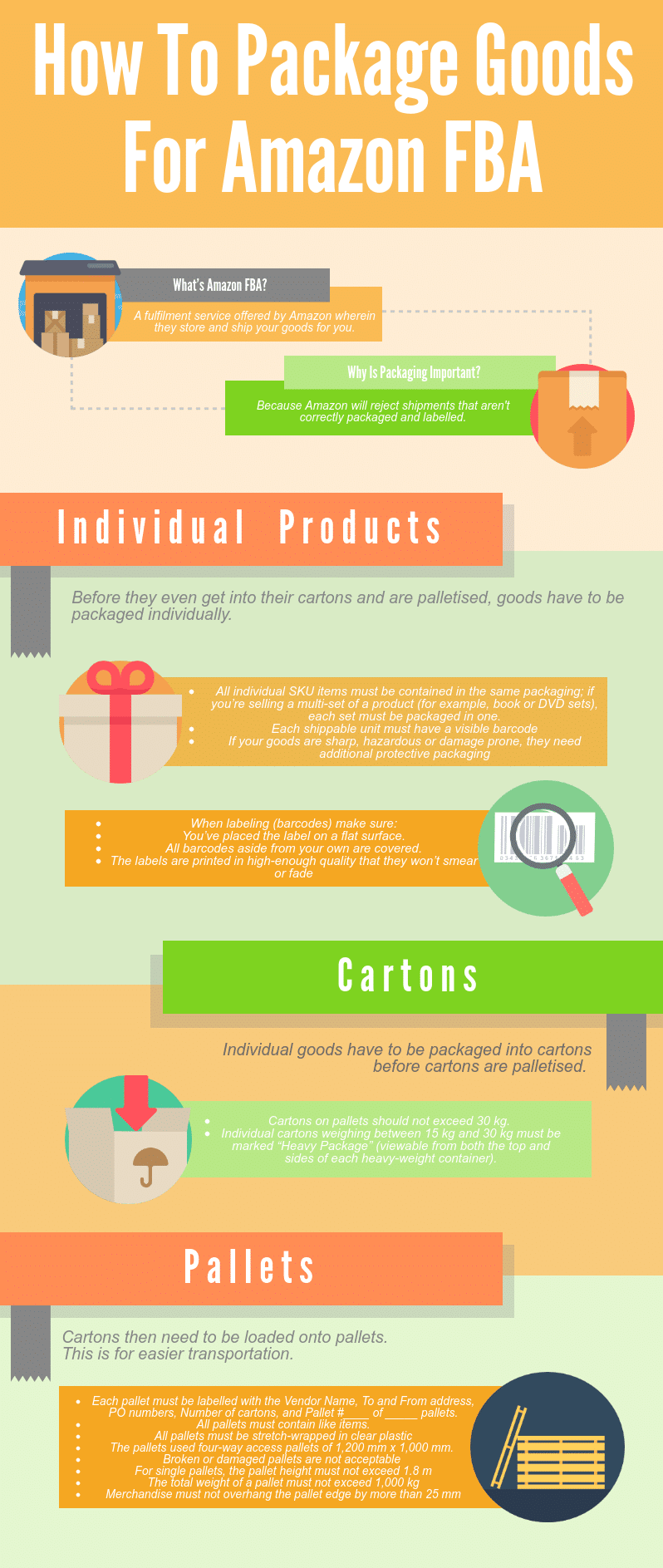
This lesson is designed to be a hands-on guide that directly addresses the learning outcome: Prepare products for FBA shipment according to Amazon's packaging and labeling requirements. We will break down the entire process into a clear, actionable checklist covering how to package individual products, how to label them correctly with barcodes, and how to prepare the larger shipping boxes that will carry your inventory to Amazon's fulfillment centers.
1. The Critical Importance of FBA Prep
"FBA Prep" refers to all the work required to get your products ready before they arrive at an Amazon fulfillment center. Amazon's warehouses are highly automated, and any inventory that doesn't meet their strict standards can disrupt their entire receiving process.
Getting this right from the start is crucial for your business.
Amazon FBA Prep Requirements: Full Checklist For Sellers
To understand the scope of FBA prep and why it's so important, please read the introductory sections of the 'Amazon FBA Prep Requirements: Full Checklist For Sellers' article from FNPrep.
Read the sections 'What Is Amazon FBA Prep?' and 'Why Proper Prep Is Critical'. This will give you a solid overview of the tasks involved and the consequences of non-compliance.
As the article highlights, proper prep helps you:
- Avoid inbound shipping delays.
- Prevent your shipment from being rejected.
- Protect your products from damage.
- Avoid unplanned prep fees from Amazon.
We will break this process into three main areas:
- Individual Unit Prep: Packaging each single product correctly.
- Individual Unit Labeling: Applying the correct barcodes.
- Shipping Carton Prep: Packing and labeling the master boxes you ship to Amazon.
2. Preparing Individual Product Units
Each item a customer will receive must be packaged and protected according to its specific needs. This is about ensuring the product survives the journey to the warehouse and then to the customer in perfect condition.
A. Packaging Types and Requirements
The packaging you or your supplier uses must be appropriate for your product.
How to PREP, PACK & LABEL Your Amazon FBA Shipments | Packaging, Labeling and Barcode Requirements
For a practical overview of the most common packaging options and their specific requirements, let's watch a segment from Crescent Kao's guide on FBA prep.
Watch from 00:56 to 05:50. Pay close attention to the specific rules for each packaging type: Boxes: The 'six-sided' and 'drop test' rules. Poly Bags: The crucial 'suffocation warning' requirement and transparency. This section also explains how your product's final packaged size and weight directly impact your FBA fees, reinforcing what we learned in a previous lesson.
Here's a summary of key packaging rules for different product types:
- Loose Products: Items that aren't in secure packaging (like a shirt or a cable) must be placed in a sealed bag or secured with a non-adhesive band.
- Poly Bags: These are required for many categories like textiles, plush toys, and liquids.
- Must be transparent and at least 1.5 mil thick.
- Crucially, bags with an opening of 5 inches or more must have a suffocation warning. You can buy bags with this pre-printed, or apply it as a sticker.
- Bubble Wrap: This is mandatory for fragile items like glass, ceramics, or anything that could break easily. The item must be completely enclosed, and the barcode label must be placed on the outside of the bubble wrap.
- "Sold as a Set" / Bundles: If you are selling multiple items as a single unit (e.g., "Pack of 3"), they must be packaged together. You must also apply a label that says "Sold as Set," "This is a Set," or "Do not separate" to prevent Amazon staff from breaking up the bundle.
B. Barcode Labeling: The FNSKU
This is arguably the most critical step in FBA prep. Every single unit sent to Amazon needs a scannable barcode so they can track it.
Amazon FBA packaging, prep, and labeling requirements
Amazon's own Seller University provides the definitive explanation of their barcode requirements. This video will clarify the different types of barcodes and which one you should use.
Watch from 00:10 to 04:30. Focus on understanding: The difference between a Manufacturer Barcode (like a UPC) and an Amazon Barcode (FNSKU). Why using the FNSKU is generally recommended to prevent your inventory from being mixed with other sellers' products (commingling). The specific requirements for printing and applying the labels (size, placement, covering old barcodes).
Key Takeaways on Labeling:
- Use the FNSKU, Not the UPC: While Amazon allows the use of the manufacturer's UPC barcode for some products, it's a best practice to always use the Amazon FNSKU barcode. This unique code links the inventory specifically to your seller account, preventing issues where a customer might receive a competitor's lower-quality product.
- Only ONE Scannable Barcode: Your product unit can only have one visible, scannable barcode. If your product's original packaging has a UPC or another barcode, you must cover it completely with your FNSKU label or by using an opaque marker. This prevents scanning errors at the fulfillment center.
- Country of Origin: If you are importing products (e.g., from China to the USA), US customs law requires that each unit be marked with its country of origin (e.g., "Made in China"). This can be printed on your product packaging or applied as a sticker. Your supplier should be familiar with this requirement.
You can print these FNSKU labels yourself from within your Seller Central account during the shipment creation process, or you can send the PDF file to your supplier to have them apply the labels for you.
Test your understanding!
You're selling a kitchen gadget that comes in a retail box with a UPC barcode printed on it. You have generated the correct FNSKU label from your Amazon account. What are the two essential things you must do regarding these barcodes before the product is ready for FBA?
Show answer
- You must apply the FNSKU label to the outside of the product's retail box.
- You must completely cover the original UPC barcode on the box so it cannot be scanned. This can be done by placing the FNSKU label directly over it or by using a blank white label or black marker.
3. Preparing Shipping Cartons (Master Boxes)
Once your individual units are prepped and labeled, you need to pack them into larger shipping boxes (often called "master cartons" or "cartons") to send to Amazon. These boxes have their own set of strict rules.
A. Packing the Cartons
There are two ways to pack your master cartons, and you'll specify which method you're using when you create your shipment plan in Seller Central.
How to PREP, PACK & LABEL Your Amazon FBA Shipments | Packaging, Labeling and Barcode Requirements
Let's turn back to Crescent Kao's video for a clear explanation of packing methods and the critical weight and dimension limits.
Watch from 08:24 to 12:10. This segment is packed with essential, practical information. Focus on: The difference between Case-Packed and Individually Packed shipments. The strict limits: boxes must not weigh more than 50 lbs and cannot exceed 25 inches on any side (unless a single unit itself is larger). Amazon's Partnered Carrier Program, which offers discounted shipping for domestic US shipments.
- Packing Materials: Use appropriate dunnage (packing material) like air pillows, bubble wrap, or full sheets of paper. Do not use packing peanuts, foam strips, or shredded paper, as Amazon forbids them. You can find a clear list of allowed and disallowed materials in the "Amazon FBA Packaging Requirements" article from Jungle Scout under the subheading
Packing materials.
B. Labeling the Cartons
This is a very common point of confusion for new sellers. Each shipping carton you send to Amazon requires TWO distinct labels.
How to PREP, PACK & LABEL Your Amazon FBA Shipments | Packaging, Labeling and Barcode Requirements
The final segment of Crescent Kao's video perfectly clarifies the two-label system for shipping cartons.
Watch from 12:10 to 13:47. The presenter does an excellent job of visually and verbally explaining the difference between: The Amazon FBA Box ID Label (for Amazon's internal tracking). The Carrier Label (for the shipping company, e.g., UPS).
To be clear:
- FBA Box ID Label: You will generate this from within your Amazon Seller Central account when you create your shipment plan. It tells the Amazon warehouse what is inside the box and that it belongs to you.
- Shipping Carrier Label: This is the actual postage label from UPS, FedEx, etc., that gets the box from your location (or your supplier's) to the Amazon fulfillment center address.
Both labels must be placed on a flat surface of the box, and they should not cover each other or any seams on the box.
Conclusion
Properly preparing your products for FBA is a foundational skill for any Amazon seller. While the rules are strict, they are systematic. By following them carefully, you ensure a smooth, efficient process that gets your products into Amazon's inventory and available for sale without costly delays or penalties.
Key Takeaways:
- Prep is Non-Negotiable: Follow Amazon's guidelines for individual units and shipping cartons to the letter.
- FNSKU is Your Identifier: Always use the FNSKU barcode for your private label products and ensure it's the only scannable barcode on the unit.
- Respect the Limits: Keep your shipping cartons under 50 lbs in weight and under 25 inches on any side.
- Two Labels per Carton: Every shipping carton needs an FBA Box ID label and a Carrier (postage) label.
Next Up:
You now know how to create an optimized listing and how to physically prepare your products. The next logical step is to bridge that gap. In our next lesson, we will walk through how to create and execute an FBA shipment plan within Seller Central to send inventory to an Amazon fulfillment center. This is where you'll tell Amazon what you're sending, get your FBA Box ID labels, and prepare your shipment for pickup.