Hello! Welcome back to the course.
In our last lesson, we focused on the crucial financial groundwork of determining a product's profitability using the FBA Revenue Calculator. You learned how to ensure a product is financially viable before committing to it. Now that you can identify a product with a healthy profit margin, the next critical step is to make sure potential customers can actually find it on Amazon.
This lesson directly addresses the learning outcome: Create a product listing optimized for Amazon's A9 search algorithm. We will explore how Amazon's search engine works and then systematically break down how to craft each component of your product listing—from the title and bullet points to the images and backend keywords—to maximize your visibility and drive sales.
1. Understanding the Amazon A9 Algorithm: The "Why"
Before we start writing, we need to understand who we're writing for. You are writing for two audiences: your human customer and Amazon's search algorithm, known as A9.
Unlike Google, which aims to provide information, A9 has one primary goal: to show customers the products they are most likely to buy. This means the algorithm is heavily biased towards performance and conversion.
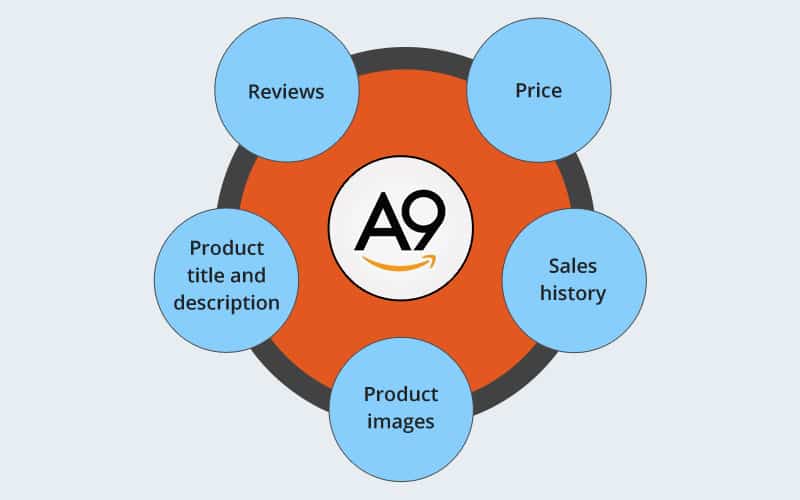
The key factors A9 evaluates are all related to sales potential:
- Click-Through Rate (CTR): What percentage of people who see your product in search results click on it?
- Conversion Rate: What percentage of people who click on your listing end up buying it?
- Sales History: How well has this product sold over time?
- Keyword Relevance: Does your listing contain the keywords the customer searched for?
This creates a powerful feedback loop. A well-optimized listing gets more clicks and sales, which tells Amazon to rank it higher, leading to even more visibility and sales. This is often called the "flywheel effect."

2. Foundational Keyword Research
The foundation of any optimized listing is keyword research. You need to know the exact words and phrases customers are using to search for products like yours. Your goal is to find keywords that are highly relevant, have significant search volume, and, most importantly, lead to sales.
In the past, you've used tools like Helium 10 to research product ideas. We'll now use its keyword research capabilities to build the vocabulary for our listing.
How to List Your First Product on Amazon Seller Central 2026
To see this process in action, let's watch a practical demonstration using Helium 10. This video shows how to find the most important keywords that you will build your listing around.
Watch from 08:07 to 09:36 and from 17:35 to 20:25. The first clip introduces the concept of using a tool like Helium 10 to find search terms. The second clip demonstrates how to analyze those keywords to decide which ones are most relevant and valuable to target in your title and bullet points.
As the video shows, the process involves:
- Identifying a "seed" keyword (e.g., "berberine tea").
- Using a tool to generate a list of related keywords and their search volumes.
- Analyzing the list to find the most relevant and high-traffic terms.
- Looking at competitor listings to see what keywords they are targeting.
A key insight from e-commerce experts is to prioritize keywords based on sales volume, not just search volume. A keyword with 1,000 searches and 100 sales is more valuable than a keyword with 10,000 searches and 10 sales.
Amazon SEO 2025: A Full Guide on Amazon Search ...
The article 'Amazon SEO 2025' from Sellerise provides an excellent step-by-step guide on how to approach keyword research with a focus on conversion and sales.
Read 'Step 1: Understand the Importance of Sales Volume Over Search Volume' and 'Step 2: Do Keyword Research with a focus on sales volume'. This will give you a solid framework for selecting keywords that actually drive revenue.
Once you have your list of primary and secondary keywords, you're ready to build your listing.
3. Crafting the Listing Components
An Amazon listing is made of several distinct parts. We will optimize each one for both the A9 algorithm and the human shopper.
A. The Product Title
The title is the single most important place for your keywords. It carries the most weight in the A9 algorithm. A well-structured title can dramatically improve your ranking.
Best Practice Formula: [Brand Name] - [Main Keyword Phrase] - [2-3 Key Benefits/Features with Keywords] - [Size/Color/Quantity]
ADVANCED Amazon SEO & Listing Optimization (2024)
The video 'ADVANCED Amazon SEO & Listing Optimization' provides an expert-level breakdown of how to construct a title for maximum SEO impact.
Watch from 01:31 to 07:55. Pay close attention to: The goal of stuffing the title with as many relevant keywords as possible (within the 200-character limit). The debate on placing your brand name at the beginning vs. the end. The concept of the canonical URL and why your first five keywords are so important for long-term SEO. This is a crucial tip for getting your listing right from the very beginning.
Key Takeaways for Your Title:
- Front-load your most important keywords. The first ~80 characters are the most critical.
- Use the full character count (usually 200) to include as many relevant keywords as possible.
- Create the final, optimized title from day one. Don't use a placeholder, as this will permanently affect your canonical URL.
B. The Bullet Points (Key Product Features)
The bullet points are your second-most important area for keywords and your primary space for persuading a customer to buy. They have a dual purpose: indexing and conversion.
Best Practice Formula (for each bullet): [BENEFIT IN ALL CAPS]: [Feature that delivers the benefit], including [secondary keywords] to [solve a customer problem].
ADVANCED Amazon SEO & Listing Optimization (2024)
Let's return to the 'ADVANCED Amazon SEO & Listing Optimization' video for a masterclass on writing effective bullet points.
Watch from 16:14 to 26:43. This is a detailed section, so focus on these practical strategies: Starting each bullet with a benefit in ALL CAPS. Using the full character count to add more keywords. The difference between a feature (what your product does) and a benefit (what it does for the customer). Using competitor reviews (the 'Review Insights' tool) to identify what benefits are most important to your customers.
Test your understanding!
You are selling a garlic press. A feature is that it's "made of stainless steel."
How would you rephrase this into a benefit-driven bullet point opener?
Show answer
A good benefit-driven opener would focus on what the stainless steel does for the customer.
Examples:
- BUILT TO LAST A LIFETIME: Made from durable, rust-proof stainless steel so you never have to buy another garlic press again.
- CLEANS IN SECONDS: The non-stick stainless steel surface rinses clean easily, saving you time and effort in the kitchen.
Both options lead with the customer benefit (durability, ease of cleaning) before mentioning the feature (stainless steel).
C. Product Images & Video
While text is crucial for the algorithm, images sell the product. High-quality images and video directly impact your Click-Through Rate (CTR) and Conversion Rate, which are powerful ranking factors.
- Main Image: This is the most critical image. It's what shoppers see in the search results. It must have a pure white background and show the product clearly. It's the #1 factor in getting a customer to click.
- Secondary Images: Use these to tell a story. Include lifestyle images (product in use), infographics (highlighting features and benefits), size comparison shots, and images that handle common customer objections.
ADVANCED Amazon SEO & Listing Optimization (2024)
The 'ADVANCED Amazon SEO & Listing Optimization' video provides an incredibly detailed critique of a product's images and video. This is a must-watch for understanding visual optimization.
Watch from 28:36 to 50:45. This is a long segment, but it's pure practical advice. Focus on: Strategies for making your main image stand out and get more clicks (28:36 - 34:45). How to structure your secondary images to tell a story, with each image focusing on a single key benefit (39:55 - 50:45).
D. Backend Keywords (Generic Keywords)
This is a hidden field in your Seller Central account. Customers don't see these keywords, but the A9 algorithm indexes them. It's a "free" way to tell Amazon what your product is about without cluttering your visible listing.
How to List Your First Product on Amazon Seller Central 2026
The video 'How to List Your First Product on Amazon' briefly highlights the importance of this often-overlooked section.
Watch the short clip from 36:45 to 37:03. The presenter calls this section 'gold'—it's a direct line to the A9 algorithm.
Best Practices for Backend Keywords:
- Use this space for synonyms, common misspellings, and related terms that didn't fit in your title or bullets.
- Include foreign language terms (e.g., Spanish keywords for the US market).
- Do not repeat keywords already in your title.
- Do not use commas. Just separate words with spaces.
- You have a limited character count (under 250 bytes), so use it wisely.
E. A+ Content & Brand Story (For Brand Registered Sellers)
Once you are Brand Registered, you unlock two powerful conversion tools: Brand Story and A+ Content. These replace the standard text description with rich images and formatted text. While they have a lower impact on keyword indexing than the title, they are massive drivers of conversion rate. A higher conversion rate signals to A9 that your product is a winner, boosting your rank.
ADVANCED Amazon SEO & Listing Optimization (2024)
The 'ADVANCED Amazon SEO & Listing Optimization' video explains exactly how to leverage these Brand Registry features.
Watch from 52:29 to 59:15. Note how A+ Content allows you to: Increase conversion rate (Amazon data shows a 5.5% average increase). Add more keywords through the 'alt-text' of the images. Tell your brand story and cross-promote other products.
Conclusion
You now have a complete, practical framework for creating a product listing that is built to perform on Amazon. By systematically optimizing each component for both customers and the A9 algorithm, you create a powerful asset for your business.
Key Takeaways:
- Amazon's A9 algorithm is a sales engine: It prioritizes products that convert. Your primary goal is to maximize your Click-Through Rate and Conversion Rate.
- A listing is a sum of its parts: The title is for keyword ranking, images are for clicks and conversion, bullet points do both, and backend keywords fill in the gaps.
- Think like a customer, write for a robot: Write persuasive, benefit-driven copy that naturally incorporates the keywords you researched.
- Get the foundation right from Day 1: Your initial title and keyword choices have a long-term impact on your listing's ranking potential.
- Optimization is a continuous process: The "flywheel" never stops. You will continually test and refine your listing based on performance data.
Next Up:
With your digital product listing created, the next logical step is to prepare your physical products to be sent to Amazon. In the next lesson, we will cover preparing products for FBA shipment according to Amazon's packaging and labeling requirements, ensuring your inventory is received smoothly and without issues.