
Welcome back. In the previous lesson, you used lists and dictionaries to hold experiment-like data and used conditionals to filter entries by a clear rule. Those ideas let a program make decisions. Today, you will make a calculation reusable by packaging it into a function.
A function is one of the main ways researchers keep code understandable: define a small job once, give it meaningful inputs, receive a result, and reuse it with new data. By the end of this lesson, you will be able to define a Python function with parameters, call it with example inputs, and return a calculated value for the rest of the program to use.
A function is a named calculation
Suppose you calculate the average of two evaluation scores several times:
first_mean = (70 + 80) / 2
second_mean = (62 + 74) / 2
third_mean = (91 + 85) / 2
Each line follows the same rule: add two scores and divide by two. Repeating it is manageable three times, but it becomes error-prone when the same logic appears throughout an experiment notebook.
A function gives that calculation a name. Think of it as a small black box with:
- inputs: values it needs;
- a rule: the calculation it performs;
- an output: the value it sends back.
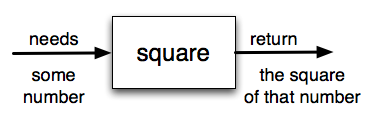
For an ML experiment, a black box might be named average_of_two. Its contract is simple:
| Part | Meaning |
|---|---|
| Function name | average_of_two |
| Inputs | Two numerical scores measured on the same scale |
| Calculation | Add them and divide by two |
| Output | Their mean score |
This is the useful 80/20 idea: a function turns a named piece of logic into a reusable tool. You do not need to know advanced Python function features yet. Focus on defining, calling, and returning.
Python Functions: Visually Explained
Watch Python Functions: Visually Explained from Visually Explained for a visual walkthrough of a function's structure, execution, inputs, and returned output. The presenter sometimes says “routine”; in Python, this means a function.
Watch definition and call. Focus on the function header, indentation, and the moment when supplied argument values are assigned to the names inside the function. Then jump to returning a result, which shows why a calculated value must be sent back to the calling code with return.
Defining a function versus running it
Here is a function that calculates the average of two scores:
def average_of_two(score_a, score_b):
    total = score_a + score_b
    return total / 2
Read the first line as a sentence:
Define a function called
average_of_twothat needs two values, calledscore_aandscore_b.
The general shape is:
def function_name(parameter_1, parameter_2):
    calculation
    return result
Four syntax details matter:
deftells Python you are defining a function.average_of_twois the function’s name. Descriptive names reduce mistakes later.score_aandscore_bare parameters, written inside parentheses.- The colon and indentation mark the function body: the instructions that belong to the function.
Defining a function does not calculate anything yet. Python records the function’s blueprint and waits for you to call it.
A function call uses the name followed by parentheses containing actual input values:
mean_score = average_of_two(70, 80)

print(mean_score)
Output:
75.0
Here is the execution trace:
| Moment | What Python knows |
|---|---|
It reads def average_of_two(...) | Store the function blueprint; do not run its body yet |
It reaches average_of_two(70, 80) | Start one call of the function |
| Inside that call | score_a is 70; score_b is 80 |
It calculates total | 150 |
It reaches return total / 2 | Send back 75.0 |
| It finishes the call | Store 75.0 in mean_score |
The names used in the definition and the values used in a call have different roles:
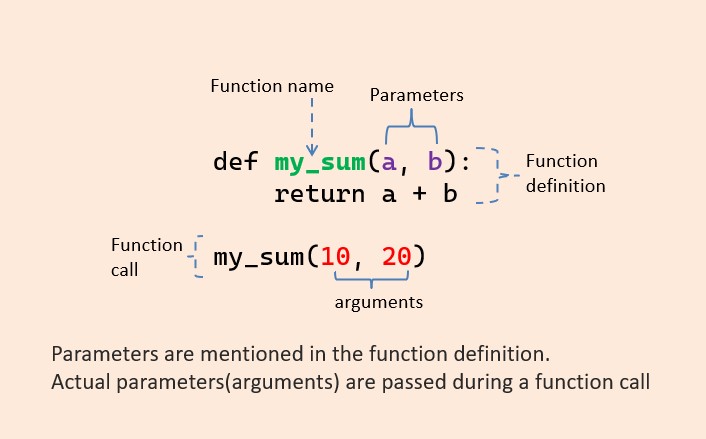
- A parameter is the temporary name inside the function definition, such as
score_a. - An argument is the actual value supplied during a call, such as
70.
The parameter names do not need to match the variable names outside the function:
original_agent_score = 63
revised_agent_score = 71

mean_score = average_of_two(original_agent_score, revised_agent_score)
print(mean_score)
Python uses the values stored in those variables. During this call, it assigns 63 to score_a and 71 to score_b.
The parameters and total are local to the function call. They are working names for that calculation, not general-purpose variables you should expect to use elsewhere.
return gives the answer back
The most important line in a calculation function is usually return:
return total / 2
Python evaluates what follows return, sends that value back to the place where the function was called, and finishes that function call immediately.
That returned result behaves like an ordinary value. You can store it, display it, or use it in another calculation:
mean_score = average_of_two(70, 80)
doubled_mean = mean_score * 2

print(doubled_mean)
Output:
150.0
You can also use the returned value directly:
print("Mean score:", average_of_two(70, 80))
Output:
Mean score: 75.0
The common trap: print is not return
This version looks as though it works:
def average_of_two_bad(score_a, score_b):
    total = score_a + score_b
    print(total / 2)
Calling it does display a result:
average_of_two_bad(70, 80)
Output:
75.0
But it does not send 75.0 back to the caller. Watch what happens when you try to save its result:
mean_score = average_of_two_bad(70, 80)

print(mean_score)
Output:
75.0
None
The first line is printed inside the function. The second line prints mean_score, whose value is None because the function did not explicitly return a value.
Keep this distinction sharp:
print(...) | return ... |
|---|---|
| Displays something for a human to see | Gives a value back to the program |
| Useful for reporting or debugging | Necessary when later code needs the result |
| Does not become the value of the function call | Makes the function call evaluate to that value |
For research code, returned values are generally more useful because you can later compare them, log them, calculate statistics from them, or use them to make decisions.
6.2. Functions that Return Values — How to Think like a Computer Scientist: Interactive Edition
Read “Functions that Return Values” from How to Think Like a Computer Scientist: Interactive Edition. It reinforces the black-box model and uses an interactive trace to distinguish defining a function, calling it, and returning a result.
In Section 6.2, “Functions that Return Values,” begin with the square example. Read the square-function setup, focusing on the input, calculation, and output. Next, stay in Section 6.2 and read parameters during a call. Notice that an argument's outside name does not determine the parameter name inside the function, and that def stores a definition rather than executing its body. Finally, after the CodeLens discussion, read the print-versus-return explanation. This is the mistake most worth catching early.
Build one small, testable function
Now use the following compact workflow whenever you write a basic calculation function.
1. State the contract before coding
For average_of_two:
Given two numerical scores, return their arithmetic mean.
Stating this plainly tells you what inputs the function needs and what output it promises. It also gives you a basis for checking whether it works.
2. Write the function
def average_of_two(score_a, score_b):
    total = score_a + score_b
    return total / 2
The temporary variable total is optional. You could write this shorter version:
def average_of_two(score_a, score_b):
    return (score_a + score_b) / 2
Both are correct. At this stage, prefer the first version when it makes the calculation easier to inspect. Clear intermediate names are useful when diagnosing an unexpected experimental result.
3. Choose examples with known answers
Before running code, decide what result you expect.
| Function call | Hand calculation | Expected result |
|---|---|---|
average_of_two(70, 80) | 75.0 | |
average_of_two(0, 10) | 5.0 | |
average_of_two(-4, 4) | 0.0 |
The third case checks that the function handles values on either side of zero. In more realistic ML code, analogous checks might include an unusually low reward, a very high metric, or two identical scores.
4. Run the examples
print(average_of_two(70, 80))
print(average_of_two(0, 10))
print(average_of_two(-4, 4))
Expected output:
75.0
5.0
0.0
For a slightly firmer check, use assert. An assertion states what must be true:
assert average_of_two(70, 80) == 75.0
assert average_of_two(0, 10) == 5.0
assert average_of_two(-4, 4) == 0.0
If all three assertions pass, Python normally prints nothing. If one fails, Python stops and reports that one of your expectations was incorrect. For now, treat assert as a compact way to preserve your expected examples alongside the function.
This habit scales well. A research function should not merely run without crashing; it should produce sensible outputs on inputs whose answers you can independently predict.
A reusable function checklist
When a short Python function does not behave as expected, inspect this list in order:
| Check | Correct pattern | Frequent issue |
|---|---|---|
| Definition | def function_name(...): | Forgetting the colon or parentheses |
| Indentation | Function body is indented | Calculation accidentally sits outside the function |
| Parameters | Names appear in the definition | Using a name inside the body that was never defined |
| Function call | function_name(arguments) | Defining the function but never calling it |
| Return | return calculated_value | Printing the value rather than returning it |
| Tests | Inputs have predicted outputs | Running only one example and assuming general correctness |
A concise note for your knowledge vault could be:
Python calculation function
A function defines a reusable named calculation. Parameters are temporary input names in the definition; arguments are the actual values supplied in a call. Usereturnto send the calculated result back so other code can store, print, compare, or combine it.Core pattern
def function_name(input_a, input_b):
    calculated_value = input_a + input_b
    return calculated_value
Common mistake:
print(calculated_value)shows a result but does not return it.
Key takeaways
A Python function is a reusable named block of code. You define it with def, give it parameters for its inputs, and later call it with actual arguments.
A function that performs a calculation should usually use return to give the answer back to the caller. print only displays a value; it does not make that value available to later code.
The core pattern is:
def average_of_two(score_a, score_b):
    total = score_a + score_b
    return total / 2
You verified it with several example inputs whose expected outputs were known in advance. Next, you will use a loop or list comprehension to apply one transformation across a whole collection of values—the natural next step after writing one reusable calculation.
Can't find a good explanation? Sign up and we'll make it for you
Sign up