
Welcome back. In the previous lesson, you turned plain-language procedures into ordered pseudocode and traced decisions step by step. Now you will express the same core logic in Python: store a small collection of data, ask a clear yes/no question about it, and keep only the entries that meet a rule.
This is a useful building block for ML work. Before fitting a model, you may filter failed runs, select checkpoints above a validation threshold, or identify experiments that need review. Today’s focus is deliberately small and reusable: lists hold ordered items, dictionaries connect labels to values, and conditionals make decisions.
The 80/20 data toolkit: sequence, labels, decisions
Use a list when you care about an ordered sequence of items. A list uses square brackets, with commas between entries:
episode_returns = [-1.0, 3.5, 0.0, 7.2]
Here, each number is one episode return, and its position is meaningful: the first value happened before the second.
| Index | Value |
|---|---|
0 | -1.0 |
1 | 3.5 |
2 | 0.0 |
3 | 7.2 |
Python begins indexing at 0, so:
print(episode_returns[0])
prints:
-1.0
Use a dictionary when each value needs a meaningful label. A dictionary uses curly braces. Each key is connected to one value by a colon:
agent_scores = {
    "waypoint_npc": 0.41,
    "ppo_original": 0.63,
    "ppo_reward_revised": 0.71,
    "ppo_replay": 0.68
}
In this example:
| Key | Value |
|---|---|
"waypoint_npc" | 0.41 |
"ppo_original" | 0.63 |
"ppo_reward_revised" | 0.71 |
"ppo_replay" | 0.68 |
Instead of remembering a numeric position, retrieve a value using its label:
print(agent_scores["ppo_reward_revised"])
Output:
0.71
A dictionary is a good choice here because a score without its agent name is not very useful. The key keeps the result attached to its source.
Python Dictionaries: Visually Explained
Watch “Python Dictionaries: Visually Explained” by Visually Explained for a visual model of keys, values, and why labelled data is often clearer in a dictionary than in a list.
Watch keys and values to see how a dictionary is constructed and accessed. Then watch lists versus dictionaries, focusing on the distinction between a position such as index 0 and a meaningful label such as "ppo_replay".
Two rules prevent many beginner mistakes:
- Keys must be unique. A dictionary cannot reliably store two separate values under the same key.
- Keys are exact.
"ppo_original"and"PPO_original"are different strings. Asking for a key that does not exist causes aKeyError.
For today, keep this choice rule in mind:
| If your question is… | Prefer |
|---|---|
| “What is the third item?” | A list |
| “What score belongs to this named agent?” | A dictionary |
| “Which entries satisfy this rule?” | A conditional, usually while examining a collection |
Conditionals: turning a rule into a decision
A conditional tells Python to run some code only if a condition is true.
For example, suppose the minimum validation score for keeping an agent is 0.65:
acceptance_threshold = 0.65
score = agent_scores["ppo_reward_revised"]

if score >= acceptance_threshold:
    print("Keep this agent for further evaluation.")
else:
    print("Do not keep this agent.")
Python first evaluates the comparison:
score >= acceptance_threshold
With score equal to 0.71, the result is True. Python therefore runs the indented line under if.
A comparison produces a Boolean value: either True or False.
| Comparison | Result |
|---|---|
0.71 >= 0.65 | True |
0.63 >= 0.65 | False |
0.65 == 0.65 | True |
The distinction between these two symbols is essential:
score = 0.71       # Assign a value to a variable
score == 0.71      # Check whether two values are equal
Also notice the colon after the if condition and the indentation beneath it. In Python, indentation is not just visual tidiness: it tells Python which instructions belong to the conditional.
Python Booleans and Conditionals - Visually Explained
Watch “Python Booleans and Conditionals - Visually Explained” by Visually Explained to connect comparisons with the if and else blocks that act on their results.
Watch Boolean decisions for the idea that program decisions reduce to True or False. Continue with comparisons, paying special attention to == versus =. Then watch if and else for the role of the colon and indentation.
Filtering a collection: keep the entries that pass
Filtering means creating a smaller collection containing only the entries that satisfy a condition.
Suppose you want a review queue containing the names of all agents whose score is at least 0.65. The plan is almost identical to the pseudocode pattern from the last lesson:
- Create an empty list for accepted names.
- Examine each name-score pair.
- If the score passes the rule, add that name to the new list.
- Keep the original dictionary unchanged.
agent_scores = {
    "waypoint_npc": 0.41,
    "ppo_original": 0.63,
    "ppo_reward_revised": 0.71,
    "ppo_replay": 0.68
}

acceptance_threshold = 0.65
accepted_agents = []

for name, score in agent_scores.items():
    if score >= acceptance_threshold:
        accepted_agents.append(name)

print(accepted_agents)
Output:
['ppo_reward_revised', 'ppo_replay']
The only new piece here is the for line. Read it in plain language:
For each
nameand itsscorein the labelled score collection, check the score.
The method .items() gives Python both parts of each dictionary entry: its key and its value. During one pass, name might be "ppo_original" and score might be 0.63.
The if block has no else because rejected agents require no action. Python simply does not append them to accepted_agents.
Trace the filter slowly
A trace makes the code’s behaviour visible.
| Current name | Current score | Does it meet score >= 0.65? | accepted_agents afterward |
|---|---|---|---|
| Start | — | — | [] |
"waypoint_npc" | 0.41 | No | [] |
"ppo_original" | 0.63 | No | [] |
"ppo_reward_revised" | 0.71 | Yes | ["ppo_reward_revised"] |
"ppo_replay" | 0.68 | Yes | ["ppo_reward_revised", "ppo_replay"] |
This is a common experimental-data pattern:
- the dictionary is the original record of scores;
- the threshold is the explicit selection rule;
- the list is the filtered result;
- the conditional explains why each entry was kept or excluded.
The selection rule matters. If the requirement were “strictly above 0.65,” write score > acceptance_threshold. If a score exactly equal to 0.65 should be included, write >=, as above.
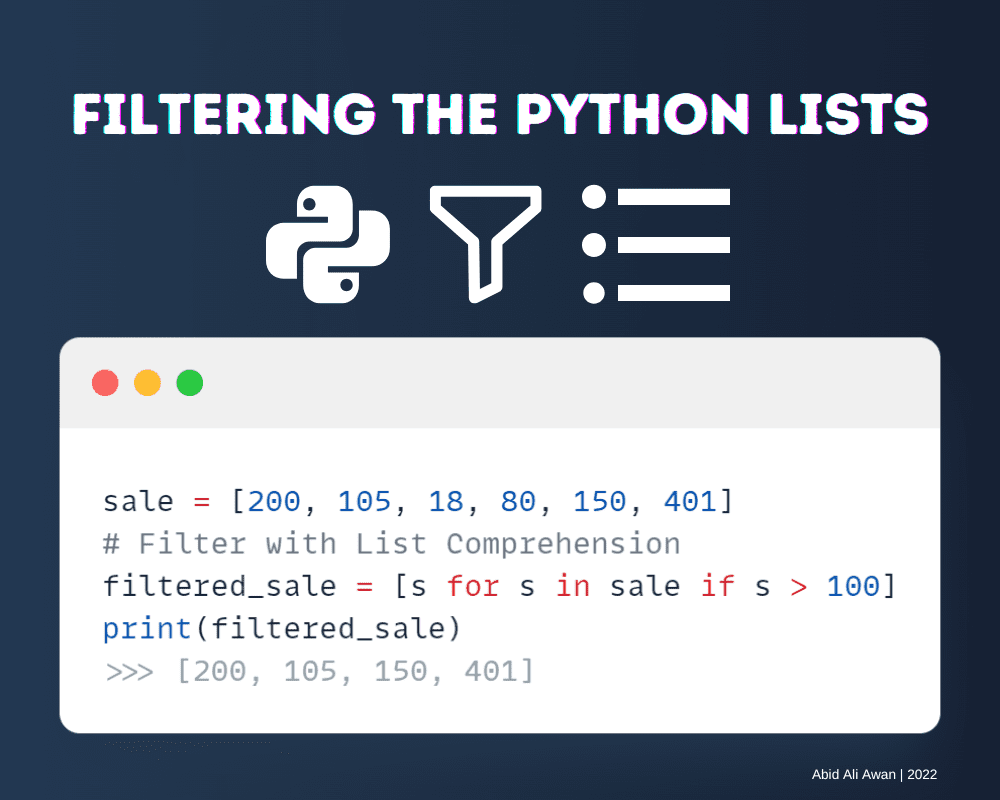
The image’s compact syntax is not something to memorise yet. Its main message is the important one: a filter checks every item against a condition and produces a new collection of the items that pass.
A compact debugging checklist
When a filter gives an unexpected result, inspect these four places before changing anything:
| Check | Typical issue |
|---|---|
| Data | Is the intended score actually stored under the intended key? |
| Condition | Did you use >= when the requirement says “at least,” or > when it says “strictly greater than”? |
| Indentation | Is accepted_agents.append(name) indented underneath the if? |
| Output collection | Did you create accepted_agents = [] before attempting to append? |
For example, this code has an indentation problem:
for name, score in agent_scores.items():
    if score >= acceptance_threshold:
        print("Accepted")
    accepted_agents.append(name)
Here, accepted_agents.append(name) runs for every agent because it is aligned with if, not placed inside it. The condition prints “Accepted” selectively, but the list accidentally receives all names.
The corrected version places the append operation inside the conditional:
for name, score in agent_scores.items():
    if score >= acceptance_threshold:
        accepted_agents.append(name)
A useful reusable note for your vault is this “filter recipe”:
## Python filtering recipe

**Input collection:** list or dictionary
**Rule:** a comparison that becomes True or False
**Output collection:** start with []

```python
selected = []

for item in collection:
    if rule_about(item):
        selected.append(item)
Common mistake: appending outside the indented if block.
For a dictionary, the loop usually becomes:

```python
for key, value in dictionary.items():
You can treat that as a pattern for now. The next Python lessons will make loops and reusable functions more systematic.
Key takeaways
A list stores an ordered sequence; use it when positions and order matter. A dictionary stores labelled key-value pairs; use it when each value needs a meaningful name, such as an agent identifier attached to a validation score.
A conditional evaluates a Boolean rule and chooses whether its indented code runs. Combining these ideas lets you filter a collection: create an empty result list, inspect each entry, and append only entries whose values meet your stated criterion.
The central pattern is:
selected = []

for name, score in agent_scores.items():
    if score >= threshold:
        selected.append(name)
Next, you will package calculations like this into Python functions that accept parameters, return a value, and can be tested on example inputs.
Can't find a good explanation? Sign up and we'll make it for you
Sign up