
Welcome back. Last time, you defined functions that accept inputs and return calculated values. A function handles one calculation well; this lesson adds the next practical move: applying a calculation to every value in a collection.
This is a high-value Python pattern for AI and ML work. You might convert evaluation scores into percentages, transform a list of rewards, clean a set of labels, or prepare a batch of values for later analysis. By the end, you will be able to create a new transformed list using either a clear for loop or a compact list comprehension—and decide which form is easier to read.
One input list, one transformed output list
Suppose these are accuracy scores from three model runs:
raw_scores = [0.62, 0.75, 0.81]
They are proportions, so it may be easier to report them as percentages:
[62.0, 75.0, 81.0]
The important idea is:
Visit each item in a source collection, apply the same rule, and collect each new result in a new list.
Here is the transformation in a compact visual form:
| Original value | Rule | New value |
|---|---|---|
0.62 | multiply by 100 | 62.0 |
0.75 | multiply by 100 | 75.0 |
0.81 | multiply by 100 | 81.0 |
This is not filtering. Filtering keeps or removes existing values based on a condition. A transformation produces a value for each item, potentially changing its value or even its type.
For example:
0.62becoming62.0is a numerical transformation."ppo_agent"becoming"PPO_AGENT"is a text transformation.- a reward value becoming a formatted label such as
"Reward: 5"is a change from number to string.
For now, use the direct mental model: one source item, one output item.
Transforming with a for loop
A for loop lets Python work through a collection one item at a time. Its core shape is:
for item in collection:
    do_something_with(item)
Read it as:
For each
itemincollection, run the indented code.
To build a new transformed list, use three steps:
- Create an empty output list.
- Loop through each source item.
- Transform the current item and add the result with
.append().
raw_scores = [0.62, 0.75, 0.81]

percentage_scores = []

for score in raw_scores:
    percentage = score * 100
    percentage_scores.append(percentage)

print(percentage_scores)
Output:
[62.0, 75.0, 81.0]
Notice that raw_scores remains unchanged:
print(raw_scores)
Output:
[0.62, 0.75, 0.81]
Keeping raw data separate from derived data is a useful research habit. If you later discover that the conversion rule was wrong, you still have the original values available.
Trace the loop slowly
When code feels fast or opaque, trace only one pass at a time.
| Loop pass | Current score | Calculated percentage | percentage_scores after .append() |
|---|---|---|---|
| Before loop | — | — | [] |
| 1 | 0.62 | 62.0 | [62.0] |
| 2 | 0.75 | 75.0 | [62.0, 75.0] |
| 3 | 0.81 | 81.0 | [62.0, 75.0, 81.0] |
The name score is a temporary loop variable. During the first pass it refers to 0.62, then 0.75, then 0.81.
List Comprehensions - Visually Explained
Watch “List Comprehensions - Visually Explained” by Visually Explained for a visual comparison between an ordinary loop and a one-line list comprehension.
Watch the core example. Focus on the two roles of the loop: visiting each source value and adding each transformed result to a fresh output list. The visual breakdown will make the compressed form in the next section easier to read.
Why indentation matters
In Python, indentation tells Python which instructions belong inside the loop.
scores = [0.62, 0.75, 0.81]
percentages = []

for score in scores:
    percentages.append(score * 100)

print(percentages)
The .append(...) line is indented, so it runs once per score. The print(...) line is not indented, so it runs once, after the whole list has been built.
A common mistake is accidentally putting .append(...) outside the loop:
scores = [0.62, 0.75, 0.81]
percentages = []

for score in scores:
    percentage = score * 100

percentages.append(percentage)
This adds only the final value, 81.0, because the append happens after the loop finishes. When a result list has suspiciously few items, inspect indentation first.
Python for Loop (With Examples)
Read the opening sections of Programiz’s “Python for Loop (With Examples)” to reinforce how a loop variable takes on each list value and how indentation creates the loop body.
In the “For loop Syntax” and “Example: Iterating Through a List” sections, read from the basic loop explanation. Then read the “Indentation in Loop” example immediately below it. Focus on reading for model in models as “for each model in models,” and on why code outside the indentation runs only after the repetitions end.
List comprehensions: the same transformation in one line
A list comprehension is Python’s compact notation for creating a list by transforming every item in another collection.
Here is the same percentage conversion:
raw_scores = [0.62, 0.75, 0.81]

percentage_scores = [score * 100 for score in raw_scores]

print(percentage_scores)
Output:
[62.0, 75.0, 81.0]
The list comprehension and the earlier loop produce the same output. The comprehension simply puts the output-building pattern into one readable line.
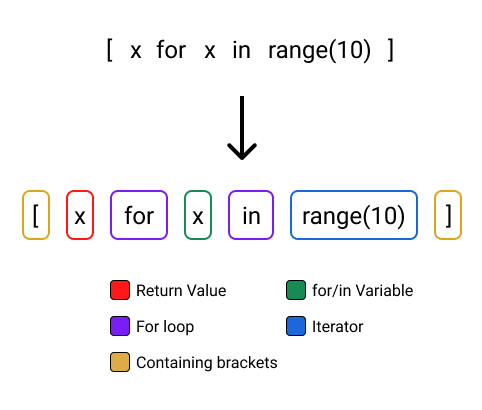
The general pattern is:
new_list = [expression for item in source_collection]
Each part has a distinct job:
| Part | Meaning | In the score example |
|---|---|---|
[ and ] | Create a new list | [ ... ] |
expression | The output rule applied to each item | score * 100 |
for item in | Visit source items one at a time | for score in |
source_collection | The values to process | raw_scores |
The position of the expression can initially feel backwards. A useful way to read it is:
Build a list containing
score * 100, for everyscoreinraw_scores.
Under the hood, Python still handles one score at a time. The comprehension is not a mysterious new kind of computation; it is a shorter way to express a familiar transformation loop.
Read Stanford’s “Python Comprehensions” for a concise explanation of the pattern and several transformations beyond multiplying numbers.
Read Section “Python Comprehensions” from the opening explanation and examples. Follow the author’s three construction steps, but keep the practical reading order from this lesson: identify the output expression, the temporary item name, and the source collection. Notice especially that the original list is left unchanged and that output values can have a different type.
Useful transformations for experiment data
The same structure works with many kinds of values.
1. Square each reward
rewards = [2, -1, 3]

squared_rewards = [reward ** 2 for reward in rewards]

print(squared_rewards)
Output:
[4, 1, 9]
The ** 2 means “raise to the power of two.” This example is purely about the Python transformation pattern; whether squaring a reward makes sense depends on the actual experiment and research question.
2. Format experiment labels
agent_names = ["ppo baseline", "reward modified", "rule based"]

display_names = [name.title() for name in agent_names]

print(display_names)
Output:
['Ppo Baseline', 'Reward Modified', 'Rule Based']
Here, each input is a string and .title() returns a transformed string.
3. Use the function you wrote last lesson
Functions and transformations fit naturally together. First define one clear calculation:
def reward_to_points(reward):
    return reward * 10
Then apply it to every reward:
episode_rewards = [3, -2, 5, 1]

reward_points = [reward_to_points(reward) for reward in episode_rewards]

print(reward_points)
Output:
[30, -20, 50, 10]
This separates responsibilities cleanly:
reward_to_pointsdefines the conversion rule once.- The list comprehension applies that rule to every value.
If the rule becomes more involved or needs checking, you can modify and test the function independently.
When to use a loop and when to use a comprehension
Both forms are valid. Choose the one that makes the code easiest to inspect later—especially in a notebook or experiment pipeline you may revisit months later.
| Prefer a list comprehension when… | Prefer a for loop when… |
|---|---|
| Each item gets one simple transformation. | Several steps are needed for each item. |
| The whole operation fits comfortably on one line. | You need to print values or inspect intermediate calculations. |
| You want to create a new list directly. | You have branching logic or multiple outputs to manage. |
| The transformation is obvious at a glance. | A comprehension would become dense or difficult to debug. |
For example, this is concise and readable:
doubled_rewards = [reward * 2 for reward in rewards]
This is also readable, and easier to pause inside while debugging:
doubled_rewards = []

for reward in rewards:
    doubled_reward = reward * 2
    doubled_rewards.append(doubled_reward)
Do not treat the one-line version as automatically “more advanced” or “better.” In research code, clarity is part of correctness: unclear transformations make it harder to find data-processing mistakes.
A practical 80/20 rule:
Use a list comprehension for a simple one input item, one clear output item transformation. Use a
forloop when seeing the intermediate steps will help you understand, test, or debug the code.
A small extension: filter, then transform
You previously used conditionals to filter collections. A list comprehension can combine filtering and transformation:
raw_scores = [0.62, 0.75, 0.48, 0.81]

high_percentages = [score * 100 for score in raw_scores if score >= 0.70]

print(high_percentages)
Output:
[75.0, 81.0]
Read this as:
For every
scoreinraw_scores, keep it only if it is at least0.70, then putscore * 100in the new list.
The condition comes at the end:
[expression for item in collection if condition]
This is useful when it stays short. If you need several conditions, intermediate calculations, or complicated logic, use a normal loop instead.
List Comprehensions - Visually Explained
Return to “List Comprehensions - Visually Explained” for one non-numerical transformation example.
Watch the text example. Notice that the structure does not change when the collection contains strings instead of numbers: the expression changes, but the for item in collection part stays the same.
Common mistakes and quick checks
Mistake 1: Forgetting that a comprehension makes a new list
scores = [0.62, 0.75, 0.81]
score * 100 for score in scores
This is invalid syntax. The square brackets are what tell Python to construct a list.
percentages = [score * 100 for score in scores]
Mistake 2: Putting the expression in the wrong place
percentages = [for score in scores score * 100]
This is also invalid. In a list comprehension, the output expression comes first:
percentages = [score * 100 for score in scores]
Mistake 3: Creating a list but not transforming it
copied_scores = [score for score in scores]
This code is valid, but it copies the values unchanged. It is a transformation only in the broadest technical sense; if your intended rule was “convert to percentages,” you need the multiplication:
percentage_scores = [score * 100 for score in scores]
Mistake 4: Testing only whether code runs
Code can run without producing the result you intended. Use a tiny input with an answer you can calculate by hand:
test_scores = [0.5, 1.0]

test_percentages = [score * 100 for score in test_scores]

assert test_percentages == [50.0, 100.0]
If the assertion passes, Python normally displays nothing. It is a compact record that your transformation produced the expected list.
For a quick active check, run the percentage example in your editor, then change the multiplier from 100 to 10. Predict the list before running it. Finally, restore 100 and verify that the original source list has not changed.
Vault-ready concept card
You can save the following as a reusable concept note.
Transforming a Python collection
A transformation applies the same rule to each item in a collection and builds a new collection of results.
Clear loop form
output_values = []

for item in input_values:
    transformed_item = item * 100
    output_values.append(transformed_item)
Compact list-comprehension form
output_values = [item * 100 for item in input_values]Decision rule: use a comprehension for one simple, readable transformation; use a loop when intermediate steps or debugging matter.
Common mistake: placing
.append(...)outside the loop, which adds only the final transformed value.
Key takeaways
A for loop lets you visit each value in a collection and build a new list by transforming each item and calling .append().
A list comprehension expresses the same common pattern more compactly:
new_list = [expression for item in source_collection]
For example:
percentage_scores = [score * 100 for score in raw_scores]
The original list remains unchanged, while the new list holds the transformed values. Prefer the version—loop or comprehension—that makes the logic easiest to understand and verify.
Next, you will use Python tracebacks to locate an error, correct the code, and verify that the fix actually works.
Can't find a good explanation? Sign up and we'll make it for you
Sign up