
Welcome back. Last lesson established a low-friction visual knowledge system and showed how a compact concept note can make an AI idea easier to retrieve later. This lesson develops the next practical skill: turning an idea stated in ordinary language into an algorithm that is ordered, unambiguous, and ready to become code.
This matters because coding problems, experimental pipelines, and agent designs often begin as vague descriptions: “pick the best model,” “retry login,” or “give the agent feedback.” Pseudocode lets you work out the logic before Python syntax becomes a distraction. By the end, you will be able to translate a short procedure into pseudocode and trace it manually using concrete inputs.
The 80/20 idea: pseudocode is logic before syntax
An algorithm is a finite set of instructions for completing a task. Pseudocode is a human-readable draft of that algorithm. It is not executable Python, JavaScript, or any other programming language.
The important distinction is:
| Concern | Pseudocode | Real code |
|---|---|---|
| Main purpose | Make the logic clear | Make the computer execute the logic |
| Rules | Flexible conventions | Strict language syntax |
| Reader | Humans first | Humans and a language interpreter |
| Main question | “What should happen?” | “How is this written in Python?” |
For now, pseudocode lets you practise the first question. When you reach Python in the following lessons, syntax will be much easier because the logical plan already exists.
What is pseudocode and how do you use it?
Watch What is pseudocode and how do you use it? by Codecademy for a quick visual explanation of why pseudocode separates problem-solving from programming syntax.
Watch the core idea to see pseudocode framed as a language-independent outline of an algorithm. Then watch writing conventions for the practical habits used in this lesson: one action per line, clear wording, capitalized control words, and indentation.
Most beginner-friendly pseudocode is built from only three control ideas:
- Sequence: do steps in a particular order.
- Selection: choose between alternatives based on a condition.
- Repetition: repeat a group of steps for several items or while a condition remains true.
You already use these ideas informally. “Open the dataset, check whether a value is missing, and repeat for every row” contains sequence, selection, and repetition. Pseudocode simply makes their structure explicit.
A compact pseudocode vocabulary
There is no single official pseudocode grammar. Still, a small shared vocabulary makes your plans readable:
| Keyword or pattern | Meaning |
|---|---|
BEGIN / END | Mark the boundaries of the procedure |
INPUT | Receive information |
SET | Store or update a value |
IF ... THEN | Test a condition |
ELSE | Specify what happens when the condition is false |
FOR EACH | Repeat once for every item in a collection |
OUTPUT | Present a result |
Capitalizing these words is a visual aid, not a law. The actual content must be specific enough that another person could follow it without guessing.
For example, this is too vague:
Check the results and pick the best one.
A better plan says what “best” means and what information must be retained:
Compare each score with the best score seen so far.
If the new score is higher, store it as the new best score.
From ordinary language to a structured plan
When given a procedure, do not immediately write lines that resemble Python. First extract the procedure’s contract:
- Inputs: What information is available at the start?
- Output: What should be produced at the end?
- Rules: What decisions must the procedure make?
- Repeated work: Does it need to handle several items?
- State: What values must be remembered while it runs?
A reliable four-pass method is:
- Underline the nouns. These are usually data: usernames, scores, checkpoints, rewards, passwords.
- Circle the verbs. These suggest actions: input, compare, store, display, update.
- Mark decision words. Words such as “if,” “otherwise,” “only when,” and “unless” imply a conditional.
- Mark quantity words. “Each,” “every,” “until,” and “while” often imply repetition.
Then write one action per line and use indentation to show which instructions belong inside an IF or FOR EACH block.
A useful warning: pseudocode should capture the requested logic, not silently invent missing requirements. For example, “credentials are correct” may hide an entire database lookup, encryption system, and account policy. At this level, it is fine to treat the check as one operation if those details are outside the stated problem.
See a decision, then write it
The login flowchart below is a visual form of a short procedure. It receives two inputs, performs one decision, and displays one of two outputs.
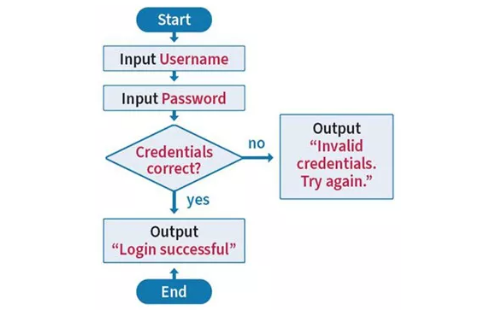
Translate the flowchart into pseudocode like this:
BEGIN
    INPUT username
    INPUT password

    IF credentials are correct THEN
        OUTPUT "Login successful"
    ELSE
        OUTPUT "Invalid credentials. Try again."
    END IF
END
Notice several details:
INPUT usernamecomes before the check because the system cannot check a value it has not received.- The condition is phrased as a question with two possible outcomes: true or false.
- The indented lines belong to their respective branches.
- Exactly one output is displayed on each run.
The message “Try again” does not automatically mean the algorithm repeats. This procedure only displays the message and ends. If the requirement were “keep requesting credentials until they are correct,” the procedure would need an explicit repetition structure. Small distinctions like this are why pseudocode is valuable: it exposes ambiguity before it becomes a bug.
Trace an algorithm: act like the computer
A trace is a slow, concrete simulation of an algorithm. You choose actual inputs, follow the lines in order, evaluate every condition, and record values when they change.
Tracing is not merely checking the final answer. It helps answer questions such as:
- Did the algorithm take the intended branch?
- Was a value initialized before it was used?
- Does the condition behave correctly when two values are equal?
- Does the procedure stop?
For the login pseudocode, suppose the user enters:
username = "sam"
password = "wrong-password"
The trace is:
| Step | Instruction | What happens |
|---|---|---|
| 1 | INPUT username | Store "sam" as username |
| 2 | INPUT password | Store "wrong-password" as password |
| 3 | Check credentials | The pair is not valid, so the condition is false |
| 4 | ELSE branch | Display "Invalid credentials. Try again." |
| 5 | END | Stop |
The condition determines the branch. It does not change the username or password; it only decides which output line runs.
For a robust check, trace both major possibilities: one input where the condition is true and one where it is false. This is called checking branch coverage: you have manually visited each possible route through the decision.
A research-relevant example: selecting a checkpoint
Now apply the same method to a procedure closer to ML experimentation.
A checkpoint is a saved version of a model during training. Suppose a plain-language requirement says:
You have validation scores for several checkpoints. Start by treating the first checkpoint as the best. Examine each remaining checkpoint. If its score is higher than the best score recorded so far, replace the recorded checkpoint and score. At the end, report the best checkpoint and score. If scores are tied, keep the earlier checkpoint.
Before writing pseudocode, extract the contract:
| Part | Interpretation |
|---|---|
| Input | A collection of checkpoint names and validation scores |
| Output | One checkpoint name and its highest observed score |
| Repetition | Inspect every checkpoint after the first |
| Decision | Is the current score strictly higher than the recorded best? |
| State | best_checkpoint, best_score, and the current checkpoint’s information |
Here is the ordered pseudocode:
BEGIN
    INPUT results

    SET best_checkpoint TO the name of the first result
    SET best_score TO the score of the first result

    FOR EACH remaining result in results
        SET current_checkpoint TO the name of the current result
        SET current_score TO the score of the current result

        IF current_score is greater than best_score THEN
            SET best_checkpoint TO current_checkpoint
            SET best_score TO current_score
        END IF
    END FOR

    OUTPUT best_checkpoint
    OUTPUT best_score
END
This algorithm has all three essential structures:
- Sequence: receive the results, initialize values, then report the answer.
- Repetition: inspect each remaining result.
- Selection: update the stored best values only when a score is higher.
The initialization is essential. You cannot compare a new score to “the best score so far” until one score has been recorded.
Full trace with concrete results
Use these four results, in this order:
| Checkpoint | Validation score |
|---|---|
A | 0.62 |
B | 0.58 |
C | 0.71 |
D | 0.71 |
Now trace the algorithm. The important columns are the condition and the values that persist after each iteration.
| Moment | Current checkpoint | Current score | Is current score greater than best score? | Best checkpoint after this moment | Best score after this moment |
|---|---|---|---|---|---|
| Initialization | A | 0.62 | No comparison yet | A | 0.62 |
| First loop pass | B | 0.58 | No: 0.58 is not greater than 0.62 | A | 0.62 |
| Second loop pass | C | 0.71 | Yes: 0.71 is greater than 0.62 | C | 0.71 |
| Third loop pass | D | 0.71 | No: 0.71 is equal to 0.71, not greater | C | 0.71 |
| Output | — | — | — | C | 0.71 |
The final answer is checkpoint C with score 0.71.
The final row reveals why exact condition wording matters. The procedure uses “greater than,” not “greater than or equal to.” Therefore checkpoint D does not replace C when their scores tie. This matches the stated tie rule: retain the earlier checkpoint.
If a project instead required the latest tied checkpoint, the only change needed would be the decision rule: update when the current score is greater than or equal to the best score. That is a change in the experiment’s specification, not just a coding detail.
A reusable trace routine
When later code behaves unexpectedly, return to pseudocode and make a trace table. You can use this small template in a scratch note or an Obsidian concept note:
## Algorithm trace

**Input:**
-

| Line or event | Current values | Condition result | Changed values |
|---|---|---|---|
| Initialization |  | — |  |
| First pass |  |  |  |
| Next pass |  |  |  |
| Output |  | — |  |

**Expected output:**

**What rule caused that output?**
Use it especially when a procedure contains a loop. You do not need to write down every unchanged variable every time; record the values that influence the next decision.
Before converting pseudocode to real code, perform this short quality check:
- Every input is identified.
- Every variable is set before it is used.
- Every
IFcondition has a clear true and false interpretation. - Instructions inside a branch or loop are indented.
- The procedure has a defined output.
- A concrete trace reaches the intended result.
Key takeaways
Pseudocode is a syntax-free algorithm draft: it clarifies what must happen before you worry about how a particular language writes it.
The high-value building blocks are sequence, selection, and repetition. To translate a plain-language procedure, first identify inputs, outputs, remembered values, decisions, and repeated work. Then write one clear action per line and use indentation to show scope.
Finally, trace the pseudocode with real values. In the checkpoint example, the trace showed that the strict “greater than” rule correctly preserved the earlier checkpoint during a tie. That kind of small, visible reasoning step is exactly what prevents silent mistakes in later ML experiments.
Next, you will begin expressing these plans in Python by using lists, dictionaries, and conditionals to represent and filter a small collection of data.
Can't find a good explanation? Sign up and we'll make it for you
Sign up