
Hi. In the previous lesson, you used loops and list comprehensions to transform collections, and you checked a small transformation with assert. That is a useful starting point for debugging: code often fails inside a function, loop, or comprehension, but Python gives you a structured report rather than leaving you to guess.
Today you will learn the 80/20 debugging skill that pays off throughout ML work: read a Python traceback, find the relevant line, make an intentional correction, and verify the program now does what you meant. This is not just about removing red error text. A program can run and still compute the wrong metric or transform data incorrectly, so verification matters.
A traceback is Python’s failure report
When an unhandled error stops a program, Python prints a traceback. Think of it as a compact record of:
- What kind of problem occurred
- What Python was trying to do
- Where in the code it happened
- How execution reached that point
The most useful rule is:
Read a traceback from the bottom upward.
The final line usually tells you the exception type and Python’s explanation. Then move upward to locate the code line that triggered it.
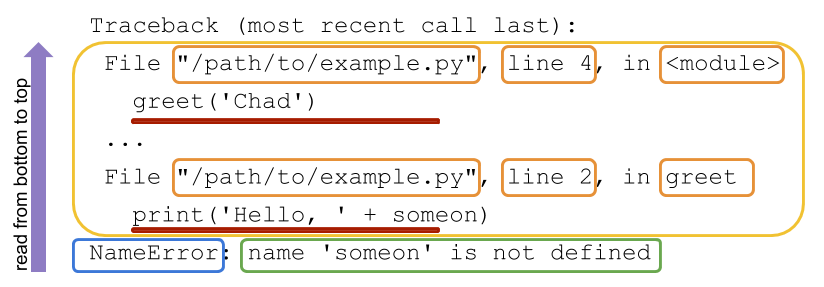
Here is the same idea in a compact reference table:
| Traceback part | What it tells you | First action |
|---|---|---|
Final line, such as NameError: ... | The error category and usually a clue about why it occurred | Read this first |
File "...", line 12, in function_name | The file, line number, and current function | Open that location |
| Code line below the file location | The statement Python was executing | Compare it with your intent |
| Earlier file-and-line entries | The chain of calls that led to the failure | Check these if the immediate line is not the true source |
A traceback is useful evidence, not a complete diagnosis. For example, if Python says a variable is a string where a number was expected, the failing addition may be perfectly reasonable. The real correction may be at the earlier point where the value entered your program.
Traceback (most recent call last): Python's tracebacks explained
Watch “Traceback (most recent call last): Python's tracebacks explained” by Python Morsels for a short visual explanation of traceback reading and call-stack frames.
Watch the walkthrough. Focus on the bottom-up reading order, then notice the distinction between the line where Python fails and an earlier caller where an unsuitable value may have been supplied.
Understanding the Python Traceback – Real Python
Read the traceback overview from Real Python to reinforce the visual labels and bottom-up method.
In “How Do You Read a Python Traceback?”, under “Python Traceback Overview,” read the traceback map. Focus on the final error line, the two-line call entries above it, and why the lowest call entry is usually closest to the actual failure.
The debugging loop: locate, explain, correct, verify
When an error appears, avoid randomly changing several lines at once. That can make the original issue harder to understand and can introduce a new one.
Use this repeatable five-step loop:
- Run the code and preserve the traceback. Read the full output rather than only the first line you notice.
- Start at the bottom. Identify the exception type and its message.
- Find the closest relevant code frame above it. Go to its file and line number.
- State the mismatch in plain language. For example: “I defined
score_list, but the function refers toscores.” - Make the smallest correction consistent with the intended behavior, rerun, and check an expected result.
The fourth step is particularly important. If you can explain the mismatch before editing, you are debugging rather than guessing.
Worked example: a NameError
Suppose you write a helper function to summarize episode rewards:
def mean_reward(reward_list):
    return sum(rewards) / len(rewards)

episode_rewards = [2, 4, 6]
print(mean_reward(episode_rewards))
When you run it, Python produces a traceback similar to this:
Traceback (most recent call last):
  File "agent_scores.py", line 5, in <module>
    print(mean_reward(episode_rewards))
  File "agent_scores.py", line 2, in mean_reward
    return sum(rewards) / len(rewards)
NameError: name 'rewards' is not defined
Read it upward.
1. Read the final line
NameError: name 'rewards' is not defined
A NameError means Python cannot find a name that your code refers to. Here, the missing name is rewards.
2. Find the closest frame
The frame immediately above the final line says:
File "agent_scores.py", line 2, in mean_reward
    return sum(rewards) / len(rewards)
Python failed at line 2, inside mean_reward().
3. Compare that line with the function definition
The function parameter is named reward_list:
def mean_reward(reward_list):
But the return statement uses rewards:
return sum(rewards) / len(rewards)
That is a naming mismatch. rewards was never defined inside the function.
4. Correct the code deliberately
Use the actual parameter name consistently:
def mean_reward(reward_list):
    return sum(reward_list) / len(reward_list)

episode_rewards = [2, 4, 6]
print(mean_reward(episode_rewards))
Expected output:
4.0
The top frame in the traceback, line 5, is still useful: it shows that mean_reward() was called from the main program. But the lower frame tells you the immediate failure occurred inside the function.
Common error messages: translate them, do not memorize them
You do not need to memorize every Python exception. Learn to translate a few frequent ones into questions you can investigate.
| Error type | Plain-language translation | Useful check |
|---|---|---|
NameError | “This variable or function name does not exist here.” | Is it misspelled, defined later, or defined in another scope? |
TypeError | “These kinds of values cannot be used together this way.” | What are the actual types of the values? |
KeyError | “This dictionary does not contain that key.” | Print or inspect the available dictionary keys. |
IndexError | “This list position does not exist.” | Check list length and remember indexing starts at 0. |
AttributeError | “This object does not have that method or attribute.” | Check the object’s type and the method name. |
SyntaxError | “Python cannot parse this code.” | Inspect the marked line and nearby lines for missing punctuation, quotes, or indentation. |
Example: TypeError can point to a data problem
Consider a reward bonus function:
def add_bonus(rewards):
    return [reward + 1 for reward in rewards]

rewards = [2, "3", 1]
print(add_bonus(rewards))
Python can add 1 to the first reward, 2. But when it reaches "3", it cannot add an integer to a string. A traceback will end with a message like:
TypeError: can only concatenate str (not "int") to str
The failing line is:
return [reward + 1 for reward in rewards]
However, the operation reward + 1 is reasonable if rewards are supposed to be numbers. The deeper issue is the mixed input list:
rewards = [2, "3", 1]
If the intended data is numeric, correct the input:
rewards = [2, 3, 1]
print(add_bonus(rewards))
Output:
[3, 4, 2]
For a larger dataset, you may not immediately see the bad value. Add a temporary diagnostic print:
print(rewards)
print([type(reward).__name__ for reward in rewards])
Output:
[2, '3', 1]
['int', 'str', 'int']
This reveals the mismatch directly.
A good debugging principle for research code is:
Fix the representation or assumption that is wrong; do not merely force the error message to disappear.
For example, converting every value with int() may be appropriate if a data source intentionally provides numeric text. It is not appropriate if "3" indicates an upstream data-quality problem that you should record and investigate.
Syntax errors versus runtime errors
Most tracebacks describe a runtime error: Python began running the program, then encountered a problem during execution.
A SyntaxError is different. Python cannot even understand the program structure, so it may not show the usual Traceback (most recent call last): heading.
For example:
def mean_reward(rewards)
    return sum(rewards) / len(rewards)
The function definition is missing a colon after ). Python will point to a line and often place a caret (^) near where it noticed the problem.
Two cautions help here:
- The caret is a strong clue, but the true mistake can be slightly earlier on the same line or even on the line above, especially with quotes or brackets.
- Fix syntax errors first. Until Python can parse the file, it cannot reveal later runtime problems.
This is also why it helps to run code in small increments. A short function with one error is much easier to debug than an entire notebook with ten unrelated changes.
Verification: “no traceback” is necessary, but not enough
After a correction, rerun the same input that originally failed. If the traceback disappears, that establishes that the immediate exception is gone.
Then check that the result is actually correct using a tiny example whose answer you know.
For mean_reward(), keep two lightweight checks directly below the function while you develop it:
def mean_reward(reward_list):
    return sum(reward_list) / len(reward_list)

assert mean_reward([2, 4, 6]) == 4.0
assert mean_reward([0.5, 1.0]) == 0.75

print("Checks passed")
If both assertions hold, the output is:
Checks passed
If an assertion fails, Python raises an AssertionError. That is useful: it means your code ran, but its result did not match the behavior you specified.
A practical verification sequence is:
| Check | What it establishes |
|---|---|
| Rerun the original failing case | The specific exception is resolved |
| Test a tiny hand-checkable case | The core calculation produces the expected output |
| Inspect a representative output | The type, length, labels, or values make sense |
| Keep the successful check near the code | A later change is less likely to silently break it |
For ML experiments, this mindset prevents a common failure mode: a preprocessing script runs successfully but changes labels, scales rewards, or filters rows in a way you did not intend. Errors that stop the program are visible; incorrect outputs require deliberate checks.
A compact traceback protocol for your notes
Save this as a reusable debugging card in your vault:
Python Traceback Protocol
- Read the final line first: exception type plus message.
- Move upward to the closest
File ..., line ..., in ...entry.- Open that exact line and compare it to the surrounding definitions and input values.
- Explain the mismatch in one sentence before changing code.
- Apply the smallest intent-preserving fix.
- Rerun the original failing input.
- Verify one known expected output with
assertor a direct comparison.Common trap: removing an exception does not prove the program is correct.
If you use an editor such as VS Code, you can also add a breakpoint by clicking beside a line number, then inspect variable values while the program is paused. That is especially useful when a traceback identifies the failing line but the value that caused the problem was created much earlier. Start with tracebacks first; they are available in every normal Python run and often tell you enough.
Key takeaways
A traceback is Python’s structured report of an unhandled error. Read it from bottom to top:
- The final line identifies the exception and gives the most immediate clue.
- The nearest code frame above it identifies the file, line, function, and failing statement.
- Earlier frames show how execution reached that line and may reveal where an unsuitable input originated.
Debug systematically: locate the failure, explain the mismatch, make a small correction that matches the program’s intent, then verify both that the traceback is gone and that a known input produces the expected output.
Next, you will bring together pseudocode, functions, collections, loops, and debugging by implementing and testing a short Python program—and explaining what each part does in your own words.
Can't find a good explanation? Sign up and we'll make it for you
Sign up