Hello! Welcome to the next lesson in our module on managing and scaling your Amazon business.
In our last lesson, we focused on "offense"—using the 'Detail Page Sales and Traffic' report to diagnose underperforming products and optimize your listings to increase sales. Today, we're shifting to "defense." A successful e-commerce business isn't just about generating sales; it's about protecting your ability to sell in the first place.
This lesson directly addresses the learning outcome: to monitor and interpret key Amazon account health metrics (ODR, VTR) to prevent policy violations. Mastering this is non-negotiable for running a remote, global business. If your account is suspended, your entire operation grinds to a halt. We'll cover how to read Amazon's "report card" for your business, understand the most critical metrics, and implement a proactive strategy to keep your account in good standing.
1. Your Business's Health Report: The Account Health Dashboard
Amazon is famously customer-centric. To ensure a consistent, positive experience for buyers, it holds sellers to very high performance standards. The Account Health Dashboard in Seller Central is your central command for tracking how well you are meeting these standards. Think of it like a system health monitor for your business; green is good, red means critical failure.
Let's start with a quick video from Amazon Seller University that shows you where to find the dashboard and what it contains.
Amazon Account Health overview
This brief clip from Amazon Seller University's 'Amazon Account Health overview' will show you exactly how to navigate to the Account Health dashboard and introduces its three core components.
Watch the segment from 0:42 to 1:11. Focus on the navigation path (Menu > Performance > Account Health) and note the three main categories that determine your account health: Customer Service Performance, Policy Compliance, and Shipping Performance.
As you saw in the video, the dashboard is broken down into three pillars.
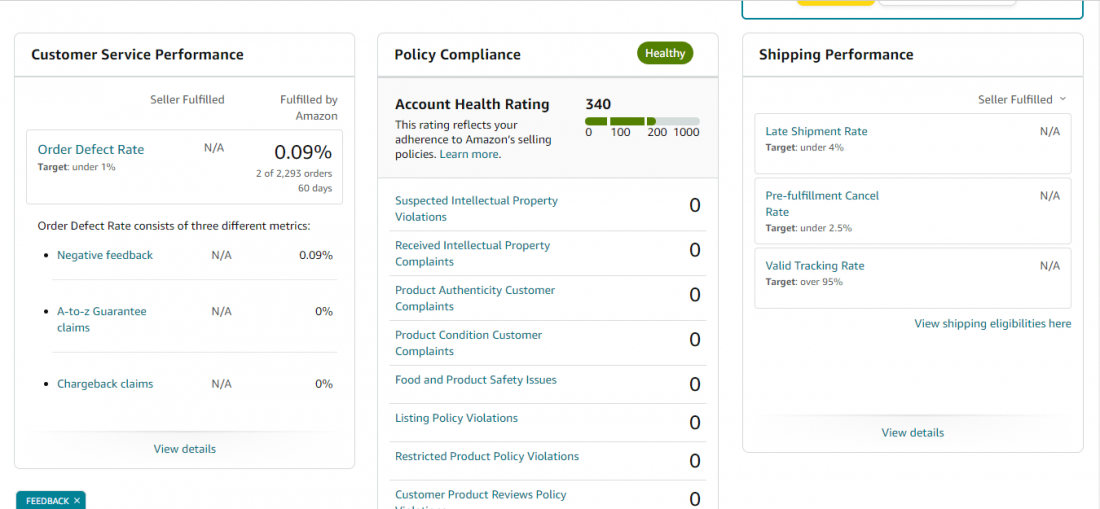
This dashboard uses a simple color-coded system to signal the status of your account:
- Green (Healthy): You are meeting all of Amazon's performance targets.
- Yellow (At Risk): One or more of your metrics are close to violating a threshold. This is a warning to take immediate action.
- Red (Critical): You have violated a performance threshold. Your account is at risk of deactivation, or may already be suspended.
2. The King of Metrics: Order Defect Rate (ODR)
The single most important metric on your dashboard is the Order Defect Rate (ODR). This is Amazon's primary measure of your ability to provide good customer service.
The Rule: Your ODR must remain below 1% of total orders over a 60-day period. Exceeding this can lead to immediate account deactivation.
An order is considered "defective" if it results in one of the following three outcomes. The next video explains each one.
Amazon Account Health overview
This segment from the 'Amazon Account Health overview' video clearly defines the Order Defect Rate and its three components. It also provides practical tips to avoid defects.
Watch from 1:11 to 3:48. Pay close attention to the definitions of: Negative Feedback (1 or 2-star seller ratings) A-to-Z Guarantee Claim (unresolved customer disputes) Chargeback Claim (customer disputes the charge with their bank) Also, note the actionable tips provided to prevent these issues.
Let's solidify those concepts.
The official Amazon Seller Central help page for 'Order defect rate' provides a concise, text-based summary of what we just learned. It's a good reference to have.
Quickly read the main definition and the short sections on 'Negative Feedback Rate', 'A-to-z Guarantee Claim Rate', and 'Credit Card Chargeback Rate'. This will reinforce your understanding of the three components.
The ODR formula is simple:
ODR = (Number of Defective Orders) / (Total Number of Orders) * 100
A single order can only be counted as defective once. For example, if a customer leaves negative feedback and files an A-to-Z claim for the same order, it still only counts as one defect.
Test your understanding!
Over the last 60 days, you have processed 500 orders. During this time, you received:
- 2 negative feedback ratings (on two different orders).
- 1 A-to-Z Guarantee claim that Amazon granted to the customer.
- 1 credit card chargeback.
What is your Order Defect Rate (ODR)? Is your account at risk?
Show answer
You have a total of 4 defective orders (2 + 1 + 1 = 4).
Your ODR is: (4 / 500) * 100 = 0.8%
Your account is not at risk of immediate suspension because your ODR is below the 1% threshold. However, at 0.8%, it would be considered "At Risk" (Yellow status), as you have very little room for error before crossing the 1% limit.
3. Delivering on Your Promise: Shipping Performance & Valid Tracking Rate (VTR)
The second critical area is Shipping Performance. This is especially important when you are fulfilling orders yourself (Fulfillment by Merchant - FBM) or using a dropshipping model, as FBA orders do not count against these metrics.
The three key shipping metrics are:
- Late Shipment Rate (LSR): Confirming shipment after the expected ship-by date. Target: < 4%.
- Pre-fulfillment Cancel Rate (PCR): Orders you cancel before shipping (e.g., out of stock). Target: < 2.5%.
- Valid Tracking Rate (VTR): The percentage of shipments with a valid tracking number. Target: > 95%.
Let's focus on VTR, as it's a common point of failure for new sellers.
Amazon Account Health overview
Let's return to the Amazon Seller University video to understand the shipping performance metrics, with a focus on the Valid Tracking Rate (VTR).
Watch the segment from 5:12 to 7:33. Focus on understanding: How the Valid Tracking Rate (VTR) is calculated. What makes a tracking number 'valid' (using an integrated carrier). The performance target of above 95%.
Maintaining a high VTR is about customer trust. Buyers want to know where their package is and when it will arrive. Failing to provide valid tracking information breaks that trust and can lead to Amazon restricting your ability to sell non-FBA products. For a remote dropshipping business, this is a critical metric to master.
4. A Proactive Strategy for Account Health
Monitoring these metrics isn't a passive activity. Successful sellers build a proactive routine to stay well within Amazon's targets.
Amazon Seller Performance Metrics 2026: Expert Account ...
This article, 'Amazon Seller Performance Metrics', is written by e-commerce experts and provides advanced, practical strategies for maintaining a healthy account. We'll focus on the most actionable sections.
Read the following two sections for battle-tested advice: 'Proven Strategies for Maintaining Excellent Performance': Pay close attention to the idea of setting internal thresholds that are stricter than Amazon's. This creates a safety buffer. '12 Critical Mistakes That Destroy Seller Performance': Review this list to understand common pitfalls. Mistake #1 ('Waiting for metrics to reach Amazon’s limits') and Mistake #2 ('Not paying attention to trends') are especially important.
Based on these expert recommendations, here is a practical weekly workflow for you:
- Daily Check-in (5 mins): Log into Seller Central every day and glance at your Account Health dashboard. Is everything green? If so, great. If you see any yellow or red, it becomes your top priority for the day.
- Weekly Review (15-20 mins):
- Review Trends: Don't just look at the current value. Is your ODR slowly creeping up from 0.2% to 0.5%? This indicates a developing problem you need to investigate.
- Drill Down: If a metric is worsening, click on it. The dashboard allows you to see the specific orders that caused the defect.
- Download Reports: For ODR, you can download a detailed report to identify patterns. Is one specific product causing all the negative feedback? Is one shipping carrier consistently causing late deliveries? Go to
Account Health > Order Defect Rate > Download Report.
- Adopt Stricter Internal Goals: Don't aim for Amazon's minimums. Aim for excellence.
- Amazon ODR Target:
< 1%. Your Goal:< 0.5%. - Amazon VTR Target:
> 95%. Your Goal:> 98%.
This buffer protects you from unexpected issues and keeps your account safely in the green.
- Amazon ODR Target:
Conclusion
You now understand the critical importance of the Account Health dashboard and its key metrics. Your ability to operate a successful, scalable Amazon business depends not just on your sales strategies but on your discipline in maintaining these performance standards.
Key Takeaways:
- Account Health is Non-Negotiable: It's the foundation of your Amazon business. Monitor the dashboard daily.
- ODR is King: The Order Defect Rate is the most critical metric. Keep it below 1% by providing accurate listings, shipping on time, and responding to customers promptly.
- VTR is Essential for FBM/Dropshipping: The Valid Tracking Rate must be kept above 95% to maintain customer trust and your selling privileges.
- Be Proactive, Not Reactive: Set internal goals stricter than Amazon's requirements. This creates a safety margin that protects your business from unforeseen problems.
Next Up:
Now that you know how to defend your account and keep it in good standing, we can return to more "offensive" strategies for growth. In the next lesson, we will tackle a key element of winning sales on competitive listings by learning how to set up an automated repricing tool to compete for the Amazon Buy Box.