
Good to continue. In the previous lesson, you rebuilt the layered model used to read a packet: Ethernet identifies the local next hop, IP identifies the end hosts, and TCP or UDP ports identify the communicating processes. Wireshark filters turn that model into an operational tool. Rather than scanning thousands of frames, you can state precisely which layer, endpoints, ports, and exchange matter.
This lesson distinguishes capture filters, which determine what is recorded, from display filters, which determine what is shown after recording. You will build filters progressively, then narrow a broad flow to one specific TCP conversation. This is the discipline needed before using packet analysis for incident triage, firewall validation, routing troubleshooting, or architectural path verification.
Two different filters, two different consequences
A capture filter operates before packets are saved into the capture buffer. Its syntax comes from the libpcap/BPF filter language. A display filter operates after Wireshark has captured or opened packets; it uses Wireshark’s much richer display-filter language.
| Question | Capture filter | Display filter |
|---|---|---|
| When is it applied? | Before packets are saved | After packets are available in Wireshark |
| Main purpose | Limit capture volume and processing load | Explore, isolate, and analyze traffic |
| Can it be changed after capture? | No; excluded packets are unavailable | Yes; clear or replace it at any time |
| Typical syntax | host 10.10.10.10 and tcp port 443 | ip.addr == 10.10.10.10 && tcp.port == 443 |
| Protocol awareness | Relatively limited: addresses, ports, basic protocol types | Deep dissection: TCP flags, DNS names, HTTP methods, TLS fields, VLANs, and more |
The key operational consequence is simple: a display filter hides packets; a capture filter prevents packets from being captured at all.
That makes display filters the normal first choice during troubleshooting. If a connection fails, the missing clue may be ARP, DNS, ICMP, an unexpected QUIC flow over UDP 443, or a TCP reset. A narrow capture filter can erase that evidence before analysis begins.
Use a capture filter when there is a real need to control volume or exposure: a high-rate span port, a long capture window, a constrained remote collector, or a controlled reproduction where the target conversation is already well understood.
This video gives a compact UI-oriented demonstration of the distinction, then shows how to build filters from a conversation rather than memorizing every field name.
How to Filter Traffic // Intro to Wireshark Tutorial // Lesson 5
Watch “How to Filter Traffic // Intro to Wireshark Tutorial // Lesson 5” by Chris Greer. It establishes the practical distinction between capture and display filtering and demonstrates the useful right-click conversation-filter workflow.
Watch the distinction between pre-capture and post-capture filtering. Then watch capture filtering for the syntax contrast and the warning against over-filtering. Continue with display filtering, especially the right-click Conversation Filter and “Prepare as Filter” methods for building an expression safely.
Start with a filtering requirement, not syntax
A filter is useful only if it expresses the right scope. Before entering syntax, define four things:
- Observation point — Where was the traffic captured? Client NIC, firewall dataplane, switch SPAN, tunnel interface, server NIC, or cloud packet-mirroring point?
- Endpoints — Which IP addresses or MAC addresses identify the systems of interest at that point?
- Transport and service — Is the target TCP, UDP, ICMP, ARP, DNS, TLS, or something else? Do not infer a protocol solely from a port.
- Exchange boundary — Do you need all traffic involving a host, all traffic to a service, one TCP connection, or only one application request?
For example, consider a client at 10.10.10.10 accessing an application server at 172.20.30.40 over TCP 443.
A broad requirement is:
Show all IP communication involving the client.
A more focused requirement is:
Show TCP traffic between this client and server involving port 443.
The most precise requirement is:
Show one particular TCP connection between these endpoints and reconstruct its application exchange.
Those three requirements need different filters. Starting broad and reducing scope is safer than starting with a highly specific filter that might silently exclude the relevant evidence.
Capture filters: constrain collection carefully
Capture filters use a concise language built from primitives such as host, net, port, tcp, udp, icmp, and arp, combined with and, or, not, and parentheses.
The official Wireshark User’s Guide is the reference for the syntax and the meaning of host, network, port, Ethernet, and protocol primitives.
4.10. Filtering while capturing - Wireshark
Read “Filtering while Capturing” in the Wireshark User’s Guide. Focus on the distinct libpcap syntax and on what each capture primitive actually includes.
In Section 4.10, begin with the capture-filter overview. Then read the examples through “Example 4.2” and continue into the primitive definitions immediately below, concentrating on host, net, port, ether host, ip, and arp. Notice that a capture filter uses host 10.10.10.10, not ip.addr == 10.10.10.10.
Useful capture-filter patterns
| Intended collection scope | Capture filter | What it retains |
|---|---|---|
| All IP traffic involving one host | host 10.10.10.10 | Packets with that host as source or destination |
| All traffic between two IP hosts | host 10.10.10.10 and host 172.20.30.40 | Packets whose IP endpoints are those two hosts |
| One TCP service between two hosts | host 10.10.10.10 and host 172.20.30.40 and tcp port 443 | Both directions of TCP port 443 traffic between the hosts |
| DNS traffic involving a client | host 10.10.10.10 and port 53 | TCP or UDP port 53 traffic involving the client |
| ARP involving a known client MAC | arp and ether host 00:11:22:33:44:55 | ARP frames where that MAC is present |
There are several important limitations behind these seemingly simple examples:
port 443means a port number, not HTTPS. It can include TCP 443 and UDP 443. If the requirement is specifically TLS over TCP, usetcp port 443.- Conversely, filtering only
tcp port 443misses HTTP/3 and QUIC, which normally use UDP 443. host 10.10.10.10does not give you the client’s ARP resolution, because ARP does not contain IP headers in the way an IP packet does. If address resolution may matter, collect ARP explicitly or avoid a narrow capture filter.- A capture filter does not make inaccessible traffic visible. A capture on a switched port sees only the frames actually delivered to that interface; a SPAN, TAP, firewall capture, or host capture each see different parts of the path.
For a controlled reproduction, the bidirectional TCP expression below is a reasonable compromise:
host 10.10.10.10 and host 172.20.30.40 and tcp port 443
For an unfamiliar incident, start wider. For example, host 10.10.10.10 preserves more context and allows later display filtering.
Display filters: analyze from broad scope to one exchange
Display filters match Wireshark’s decoded protocol tree. This is why their syntax is richer: Wireshark can filter on fields such as ip.addr, tcp.flags.syn, dns.qry.name, or http.request.method.
6.4. Building Display Filter Expressions - Wireshark
Read “Building Display Filter Expressions” in the Wireshark User’s Guide. This is the core reference for using protocol names, fields, comparisons, and logical operators to create precise display filters.
In Section 6.4.1, read the display-filter foundation, then continue through the tcp and http.request examples. In Section 6.4.2, study the comparison-operator table and the address, Boolean, and text-string field examples. Finish with Section 6.4.3 and Table 6.8, focusing on and, or, and not; these are what let separate criteria express one troubleshooting hypothesis.
The display-filter vocabulary
A display filter usually has one of these forms:
protocol
field == value
condition and condition
condition or condition
not condition
Wireshark accepts English operators such as and and or, as well as C-like forms such as && and ||. For clarity in longer filters, use parentheses deliberately.
Here are the essential patterns.
| Analytical intention | Display filter |
|---|---|
| Show all TCP | tcp |
| Show all ARP | arp |
| Show all traffic involving one IPv4 host | ip.addr == 10.10.10.10 |
| Show traffic sent from a host | ip.src == 10.10.10.10 |
| Show traffic sent to a host | ip.dst == 172.20.30.40 |
| Show TCP packets using either source or destination port 443 | tcp.port == 443 |
| Show only destination port 443 | tcp.dstport == 443 |
| Show packets involving a VLAN | vlan.id == 120 |
| Show DNS queries for a name | dns.qry.name == "app.example.com" |
| Show TCP SYNs that begin a connection | tcp.flags.syn == 1 && tcp.flags.ack == 0 |
The final example deserves attention. In Wireshark, the presence of a Boolean field is not always equivalent to its value being set. For TCP flags, use an explicit comparison such as tcp.flags.syn == 1 rather than relying only on the field’s presence.
A progressive construction example
Suppose you have a busy capture and need to isolate the TCP 443 exchange between 10.10.10.10 and 172.20.30.40.
Begin with the client:
ip.addr == 10.10.10.10
Add the transport:
ip.addr == 10.10.10.10 && tcp
Add the server endpoint:
ip.addr == 10.10.10.10 && ip.addr == 172.20.30.40 && tcp
Finally, add the service port:
ip.addr == 10.10.10.10 &&
ip.addr == 172.20.30.40 &&
tcp.port == 443
The final filter is bidirectional because:
ip.addrmatches an address appearing as either the source or destination IP address.tcp.portmatches a port appearing as either the source or destination TCP port.
This expression may still show several separate TCP connections if the client opened multiple sessions to the server. That is normal. Ports identify a service, while the complete TCP flow is identified by its five-tuple:
Wireshark represents each distinct TCP conversation with a tcp.stream number.
Isolating one TCP conversation
Once you find any packet belonging to the target connection, the most reliable way to isolate that one exchange is not to manually type a long five-tuple. Instead:
- Select a packet from the connection.
- Right-click the packet.
- Choose Conversation Filter.
- Select TCP.
Wireshark generates a bidirectional filter based on both endpoints and both ports. This is particularly helpful when an ephemeral client port matters, when IPv6 addresses are involved, or when you want to avoid a manual syntax mistake.
An even more compact option is to use the stream number. Expand the TCP header in Packet Details, locate the Stream index, and use:
tcp.stream eq 7
Replace 7 with the stream index from your own capture. This filter means: show every packet Wireshark associates with that one TCP conversation, in both directions.
Use tcp.stream when the analytical unit is the individual connection. Use a host-and-port filter when the analytical unit is the service behavior across several connections.
From packet list to reconstructed payload
After isolating a stream, choose Follow and then TCP Stream. Wireshark reconstructs application bytes from the selected TCP conversation and presents client and server data together. This is useful for plaintext HTTP, SMTP, FTP control traffic, some proprietary protocols, and any exchange where the application payload is available.
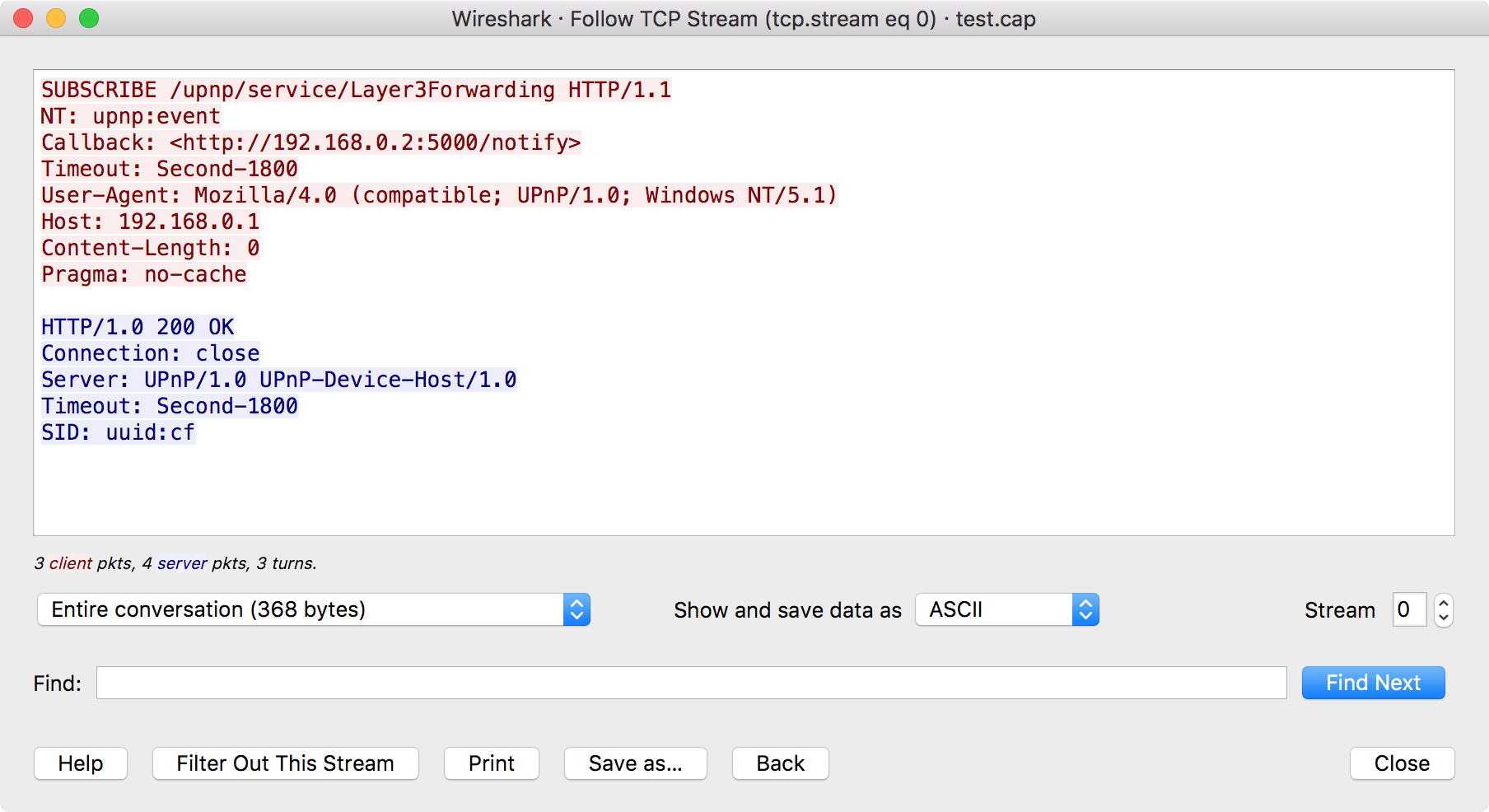
The reconstructed view is not a substitute for inspecting individual packets. Return to the packet list when you need to understand:
- TCP handshake timing, resets, retransmissions, or window behavior.
- Which segment contained a particular application byte.
- Whether Wireshark had enough captured data to reassemble the application message.
- Whether a middlebox modified the traffic at the capture point.
Also, Follow TCP Stream does not decrypt TLS. For a standard HTTPS session, it will show TLS records and encrypted application data, not the HTTP request or response. A filter such as tcp.port == 443 is useful to identify the transport, but it does not establish that plaintext HTTP is available for inspection.
A practical filtering workflow
For routine troubleshooting, use this repeatable workflow.
1. Preserve enough evidence
When capturing live traffic, choose the least restrictive capture filter that meets storage and performance constraints. Preserve supporting protocols if the cause is unknown:
- DNS for name resolution
- ARP or Neighbor Discovery for local address resolution
- ICMP or ICMPv6 for reachability and MTU feedback
- TCP or UDP traffic for the application exchange itself
A narrow service-only capture can be appropriate during a deliberate test. It is riskier during incident response.
2. Build display filters incrementally
Start with one observable fact: a client address, server address, protocol, port, VLAN, or time range. Confirm that the result looks plausible before adding another condition.
This avoids the common failure mode of typing a complex expression that returns no frames, without knowing which condition eliminated the traffic.
3. Use Wireshark to generate field names
When you find a useful field in Packet Details:
- Right-click it and use Apply as Filter to apply a generated expression immediately.
- Use Prepare as Filter to place a generated expression in the filter bar for inspection and editing.
- Use Conversation Filter for endpoint-and-port conversations.
Generated filters are valuable even for experienced engineers: they expose the exact field abbreviation Wireshark’s current dissector uses.
4. Narrow to an exchange identifier
For TCP, use either the generated TCP conversation filter or tcp.stream.
For UDP, there is no connection state comparable to TCP’s stream. A useful approximation is the endpoint-and-port tuple:
ip.addr == 10.10.10.10 &&
ip.addr == 172.20.30.40 &&
udp.port == 53
Then distinguish individual requests using protocol-specific fields. For example, DNS analysis can narrow further with a transaction ID or query name:
dns.qry.name == "app.example.com"
5. Record the filter with your evidence
A packet capture without its analytical filter often becomes difficult for another engineer to reproduce. In a case note or architecture validation record, save:
- Capture location and interface
- Time range and timezone
- Capture filter, if one was used
- Final display filter
- Selected stream number or conversation tuple
- The observed result and the expected result
This turns packet analysis from an individual debugging activity into repeatable operational evidence.
Short EVE-NG or workstation practice
Use an authorized lab path with one client and one reachable service.
-
Capture from the client-facing interface without a restrictive capture filter, or use the broader filter below:
host 10.10.10.10 -
Generate a TCP connection from the client to a known server on port 443.
-
Apply the progressive display filters from this lesson, ending with:
ip.addr == 10.10.10.10 && ip.addr == 172.20.30.40 && tcp.port == 443 -
Select one packet, create a TCP Conversation Filter, and compare its result with:
tcp.stream eq N -
Use Follow TCP Stream. If the traffic is TLS-protected, verify that the TCP conversation is isolated even though the HTTP payload remains encrypted.
The expected outcome is not a particular packet count. It is the ability to explain why each successive filter includes or excludes a frame, and to distinguish a service-level filter from a single-connection filter.
Key takeaways
- Capture filters limit what is recorded and use libpcap syntax such as
host,port,tcp, andarp. Packets excluded here cannot be recovered later. - Display filters analyze captured packets and use Wireshark fields such as
ip.addr,tcp.port,dns.qry.name, andtcp.flags.syn. - Build filters from a defined requirement: observation point, endpoints, transport or protocol, and exchange boundary.
- Begin broadly, validate the result, and then add conditions. This preserves diagnostic context and makes empty results easier to troubleshoot.
ip.addr == A && ip.addr == B && tcp.port == 443isolates bidirectional TCP 443 traffic between two IP endpoints, but can include multiple connections.- Use Conversation Filter or
tcp.stream eq Nto isolate one TCP connection precisely. - Follow TCP Stream reconstructs captured TCP application bytes, but it does not decrypt TLS and should be paired with packet-level inspection when timing, loss, or handshake behavior matters.
Next, you will move one layer outward and decode the Ethernet II frame itself: destination and source MAC addresses, EtherType, payload, optional 802.1Q tags, and the role of the FCS.
Can't find a good explanation? Sign up and we'll make it for you
Sign up