
Hello! Welcome back to our module on Privilege Escalation.
In the last lesson, you learned how to perform systematic enumeration on a compromised Linux host. You used manual commands and powerful automated scripts like LinEnum and LinPEAS to gather information and, most importantly, identify potential privilege escalation vectors. One of the first and most critical checks you learned was running sudo -l to see what commands your current user can execute with higher privileges.
Today, we'll take the next logical step. This lesson will teach you how to exploit misconfigured sudo permissions to escalate your privileges to root. You'll move from finding these weaknesses to actively exploiting them, a core skill for any penetration tester or bug bounty hunter. We will cover the most common exploitation paths, from abusing overly permissive binaries to more advanced techniques involving environment variables.
1. Understanding Sudo and the Sudoers File
On Linux, the sudo command (superuser do) allows a permitted user to execute a command as another user, typically the root user. The rules that govern who can run what are defined in the /etc/sudoers file. A misconfiguration in this file is one of the most common and reliable ways to escalate privileges.
As you learned previously, the command sudo -l is your primary tool for investigating these rules. It lists the allowed and forbidden commands for your current user.
Let's look at what a misconfiguration might look like in the actual sudoers file.
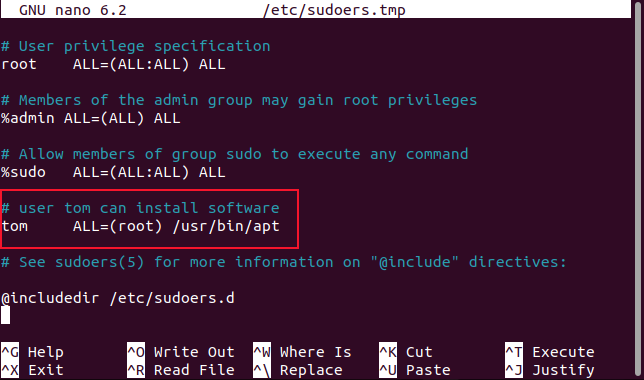
The syntax user host=(runas) options: command is key. The NOPASSWD option is a significant finding because it means you can execute the command as root without needing to know the user's or root's password.
2. Exploiting Sudo-able Binaries with GTFOBins
The most straightforward sudo exploit involves a binary that can, by its nature, interact with the operating system—for example, by opening a shell or reading/writing files. If such a binary is permitted in the sudoers file, you can often leverage its intended functionality to break out and gain a root shell.
Your best friend for this task is GTFOBins. It's a curated list of Unix binaries and how they can be abused to bypass local security restrictions.
Let's see this in action. The following video demonstrates finding and exploiting a sudo rule for Python. This directly continues from the enumeration workflow you studied in the previous lesson.
Linux Red Team Privilege Escalation Techniques - Kernel Exploits & SUDO Permissions
In 'Linux Red Team Privilege Escalation Techniques', HackerSploit demonstrates the full workflow: finding a sudo misconfiguration and then exploiting it. This will solidify the connection between enumeration and exploitation.
Please watch the segment from 19:04 to 21:58. The enumeration script (LinEnum) has just discovered that the user 'Steven' can run Python as root without a password. Observe how the presenter: Identifies the vulnerable binary (python). Immediately consults GTFOBins. Finds the correct payload under the 'Sudo' section for Python. Executes the command to spawn a root shell.
The pattern you just saw is fundamental:
- Run
sudo -lto find a(root) NOPASSWD:entry for a binary. - Search for that binary on GTFOBins.
- Copy and adapt the command from the "Sudo" section.
- Execute it to get a root shell.
This works for a huge number of standard Linux commands: find, less, more, nano, vim, awk, nmap, and many more. If you can run it as root, check GTFOBins.
Test your understanding!
You have compromised a machine as the user 'webadmin'. You run sudo -l and see the following output:
User webadmin may run the following commands on this host:
    (root) NOPASSWD: /usr/bin/less
Based on what you've learned, what are your exact next steps to get a root shell?
Show answer
- Go to the GTFOBins website (gtfobins.github.io).
- Search for "less" in the search bar.
- Click on the "Sudo" tab in the results.
- You will find a command like
sudo less /etc/profile, and oncelessis running, you can type!/bin/shand press Enter. - Executing this sequence will drop you into a shell with root privileges because
sudo lesswas run as root.
3. Exploiting Sudo with Environment Variables
A more advanced, and often overlooked, vector involves sudo's handling of environment variables. By default, sudo resets most environment variables for security. However, a misconfiguration can cause it to preserve "unsafe" variables.
The most notorious of these is LD_PRELOAD. This is a Linux environment variable that tells the dynamic linker to load a specified shared library (.so file) before any others. If you can control this variable and execute a program with sudo, you can force that program to load your own malicious library, executing your code with root privileges.
Step 1: Identification
First, you need to check if LD_PRELOAD is preserved. Again, sudo -l is the tool.

Step 2: Exploitation
If you find that LD_PRELOAD is kept, the process is as follows:
- Write a simple C program that will spawn a root shell.
- Compile this C code into a shared object (
.so) file. - Execute any of the allowed
sudocommands while setting theLD_PRELOADvariable to point to your malicious shared object.
The following guide provides a clear, practical walkthrough. Given your Computer Science background, you should find the C code and compilation steps straightforward.
Sudo Misconfigurations | Infiltr8: The Red-Book
The article 'Sudo Misconfigurations' from Infiltr8: The Red-Book provides an excellent explanation and example of exploiting the LD_PRELOAD misconfiguration.
Please read the section titled LD_PRELOAD. It starts with a short explanation and then provides the C code for a payload, the gcc command to compile it, and the final command to execute the exploit. Focus on understanding how these three pieces fit together to achieve privilege escalation.
This technique is powerful because it works with any program you can run with sudo if LD_PRELOAD is preserved. The program doesn't need to have shell-spawning capabilities itself; your malicious library provides them. A similar technique exists for the LD_LIBRARY_PATH variable, which is also covered in the same article.
4. Other Common Sudo Misconfigurations
While abusing binaries and LD_PRELOAD are the most frequent vectors, it's good to be aware of a few others:
(ALL : ALL) NOPASSWD: ALL: This is the ultimate jackpot. If you see this insudo -l, it means your user can run any command as any user without a password. You can simply runsudo suorsudo /bin/bashto become root immediately.- PATH Hijacking: If a command is listed in
sudoerswithout its full path (e.g.,apache2instead of/usr/sbin/apache2),sudowill search for the binary in the directories specified by thePATHvariable. If you have write permissions to a directory that appears earlier in thePATHthan the legitimate binary's location, you can create a malicious script with the same name (e.g., a script namedapache2in/tmp), andsudomight execute your script as root instead of the real one. - Script Exploitation: Sometimes
sudoallows a user to run a script (e.g., a Python or Bash script) as root. If you have write permissions to that script, you can simply edit it to include a payload, like a reverse shell, and then run it withsudoto get root.
Conclusion
You have now learned how to turn the output of your enumeration tools into a root shell by exploiting sudo misconfigurations. This is a critical and highly practical skill that moves you from being a passive observer on a system to an active administrator.
Key Takeaways:
sudo -lis Paramount: Always check your sudo privileges first upon gaining access to a system. Look forNOPASSWDandenv_keepdirectives.- GTFOBins is the Playbook: For any standard binary you can run as root, GTFOBins provides the exact command to elevate your privileges. This should be a reflex.
LD_PRELOADis a Powerful Vector: Ifsudopreserves theLD_PRELOADenvironment variable, you can gain root access by creating a malicious shared object, regardless of what the sudo-ed program is.- Context is Key: Privilege escalation isn't just one trick. It's about understanding how permissions, binaries, and environment variables interact, and spotting when those interactions are insecure.
Next Lesson Preview:
In our next lesson, we will explore another extremely common Linux privilege escalation vector: Exploiting SUID/GUID binaries. You will find that the methodology is very similar to what you learned today. You'll use enumeration to find these special binaries and then consult resources like GTFOBins to exploit them. This will further reinforce the pattern of "find, research, exploit."