
Hello! Welcome to the first lesson in our module on Privilege Escalation & Post-Exploitation.
In the previous module, you mastered the art of gaining initial access to a target by finding, exploiting, and even chaining web vulnerabilities. You've successfully breached the perimeter and have a shell on a remote machine. But what comes next? Often, this initial access is as a low-privilege user, like www-data or a standard user account. To truly take control of the system, you need to elevate your privileges to the highest level: root.
This lesson begins that journey. We will cover the learning outcome: Perform manual and automated enumeration on a compromised Linux host to identify privilege escalation vectors. This is the foundational step for every privilege escalation attempt. You will learn how to systematically gather information about a compromised Linux system to identify weaknesses that can be exploited to gain root access.
1. The Post-Exploitation Mindset: From Foothold to root
You've landed on the system, but you're not the administrator. Your goal is to find a flaw in the system's configuration that allows you to execute code or access files as the root user. This process is called Privilege Escalation (PrivEsc).
The first and most critical phase of any privilege escalation attempt is enumeration. Before you can attack, you must understand your environment. Your CS background gives you an advantage here; you already understand core Linux concepts like users, groups, permissions, and processes. Now, you'll learn to look at them through an attacker's lens.
We are primarily looking for misconfigurations in these key areas:
- System & Kernel: Outdated kernel or software versions vulnerable to known exploits.
- Users & Permissions: What can your current user do? Are there other users? Who can run commands with
sudo? - File System: Are there any sensitive files you can read or write? Do any scripts or configuration files contain passwords?
- Running Processes & Services: Are there any services running as
rootthat you can interact with or that are misconfigured? - Scheduled Tasks: Are there any
cronjobs that run with higher privileges and can be manipulated?
2. Lay of the Land: Manual Enumeration
Before deploying automated tools, it's crucial to know how to perform quick manual checks. This helps you understand what the tools are doing under the hood and allows you to spot "low-hanging fruit" immediately.
A great way to structure your manual enumeration is to start with who you are and what your system is.
Manual Enumeration – Linux Privilege Escalation
The article 'Manual Enumeration – Linux Privilege Escalation' from Juggernaut Security provides an excellent, structured guide to manual enumeration. We will use it as a reference for the essential commands.
Please read the following sections from the article: User Enumeration: Start here and focus on the commands to understand your current user (whoami, id) and, most importantly, check your sudo privileges (sudo -l). This is one of the most common and immediate paths to root. System Enumeration: Read this section to learn how to identify the operating system, kernel version (uname -a), and architecture. This information is critical for finding potential kernel exploits. My Personal Set of Manual Commands...: This is a fantastic, concise checklist. Think of these as the first commands you should run the moment you get a shell. It's a quick, efficient way to check for the most obvious vulnerabilities.
Running these manual commands gives you a quick baseline. Did you get lucky with sudo -l showing (ALL : ALL) NOPASSWD:? Is the kernel version ancient and likely vulnerable? This initial assessment guides your next steps.
3. The Need for Automation
Manual enumeration is fundamental, but it can be slow and you might miss something. To be efficient and thorough, penetration testers use automated scripts. These scripts run hundreds of checks, parse the results, and highlight potential vectors for you.
Here's a look at the landscape of common enumeration tools for both Linux and Windows. Today, we're focusing on the Linux side.
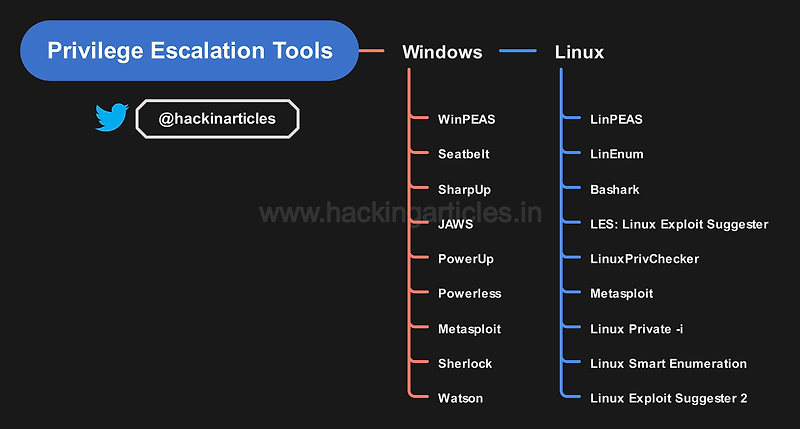
The general workflow for using these scripts is:
- Gain initial access to the target.
- Transfer the script from your attacker machine to the target (usually into a world-writable directory like
/tmp). - Make the script executable (
chmod +x script.sh). - Run the script and analyze its output.
4. Automated Enumeration in Practice
Let's see how this works with two of the most popular scripts.
4.1. LinEnum and Linux Exploit Suggester
LinEnum is one of the classic enumeration scripts. It's thorough and provides a detailed report of the system's configuration. Often, its output is used to find information that can be fed into another, more specific tool.
Linux Red Team Privilege Escalation Techniques - Kernel Exploits & SUDO Permissions
The video 'Linux Red Team Privilege Escalation Techniques' by HackerSploit provides a fantastic practical demonstration of the enumeration process. It covers manual checks, using LinEnum, and then using the findings to identify a kernel exploit.
Watch the following segments, focusing on the enumeration methodology: Using LinEnum (15:10 - 19:04): Observe the process of transferring LinEnum.sh to the target machine via a simple Python web server and wget. Watch how the script is executed and the kind of information it immediately provides, such as kernel version and, critically, a misconfigured sudo permission. Using Linux Exploit Suggester (22:44 - 29:59): This part demonstrates how to use the kernel version information found earlier. The presenter uses another script, Linux Exploit Suggester, to find potential kernel exploits matching the target's specific version. Pay attention to how the script's output lists CVEs and ranks them by 'Exposure' (probability of success).
The video also demonstrates exploiting the sudo misconfiguration it finds. We will cover the exploitation of sudo rules in our next lesson. For now, the key takeaway is how the automated script made finding that vector trivial. Also, note the presenter's caution: kernel exploits can be unstable and should be handled carefully.
4.2. LinPEAS: Colorful and Effective
LinPEAS (Linux Privilege Escalation Awesome Script) is a more modern script that has become a favorite among testers. Its key feature is its color-coded output, which makes spotting high-probability vectors incredibly easy.
How to Use Linpeas | linpeas.sh | Linux Privilege Escalation – a Step by Step Guide
The video 'How to Use Linpeas' by Security in mind offers a clear, concise walkthrough of this powerful tool.
Watch these sections to understand how LinPEAS works and why it's so popular: Transfer and Execution (01:00 - 03:15): The process is the same as with LinEnum: host the file on your machine and download it on the target. This reinforces the common technique for getting tools onto a compromised host. Interpreting the Output (03:15 - 07:15): This is the most important part. Pay close attention to the legend. LinPEAS highlights findings in red with a yellow background to indicate a 95% chance of a privilege escalation vector. As you see the presenter scroll through the output, notice how your eyes are immediately drawn to these high-value items, such as SUID binaries.
Test your understanding!
You run LinPEAS on a compromised machine and see the following line highlighted in red and yellow:SUID Binaries - ==> /usr/bin/find
What does this mean, and what would be your immediate next step?
Show answer
This means the find command has the SUID (Set User ID) bit set. When you execute /usr/bin/find, it will run with the permissions of the file's owner, which is likely root. This is a potential privilege escalation vector.
Your immediate next step would be to check GTFOBins (a curated list of Unix binaries that can be abused). Searching for find on GTFOBins will show you the exact command to run to spawn a root shell using this misconfiguration.
Conclusion
You now have a solid methodology for the first step of Linux privilege escalation: enumeration. You know how to perform quick manual checks for low-hanging fruit and how to deploy powerful automated scripts like LinEnum and LinPEAS to conduct a deep and efficient analysis of a target system. This ability to systematically find potential weaknesses is the most important part of the privilege escalation process.
Key Takeaways:
- Enumeration is the Foundation: You can't exploit what you can't find. Systematic enumeration is the key to successful privilege escalation.
- Start Manually, Finish Automatically: Always begin with a few quick manual commands (
id,sudo -l,uname -a) to get your bearings. Then, deploy an automated script like LinPEAS for a thorough search. - Recognize Key Vectors: Your enumeration efforts are focused on finding common misconfigurations:
sudoprivileges, SUID/GUID binaries, vulnerable kernel/software versions, writable sensitive files, and credentials in configuration files. - Leverage Your Tools: Tools like
LinPEASare designed to make your job easier. Understanding their output, especially color-coding, allows you to quickly zero in on the most promising vectors.
Next Lesson Preview:
Now that you know how to find privilege escalation vectors, our next few lessons will focus on how to exploit them. We'll start with one of the most common and reliable paths to root that you've learned to identify today: Exploiting misconfigured sudo permissions.