
Hello! Welcome to your next lesson in the "Privilege Escalation & Post-Exploitation" module.
In our last session, you mastered exploiting insecure service configurations to escalate your privileges to NT AUTHORITY\SYSTEM. This is a critical milestone. Once you "own" a machine, the primary goal shifts from gaining access to expanding it. The most effective way to do this is by harvesting credentials.
This lesson will teach you the art of credential dumping. You'll learn how to find and extract sensitive information like passwords, hashes, and tokens left on a compromised system. This is a fundamental skill that separates a single-machine compromise from the starting point of a full network takeover. By the end of this lesson, you will be able to extract credentials from memory, configuration files, and the registry on a compromised system.
1. Where to Find Credentials: The Lay of the Land
Before we start grabbing credentials, it's essential to know where they hide. Attackers target several key locations on a Windows system. The MITRE ATT&CK framework categorizes this as technique T1003: OS Credential Dumping.
To get a comprehensive overview of these locations, let's start with a foundational reading.
MITRE ATT&CK T1003 Credential Dumping
The article 'MITRE ATT&CK T1003 Credential Dumping' from Picus Security provides an excellent breakdown of the primary sources attackers target for credentials. This will give you the theoretical map for our practical exercises.
Please read the section titled 'Resources Targeted by Adversaries for Credential Dumping and Sub-techniques of the MITRE ATT&CK Framework'. As you read, focus on understanding the 'what' and 'why' for these key sources: LSASS Memory: Why is this process such a high-value target? Security Account Manager (SAM): What kind of credentials does it store, and why can't you just copy the file directly? Configuration Files & Registry: The article touches on LSA Secrets and Cached Credentials, which are stored in the registry. Think about other types of software that might store credentials in configuration files or registry keys.
To summarize and structure our approach based on the learning outcome, we'll focus our hunt on three main areas:
- Memory: Primarily the
lsass.exeprocess (Local Security Authority Subsystem Service). It caches credentials of logged-on users for convenience (like single sign-on), making it a goldmine for plaintext passwords and password hashes. - Configuration Files: These are files on the disk that applications use to store settings. Developers sometimes insecurely hardcode passwords, API keys, or connection strings in them. Common targets include
unattended.xml(for automated Windows setups),web.config, or custom.json/.inifiles. - The Registry: The Windows Registry is a massive database of configuration settings. Credentials for services, auto-logon features, and saved application sessions (like for PuTTY or VNC) can often be found here.
Now, let's move from theory to practice and start extracting these secrets.
2. The Crown Jewels: Dumping Credentials from LSASS Memory
Attacking lsass.exe is the most common and often most fruitful credential dumping technique. The go-to tool for this is Mimikatz. It's a powerful post-exploitation tool that can parse the lsass.exe memory dump and extract credentials in various formats.
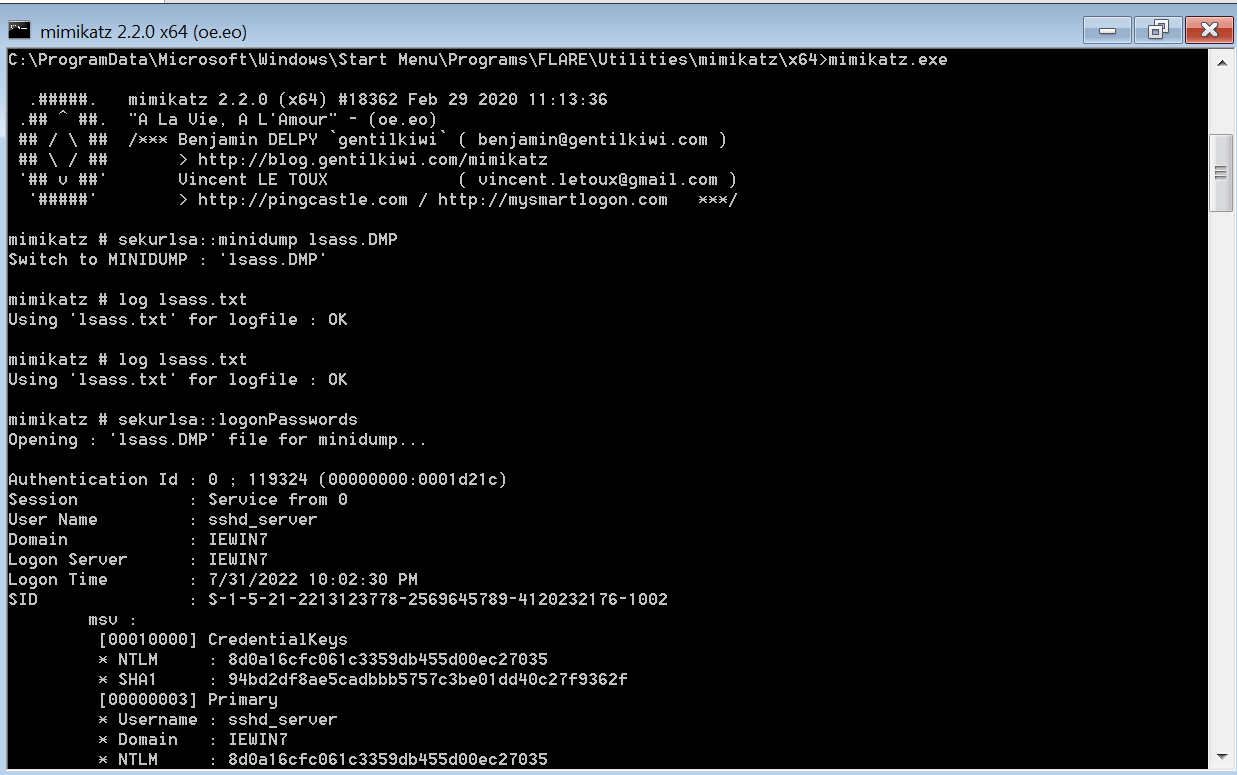
The general process requires SYSTEM privileges, which you already know how to obtain. Let's watch a video that demonstrates the full manual process.
Windows Red Team Credential Access Techniques | Mimikatz & WCE
This video from HackerSploit, 'Windows Red Team Credential Access Techniques', provides a perfect hands-on demonstration of using Mimikatz manually within a Meterpreter session to dump credentials.
Please watch from 10:40 to 18:44. The presenter has already gained initial access and will now escalate and dump credentials. Follow these key steps: Privilege Escalation (13:10 - 16:00): The presenter escalates to NT AUTHORITY\SYSTEM. This is a necessary prerequisite. Uploading Mimikatz (16:00 - 16:45): The upload command is used to get the tool onto the target machine. Running Mimikatz (16:45 - 18:44): Pay close attention to these two crucial commands: privilege::debug: This grants your process the necessary rights to interact with a protected process like lsass.exe. sekurlsa::logonpasswords: This is the command that dumps credentials from LSASS memory.
A Note on Modern Defenses: LSA Protection
Modern Windows versions (Windows 8.1/Server 2012 R2 and later) introduced LSA Protection, which prevents even administrators from reading the LSASS memory. If you try to run sekurlsa::logonpasswords on a protected system, you'll get an Access is denied error.
Mimikatz includes a driver (mimidrv.sys) that can be used to patch the kernel in memory and temporarily remove this protection. The "Credentials Harvesting Practice Walkthrough" article provides a clear, text-based guide on how to do this.
Credentials Harvesting Practice Walkthrough
For a text-based reference on using Mimikatz and bypassing LSA protection, review the relevant sections of this Medium article.
Read Task 5: Local Security Authority Subsystem Service (LSASS). Focus on the sub-sections 'MimiKatz' and 'Protected LSASS'. The latter explains how to load the Mimikatz driver (!+) and disable the protection (!processprotect /process:lsass.exe /remove).
3. Digging for Treasure: Credentials in Files and the Registry
If dumping LSASS memory fails or yields no useful results, your next step is to scour the filesystem and registry. This is often less direct but can be just as effective.
Configuration Files
Developers often leave credentials in plain text inside configuration files for convenience. Your task is to know where to look.

Your methodology should be:
- Search for common file names:
web.config,app.config,settings.json,database.yml,.env. - Look for setup/automation files: A fantastic example is
unattended.xml, which is used for automated Windows installations and can contain the administrator password. - Use
findstr(Windows) orgrep(Linux shell) to search file contents for keywords likepassword,pass,secret,api_key,connectionString.
The HackerSploit video you watched earlier has a great segment on finding and analyzing an unattended.xml file.
Windows Red Team Credential Access Techniques | Mimikatz & WCE
Let's revisit the HackerSploit video to see a practical example of finding credentials in a configuration file.
Watch the segment from 18:44 to 25:54. The presenter discovers an unattended.xml file identified by the powerup script, locates it manually, and inspects its contents for credentials. Although the credentials in this specific example are redacted, it perfectly demonstrates the process.
The Windows Registry
The registry can also contain passwords for various applications and services. Manually searching the vast registry is impractical. This is where the enumeration scripts you learned about in the previous lesson, like WinPEAS, shine. They have built-in checks for dozens of common registry locations where credentials might be stored.
Windows Privilege Escalation - Searching For Passwords In Windows Registry
This final video from HackerSploit demonstrates how to effectively find passwords stored in the registry, contrasting the inefficient manual approach with the power of automated tools.
Please watch from 01:30 to 09:27. First, observe the manual reg query (01:30 - 05:22). Note how much irrelevant information it returns. This illustrates why we use automated tools. Next, watch the demonstration of WinPEAS (05:22 - 09:27). See how it intelligently checks specific, high-value locations and immediately discovers cleartext credentials for a PuTTY session stored in the registry.
Test your understanding!
You have SYSTEM on a modern Windows Server. You try sekurlsa::logonpasswords in Mimikatz, but it fails with an "Access is denied" error, and your security constraints prevent you from loading the mimidrv.sys driver.
What are the next two classes of locations you should search for credentials? For each location, name one specific file or registry path that would be a high-priority target.
Show answer
If LSASS is off-limits, the next two places to look are configuration files and the registry.
- Configuration Files: A high-priority target is the
C:\Windows\Panther\unattended.xmlfile. It's used for automated installations and can contain local administrator credentials. - Registry: A high-priority target would be searching for PuTTY saved sessions under
HKEY_CURRENT_USER\Software\SimonTatham\PuTTY\Sessions. These can store usernames and sometimes even proxy passwords. WinPEAS automates this check.
Conclusion
Excellent work! You've just added one of the most impactful post-exploitation skills to your arsenal. Gaining SYSTEM is the key, but harvesting credentials is what opens the rest of the doors on a network.
Key Takeaways:
- Credentials are most commonly found in LSASS memory, on-disk configuration files, and the Windows Registry.
- Mimikatz is the essential tool for dumping credentials from LSASS memory, but it requires
SYSTEMprivileges and the use ofprivilege::debug. - Modern defenses like LSA Protection can block memory dumping, forcing you to use alternative methods or bypasses.
- Searching for plaintext credentials in configuration files (like
unattended.xml) and using automated tools like WinPEAS to scan the registry are critical secondary techniques.
Next Lesson Preview:
You've gained administrator access and harvested credentials. But what happens if the machine reboots or your shell is disconnected? You lose your foothold. In our next lesson, we will address this by covering persistence. You will learn how to plant backdoors and configure triggers (like scheduled tasks or registry run keys) to ensure your access to the compromised system survives a restart.