
Hello! Welcome to the next lesson in our module on Windows Privilege Escalation.
In our last session, we focused on the critical first step after gaining a foothold: enumeration. You learned how to use both manual commands and automated scripts like WinPEAS to map out a Windows environment and hunt for weaknesses. One of the key findings these tools often highlight are misconfigured Windows services, which are a common and reliable path to SYSTEM-level privileges.
Today, we move from finding these weaknesses to actively exploiting them. This lesson will teach you how to turn the "interesting findings" from your enumeration scans into a full system compromise. By the end of this 60-minute lesson, you will be able to exploit two of the most prevalent service-related vulnerabilities: insecure service permissions and unquoted service paths.
1. Unquoted Service Paths
This vulnerability is a classic example of how a simple configuration oversight can lead to a major security hole. It stems from how the Windows operating system interprets file paths that contain spaces and are not enclosed in quotation marks.
Understanding the Vulnerability
When a service is configured to run an executable from a path like C:\Program Files\Some App\service.exe, Windows needs to know exactly where the executable is.
- If the path is quoted (
"C:\Program Files\Some App\service.exe"), Windows knows the exact location. No ambiguity. - If the path is unquoted, Windows gets confused by the spaces. It will try to find and execute a program at each possible point in the path, in order.
For the path C:\Program Files\Some App\service.exe, Windows will try to execute the following, in this order:
C:\Program.exeC:\Program Files\Some.exeC:\Program Files\Some App\service.exe
If we, as a low-privileged user, can write a malicious file to C:\Program.exe or C:\Program Files\Some.exe, the service will execute our code with its privileges (often NT AUTHORITY\SYSTEM) the next time it starts.
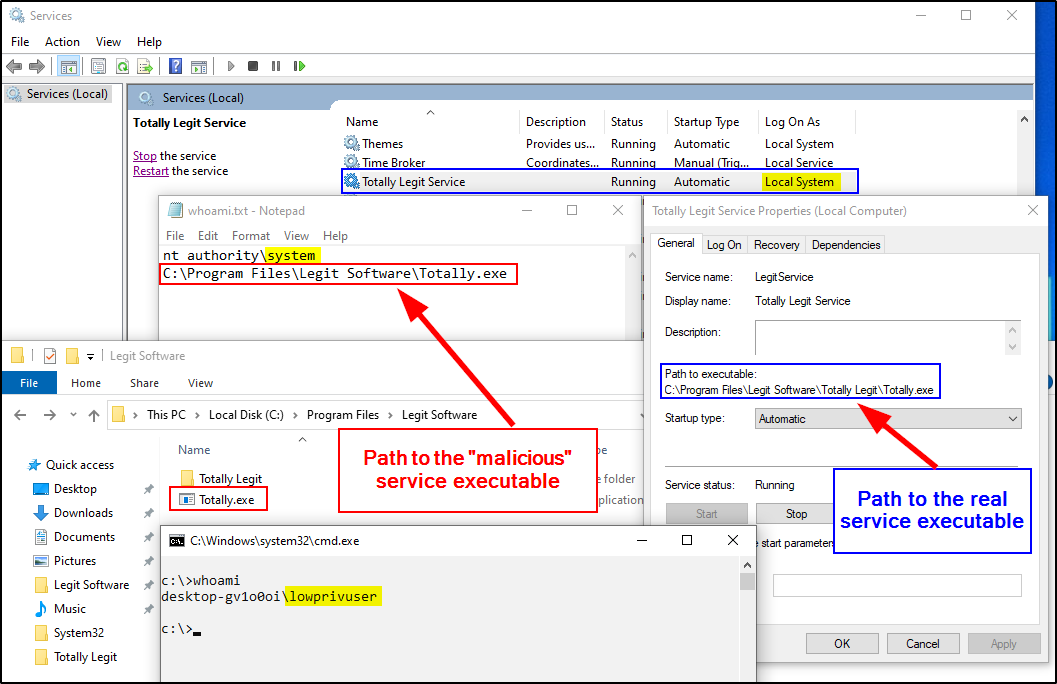
The Exploitation Workflow
The process is methodical:
- Identify: Use tools like WinPEAS or manual commands to find services with unquoted paths.
- Check Permissions: Verify you have write access to one of the parent directories in the vulnerable path.
- Craft & Place Payload: Create a malicious executable and place it in the writable directory, naming it to match what Windows will search for (e.g.,
Program.exe). - Trigger: Restart the service to force it to execute your payload.
The following video from HackerSploit provides an excellent step-by-step demonstration of this entire process.
Windows Privilege Escalation - Unquoted Service Paths
This video, 'Windows Privilege Escalation - Unquoted Service Paths', will guide you through a full exploit chain for this vulnerability.
Please watch from 00:57 to 13:30. Follow the presenter as they: Explain the vulnerability (00:57 - 02:20). Use WinPEAS to identify a vulnerable service (02:20 - 04:07). Use accesschk.exe to verify write permissions in the service path (05:12 - 06:22). This is a critical step; without write permissions, the vulnerability is not exploitable. Generate a reverse shell payload using msfvenom and upload it to the target directory, renaming it appropriately (06:22 - 11:10). Start the service and receive a SYSTEM shell (11:10 - 13:30).
The article "Mastering Windows Privilege Escalation with Boxes" also provides a great written summary of this technique under the section "Unquoted Service Path".
Mastering Windows Privilege Escalation with Boxes
For a concise, text-based explanation that reinforces the video, read the following section from the 'Mastering Windows Privilege Escalation' article.
Read the sub-section titled 'Unquoted Service Path' within the 'Service Permission Abuse' section. It provides a clear example and exploitation steps.
2. Insecure Service Permissions
This second type of service vulnerability occurs when a low-privileged user is granted excessive permissions over a service object itself. Even if the service path is correctly quoted, if you can modify the service's configuration, you can hijack it.
Understanding the Vulnerability
Every service on Windows has an Access Control List (ACL) that defines who can interact with it and how. If a user is granted dangerous permissions like SERVICE_CHANGE_CONFIG or SERVICE_ALL_ACCESS, they can reconfigure the service to execute arbitrary code.
The most direct way to exploit this is by changing the service's binpath (binary path) to point to a malicious executable we control. When the service is next started, it will run our code instead of the legitimate program, again with the service's elevated privileges.

The Exploitation Workflow
The attack pattern is very similar to the last one, but with a key difference in step 3:
- Identify: Find services where your user has modification rights using WinPEAS, PowerUp, or
accesschk. - Check Permissions: Confirm you have permissions like
SERVICE_CHANGE_CONFIG. - Craft & Upload Payload: Create a malicious executable with
msfvenomand upload it to a location you control on the target (e.g.,C:\temp). - Modify Service: Use the Service Control command-line tool (
sc.exe) to change thebinpathof the vulnerable service to point to your payload. - Trigger: Stop and restart the service to execute your payload and gain a SYSTEM shell.
Let's watch another excellent demonstration from HackerSploit that walks through this exact scenario.
Windows Privilege Escalation - Exploiting Insecure Service Permissions
This video, 'Exploiting Insecure Service Permissions', provides a clear walkthrough of hijacking a service by modifying its binary path.
Please watch from 02:07 to 14:49. The video covers the entire exploitation lifecycle: Identifying a potentially weak service with WinPEAS (02:07 - 04:13). Confirming modifiable permissions using accesschk.exe (04:13 - 06:35). Querying the service configuration with sc qc to verify it runs as LocalSystem (07:10 - 08:23). This confirms the escalation will be successful. Generating and uploading a malicious payload (08:23 - 11:34). Modifying the binary path using sc config <servicename> binpath= (11:34 - 12:38). This is the core of the exploit. Restarting the service and receiving the SYSTEM shell (12:38 - 14:49).
For further reading, the article "Windows Privilege Escalation: Weak Services Permission" provides another detailed, command-by-command walkthrough.
Windows Privilege Escalation: Weak Services Permission
This article provides a supplementary, text-based guide to exploiting weak service permissions.
Read the section titled 'Abusing Insecure Configuration File Permissions (PTOC)'. It mirrors the steps shown in the video, reinforcing your understanding of the commands used.
Test your understanding!
You've found a service with an unquoted path: C:\A B\C D\E.exe. Your user has write permissions in the directory C:\A B\. What should you name your malicious executable and where should you place it to exploit this vulnerability?
Show answer
You should name your malicious executable C.exe and place it in the C:\A B\ directory.
When the service starts, Windows will first try to execute C:\A.exe (fails), then C:\A B\C.exe. Since you placed your payload there, it will be executed with the service's privileges before Windows ever looks for the legitimate E.exe.
Conclusion
Congratulations on completing this lesson! You've moved beyond simple enumeration and learned the practical, hands-on techniques to exploit two very common Windows privilege escalation vectors. These are bread-and-butter skills for any penetration tester or bug bounty hunter.
Key Takeaways:
- Unquoted Service Paths are a path interpretation vulnerability. You exploit them by placing a malicious executable in a writable parent folder that Windows will parse first.
- Insecure Service Permissions are an ACL vulnerability. You exploit them by using your modification rights to change the service's binary path (
binpath) to point to your own payload. - The common workflow for both is: Identify -> Verify Permissions -> Place Payload / Modify Config -> Restart Service.
- Tools like
accesschk.exeare essential for verifying permissions, andsc.exeis the native tool for modifying service configurations.
Next Lesson Preview:
Having now covered several key privilege escalation techniques for both Linux and Windows, our next step in the post-exploitation process is to become more entrenched in the compromised system. In the next lesson, we will focus on credential harvesting, where you will learn how to extract passwords, hashes, and tokens from memory, configuration files, and the Windows registry using tools like Mimikatz. This is how an attacker moves from controlling one machine to compromising an entire network.