Hello! Let's get started with your next lesson.
In our last session, we set up retargeting pixels to build audiences of visitors who left your site without taking action. This is a crucial strategy for bringing people back. Today, we'll focus on what happens when you successfully capture a lead's email address, for instance, through the popups we discussed earlier. This first interaction is your golden opportunity to make a great impression and turn a curious prospect into a customer.
This lesson directly addresses your goal of building a robust e-commerce operation by introducing a fundamental component: email automation. Specifically, you will learn how to set up an email marketing tool and create an automated welcome email sequence.
You mentioned that you wanted a practical, brief overview of email tools, and we'll stick to that. We will focus on Klaviyo, the industry standard for e-commerce, and build the single most important automation every store needs: the welcome series.
1. Choosing Your Tool: Why Klaviyo?
For e-commerce, especially dropshipping and direct-to-consumer brands, Klaviyo is a top choice. It stands out because of its deep integration with platforms like Shopify, allowing it to pull in a vast amount of customer data (e.g., what products someone viewed, what's in their cart, past purchases) and use that data to trigger highly personalized, automated emails.
While other tools like Mailchimp exist, Klaviyo's e-commerce focus makes it exceptionally powerful for the business you're building.
2. Getting Started with Klaviyo
The first step is to create an account and connect it to your store. The video below provides a concise walkthrough of the initial setup and familiarizes you with the main sections of the Klaviyo dashboard.
Klaviyo Email Marketing Tutorial For Beginners (FULL SETUP)
This video by Max Sturtevant, an e-commerce expert, will guide you through the initial setup of a Klaviyo account and give you a tour of the dashboard. This will help you understand the core components of the platform.
Watch from 02:12 to 04:23. Focus on understanding the main navigation areas he points out: Campaigns: One-time email blasts. Flows: Automated email sequences (our focus today). Signup Forms: Popups and forms to collect emails. Audience: Your lists and segments of subscribers.
As you saw, the main difference to grasp is between Campaigns and Flows.
- Campaigns are what you manually create and send, like a newsletter or a Black Friday sale announcement.
- Flows are automated sequences that run in the background, triggered by a user's action.
The welcome series is a flow because it's automatically triggered when a new person subscribes to your list.
3. Architecting Your Welcome Sequence
A welcome sequence does more than just deliver a discount code. Its goals are to:
- Welcome new subscribers and deliver the promised incentive.
- Introduce your brand's story and mission to build a connection.
- Showcase your products and build trust through social proof.
- Drive the first sale with a sense of urgency.
Klaviyo provides excellent documentation on how to get started. Before we look at the video tutorial, read through their official guide to understand the structure.
How to create an email welcome series
This official Klaviyo help document outlines the steps for creating a welcome series. It provides a solid, text-based foundation for what we're about to build.
Read the sections titled 'Use Klaviyo's standard welcome flow', 'How to time your welcome series and how many emails to include', and 'Content to include in your welcome series'. This will give you a clear blueprint for a standard 3-email sequence and its content.
Now that you have the blueprint, let's see it in action. The next video segment shows exactly how to build this flow inside Klaviyo, from selecting the trigger to adding the emails.
Klaviyo Email Marketing Tutorial For Beginners (FULL SETUP)
Let's return to Max Sturtevant's tutorial. He will now walk you through the practical steps of setting up a welcome flow using Klaviyo's pre-built templates.
Watch from 08:47 to 13:07. Pay attention to these key actions: Selecting the 'Welcome Series' template. Understanding the trigger: 'When someone joins the Newsletter list'. Seeing how emails and time delays are arranged in the flow builder. A brief look at the email editor for customizing content.
A Recommended 3-Email Welcome Sequence Structure
Based on best practices, here is a simple but highly effective 3-email structure for your welcome flow:
-
Email 1 (Sent Immediately): Deliver the Goods
- Subject Idea: "Welcome! Your 10% Off Code Is Inside."
- Content: Thank them for subscribing. Deliver the discount code promised in your popup. Briefly state what your brand is about and include a clear call-to-action button like "Shop Now".
-
Email 2 (Sent 1 Day Later): Tell Your Story
- Subject Idea: "Here's why we started [Your Brand Name]"
- Content: This is your chance to build a connection. Share a short story about why you started your business. What problem are you solving? What is your mission? This makes your brand more than just a store. Gently remind them of their unused discount code.
-
Email 3 (Sent 3 Days Later): Social Proof & Urgency
- Subject Idea: "Your 10% off is expiring soon..."
- Content: Showcase your best-selling products or include a few customer testimonials/reviews. Create a sense of urgency by stating that their welcome discount is about to expire.
Test your understanding!
A new subscriber joins your list, opens Email 1, and immediately makes a purchase using the discount code. Should they receive Email 2 and Email 3, which are designed to encourage a first purchase? How would you prevent this in Klaviyo?
Show answer
No, they should not receive the remaining emails in this specific sequence, as they have already converted.
You would prevent this by adding a Flow Filter. At the top of the flow, you would add a filter that says: "Has Placed Order zero times since starting this flow". This ensures that as soon as someone makes a purchase, they are immediately removed from this particular welcome flow.
4. Personalizing Your Welcome Flow
As your business grows, you can make your flows even smarter. The real power of Klaviyo comes from using data to personalize the experience. For example, you wouldn't want to send a "first purchase" discount to someone who has already bought from you in the past but is only now signing up for the newsletter.
You can handle this using a Conditional Split, which directs users down different paths based on their properties or actions.
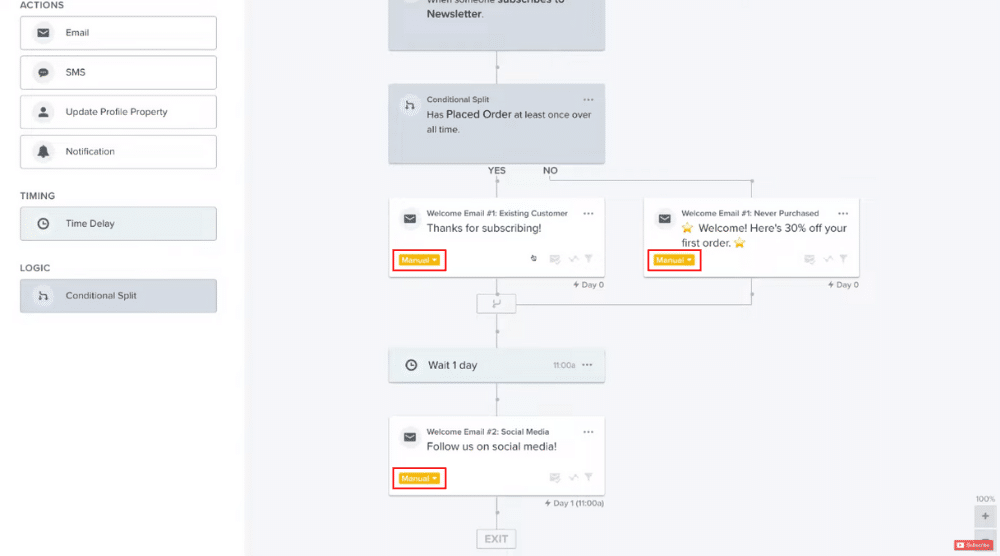
We will explore this concept of segmentation in much greater detail in the next lesson, but it's useful to see how it can be applied from the very beginning.
Conclusion
You've now learned how to set up the foundational automated email system for your e-commerce business. This single flow will work for you 24/7, nurturing new leads and driving sales on autopilot.
Key Takeaways:
- Klaviyo is a powerful, e-commerce-focused email marketing tool.
- Flows are automated email sequences triggered by user actions, distinct from manual Campaigns.
- A standard welcome sequence consists of 3 key emails: one to deliver the offer, one to tell your brand story, and one to create urgency with social proof.
- Using Flow Filters is crucial to ensure that customers don't receive irrelevant emails after they've made a purchase.
Next Up:
The welcome flow is just the beginning. The real magic happens when you start sending different messages to different groups of people based on their behavior. In our next lesson, we will dive deep into this by learning how to segment a customer email list based on interest or purchase behavior to send targeted promotions.