Hello! Welcome to our next lesson.
In the previous session, we covered how to build landing pages and various types of pop-up forms to capture leads. We established that building your own email list is crucial, especially when selling on marketplaces that don't share customer data.
Today, we're going to focus on one of the most effective lead capture tools in your arsenal: the exit-intent popup. This is your last chance to convert a visitor who is about to leave your site. By triggering a targeted offer at the precise moment of abandonment, you can recover potentially lost sales and grow your email list.
This lesson is purely practical. By the end of this 60-minute session, you will know how to implement an exit-intent popup on a store or landing page to capture abandoning visitors, including the strategy behind a compelling offer and the technical setup for both desktop and mobile devices.
1. The "Hail Mary Pass" of Conversions
An exit-intent popup is different from the pop-ups we discussed previously. Instead of appearing after a set time or on page load, it uses technology to detect when a visitor's cursor moves towards the 'close' or 'back' button in their browser. At that exact moment, it presents a targeted message.
Why is this so effective?
- It's Not Disruptive: It doesn't interrupt visitors while they are actively browsing. It only appears when they've already decided to leave, so you have nothing to lose by making one last offer.
- It's Highly Relevant: You can tailor the message to the page the user is leaving. For example, if they abandon a cart page, you can offer a discount to complete the purchase.
To get a clear, quick overview of why this strategy works, let's watch the beginning of this video from BitBranding.
Klaviyo Exit Intent Cart Popup on Shopify [2022 TUTORIAL]
This segment quickly explains the core concept of exit-intent popups and why they are more effective than standard, time-based popups.
Watch from the beginning to 01:02. Focus on the explanation that these popups are effective because they don't interrupt the user's journey.
2. Crafting an Irresistible Offer
The success of your exit-intent popup depends almost entirely on the quality of your offer and the clarity of your message. Since the visitor is already leaving, your offer must be compelling enough to make them reconsider.
Here are some best practices for designing a high-converting exit-intent popup.
How To Create Shopify Exit Intent Popup And Optimization ...
This article from Qikify provides excellent, actionable tips for creating and optimizing your popups. We'll focus on the optimization strategies.
Read the section titled 'Tips when create and for optimization'. Pay special attention to the advice on personalizing your message ('Humanize'), creating urgency (FOMO), and the importance of continuous testing.
Based on that reading and other expert advice, here are the key elements to focus on:
- A Strong, Specific Offer: Vague offers like "Join our newsletter" are weak. Instead, offer tangible value:
- A percentage discount (e.g., 15% off)
- A fixed dollar amount off (e.g., $10 off your first order)
- Free shipping
- A free gift with purchase
- Urgency and Scarcity: Use a countdown timer or phrases like "Limited time offer" to encourage immediate action.
- Compelling Copy and Design: The headline should be attention-grabbing (e.g., "Wait! Don't Go..."). The design should be clean, on-brand, and visually appealing.

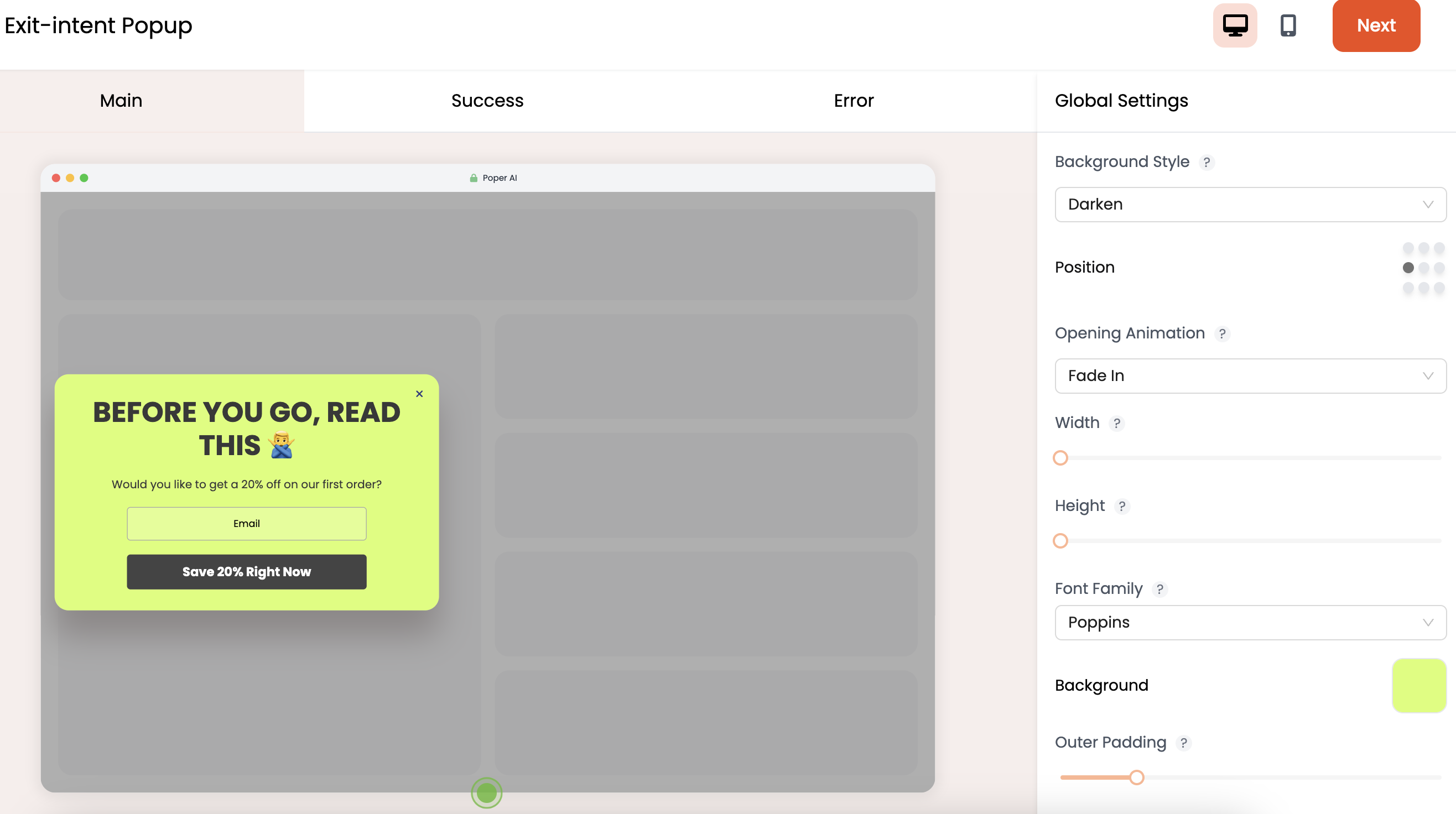
3. Implementing Your Exit-Intent Popup in Klaviyo
Now for the practical part. We'll continue using Klaviyo, which you were introduced to in the last lesson. Its integration with e-commerce platforms and robust targeting rules make it ideal for this task.
This process involves four key steps:
- Creating the sign-up form.
- Setting the exit-intent trigger for desktop users.
- Creating a separate trigger for mobile users.
- Configuring the offer with a unique discount code.
This video from Brendan Gillen provides a clear, step-by-step walkthrough. We will watch it in sections.
Step 1 & 2: Create the Form and Set the Desktop Trigger
First, let's see how to create a new form and apply the crucial exit-intent behavior rule.
How To Create A Pop-Up In Klaviyo For Your Shopify Store in 2024 (step-by-step tutorial)
This segment will guide you through creating a new form and, most importantly, setting the trigger to 'show when a visitor is exiting the page.'
Watch from 02:52 to 07:26. You can skip the styling details (03:41 - 05:14) if you like, but pay close attention to the 'Targeting & Behavior' section starting at 05:14. This is where you'll find the exit-intent setting.
Step 3: Configure the Mobile Trigger
Exit-intent technology relies on tracking mouse movement, which doesn't exist on mobile devices. Therefore, we need a different strategy for mobile users. The common best practice is to trigger the popup based on scroll depth.
Klaviyo Exit Intent Cart Popup on Shopify [2022 TUTORIAL]
This video from BitBranding clearly explains how to create a mobile version of your exit-intent popup. The key is cloning your desktop form and changing the trigger.
Watch from 11:02 to 12:16. Observe how the desktop form is cloned, set to 'mobile only,' and the trigger is changed from exit-intent to 'show after scrolling a certain amount' (e.g., 60%).
Test your understanding!
You've set up an exit-intent popup for desktop. For the mobile version, you choose a scroll-based trigger. Why is a 60-70% scroll depth often a better trigger than showing the popup after 5 seconds on the page?
Show answer
A scroll-depth trigger indicates user engagement. If someone has scrolled 60-70% down a page, they have shown genuine interest in the content. Triggering a popup at this moment is more likely to be relevant. In contrast, a 5-second timer could trigger for a user who is not engaged at all, making the popup feel more like an annoying interruption.
Step 4: Configure the Offer and Targeting
Your popup is almost ready. The final steps are to create the discount you're offering and ensure the popup doesn't appear where it could be disruptive, like on the cart or checkout pages.
How To Create A Pop-Up In Klaviyo For Your Shopify Store in 2024 (step-by-step tutorial)
Let's return to the first video to see how to exclude certain pages and, most importantly, how to create dynamic, unique coupon codes in Klaviyo that automatically get sent to new subscribers.
Watch these two final clips. First, watch from 07:49 to 08:30 to learn how to exclude the popup from showing on your cart page. Then, watch from 14:01 to 15:32 to see how to generate unique Shopify coupon codes within Klaviyo. This ensures each subscriber gets their own code, preventing it from being shared widely online.
Conclusion
You now have a powerful, automated tool for converting abandoning visitors. By combining a compelling, last-minute offer with smart targeting, the exit-intent popup can significantly boost your email list growth and recover potential lost revenue.
Key Takeaways:
- Exit-intent is a non-intrusive way to re-engage visitors at the exact moment they decide to leave.
- The offer is everything. It must be valuable and specific enough to make a user stop and reconsider. Use discounts, free shipping, or exclusive content.
- Desktop and mobile require different triggers. Use "exit-intent" (mouse movement) for desktop and "scroll depth" for mobile to signal user engagement.
- Refine your targeting. Use tools like Klaviyo to exclude popups from sensitive pages (like checkout) and generate unique, dynamic discount codes for each new subscriber.
Next Up:
We've now covered two key ways to capture leads: landing pages and pop-ups. But what about the visitors who ignore your pop-ups and leave anyway? In our next lesson, we will learn how to use retargeting pixels to build custom audiences of these website visitors, allowing you to bring them back to your store with targeted ads on platforms like Google and TikTok.