Hello! Welcome back.
In our last lesson, you learned how to create a compelling lead magnet—the valuable "bait" you offer to attract potential customers. We established that a good lead magnet solves a specific problem and provides a quick win.
Today, we're building the "trap." This lesson focuses on the practical steps to set up a landing page with an opt-in form to present your lead magnet and start building your all-important email list. This is the mechanism that turns a casual visitor into a contact you can nurture into a loyal customer, a critical step in moving from local marketing to a global, remote e-commerce operation.
By the end of this 60-minute session, you'll understand how to build and deploy the two primary types of lead capture systems: a standalone landing page and forms integrated directly into your e-commerce site.
1. The Anatomy of a High-Converting Landing Page
Before we jump into the tools, let's quickly define the essential building blocks of a landing page designed for one purpose: to capture an email address. Unlike a full website homepage with many distractions, a lead-capture landing page is ruthlessly focused.
The key components are:
- A Compelling Headline: This grabs attention and clearly states the main benefit of your lead magnet.
- A Supporting Sub-headline: Briefly explains what the offer is and for whom.
- Visuals: An image of your lead magnet (like a PDF cover) makes the offer feel tangible and more valuable.
- Benefit-Oriented Bullet Points: List 3-5 key outcomes or solutions the user will get. Focus on the "win," not the features.
- The Opt-in Form: The core of the page. Keep it simple—at most, a name and email field.
- A Strong Call-to-Action (CTA) Button: The text on the button should be action-oriented and specific (e.g., "Get My Free Guide," "Send Me the Checklist!"). Avoid generic words like "Submit" or "Subscribe."
2. Building a Standalone Landing Page with System.io
For your first landing page, you don't need complex, expensive software. A free, all-in-one tool is the perfect starting point. System.io allows you to build landing pages, manage email lists, and send automated emails, all from one dashboard.
This video provides a complete, step-by-step walkthrough of the entire process. We'll go through it in stages.
How to Create a Landing Page FOR FREE (2024 New Method!) in Just 10 Minutes
Let's begin by watching how to set up a 'funnel' in System.io. A funnel here is just a sequence of pages, starting with our landing page (which they call a 'squeeze page').
Watch from the beginning to 02:52. Pay attention to how you register for a free account and then create a new funnel with the goal of 'Build an audience.' This is the foundational setup for capturing emails.
Now that you've created the basic structure, the next step is to choose a template and customize it with your content using the drag-and-drop editor. This is where you'll apply the "anatomy of a landing page" we just discussed.
How to Create a Landing Page FOR FREE (2024 New Method!) in Just 10 Minutes
This next segment is the most important part. It shows you how to take a pre-built template and make it your own. You'll see how to change text, add your logo, and customize the form itself.
Watch from 02:52 to 08:55. Focus on how simple it is to edit the headline, sub-headline, and bullet points. Notice how you can delete unnecessary sections to keep the page clean and focused. This is a very hands-on tutorial that mirrors exactly what you'll be doing.
After a visitor enters their email, they shouldn't just be left hanging. You need to redirect them to a "Thank You" page. This page serves two purposes:
- Confirms their subscription was successful.
- Tells them what to do next (e.g., "Check your inbox for the guide!").
How to Create a Landing Page FOR FREE (2024 New Method!) in Just 10 Minutes
Let's see how to configure the Thank You page. This is the final step in the user's journey and a great opportunity to strengthen your connection.
Watch from 08:55 to the end (12:31). Observe how you can customize the Thank You page and how the collected emails appear in your System.io dashboard. This demonstrates the seamless integration of the landing page and email list.
With a tool like System.io, you can have a professional, functional landing page live in under 30 minutes, ready to collect leads for your e-commerce business.
Test your understanding!
Using one of the lead magnet ideas you developed in the last lesson (e.g., "The 5-Minute Smart Lighting Setup Checklist"), write a short, compelling headline and a call-to-action (CTA) button text for its landing page.
Show answer
- Headline: "Go From Box to Perfect Ambiance in 5 Minutes." (Focuses on the speed and the emotional outcome).
- CTA Button Text: "Send Me the Checklist!" (Action-oriented, personal, and specific).
3. Integrated Forms for Your Store: Pop-ups & Embeds
Standalone landing pages are great for traffic from ads or social media. But what about capturing visitors who are already on your store? For this, we use integrated forms like pop-ups and embeds.
A powerful tool for this, especially for e-commerce, is Klaviyo. While System.io is an all-in-one starter tool, Klaviyo is a specialized email marketing platform that integrates deeply with e-commerce platforms like Shopify.
A. Pop-up Forms
Pop-ups are modal windows that appear based on triggers (e.g., after 6 seconds on-page, or when a user is about to leave). They are highly effective but must be designed well to avoid being annoying.
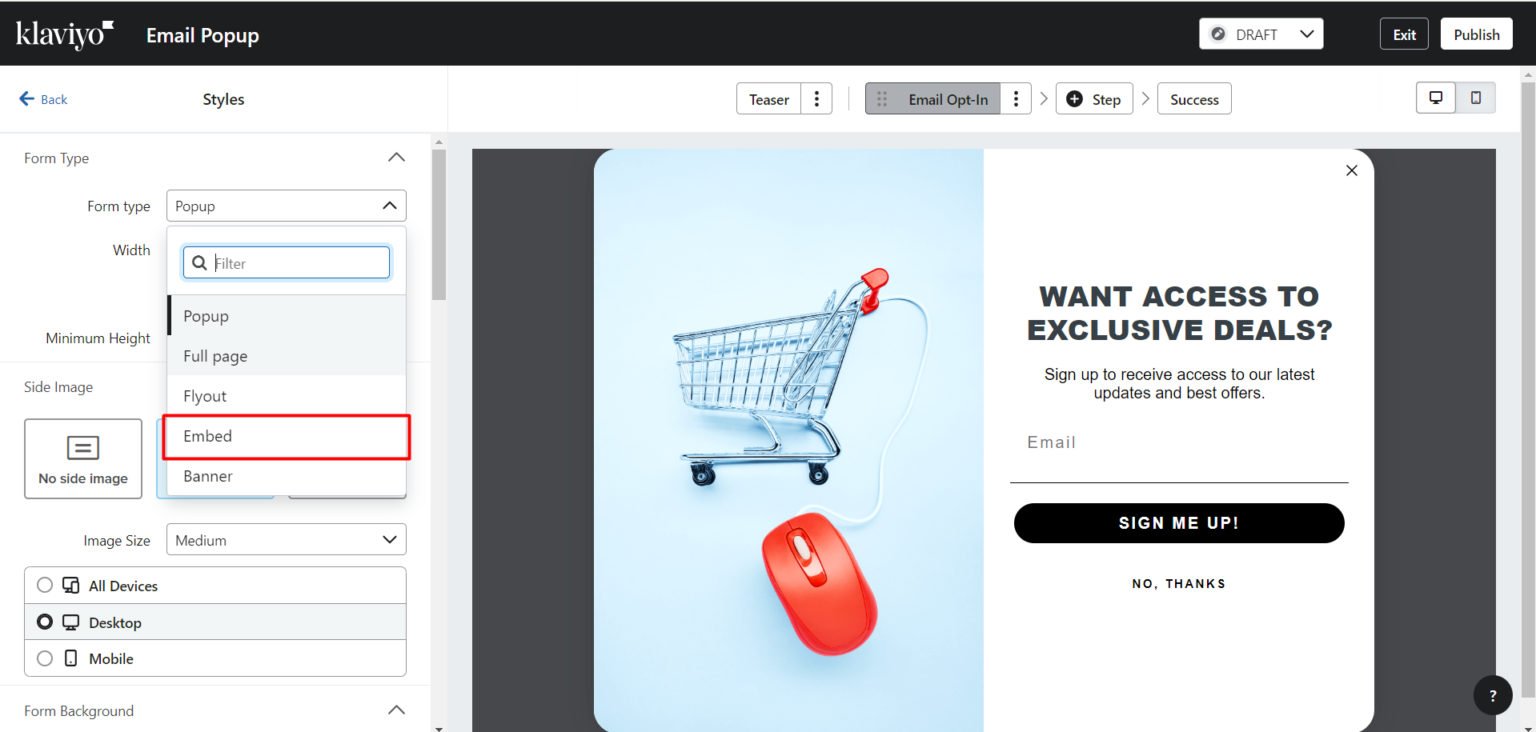
This next video is an advanced tutorial on creating high-performing pop-ups in Klaviyo. It introduces strategic concepts that go beyond just asking for an email.
Klaviyo Pop Up Form Tutorial for Ecommerce Brands
First, let's understand the strategy. This video explains different types of pop-ups, like the 'micro-commit' and 'quiz' forms, which can dramatically increase conversion rates compared to a simple email field.
Watch from 00:42 to 08:39. Focus on understanding the psychology behind the 'quiz pop-up form' and the strategy for framing your offer (e.g., using a dollar amount vs. a percentage off based on your average order value). This is a masterclass in optimization.
Now, let's see how to build it. This section of the video is a hands-on walkthrough of creating a mobile-optimized, multi-step quiz pop-up in Klaviyo. Given your IT background, you'll appreciate the level of detail here.
Klaviyo Pop Up Form Tutorial for Ecommerce Brands
This is a detailed, practical walkthrough of the Klaviyo form builder. You'll see how to build the form from scratch, including adding quiz questions that segment your audience and optimizing the copy.
Watch from 09:18 to 20:46. Pay close attention to the small but impactful details, like changing the button copy from 'Continue' to 'Claim Now', removing the 'X' button, and using quiz answers to tag customer profiles for future personalized marketing.
B. Embedded Forms
An alternative to the more aggressive pop-up is the embedded form. This is a static form that lives permanently in a section of your site, like the footer or a blog sidebar. It's a non-intrusive, passive way to collect leads.
Klaviyo Embed Form: 8 Steps to Add High-Converting ...
To understand how to implement this, let's look at this guide from Titan Marketing Agency. It gives a clear overview of what an embedded form is and provides step-by-step instructions for adding it to your site.
Read 'Step 1: Understand What a Klaviyo Embed Form Is' to grasp the concept and its use cases. Then, review 'Step 4: Embed the Form on Your Platform' to see the simple copy-and-paste process for Shopify, which is highly relevant for future e-commerce stores you might build.

4. Special Case: Landing Pages for Amazon & Walmart
A major challenge when selling on marketplaces like Amazon or Walmart is that you don't get your customers' email addresses. This is where a landing page becomes a critical tool for building your own audience. You can run ads (e.g., on TikTok or Google) pointing to your landing page first. On this page, you offer a discount code in exchange for an email, and then you send the visitor to your Amazon listing.
Helium 10, a tool you'll use for product research on Amazon, has a built-in landing page creator called Portals designed for this exact purpose.
Make Your External Traffic Count with Portals by Helium 10
This article from Helium 10 explains how their Portals tool works. It's designed to help you capture customer data before sending them to your Amazon or Walmart product page.
First, read the introduction to understand the concept. Then, focus on the section 'Setting Up a Portal', particularly the choice for an 'Email Opt-In Page'. Finally, review 'How to Set Up a Zapier Integration' to see how you can automatically send the emails you collect to an email service like Mailchimp. This demonstrates a powerful automation workflow.
Conclusion
You now have a complete toolkit for capturing customer leads. You know how to build the "front door" for your email list, whether it's a dedicated page or a form integrated into your store.
Key Takeaways:
- Standalone Landing Pages Are for Focused Campaigns: Use a tool like System.io to create simple, focused pages to send traffic from ads or social media.
- Integrated Forms Capture On-Site Visitors: Use a tool like Klaviyo to add pop-up or embedded forms to your e-commerce store to convert browsing visitors into subscribers.
- The Strategy Changes the Form: Simple email forms are good, but multi-step quiz forms can increase conversions and help you segment your audience for more personalized marketing.
- Marketplace Selling Requires an Extra Step: Use a tool like Helium 10 Portals to create a landing page to capture emails before sending traffic to your Amazon or Walmart listings, allowing you to build your own customer list.
Next Up:
We've touched on different types of pop-ups, but one of the most powerful is the exit-intent popup. This form appears at the precise moment a visitor is about to leave your site, giving you one last chance to capture their information. In our next lesson, we will do a deep dive into the strategy and setup for implementing an effective exit-intent popup.