
Hello! Welcome back to our series on building your secure ThinkPad.
Introduction
In our last session, you mastered the fundamental lifecycle of AppVMs: creating, starting, stopping, and deleting them. We established an analogy you might find useful: a TemplateVM is like a class in object-oriented programming, defining the core structure, while an AppVM is an object, an instance of that class with its own private, persistent state (/home/user).
This lesson delves into the heart of that relationship. Our goal is to explain how this "class-object" model is leveraged for one of the most critical aspects of system administration: managing software and updates. By the end of this lesson, you will understand:
- How AppVMs inherit their software from TemplateVMs.
- Why this model is efficient and secure.
- The correct workflow for applying updates across your compartments.
- The security implications of this hierarchical trust model.
Understanding this relationship is the key to effectively and securely managing your entire Qubes OS environment.
1. The Core Relationship: Inheritance and Efficiency
The central design principle of Qubes OS is that you install software in one place (TemplateVMs) and run it in another (AppVMs). This separation is the source of many of Qubes' security and efficiency benefits.
The official Qubes OS documentation provides the most precise explanation of this concept.
Please read the introductory sections of the 'TemplateVMs' documentation page from the Qubes OS project. This will define the core relationship and list its primary benefits.
Read the initial section titled 'TemplateVMs' and the following section 'Benefits of the TemplateVM system'. Focus on the four key benefits listed, as they form the 'why' for this entire model.
As you read, you'll see the benefits can be summarized as:
- Security: An AppVM has read-only access to its template's root filesystem. This is a powerful constraint: even if an application in your
untrustedAppVM is exploited, the malware cannot modify the underlying system files (/usr/bin/firefox, for example). It cannot infect the TemplateVM or, by extension, any other AppVMs based on that same template. - Storage: Since multiple AppVMs share a single, read-only copy of the OS, you save a significant amount of disk space. An AppVM's disk footprint is primarily just its private
/homedirectory. - Speed: Creating a new AppVM is nearly instantaneous because the system doesn't need to copy gigabytes of OS files; it simply creates a new private storage volume and links it to the existing template.
- Centralized Updates: This is the crux of today's lesson. You update the TemplateVM once, and every AppVM based on it will use the updated software the next time it starts.
This architectural diagram provides a good visual model of the hierarchy. The TemplateVMs are the foundation upon which the AppVMs are built.
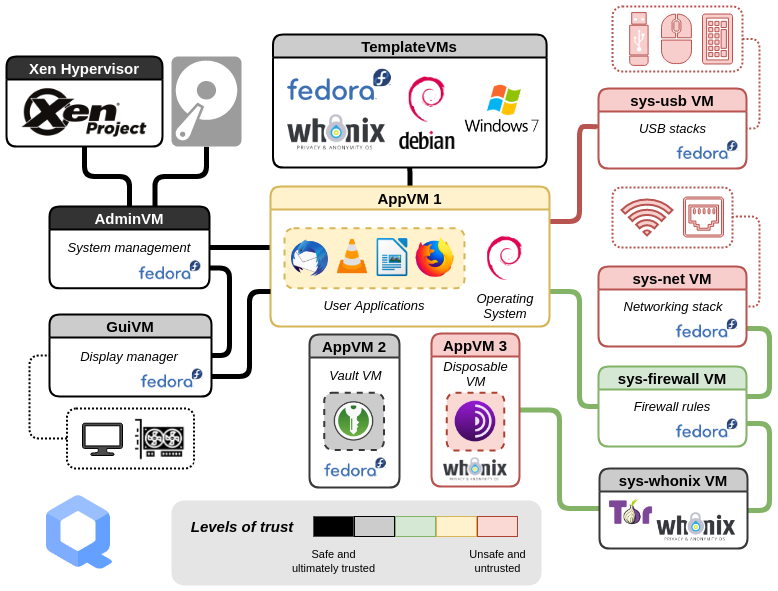
2. The Filesystem Boundary: Persistence and Non-Persistence
You might now be wondering: if the AppVM's root filesystem is read-only, how does anything get saved? And why can't I just run sudo apt install in my work AppVM?
The answer lies in how Qubes OS cleverly manages the filesystem. The following documentation explains the specific directories that are persistent within an AppVM.
This section of the documentation, 'Inheritance and Persistence', is crucial. It explains exactly what is and is not saved when you shut down an AppVM.
Read the section 'Inheritance and Persistence'. Pay close attention to the table that summarizes what is inherited and what is persistent for TemplateVMs and TemplateBasedVMs (AppVMs).
The key takeaway is that within an AppVM, only the following directories are persistent across reboots:
/home/user/usr/local/rw/config
Any changes made elsewhere are written to a temporary, disposable layer and are discarded when the AppVM shuts down. This is why installing software directly into an AppVM (e.g., via dnf or apt) has no lasting effect. The new files are written to non-persistent parts of the filesystem, and they vanish on the next reboot. Your personal data, configurations, and any manually compiled software you place in /usr/local remain.
3. The Software Management Workflow
This architecture dictates a clear and secure workflow for managing software.
Updating Software
Since applications are inherited from the template, you must update the template to update the applications in all its child AppVMs. Qubes provides a secure, streamlined tool for this.
The following video demonstrates the update process and highlights the underlying security mechanism.
Qubes OS: How it works, and a demo of this VM-centric OS
This clip from DorianDotSlash's 'Qubes OS: How it works' video demonstrates the template update process and explains the security measures involved.
Watch from 14:25 to 18:17. Observe how the Qubes Update tool initiates the update for a TemplateVM. Critically, notice the explanation that updates are not downloaded directly into the template. Instead, a separate, temporary VM is used to download and verify packages before they are safely passed to the template for installation. After the template is updated, the linked AppVM needs to be restarted to inherit the changes.
The mechanism shown in the video is called the updates proxy. This is a service that intercepts package manager traffic. It allows a TemplateVM, which by default has no general network access, to only connect to official repositories for updates. This is a powerful risk mitigation strategy, as it prevents a user from, for example, accidentally browsing the web from within a TemplateVM, which should be used solely for software installation. Your background in designing complex systems at Revolut will likely give you an appreciation for this kind of purpose-built, security-in-depth architecture.
Installing New Software
Following the same logic, to install a new application and make it available to one or more AppVMs, you must install it in their parent TemplateVM.
We will cover the exact step-by-step commands for this in our next lesson. For today, the crucial takeaway is understanding where the installation must happen.
Once software is installed in a template, you may need to explicitly add it to an AppVM's application menu. This doesn't install the software again; it just creates a shortcut.
Qubes OS: Security Oriented Operating System
This short clip from ExplainingComputers shows how to make an application that is already installed in the template visible in an AppVM's menu.
Watch from 11:57 to 13:26. The video demonstrates going into an AppVM's settings and adding an application from the 'Available' list to the 'Selected' list, which makes it appear in the main application menu.
4. Security Implications: The Template as a Trust Anchor
This hierarchical model creates a chain of trust. Your AppVMs are only as secure as the template they are based on. If a TemplateVM is compromised, all AppVMs that inherit from it are also compromised.
This makes the integrity of your templates a cornerstone of your system's security. The Qubes documentation has an excellent discussion on this topic.
Finally, let's consider the security model this relationship implies. These sections from the Qubes documentation discuss the trust placed in TemplateVMs and a common misconception about the non-persistent root filesystem.
Read the sections 'Trusting your TemplateVMs' and 'Note on treating TemplateBasedVMs’ root filesystem non-persistence as a security feature'. This will clarify the role of the template as a high-value asset and explain why non-persistence is not a complete defense against malware.
The key security principles to internalize are:
- Templates are high-value targets. Be extremely careful about what you install in them. Stick to official, signed repositories whenever possible.
- Non-persistence is not a panacea. While an AppVM's root filesystem is reset on reboot, malware can still achieve persistence by writing itself into your persistent
/homedirectory (e.g., by modifying.bashrc, a browser profile, or a document you open frequently). This is why DisposableVMs, which we'll cover later, are so important for handling untrusted files.
Conclusion
You now have a robust mental model of the relationship between TemplateVMs and AppVMs and how it governs software management in Qubes OS.
Key Takeaways:
- AppVMs inherit their root filesystem (OS and applications) from a parent TemplateVM in a read-only fashion.
- This design provides strong security isolation, significant storage efficiency, and centralized software management.
- Software updates and installations must be performed in the TemplateVM. The changes are then inherited by linked AppVMs after they are restarted.
- In an AppVM, only specific directories (
/home,/usr/local,/rw/config) are persistent across reboots. - Your TemplateVMs are a critical part of your Trusted Computing Base (TCB). Their integrity is paramount to the security of the AppVMs that depend on them.
In our next lesson, we will put this theory into practice. You will install a new application in a TemplateVM and make it available to a specific AppVM, completing the full software provisioning workflow.
Can't find a good explanation? Sign up and we'll make it for you
Sign up