
Hello! Welcome back to our study of behavioral design patterns.
In our previous lesson, we explored the Mediator pattern, which is all about simplifying complex communication webs by introducing a central coordinator. It helps manage who communicates with whom.
Today, we shift our focus from the "who" to the "what." Your learning outcome is to apply the Command pattern to encapsulate requests as objects for queuing or undo operations. Instead of an object directly calling a method on another object, we will wrap that method call—the request itself—into its own object. This small but powerful idea unlocks a host of capabilities crucial for robust application design, something that frequently comes up in low-level design interviews.
The Problem: When a Request Isn't Just a Simple Method Call
Imagine you're designing a user interface for a text editor. You have a "Save" functionality. This single action can be triggered in multiple ways:
- Clicking a "Save" button on the toolbar.
- Selecting "Save" from the "File" menu.
- Pressing a keyboard shortcut like
Ctrl+S.
The naive approach is to put the file-saving logic inside the event handler for each of these UI components. This leads to code duplication and tight coupling. The UI components become directly dependent on the business logic for saving files. What if you want to add this "Save" action to a context menu later? You'd have to duplicate the logic again.
The core issue is that we are treating the request ("save the file") as something inseparable from the trigger (the button click or key press). The Command pattern helps us separate these concerns.
The Solution: Encapsulating the Request
The Command pattern's solution is elegant: turn the request into a stand-alone object. This object, called a Command, contains all the information needed to perform the action.
- The action to perform (e.g., the
savemethod). - The object that will perform the action (e.g., a
TextFileobject). - Any parameters required for the action.
To get a clear definition of this concept, let's start with a video that breaks down the pattern's intent.
Command Pattern – Design Patterns (ep 7)
This video by Christopher Okhravi provides an excellent breakdown of the Command pattern's formal definition, explaining what it means to encapsulate a request and the benefits that follow.
Watch from the beginning until 04:55. Pay close attention to the four key concepts he introduces: encapsulating a request, parameterizing objects, queuing/logging, and supporting undoable operations.
As the video explains, by turning a request into an object, we can pass it around, store it, and execute it whenever we want, without the triggering object needing to know anything about how the work gets done. A great analogy is a waiter in a restaurant. The waiter (Invoker) takes your order (Command) and passes it to the kitchen. The waiter doesn't need to know how the chef (Receiver) cooks the meal; they just need to hand over the order slip.
The Four Components of the Command Pattern
The Command pattern typically involves four key participants:
- Command: An interface that declares a single method, usually named
execute(). - Concrete Command: An implementation of the Command interface. It holds a reference to a Receiver object and implements the
execute()method by calling one or more methods on the Receiver. - Receiver: The object that performs the actual business logic. It knows how to do the work (e.g., how to save a file, turn on a light).
- Invoker: The object that initiates the request. It holds a reference to a command object and calls its
execute()method. The Invoker is completely decoupled from the Receiver. - Client: The part of the application that assembles the other components. It creates the Receiver, the Concrete Command (and passes the Receiver to it), and the Invoker (and passes the Command to it).
Let's see these components in a modern, practical example.
Command Pattern – Design Patterns (ep 7)
To see these components in action, let's look at a smart home remote control. This part of the same video clearly explains the roles of the Invoker (the remote), the Command, and the Receiver (the light), and maps them to a UML diagram.
Watch from 06:21 to 20:03. This segment first introduces the smart home scenario and then uses a UML diagram to clarify how each component interacts. This will solidify your understanding of the roles.
Implementation in Java
With your background in Java, let's look at a concrete code implementation. We'll use the classic text editor example, which aligns well with the diagram below.
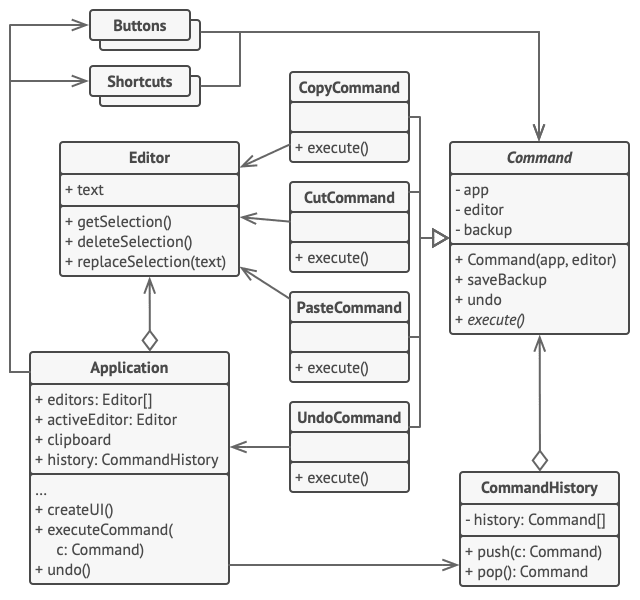
The following article from Baeldung is a trusted resource for Java developers and provides a clean, idiomatic implementation.
Now, let's examine a classic Java implementation for a text file editor. This article from Baeldung clearly implements the four components we've discussed.
Read Section 2, 'Object-Oriented Implementation'. Pay close attention to how the four components (TextFileOperation as Command, Open/SaveTextFileOperation as Concrete Commands, TextFile as Receiver, and TextFileOperationExecutor as Invoker) are implemented and connected in the client code (main method).
After reading, notice the flow:
- The Client (
mainmethod) creates aTextFile(Receiver). - It then creates an
OpenTextFileOperation(Concrete Command), passing theTextFileinstance to its constructor. - It passes this command object to the
TextFileOperationExecutor(Invoker). - The Invoker simply calls
command.execute(), which in turn callstextFile.open(). The invoker has no idea it's opening a file; it only knows how to execute a command.
The Baeldung article also briefly covers an object-functional implementation using lambdas (Section 3.1). Since your Command interface (TextFileOperation) has a single abstract method, it is a functional interface. This allows for a more concise syntax in modern Java, where you can pass the behavior directly to the invoker without creating an explicit concrete command class:
// Traditional way
executor.executeOperation(new OpenTextFileOperation(new TextFile("file1.txt")));

// Functional way with a lambda expression
executor.executeOperation(() -> "Opening file file1.txt");
This is a powerful and common practice in frameworks like Spring, where you often pass behavior (like in JdbcTemplate or RestTemplate callbacks).
Key Use Cases: Queuing and Undo/Redo
Encapsulating requests as objects opens up two powerful capabilities mentioned in our learning outcome.
1. Queuing and Logging Requests
Because commands are objects, you can store them. The invoker in the Baeldung example already adds each command to a List. This simple list can act as a history log. You could also place commands into a queue for later processing. This is useful for:
- Asynchronous Tasks: Add commands to a queue and have a worker thread pool execute them in the background.
- Macro Recording: Store a sequence of commands executed by a user and "play them back" by executing them in order.
- Transactional Workflows: Queue up a series of commands. If one fails, you can iterate through the successfully executed commands and call an
undo()method on each.
2. Undoable Operations
This is the "killer app" for the Command pattern. To support undo, you extend the Command interface with an undo() method.
public interface Command {
    void execute();
    void undo();
}
The ConcreteCommand is then responsible for implementing both. When execute() is called, it first saves whatever state is necessary to reverse the operation, and then performs the action. The undo() method uses that saved state to revert the change.
To manage this, you can use a Stack to keep a history of executed commands.
- When a command is executed, you push it onto the
undoStack. - When the user clicks "Undo", you
popthe last command from the stack and call itsundo()method.
Test your understanding!
Imagine you are designing the BrightnessCommand for the smart home remote. The Light receiver has a method setBrightness(int level). Your command needs to support undo.
How would you implement the execute() and undo() methods for BrightnessCommand? What state does the command need to store?
Show answer
The BrightnessCommand needs to store the previous brightness level to be able to undo its action.
class BrightnessCommand implements Command {
    private Light light;
    private int newBrightness;
    private int previousBrightness; // State needed for undo

    public BrightnessCommand(Light light, int newBrightness) {
        this.light = light;
        this.newBrightness = newBrightness;
    }

    @Override
    public void execute() {
        // Before changing the brightness, store the current level.
        this.previousBrightness = light.getBrightness();
        light.setBrightness(this.newBrightness);
    }

    @Override
    public void undo() {
        // Restore the light to its previous brightness level.
        light.setBrightness(this.previousBrightness);
    }
}
When execute() is called, it queries the light for its current brightness and saves it before setting the new one. The undo() method can then use this saved previousBrightness value to restore the light's state.
This final video clip gives a great overview of how this concept applies to a real-world application like Photoshop, which has a deep undo history.
Command Pattern – Design Patterns (ep 7)
To wrap up, let's see how this undo/redo mechanism works in a large-scale application. This clip explains the concept using the example of an image editor.
Watch from 35:59 to 38:45. Focus on how maintaining a history of command objects makes implementing a complex feature like multi-level undo/redo surprisingly straightforward.
Conclusion
In this lesson, we've seen how the Command pattern provides a robust way to decouple the invoker of an action from the object that performs it.
Key Takeaways:
- The Command pattern encapsulates a request as an object, decoupling the invoker from the receiver.
- It consists of four main components: Command, Concrete Command, Invoker, and Receiver.
- This pattern enables powerful features like queuing requests for logging or asynchronous execution.
- It is the classic solution for implementing multi-level undo and redo functionality by adding an
undo()method to the command interface and maintaining a history of executed commands.
In our next lesson, we'll look at the Iterator pattern. We will shift from encapsulating actions to encapsulating the process of traversal, allowing you to access elements of a collection sequentially without exposing its underlying representation.