
Hello! Welcome back to our module on behavioral design patterns.
In our last lesson, we covered the Chain of Responsibility pattern, which organizes objects into a line to process a request sequentially. It's a great way to decouple a sender from multiple potential receivers in a linear fashion.
Today, we're shifting from linear chains to complex communication webs. Your learning outcome is to apply the Mediator pattern to centralize complex communications between objects. When you have a set of objects where each one might need to talk to many others, direct connections can quickly create a tangled, hard-to-maintain system. The Mediator pattern solves this by introducing a central coordinator, much like an air traffic control tower manages communication between airplanes.
The Problem: A "Spaghetti" of Dependencies
Imagine designing the user interface for a login dialog. You might have:
- A
Usernametext field. - A
Passwordtext field. - A "Remember Me" checkbox.
- A
Submitbutton.
The logic is intertwined: the Submit button should only be enabled if both the username and password fields are not empty. If the user starts typing in a field that was previously empty, it needs to notify the Submit button to check if it should become enabled. If you add more components, like a "Forgot Password" link that disables other fields, the number of direct connections and dependencies skyrockets. Each component needs to know about many others, creating a maintenance nightmare.
This is a classic "many-to-many" communication problem.
The Solution: A Central Coordinator
The Mediator pattern addresses this by forbidding direct communication between components (which we call Colleagues). Instead, they all communicate through a single, central Mediator object.
A Colleague object notifies the Mediator when its state changes. The Mediator then orchestrates the necessary actions, such as telling other Colleagues to update their state. To get an intuitive feel for this, let's start with a classic real-world analogy.
Mediator Design Pattern in detail | Interview Question
This video from Daily Code Buffer begins with the perfect analogy for the Mediator pattern: an Air Traffic Control (ATC) system. It clearly shows how a central authority prevents chaos by coordinating multiple independent entities (airplanes).
Watch the first 2 minutes of the video. Focus on the core problem of tight coupling and how the ATC (the mediator) solves it by becoming the single point of communication.
The key insight is that the airplanes (Colleagues) don't need to know about each other. They only need to know how to talk to the tower (the Mediator).
The Structure of the Pattern
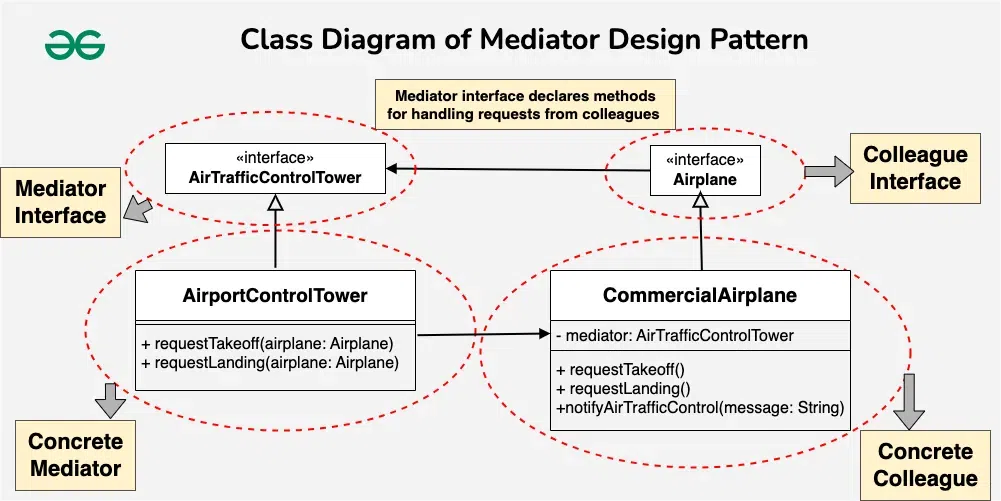
The Mediator pattern consists of four key participants:
- Mediator Interface: Defines a contract for communication between Colleagues. This interface typically includes methods for Colleagues to call when they need to communicate (e.g.,
sendMessage,componentChanged). - Concrete Mediator: Implements the Mediator interface and coordinates communication between Colleagues. It knows and maintains references to all the Colleague objects. This is where the centralized logic lives.
- Colleague (Interface or Abstract Class): Defines a contract for the individual components that will be communicating. Crucially, it holds a reference to a Mediator object.
- Concrete Colleagues: Implement the Colleague interface. When a Colleague needs to communicate with others, it doesn't do so directly; it calls a method on its Mediator object.
This UML diagram, using the Air Traffic Control example, visualizes the structure perfectly.
Implementation in Java: Building a Chat Room
A chat room is the quintessential example for the Mediator pattern. Without a mediator, every user would need a direct connection to every other user. With a mediator (the chat room server), each user only needs one connection: to the server.
Let's walk through how to build this in Java.
Mediator Design Pattern in Java – Example and Explanation
This article from MangoHost provides an excellent, step-by-step guide to implementing a chat room using the Mediator pattern in Java. It clearly lays out the code for each of the four components we just discussed.
Please read the sections 'How the Mediator Pattern Works' and 'Step-by-Step Implementation Guide'. Follow the five steps in the implementation guide carefully: Create the ChatMediator interface. Implement the ChatMediatorImpl concrete mediator. Create the abstract User colleague class. Implement concrete ChatUser and PremiumUser colleagues. See how it all comes together in the MediatorPatternDemo client.
After reviewing the code, notice these key characteristics:
- The
ChatMediatorImplmaintains aList<User>—it knows all the colleagues. - The
ChatUserandPremiumUserclasses have aChatMediatorfield—they know their mediator. - When a
user.send("...")message is called, the user doesn't loop through other users. It simply tells the mediator:mediator.sendMessage(message, this). - The mediator's
sendMessagemethod then contains the logic for broadcasting the message to all other users.
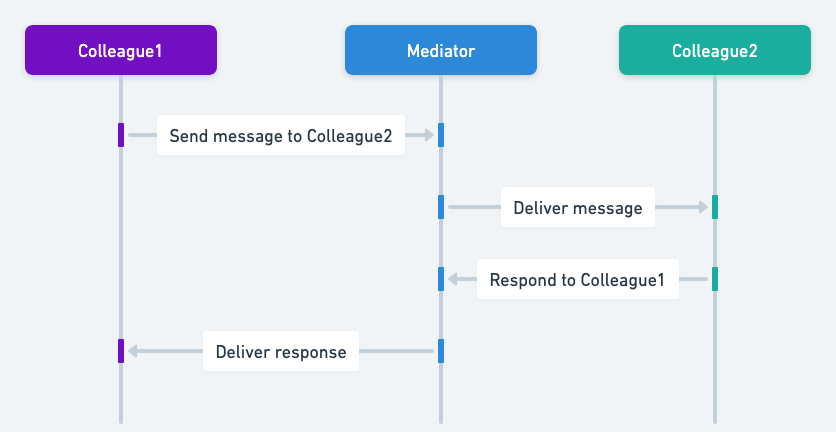
This sequence diagram illustrates the flow of interaction perfectly. A message from one colleague to another is always routed through the mediator.
Test your understanding!
Let's return to the login dialog example: a UsernameField, a PasswordField, and a SubmitButton. The button should be enabled only when both text fields have content.
How would you use the Mediator pattern to manage this? Describe the role of the DialogMediator (the Concrete Mediator). What happens when a user types a character into the UsernameField?
Show answer
-
Components: The
UsernameField,PasswordField, andSubmitButtonwould be the Concrete Colleagues. Each would hold a reference to theDialogMediator. -
Mediator's Role: The
DialogMediatorwould be the Concrete Mediator. It would hold references to all three components (usernameField,passwordField,submitButton). It would contain a method likecomponentChanged(Component component). -
Interaction Flow:
- When the user types a character into the
UsernameField, the field'sonTextChanged()event handler would not try to talk to the button directly. Instead, it would callmediator.componentChanged(this). - The
DialogMediator'scomponentChangedmethod would then execute the logic: it would check the text content of bothusernameFieldandpasswordField. - Based on this check, it would call
submitButton.setEnabled(true)orsubmitButton.setEnabled(false).
- When the user types a character into the
This way, the UsernameField has no knowledge of the SubmitButton or the rules governing it. All that logic is centralized in the mediator.
When to Use It and Common Pitfalls
The Mediator pattern is a powerful tool for simplifying complex systems, but it's not without its trade-offs.
Use the Mediator pattern when:
- You have a set of objects that communicate in complex, poorly structured ways (a "spaghetti" of connections).
- Reusing an object is difficult because it's tightly coupled to many other objects.
- You want to centralize complex control logic that is distributed among several objects. This aligns with the Single Responsibility Principle, as colleagues are only responsible for their own state, not for coordinating the system.
Common Pitfalls:
- The God Object: The biggest risk is that the Mediator itself can become a monolithic, overly complex object that is difficult to maintain. If a mediator becomes too large, consider splitting its functionality into multiple, more focused mediators.
- Performance Bottleneck: Since all communication routes through a single point, it can become a bottleneck in high-performance or highly concurrent systems. The article from MangoHost provides an interesting example of an
AsyncChatMediatorto mitigate this.
Conclusion
In this lesson, we explored how to tame communication complexity using the Mediator pattern. By centralizing interactions, we can create systems that are more modular, maintainable, and easier to understand.
Key Takeaways:
- The Mediator pattern replaces complex many-to-many relationships with a simple many-to-one-to-many (hub-and-spoke) model.
- It promotes loose coupling because components (Colleagues) no longer refer to each other directly, only to the central Mediator.
- This centralizes interaction logic, making it easier to change how components interact without modifying the components themselves.
- The main trade-off is the risk of the Mediator becoming a complex "God Object".
In our next lesson, we will explore the Command pattern. While the Mediator pattern is about orchestrating who communicates, the Command pattern is about encapsulating a request itself as an object. This allows you to parameterize clients with different requests, queue or log requests, and support undoable operations.