
Hello! Welcome to our next lesson on behavioral design patterns.
In our last session, we dove into the Command pattern, which taught us how to encapsulate an action or a request into a standalone object. This decouples the object that triggers an action from the object that performs it.
Today, we'll explore a different kind of encapsulation. Your learning goal is to apply the Iterator pattern to provide sequential access to a collection's elements. Instead of encapsulating an action, we will encapsulate the process of traversing a collection. This allows a client to loop through elements without needing to know anything about the collection's internal structure, like whether it's an ArrayList, a LinkedList, or a custom data structure. This is a fundamental concept in object-oriented design and ubiquitous in Java development.
The Problem: Exposing a Collection's Insides
Imagine you are building a music player application. You have a Playlist class that holds a collection of Song objects. A client, like a MusicPlayer class, needs to iterate through the songs to play them.
A simple, but flawed, approach would be to add a getSongs() method to your Playlist class that returns the internal List of songs:
public class Playlist {
    private List<Song> songs = new ArrayList<>();

    public void addSong(Song song) {
        this.songs.add(song);
    }

    // Flawed approach
    public List<Song> getSongs() {
        return this.songs;
    }
}

// Client code
Playlist myPlaylist = new Playlist();
// ... add songs ...
List<Song> songsToPlay = myPlaylist.getSongs();
for (Song song : songsToPlay) {
    player.play(song);
}
This seems to work, but it introduces significant problems that are red flags in a system design interview. The following article clearly outlines why this is a poor design.
This article, 'Iterator | LLD,' clearly explains the issues with directly exposing a collection's internal data.
Read the section titled '1. The Problem: Traversing a Playlist'. Focus on the four reasons why returning the internal list is problematic: breaking encapsulation, tight coupling, limited traversal options, and difficulties in testing.
As the article highlights, this design breaks encapsulation. The client can now directly manipulate the Playlist's internal list (myPlaylist.getSongs().clear()). It also tightly couples the client to the implementation detail that the Playlist uses an ArrayList. If you decide to switch to a LinkedList or a custom data structure for better performance, all client code that relies on getSongs() will break.
The Solution: The Iterator Pattern
The Iterator pattern solves this by providing a clean, abstract way to traverse a collection. The core idea is to extract the traversal logic out of the collection and into a separate object called an iterator.
The collection itself is responsible for creating an iterator object, which the client then uses to step through the elements one by one. This is like a TV remote: you press "next channel" without knowing or caring how the TV stores or finds the channels.
To get a quick overview of this idea, watch the beginning of the following video.
The Iterator Pattern Explained and Implemented in Java | Behavioral Design Patterns | Geekific
This video from Geekific provides a great analogy and explains the core purpose of the Iterator pattern.
Watch the first 1 minute and 51 seconds. Pay attention to the 'tour guide' analogy and the key idea: extracting the traversal behavior into a separate object.
The Four Components of the Iterator Pattern
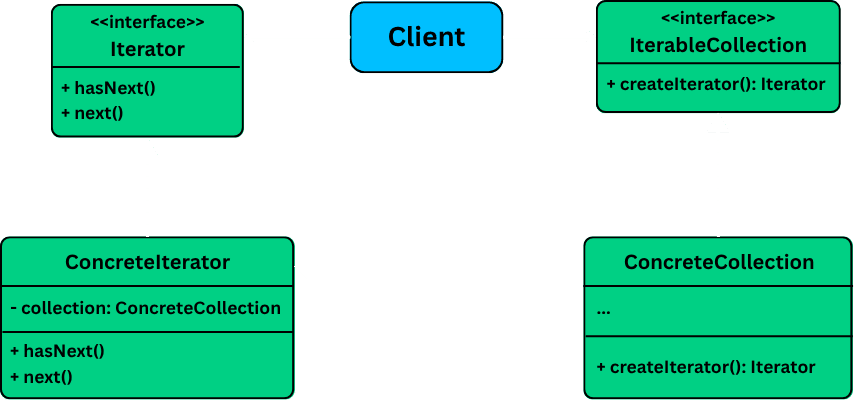
The pattern is typically composed of four main participants. Since you work with Java, you'll recognize that this structure is the foundation for Java's own Iterator and Iterable interfaces.
- Iterator Interface: Declares the standard methods for traversal, such as
hasNext()andnext(). - Concrete Iterator: Implements the Iterator interface for a specific collection. It keeps track of the current position in the traversal.
- Collection Interface (or Aggregate/Iterable): Declares a factory method for creating an iterator object (e.g.,
createIterator()). - Concrete Collection: Implements the Collection interface and stores the actual elements. It returns a new instance of a corresponding Concrete Iterator when requested.
This UML diagram shows how these components interact:
Implementing the Iterator Pattern in Java
Let's refactor our music playlist example to use the Iterator pattern. The following resource provides a very clear, step-by-step implementation. We will build a custom iterator for our Playlist class.
This article, 'Iterator Design Pattern,' walks through creating a custom iterator for a playlist. It's a great example of applying the pattern from scratch.
Read through the sections '1. The Iterator Interface', '2. Concrete Iterators' (focus on the Simple Playlist Iterator), '3. The Playlist Class', and '4. Driver Code'. This will show you how to build and use a basic iterator.
After reviewing the code, notice the key improvements:
- The
Playlistclass no longer exposes its internalArrayList. Instead, it has aniterator()method that returns aPlaylistIterator. - The client code is now completely decoupled from the
Playlist's internal storage. It only interacts with thePlaylistIteratorinterface.
The Power of Multiple Traversal Strategies
The true power of the Iterator pattern shines when you need to support multiple ways of traversing the same collection. For our Playlist, we might want to iterate sequentially, in a shuffled order, or only over favorite songs.
With the Iterator pattern, you can achieve this by creating a new Concrete Iterator for each traversal strategy, without changing the Playlist class or the client code at all.
The article you just read demonstrates this perfectly.
Let's revisit the 'Iterator Design Pattern' article to see how to implement multiple traversal algorithms.
Focus on section '2. Concrete Iterators' again, but this time examine the implementations for 'ShuffledPlaylistIterator' and 'FavoritesPlaylistIterator'. Also, look at how the Playlist class's iterator(String type) method acts as a factory to provide the correct iterator.
This flexibility is a massive win. You are adhering to the Open/Closed Principle: your collection is open for extension (by adding new iterators) but closed for modification.
Test your understanding!
Based on the Playlist example, how would you design a RecentlyPlayedIterator? Assume the Playlist class has a method getRecentlyPlayedSongs() that returns a List<Song>. What would the RecentlyPlayedIterator class look like?
Show answer
You would create a new class RecentlyPlayedIterator that implements the PlaylistIterator interface. In its constructor, it would receive the Playlist object and immediately fetch the list of recently played songs to iterate over.
public class RecentlyPlayedIterator implements PlaylistIterator {
    private List<Song> recentlyPlayed;
    private int index;

    public RecentlyPlayedIterator(Playlist playlist) {
        // Fetch the specific list of songs this iterator will traverse
        this.recentlyPlayed = playlist.getRecentlyPlayedSongs();
        this.index = 0;
    }

    @Override
    public boolean hasNext() {
        return index < recentlyPlayed.size();
    }

    @Override
    public String next() {
        if (hasNext()) {
            return recentlyPlayed.get(index++);
        }
        return null; // Or throw NoSuchElementException
    }
}
You would then update the iterator(String type) factory method in the Playlist class to include a "recentlyPlayed" case. The client code while (iterator.hasNext()) would remain unchanged.
Implementation Choice: Inner Class vs. Separate Class
The examples we've seen use separate classes for the iterators. Another common approach in Java, especially for iterators that are tightly bound to one specific collection, is to implement them as private inner classes.
The main advantage is that an inner class has direct access to the private members of its enclosing outer class. This means you don't need to pass the collection's data to the iterator's constructor.
This next video provides a detailed, hands-on demonstration of building an iterator both as an inner class and as a separate class.
The Iterator Design Pattern in Java - Concept & Code walkthrough | Reactive Programming With Java #3
This video from Selenium Express offers a deep dive into the implementation details, comparing the inner class and separate class approaches for creating a custom iterator.
This video is long, so focus on these two key segments: Inner Class (26:30 - 31:00): Watch this part to see how an inner class is defined and how it can directly access the courses array of the outer CourseRepository class. Separate Class (46:47 - 51:30): Watch this segment to see the alternative, where the iterator is a separate class and receives the courses array via its constructor. Compare this with the inner class approach.
To summarize the trade-off:
- Inner Class: Simpler implementation as it has direct access to the collection's private data. Tightly couples the iterator to its collection. A good choice if the iterator will only ever be used by that one collection class.
- Separate Class: Promotes better separation of concerns. The iterator can't directly access the collection's private state, which can be safer. This approach is more flexible if the iterator's logic could potentially be reused.
The Iterator as a "Pull-Based" Model
It's useful to classify the Iterator pattern as a pull-based model. The consumer (the client code doing the looping) is in control. It "pulls" data from the source (the iterator) by calling next() whenever it's ready for the next item.
The Iterator Design Pattern in Java - Concept & Code walkthrough | Reactive Programming With Java #3
The same video also contains a concise explanation of this 'pull-based' concept.
Watch from 41:56 to 46:31. The presenter contrasts this with a 'push-based' model, which is a key distinction when comparing it to other patterns like the Observer pattern.
Understanding this "pull" nature is crucial for comparing it with other patterns. For example, the Observer pattern (which we'll review soon) is "push-based": the subject pushes notifications to observers when its state changes, whether the observer is ready or not.
Conclusion
In this lesson, we've deconstructed the Iterator pattern, a cornerstone of object-oriented design and a vital tool for any Java developer.
Key Takeaways:
- The Iterator pattern provides a way to access the elements of a collection sequentially without exposing its underlying representation.
- It decouples the client from the collection's implementation, preserving encapsulation and making the system more flexible.
- The pattern consists of four main components: an Iterator interface, a Concrete Iterator, a Collection interface, and a Concrete Collection.
- It enables multiple, independent traversal algorithms (e.g., forward, reverse, shuffled) for the same collection by creating different concrete iterator classes.
- The Iterator is a pull-based model, where the client actively requests the next item.
In our next and final lesson for this module, we will synthesize what we've learned. We will compare the communication-focused behavioral patterns—Observer, Chain of Responsibility, Mediator, Command, and Iterator—to help you identify the best pattern for a given design problem.