
Welcome back. In the last lesson, you learned to treat pressure, new contact methods, and attempts to bypass verification as reasons to strengthen the process rather than make exceptions. That judgment is only useful if the ticket preserves what happened without exaggeration, omitting key facts, or exposing sensitive information.
This lesson turns an IAM interaction into a record that another analyst, an approver, or a security investigator can understand without interviewing you again. By the end, you should be able to write an IAM ticket containing a clear timeline of actions, the supporting evidence, the business and security impact, and a precise resolution or escalation state.
Suggested study time: about 40 minutes.
A ticket is more than a reminder: it is an IAM control record
A routine desktop-support ticket often documents diagnosis and repair. An IAM ticket does that too, but it may also document a change to an account, authentication method, license, group membership, or privileged entitlement. The record therefore needs to show not only what you did, but why that action was appropriate and what changed as a result.
A useful IAM ticket should let a reviewer answer these questions quickly:
| Record element | Question it answers | IAM-specific example |
|---|---|---|
| Context | What is this case, and who is affected? | Requester, affected identity, request type, category, priority, current status |
| Impact | Who or what is blocked or at risk? | One user cannot access a project workspace; no service-wide outage |
| Evidence | What facts support the decision? | Approved request, group-owner approval, audit-event reference, exact error text |
| Actions | What did the analyst do, in what order? | Verified authorization, added group membership, informed user, escalated case |
| Resolution | What was the outcome and how was it validated? | Access granted, account action withheld, user confirmed access, or case escalated |
| Follow-up | What remains to be done, by whom, and when? | Time-bound access removal, pending security review, application-owner decision |
The four required elements—actions, evidence, impact, and resolution—are the core narrative. Context fields such as category, priority, assignee, and status make that narrative routable and auditable.
A strong note is specific, chronological, and objective:
- Specific: “Added user to
CRM-Forecast-Editors” rather than “updated access.” - Chronological: records actions in the order they occurred.
- Objective: “Requester could not complete approved verification” rather than “Requester seemed suspicious.”
This distinction matters especially after the social-engineering scenarios from the previous lesson. A ticket should preserve observable facts and decisions, not turn a support analyst’s suspicion into an unsupported conclusion.
Documentation and Managing Tickets - Learn Help Desk Series
Watch “Documentation and Managing Tickets – Learn Help Desk Series” from IT Career Questions for a practical view of why detailed notes matter to the next technician, not only to the person closing the ticket.
Begin with the purpose, which frames ticket notes as essential operational documentation. Continue through intake context to see how a vague user report becomes useful support information. Then watch sample notes, focusing on how each troubleshooting action is paired with its result. Finish with future value, which explains why records prevent repeated work and support team handoffs.
Write actions as a timeline, not as a claim of success
The actions section says what the support team actually did. Each entry should make clear:
- When it happened.
- Who performed it, when that is relevant.
- What system or object was affected.
- What was done.
- What the immediate result was.
For IAM work, actions often fall into four categories:
| Action category | Examples |
|---|---|
| Intake and validation | Reviewed request scope, checked the authoritative user record, confirmed the request came through the approved portal |
| Authorization handling | Located manager or resource-owner approval, identified missing approval, routed an exception |
| Identity-account action | Reset password, unlocked account, assigned license, changed group membership, disabled account |
| Communication and routing | Sent a user update, assigned to security, requested application-owner review, recorded a follow-up date |
Avoid vague entries such as “worked on issue,” “checked Entra,” or “permissions fixed.” They conceal the exact state change and force a colleague to repeat your investigation.
Compare these two entries:
| Weak note | Useful note |
|---|---|
| “Access approved and added.” | “10:22 UTC: Confirmed manager approval and CRM workspace-owner approval in request workflow. Added employee object to CRM-Forecast-Editors Entra group. Membership change completed successfully.” |
| “Password issue handled.” | “09:14 UTC: No password reset performed. Requester could not complete the approved identity-verification process and requested delivery to a newly supplied personal email address. Routed to Security Operations under account-recovery procedure.” |
The second example in each row makes the decision reviewable. It also records an important principle: an action not taken can be a crucial action to document. In a suspicious recovery case, “no reset performed” may be the most important fact in the record.
Best Practices for Documenting Support Incidents and Resolutions – ITU Online IT Training
Read “Best Practices for Documenting Support Incidents and Resolutions” from ITU Online to reinforce the support-documentation habits that transfer directly to IAM work: objective evidence, chronological actions, decision points, and validated outcomes.
In the section “What to Capture in Every Support Incident,” read from the opening rationale through the discussion of core fields. In the same section, focus on the timeline guidance. Then read “How to Write Clear, Useful Incident Notes” and “Document Troubleshooting Steps and Decision Points,” paying attention to the difference between facts and guesses. Finish with “Capture the Resolution in a Reusable Way,” especially the resolution guidance.
Evidence: support the decision without storing secrets
In an IAM ticket, evidence is the traceable information that supports the requested action, the decision, and the recorded outcome. Evidence should be relevant, minimal, and retrievable.
Typical IAM evidence includes:
- the request reference and submission time;
- the requested application, role, group, license, or account action;
- the business justification and requested duration;
- confirmation that required identity verification was completed, failed, or was not applicable;
- approver identity, approval timestamp, and workflow reference;
- exact error text or a correlation ID, when troubleshooting;
- a reference to an audit event showing the administrative change;
- the user’s validation or another objective confirmation that the expected state exists.
Evidence does not mean copying everything into the ticket. Never place these in standard notes:
- passwords or password hints;
- one-time passcodes;
- recovery-code values;
- MFA secrets, QR codes, or seed values;
- access tokens, refresh tokens, or session cookies;
- full authentication answers;
- unnecessary personal data;
- broad log exports containing unrelated users’ data.
If sensitive material must be retained under organizational policy, use the approved restricted evidence store and place only its case reference in the ticket. A ticket should help the next person find evidence without becoming a new source of credential exposure.
Microsoft Entra audit logs are often useful evidence after an administrative change. They can help establish the activity performed, the target object, the initiating actor, and the time of the event. In the ticket, record the relevant event reference and time convention—usually UTC if that is your team standard—rather than pasting a large unfiltered log.
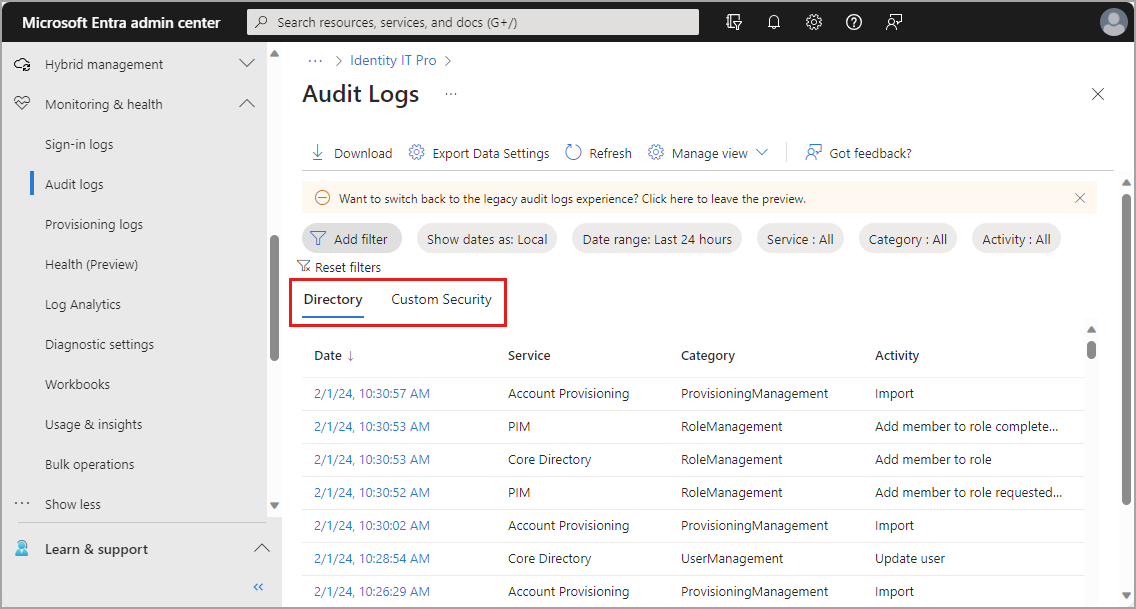
Notice that the portal can show times as local time. If your ticketing system, Entra portal, and logs use different time zones, state the time zone explicitly. A correctly recorded event at the wrong time zone can still mislead an investigation.
For access requests, evidence must also establish authorization, not only identity. An authenticated requester is not automatically entitled to receive any access they ask for.
Access Request Management: The Complete Guide for IT Teams | Zluri
Read the two access-request FAQ answers in “Access Request Management: The Complete Guide for IT Teams” from Zluri. They provide a concise checklist for what must be captured before access is granted and what an auditable request trail should retain.
In the FAQ section, read the full answer to “What should an access request form capture?” Focus on the application, requested role or access level, business justification, duration, and the point that request detail should match risk. Then read the full answer to “What should an audit trail for access requests include?” Focus on requester, approval chain, reasons for decisions, and provisioning outcome; the final retention reminder begins here.
Impact is scope and consequence, not simply urgency
The impact field explains why the ticket matters and helps set priority. It should describe both the actual current effect and, where appropriate, the plausible security consequence.
Keep these concepts separate:
| Concept | Meaning | Example |
|---|---|---|
| Actual impact | What is currently affected | One employee cannot update a project forecast |
| Potential impact | What could happen if the case is mishandled | Improper access could expose confidential forecast data |
| Urgency | How quickly action is needed | Forecast deadline is today at 15:00 UTC |
| Priority | The team’s handling order, based on impact and urgency | High, according to the organization’s priority matrix |
A good impact statement is bounded:
Impact: One Sales Operations employee is blocked from entering forecast updates for Project North. No other users or services reported affected. Requested access is edit access to a confidential workspace; incorrect provisioning could expose or alter forecast data.
A weak statement either understates the issue (“user needs access”) or overstates it (“critical security emergency”) without evidence.
For suspected compromise, avoid writing “account compromised” unless an investigation has established that. A better note might be:
Impact: User is unable to complete account recovery. Request involves password reset and replacement MFA method. No unauthorized account change has been confirmed; however, granting both changes without approved recovery verification could enable account takeover.
That language accurately distinguishes fact, risk, and outcome.
Resolution means the resulting state, not merely “ticket closed”
The resolution section should answer: What is true now because of this ticket? It should identify whether the outcome was completed, denied, deferred, or escalated.
A complete resolution commonly includes:
- the exact change made, or confirmation that no change was made;
- the final access scope or account state;
- validation method and result;
- user communication;
- any follow-up owner and date;
- the correct ticket status.
“Resolved” and “closed” are not always identical. Many teams use Resolved when the action is complete and awaiting confirmation, then Closed after the user validates or a standard closure period passes. Your organization’s service-management workflow controls the exact labels, but the notes must always match the actual state.
Examples:
| Outcome | Appropriate resolution wording |
|---|---|
| Access granted | “Added user to approved group. Confirmed membership and user verified access to requested workspace. Time-bound access review scheduled for 31 March.” |
| Request denied | “No group-owner approval was provided for elevated role. No access change made. Requester informed of required approval route.” |
| Account recovery escalated | “No password or MFA change performed. Case transferred to Security Operations for account-recovery review. Status: Escalated.” |
| Temporary workaround | “Issued approved temporary access method under recovery procedure. Permanent authentication-method registration remains pending with Identity team.” |
Do not write “resolved” just because you sent an email, transferred the ticket, or waited for a response. If work is now owned by another team, the accurate current state is usually Escalated, Pending, or Assigned, depending on your process.
A complete IAM ticket example
The following is a simulated internal ticket record for an approved, least-privilege access request. The names, references, group name, and times are illustrative.
Subject: Grant time-bound CRM forecast editing access — Sales Operations
Category: IAM service request / Group membership
Priority: High
Affected user: M. Chen, Sales Operations
Status: ResolvedRequest and impact
Requester requires edit access to the Project North forecasting workspace to submit the quarterly forecast. One user is currently blocked from forecast-entry work. No broader service interruption reported. Requested scope is edit access to one workspace; elevated administrative access was not requested.Evidence
- Request submitted through authenticated service portal, reference SR-10482.
- Request specifies CRM forecasting workspace, Editor role, Project North business justification, and access end date of 31 March.
- Manager approval recorded in workflow at 10:14 UTC.
- CRM workspace-owner approval recorded in workflow at 10:18 UTC.
- Entra audit-log reference recorded for the membership change at 10:24 UTC.
Actions
- 10:09 UTC: Reviewed request details and confirmed the requested group maps to CRM Forecast Editor access, not workspace-owner or tenant-administrator permissions.
- 10:19 UTC: Confirmed required manager and workspace-owner approvals in the approved workflow.
- 10:24 UTC: Added M. Chen to the
CRM-Forecast-Editorsgroup.- 10:26 UTC: Confirmed group membership is present and requested CRM role is displayed as Editor.
- 10:29 UTC: Sent user-facing confirmation with the expected sign-in refresh guidance.
- 10:36 UTC: User confirmed access to the Project North forecasting workspace.
Resolution and follow-up
Approved edit access provisioned throughCRM-Forecast-Editors; user validation received. Access is time-bound through 31 March. Follow-up: group owner to confirm removal at project completion. Ticket status set to Resolved.
This record is useful because it establishes the full chain: a defined request, approved authority, least-privilege provisioning, auditable action, validation, and an end date.
Now compare how the same structure handles a risky recovery request:
| Field | Appropriate internal note |
|---|---|
| Impact | “Requester unable to access account. Requested password reset and MFA replacement would affect both primary and secondary authentication controls.” |
| Evidence | “Requester contacted support from an unregistered number and requested verification through a newly supplied personal email. Approved verification was not completed.” |
| Actions | “No password reset, MFA-method change, or recovery-contact update performed. Account-recovery procedure invoked; case assigned to Security Operations.” |
| Resolution | “No account state change performed. Security review pending. Status: Escalated.” |
The ticket does not accuse the requester of fraud. It records the facts that justify withholding a high-impact change and escalating through the approved process.
Use separate internal and user-facing notes
IAM tickets often have two audiences:
- The user-facing update should be brief, helpful, and free of internal security details.
- The internal note should contain the operational record: approvals, evidence references, action timestamps, decision points, and escalation rationale.
For example, a user-facing message might say:
Your approved access has been provisioned. Please sign out and back in before retrying the CRM forecasting workspace. Reply to this ticket if access is still unavailable.
The accompanying internal note can record the Entra group, approval references, audit-log event, and validation result. Conversely, in a suspicious recovery case, do not disclose which verification check failed, what authenticators are enrolled, or why Security Operations is investigating. A neutral user-facing statement such as “Your request is being processed through the account-recovery procedure” is safer.
Final quality check before saving or closing
Before updating an IAM ticket, scan it against this checklist:
- The affected identity and requested change are unambiguous.
- The impact identifies affected scope and consequence without exaggeration.
- Actions are chronological and state both what was done and what was deliberately not done.
- Evidence supports identity verification, authorization, and technical outcome where relevant.
- Approval references identify the correct authority and required access duration.
- The resolution names the exact resulting state and includes validation.
- The ticket status matches reality: do not label an escalation as resolved.
- Notes contain no passwords, one-time codes, MFA secrets, tokens, or unnecessary personal data.
- Another analyst could continue the work or defend the decision using only the ticket record.
Key takeaways
An effective IAM ticket is a concise, defensible account of a security-relevant support decision.
- Actions are timestamped, specific, and chronological.
- Evidence supports the request, verification, approval, technical change, and outcome—without exposing secrets.
- Impact separates current scope, potential consequence, urgency, and priority.
- Resolution states exactly what changed, what was validated, and whether the ticket is resolved, pending, or escalated.
- In risky cases, “no change performed and escalated” is often the correct and complete outcome.
- Clear internal documentation and limited user-facing updates protect both support quality and identity security.
Next, you will focus on deciding which IAM issues must be escalated to Security, HR, or an application owner—and how to route them with the evidence and decision record already captured.
Can't find a good explanation? Sign up and we'll make it for you
Sign up